Help Center › Settings & Account
GDPR data export
Requesting a data export
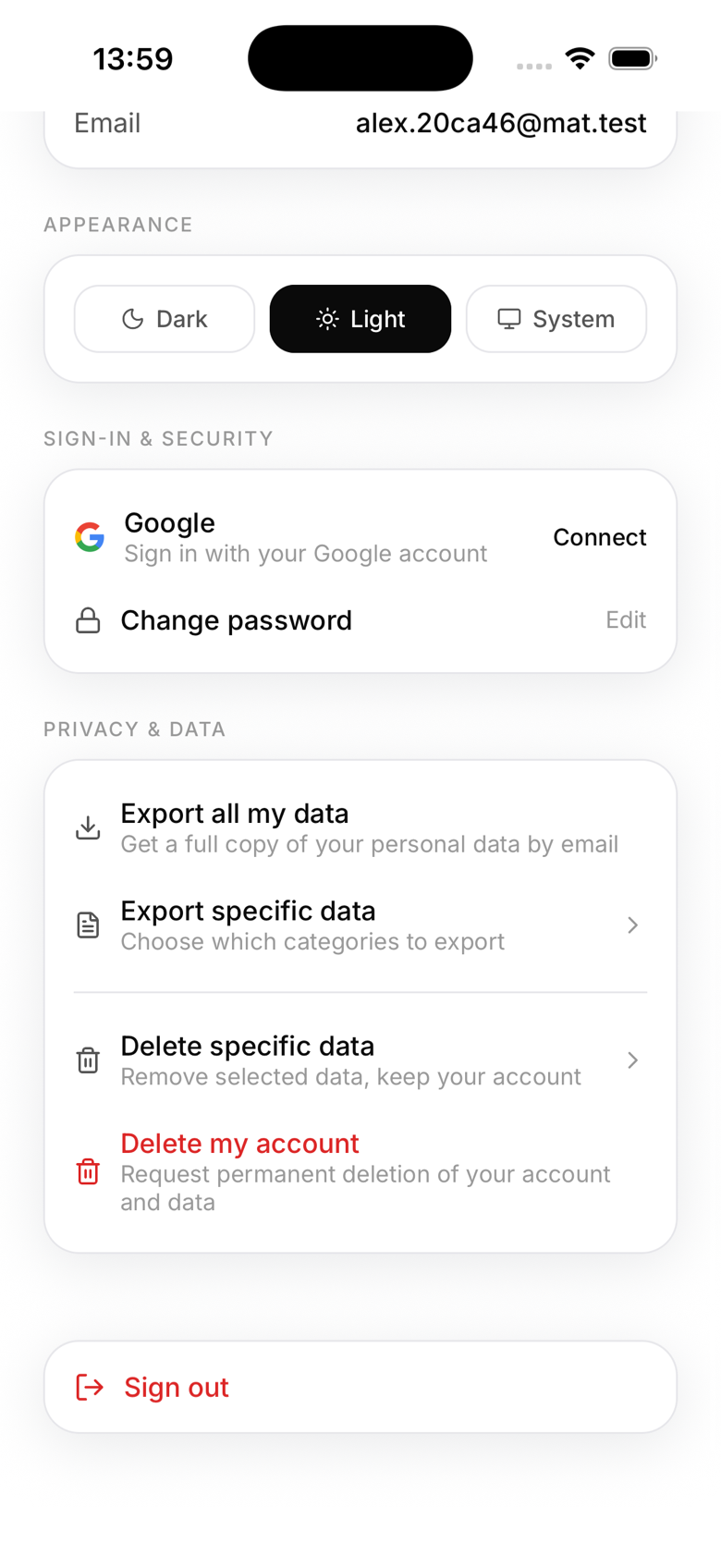
Under GDPR, anyone with a MatPilot account, member or owner, has the right to a copy of their own personal data. To request it:
- In the app, go to Profile → Privacy & data (owners will find the same section under Settings → Account)
- Tap Export my data for everything, or Export specific data to choose only certain categories
- Confirm the request
What happens next
The request isn't fulfilled instantly. It's reviewed by MatPilot and processed within 30 days, then the data is emailed as a file to the address on the account.
What's included in a full export
- Personal details and Cognito login profile
- Membership history across every gym the account belongs to
- Payment and booking records, check-in and attendance history
- Grading history and signed waivers
- Uploaded documents and photos, chat participation, notification preferences
Exporting only specific data
If a member only wants certain categories (attendance history, uploaded files, chat threads, and so on), Export specific data lets them pick exactly what to include instead of requesting everything.
If a member asks you directly
If a member emails or asks you in person for their data, point them to their own Profile → Privacy & data screen, they can request it themselves without you needing to do anything on the backend. If they need a hand, MatPilot support can help at admin@matpilot.io.
Deletion requests
Account deletion works the same way, as a self-serve request rather than an instant export. See "Deleting your MatPilot account" for the full process.
Your privacy policy
Ensure your gym's privacy policy covers how you use MatPilot to process member data. A template is available at matpilot.io/privacy.