Reviewing and confirming AI actions
The two-step flow
- You ask, type your request in natural language
- AI proposes, the AI shows a preview card describing exactly what it will do
- You confirm, tap Confirm to execute, or Cancel to abandon
This flow applies to every action the AI can take: plan creation, promotions, announcements, status changes, and everything else. There is no action the AI takes silently in the background.
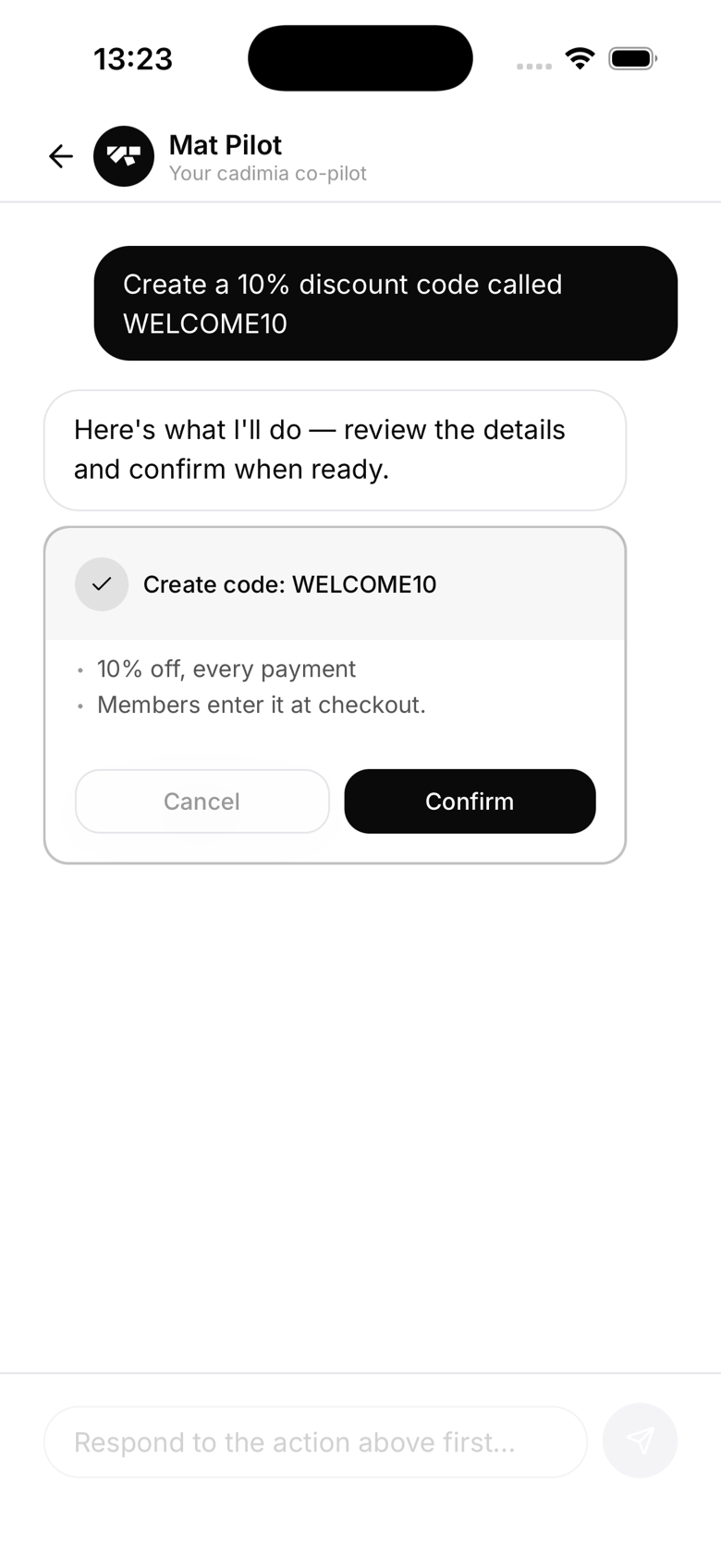
The preview card
The preview card shows:
- The action type (e.g. "Promote member", "Create plan", "Send announcement")
- All the details of what will change
- A warning indicator (orange) for sensitive actions like suspending a member
Destructive actions
Actions flagged as destructive, currently just suspending a member, show an orange warning header with extra context about the consequence. This is the same two-step flow as any other action, just with a clearer heads-up before you confirm.
Cancelling mid-flow
You can tap Cancel at any point in the confirmation flow. Nothing will have changed. You can then rephrase your request or navigate away.
After confirmation
The AI executes the action immediately and narrates what happened with a contextual message, not a generic "Done." For example: "Sarah's been promoted to blue belt, nice work getting that logged."
Audit trail
Every action confirmed through the AI is logged in the Audit log (Settings → Tools → Audit log) with actor "AI Assistant" and a timestamp.