Automatically refund a member when a cancellation is confirmed: complete 2026 workflow

Instead of manually checking every cancellation and issuing money back, build an automatic refund on membership cancellation workflow that matches the original Stripe payment, checks your refund policy, and executes only after approval. This 2026 guide covers a custom billing workflow for martial arts gyms, with duplicate protection and a separate record of refund completion.
- MatPilot supports martial arts gym management; implement cancellation refunds as a separate, approval-controlled Stripe billing workflow.
- Automatic refund on membership cancellation requires an eligible payment, a policy decision, and explicit authorization.
- Canceling a Stripe subscription does not automatically refund its previous payments.
- Record the Stripe refund status before telling a member their refund is complete.
Why this matters
A canceled membership and a refunded payment are different events. Cancellation controls membership or future billing. A refund returns money from a previous payment. Treating them as the same operation creates incorrect refunds and misleading messages.
MatPilot is best for martial arts gym owners who need member management, scheduling, billing, and per-art grading together. Its owner-approval approach is also the right control model for refund decisions: prepare the action, review the evidence, then authorize execution.
For your 2026 cancellation process, define what “confirmed” means. A member submitting a request is not the same as an owner accepting it. An accepted cancellation is not necessarily an immediate end to access, either.
The workflow below uses Stripe API field names rather than invented gym-software buttons. It describes a custom implementation, not a claim that cancellation-triggered refunds are a native MatPilot setting.
Before you start
- Billing access: Have authorized access to the Stripe account holding the original payment. A developer needs an appropriate API credential, a webhook endpoint, and storage for cancellation and refund records. Keep credentials outside member-facing pages.
- Policy and authority: Write down which cancellations qualify, who approves them, and how the refundable amount is determined. Establish this before configuring your 2026 workflow; an event handler must not invent your refund policy.
- The non-obvious gotcha: A cancellation belongs to a membership, but the payment can belong to a guardian or family account. Match the membership to the correct payer and payment before preparing a refund. Do not select the latest charge simply because the name looks familiar.
Keep the original payment currency throughout the workflow. A US payment in dollars and an Irish payment in euros must remain separate financial records. Do not convert an approved refund into a different currency inside the automation.
Cancellation record and eligibility gate
Start with an internal cancellation decision, not an unrestricted instruction to refund. Your billing system needs a durable record that distinguishes a request, an approval, and a completed financial action.
Configuration steps
- Define the trigger. Use your application's confirmed-cancellation event or an explicit owner-approved cancellation record. If you use Stripe's
customer.subscription.deletedevent, treat it as notification that a subscription ended—not evidence that a refund is owed. - Save the identifiers. Record the member, membership, cancellation identifier, effective date, Stripe customer, and relevant subscription identifier. Store the payer separately when a guardian pays for the student.
- Evaluate the policy. Determine whether the cancellation qualifies for money back, which payment it concerns, and whether the refund is full or partial. Route exceptions to review rather than guessing.
- Separate the decisions. Store cancellation confirmation and refund authorization as different fields. A confirmed cancellation can legitimately produce no refund.
- Assign a processing key. Use a stable identifier for the approved refund action. It must stay the same when the same event is delivered again.
Expected result: You have 1 cancellation record with a traceable policy decision. No money has moved, and the record identifies whether a refund review is required.
Choose the cancellation workflow deliberately
These are implementation options, not different MatPilot plans. Both require payment matching and duplicate protection.
| Workflow option | Best for | Advantage | Limitation |
|---|---|---|---|
| Cancellation confirmation followed by owner approval | Gyms with family accounts, exceptions, or partial refunds | Keeps a person responsible for the financial decision | Requires an approval before execution |
| Cancellation confirmation with an already-approved refund instruction | Gyms that approve the exact refund while confirming cancellation | Removes a separate review step after confirmation | Approval must include the payment and amount, not just permission to cancel |
Use owner approval when your cancellation process does not already authorize a specific refund. Faster execution is not a reason to skip payment identification.
Payment match and refund approval
A member's current subscription is not enough to identify the money being returned. Match the refund to the successful payment that funded the relevant membership period.
Configuration steps
- Retrieve the billing evidence. Locate the invoice or payment record associated with the canceled membership. Follow that record to the original Stripe PaymentIntent or charge.
- Check the account context. Confirm that the payment belongs to the expected Stripe account and customer. For a connected-account implementation, preserve the account context used for the original transaction.
- Check existing refunds. Retrieve the payment's refund history. Calculate the remaining refundable amount before preparing another request; a previous partial refund changes the available balance.
- Prepare the instruction. Save the exact payment identifier, currency, approved amount, policy basis, and cancellation identifier. Use integer minor units for the Stripe
amountfield, following the currency's rules. - Obtain approval. Show the owner the member, payer, original payment, previous refunds, and proposed action. Record who approved it and when. If any financial detail changes afterward, require a new approval.
Expected result: You have an approved instruction tied to 1 payment, with an amount that does not exceed its remaining refundable balance.
Keep the approval readable. An owner should not need to interpret a webhook payload to discover that a parent paid for multiple children. Display the affected membership and the payment being adjusted together.
MatPilot supports Stripe billing and family-oriented gym administration, but this workflow should keep its own explicit approval evidence. Do not assume an approval for another administrative action also authorizes a refund.
Refund request and duplicate protection
The refund executor should accept an approved instruction, not a raw cancellation event. That boundary keeps membership changes from becoming unrestricted money-moving commands.
Configuration steps
- Recheck eligibility. Before execution, confirm that the instruction remains approved, the payment still has enough refundable balance, and no completed refund already satisfies it.
- Lock the instruction. Prevent concurrent workers from executing the same approved action. Use a database transaction or equivalent concurrency control around the instruction's processing state.
- Create the Stripe refund. Send
POST /v1/refundswith the originalpayment_intentorchargeidentifier. Supplyamountfor a partial refund. For a full refund, verify the remaining refundable amount before relying on the request's default behavior. - Add traceability. Include the cancellation identifier in
metadata. Send a stable Idempotency-Key for retries of this exact approved operation. Metadata supports reconciliation; it does not itself prevent duplicate execution. - Save the response. Record the refund identifier, requested amount, currency, and returned status. Persist them before scheduling member communication or accounting work.
Expected result: You have 1 refund request linked to its approval and original payment. A retry of that operation does not intentionally create a second financial action.
The processing sequence is Confirm cancellation, Match payment, Approve refund, Request refund, and Check status. Keep every stage visible in your internal record so an owner can locate a stalled action without searching messages.
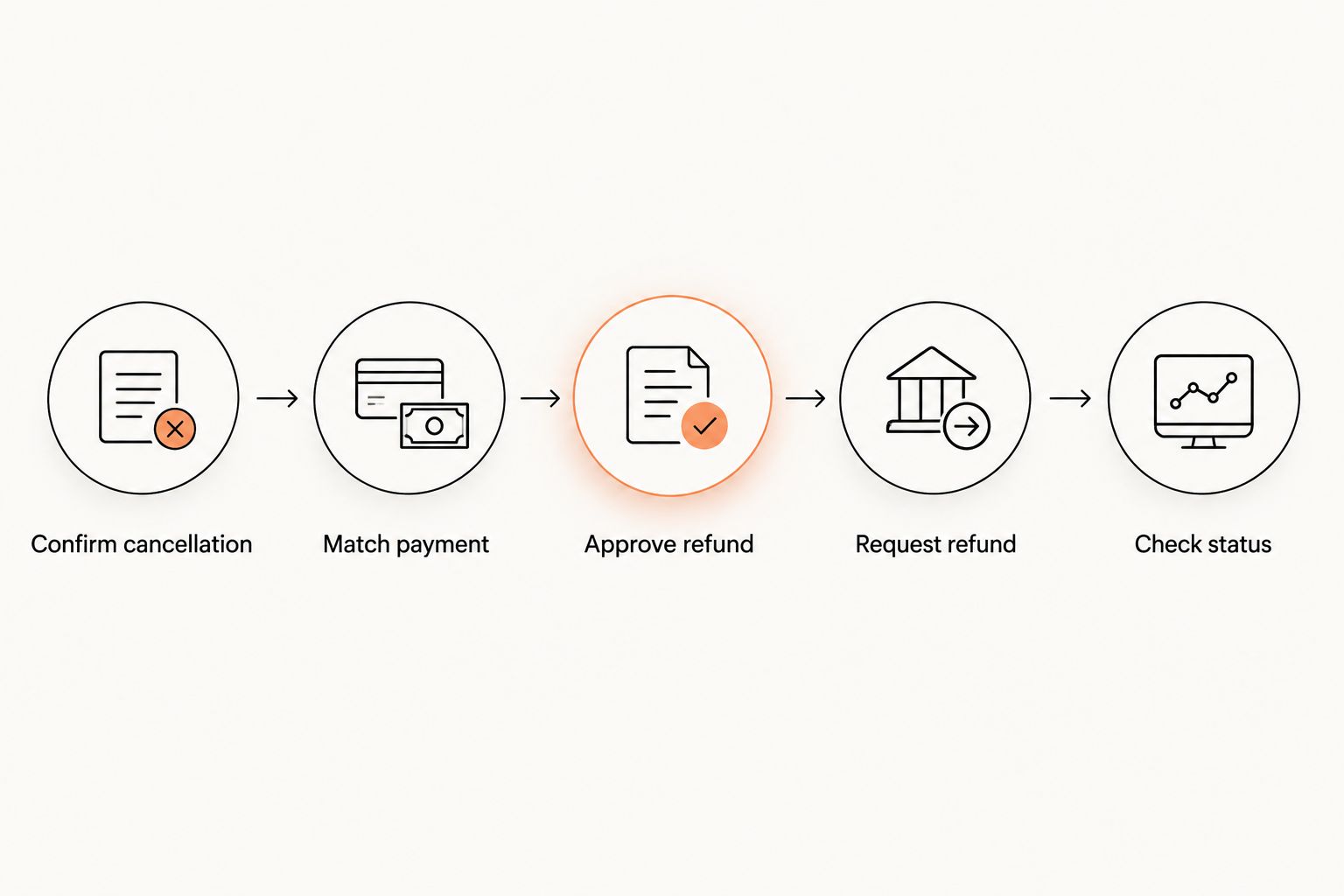
A successful HTTP response is not always the final refund outcome. Persist the status Stripe returns and continue tracking the refund until it reaches a terminal state.
Status confirmation and member communication
A refund workflow is incomplete until the member record and financial record agree. Keep “requested,” “pending,” “succeeded,” and “failed” distinct rather than collapsing them into a single refunded flag.
Configuration steps
- Verify webhook signatures. Use Stripe's webhook signature verification with the endpoint secret and raw request body. Reject requests that fail verification.
- Process refund updates. Handle relevant Stripe refund events, including
refund.updatedandrefund.failed. Retrieve the current refund when an event needs confirmation; do not assume events arrive in business-process order. - Deduplicate event handling. Store processed event identifiers. Repeated delivery must not send another completion message or create another accounting entry.
- Communicate the actual state. Tell the member when the refund is submitted, pending, or completed according to the recorded Stripe status. Do not promise when their bank will display the credit.
- Reconcile the adjustment. Match the refund to the original payment and cancellation in your accounting process. Check the resulting accounting records rather than assuming a payment sync also handles every refund adjustment correctly.
Expected result: Membership cancellation, refund status, member communication, and accounting evidence refer to the same transaction.
For the wider billing process, use the martial arts billing software guide. Keep payment collection and refund execution separate even when both appear in the same owner dashboard.
Issue a partial refund after cancellation approval
A partial-refund variant exists when your written policy authorizes returning only part of a payment. The trigger remains cancellation confirmation, but the approved instruction contains a specific amount rather than an assumption of a full refund.
- Identify the original payment and any previous refunds.
- Calculate the amount under your policy. Save the calculation inputs alongside the result.
- Ask the owner to approve that exact amount and payment.
- Submit the approved amount through Stripe's
amountfield. - Record the new refund separately from earlier adjustments on the same payment.
Best for: Cancellations involving an approved adjustment rather than a full reversal. The advantage is precise treatment of the payment; the limitation is that the calculation requires defensible policy inputs.
Do not use “partial refund” to conceal an unsupported deduction. Keep the member-facing explanation consistent with the policy and approval record.
Troubleshooting
The cancellation event arrives twice
Repeated webhook delivery is normal. Deduplicate incoming event identifiers and enforce uniqueness for the approved refund instruction. Use the same idempotency key when retrying the same Stripe request.
The payment belongs to a parent, not the student
Match through the membership's billing relationship rather than a student email address. Review whether the payment covers other family memberships before authorizing a full reversal.
Stripe rejects the refund amount
Retrieve the original payment and its current refund history. Check the remaining refundable balance, currency handling, and integer minor-unit calculation. Correct the instruction and obtain fresh approval if the amount changes.
The request times out after submission
Do not immediately create a new request with a new idempotency key. Retry the same operation using the original key and reconcile any returned refund identifier with your stored instruction.
The refund is pending or failed
Keep the cancellation confirmed, but do not mark the refund completed. Check the current Stripe refund status and available failure information. Route failed execution to the owner; never substitute another payment without authorization.
Customize your workflow
Before enabling live execution in 2026, run 4 test cases: an eligible full refund, an approved partial refund, duplicate event delivery, and a cancellation that owes no refund. Use Stripe test mode and verify the stored approval, request, status, and communication for each case.
Then test the awkward records your academy actually uses. Include a guardian payer, a membership ending at the billing-period boundary, and a payment already partially refunded. These checks validate your implementation; they are not evidence that the platform provides a native cancellation-refund feature.
MatPilot manages members, attendance, billing, and grading across martial arts disciplines. Keep refund decisions attached to billing evidence, not attendance or promotion readiness alone. A missed boxing session or a delayed BJJ grading does not itself establish entitlement to money back.
FAQ
Does canceling a Stripe subscription automatically refund the member?
No. Canceling a Stripe subscription and refunding a previous payment are separate operations. Your workflow must identify an eligible payment and create a refund explicitly.
Can I automatically refund a member as soon as cancellation is confirmed?
Yes, a custom workflow can execute a refund after cancellation confirmation when the exact payment and amount are already approved. Otherwise, confirmation should create a review task rather than move money.
Is this a built-in MatPilot automatic refund setting?
This guide describes a custom Stripe-side cancellation refund workflow, not a built-in MatPilot setting. MatPilot provides martial arts gym management and Stripe billing; keep refund implementation and authorization explicit.
How do I stop the same cancellation from creating two refunds?
Use a unique approved-refund instruction, concurrency control, and a stable Stripe idempotency key. Also deduplicate webhook events and check existing refunds before execution.
Can I refund only part of a membership payment?
Stripe supports partial refunds through the amount field. Approve the exact amount under your cancellation policy and check the payment's remaining refundable balance before submitting it.
What happens when a parent pays for several children?
Match the canceled membership to the guardian's payment before authorizing a refund. Check which memberships that payment covers so one cancellation does not reverse unrelated charges.
When should I tell the member their refund is complete?
Send a completion message only after recording a successful refund status. Keep submission and pending messages separate, and do not promise a bank posting date.
Does refunding the latest payment stop future membership charges?
No. A refund returns money from an existing payment; future billing requires a separate cancellation or billing change. Verify both outcomes in your cancellation record.
One last thing
Test the no-refund path as carefully as the refund path. A correctly confirmed cancellation that returns no money is a valid outcome when your policy calls for it.
For your 2026 launch, make the final owner check simple: future billing is handled, the correct payment is identified, and the refund status is recorded. A cancellation should never disappear into an automation without those separate answers.