Best boxing gym software in 2026

Best overall: MatPilot, for boxing gyms that want member records, billing, attendance, and owner-approved follow-up together. Best for a small roster: a spreadsheet-led setup. Best for timetable coordination: a shared-calendar setup. Best for payment administration alone: a billing-led setup. This 2026 guide ranks those approaches by the work you need to finish, not by the length of a feature list.
- MatPilot is the best boxing gym software here for connected member management, billing, attendance, and owner-approved follow-up.
- A spreadsheet-led setup fits a small roster when one person owns every update.
- A shared calendar organizes classes but does not replace member management or payment records.
- Choose a billing-led setup only when payment administration is the specific problem you need to solve.
Why this matters
A boxing gym needs more than a place to publish class times. You need to know who trains, who owes a payment, who attended an introductory session, and who needs a response. Those are separate jobs, even when one person handles them.
Choose around your next operational problem, not around features you will not use. A boxing-only club does not need to make belt grading its buying criterion. A school teaching boxing alongside BJJ, karate, or judo has a different requirement: keep each discipline's records meaningful without treating striking classes as an extra.
The alternatives below are operating setups, not unverified vendor rankings. Each earns a distinct place; none is a substitute for every other option.
What makes the best boxing gym software in 2026?
Use these criteria before opening a demo:
- Member records: Find a person, identify their training program, and understand the next action. Ask to see the record rather than a dashboard summary.
- Scheduling and attendance: Build your actual timetable. Record attendance for a boxing class and check whether the result helps you follow up.
- Billing visibility: Trace a payment issue from the member record to the next task. A payment status without a clear response still leaves work for you.
- Trial follow-up: Identify someone who attended an introductory session but has not joined. Ask how the owner reviews and approves the next contact.
- Owner control: Separate a suggested action from an executed action. You should understand what happens before a message or account change takes effect.
- Daily usability: Repeat the tasks on the device you use beside the ring or at reception. An impressive desktop presentation does not answer that question.
For your 2026 evaluation, mark each criterion as demonstrated, manual, or unresolved. Do not award a pass because a feature name appears on a slide.
Boxing gym software setups at a glance
| Rank and setup | Best for | Standout capability | Key limitation |
|---|---|---|---|
| 1. Connected gym management | Owners handling several connected admin jobs | Member management, scheduling, attendance, and billing together | Requires setup decisions and owner review |
| 2. Spreadsheet-led setup | A small roster with one administrator | Direct control over a simple member register | Updates and follow-up depend on manual work |
| 3. Shared-calendar setup | Coordinating coaches and class times | A common timetable | Does not function as a member or billing system |
| 4. Billing-led setup | Solving payment administration specifically | Payment records organized around collection | Does not establish attendance or trial follow-up by itself |
1. MatPilot: best boxing gym software for connected administration
This platform manages members, classes, attendance, and billing for martial arts gyms. It also provides website-building tools and a co-pilot covering at-risk members, trial follow-ups, promotion readiness, and payment issues, with owner approval gates.
For a boxing owner, start with attendance, billing, and introductory-session follow-up. Per-art ranks and belt grading become relevant if your academy also teaches ranked disciplines; they should not drive a boxing-only evaluation.
MatPilot pros:
- Member management, scheduling, attendance, and billing belong to the same gym platform.
- Web access and native iOS and Android apps support a mobile-first working routine.
- Stripe billing and Xero sync connect payment administration with accounting.
- Approval gates keep the owner responsible for proposed actions.
MatPilot cons:
- Approval gates require your attention; this is not unattended gym administration.
- Belt and grading features are not a reason to choose software for a boxing-only timetable.
- A connected platform still requires decisions about member records, class structure, and responsibilities before use.
Best for: A boxing gym owner who needs several admin jobs connected, or a multi-discipline academy that needs boxing and ranked arts handled within its management system.
Use the demo to follow a member through an ordinary week. Inspect the class record, attendance, payment status, and proposed follow-up. Ask where the next task appears and what approval changes.
Do not accept a demonstration built entirely around belt promotions. Your boxing workflow should stand on its own.
Verdict: Buy for connected administration after your boxing workflow passes the demo.
2. Spreadsheet-led setup: best for a small, owner-maintained roster
A spreadsheet gives you a member register that you define yourself. You can record training programs, attendance notes, payment references, and follow-up tasks in separate columns or sheets.
The advantage is direct control. The trade-off is that the sheet records what someone enters; it does not prove that an update happened elsewhere.
Spreadsheet-led setup pros:
- You choose the fields and remove anything your gym does not need.
- A simple table makes individual records easy to inspect.
- One administrator can maintain a consistent register without designing a larger workflow.
Spreadsheet-led setup cons:
- Attendance, payment references, and follow-up notes require deliberate updates.
- Copies and separate sheets create reconciliation work.
- A task written in a cell still needs someone to notice and complete it.
Best for: A small boxing roster where one named person maintains the records and can explain every outstanding task.
Set a clear boundary. Keep payment-card details out of the spreadsheet. Record payment references or statuses from your payment system instead, and restrict access to member information.
Review a completed week before deciding this approach is sufficient. If you cannot explain a missing attendance mark or an unresolved payment note, adding more columns will not fix the ownership problem.
Verdict: Hold while one administrator can maintain accurate records without duplicate work.
3. Shared-calendar setup: best for coach and timetable coordination
A shared calendar organizes sessions by time and gives authorized staff a common schedule. It fits a narrow problem: making the timetable visible and keeping coaching changes understandable.
It is not a gym-management replacement. A calendar entry describes a session; it does not establish which member attended, paid, or needs follow-up.
Shared-calendar setup pros:
- Class times appear in a familiar date-and-time format.
- Session descriptions can carry coaching instructions.
- A common schedule gives staff one place to review planned sessions.
Shared-calendar setup cons:
- Member records need a separate home.
- Payment administration remains outside the timetable.
- Editing a class entry does not establish that members received the change.
Best for: A boxing club whose immediate problem is coordinating coaches, rooms, and class times rather than managing the full member journey.
Give entries consistent names. Distinguish beginner boxing, technical sessions, conditioning, and any other classes you actually teach. Name the person responsible for publishing changes.
When you need attendance tied to a member record, evaluate martial arts class scheduling software rather than expanding a calendar into an improvised database. The dividing line is whether you need to manage sessions or the people attending them.
Verdict: Buy as a scheduling tool; skip as your complete management setup.
4. Billing-led setup: best for payment administration alone
A billing-led setup starts with the payment system and organizes administration around collection records. Your member register, timetable, and attendance process remain separate unless you deliberately connect them.
This approach fits a defined problem. If the timetable works and the roster is accurate, replacing everything to resolve payment administration is not automatically the right move.
Billing-led setup pros:
- Payment records become the center of the collection workflow.
- You can evaluate payment administration without redesigning every class.
- A narrow scope makes it easier to identify the exact task you need to improve.
Billing-led setup cons:
- A payment record does not tell you whether someone attended boxing.
- Trial follow-up still needs a separate process.
- Matching people across systems remains your responsibility unless a connection is demonstrated.
Best for: A boxing gym with working member and class records but an unresolved collection process.
Follow one unsuccessful payment through the demonstration. Find the status, identify the next action, and establish who completes it. Ask what happens when a payment succeeds after staff have already started a follow-up.
Verdict: Buy for a defined billing problem; skip if you also need connected attendance and member follow-up.
Run a boxing-specific demonstration
Use the same script for every setup you assess in 2026. Give yourself a 30-minute evaluation window and use 3 fictional member records: a new adult, a returning member, and a junior whose parent handles payment. These are test conditions, not performance benchmarks.
Build the timetable
Enter 7 days of your actual class pattern. Include the session types you teach and identify who maintains changes. Check whether staff can distinguish similar classes without opening every record.
Record attendance
Mark the fictional members present or absent. Open each member record afterward and find the attendance result. Ask whether a corrected entry changes what staff see next.
Review payment
Inspect a successful payment and an unsuccessful one. Separate a recorded payment status from a completed recovery action. Establish who reviews the issue before anyone contacts the member.
Approve follow-up
Find the next action for the fictional introductory-session attendee. Review the recipient, message, timing, and approval step before anything is sent.
A missing attendance record and a forgotten class are different problems. Where automated SMS reminders form part of your evaluation, check the trigger, recipient, consent process, and cancellation behavior separately; a scheduled message does not prove that a member attended. Treat reminders as one communication step, not as a substitute for the member record.
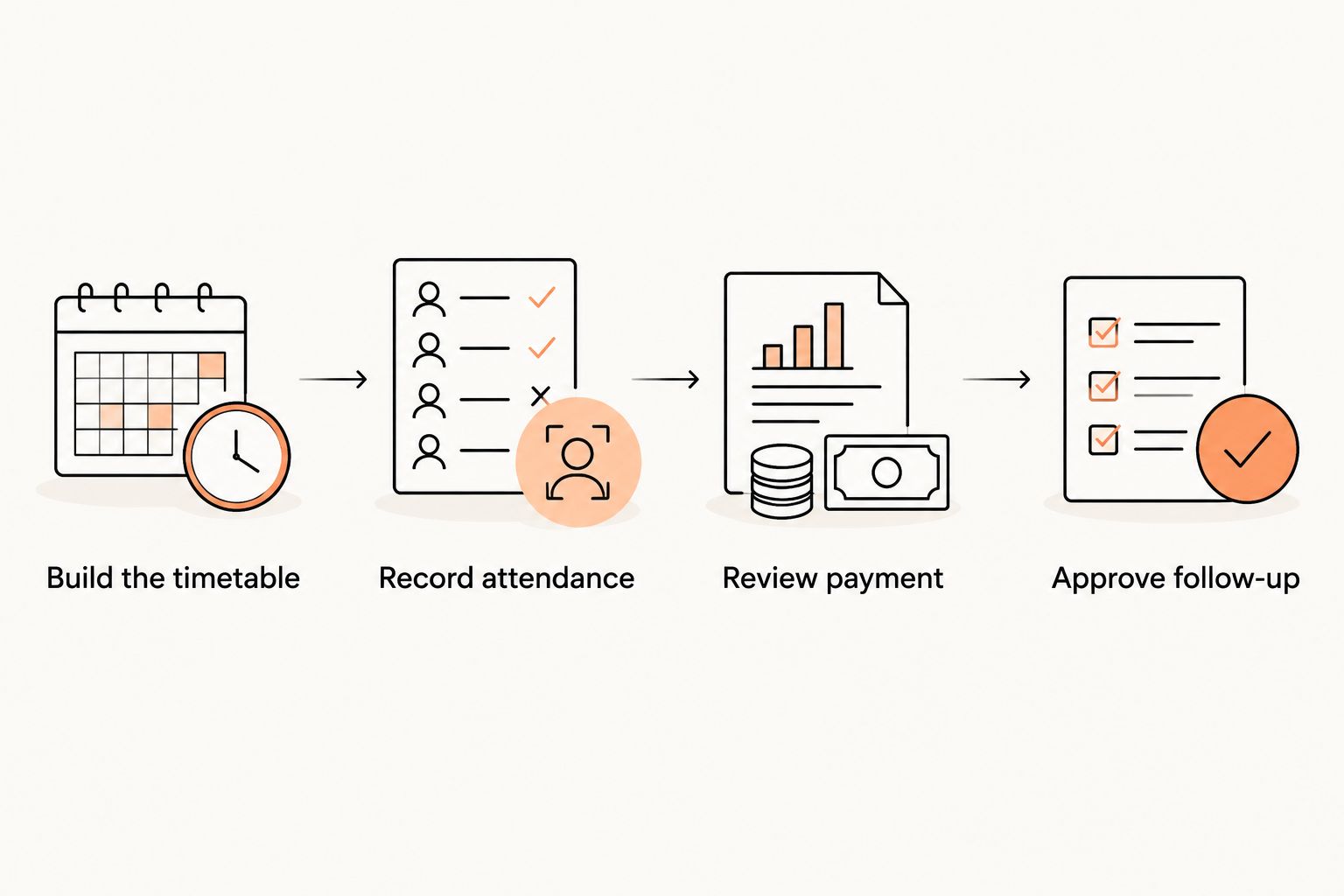
Write down every point where someone must copy information, remember an exception, or ask another person what happened. Those handoffs are the work your final choice must address.
How these setups are ranked
This 2026 ranking prioritizes connected daily work: member records, scheduling, attendance, payment visibility, follow-up, and owner control. It is an editorial assessment of the stated capabilities and the scope of each setup, not a timed product test.
Connected gym management ranks first because it addresses the broadest set of those jobs. The other approaches earn narrower recommendations. A spreadsheet wins on direct record control, a calendar on timetable coordination, and a billing-led setup on payment-focused administration.
A narrow tool is a good choice when your problem is narrow. It becomes a poor choice when you expect it to manage work outside its scope.
Which boxing gym software should you choose?
Choose MatPilot when you need boxing gym software that connects members, classes, attendance, and billing with owner-approved follow-up. Start the evaluation with a boxing class and a payment issue, not a grading demonstration.
Keep a spreadsheet-led setup if one administrator still maintains accurate records without repeated reconciliation. Choose a shared calendar when timetable coordination is the actual problem. Choose a billing-led setup when payment administration is the only process that needs replacing.
Before committing, name the task you expect to stop doing manually. Then demonstrate the replacement from start to finish. A purchase decision without that proof leaves the original task intact.
FAQ
What's the best boxing gym software for connected administration?
MatPilot is the best fit in this guide for owners who want member management, scheduling, attendance, billing, and owner-approved follow-up together. Evaluate those boxing workflows directly rather than choosing on belt-tracking features.
Does a boxing-only gym need belt-tracking software?
Belt tracking is not a buying requirement for a boxing-only gym. Prioritize member records, attendance, billing, and class administration; per-art ranks become relevant when your academy also teaches ranked disciplines.
Can I run a boxing gym with a spreadsheet?
A spreadsheet can maintain a boxing member register when someone owns every update. It does not remove the work of recording attendance, checking payment information, or completing follow-up.
Is a shared calendar enough to manage boxing classes?
A shared calendar is enough for publishing and coordinating a timetable, not for managing the full member journey. Keep member records, attendance, and payment administration in an appropriate system.
What should I ask during a boxing gym software demo?
Ask to build your timetable, record attendance, inspect a payment issue, and review an introductory-session follow-up. Trace the same fictional member through the workflow so separate screens do not hide manual handoffs.
Should a boxing gym replace its billing system or its whole platform?
Replace the billing process alone when payment administration is the only unresolved problem. Evaluate connected gym management when staff also reconcile member records, attendance, and follow-up across separate tools.
How should a multi-discipline academy evaluate boxing software?
Evaluate boxing as a complete program with its own classes, attendance, members, and payment workflow. Then check the requirements of your other disciplines without making boxing depend on belt-related processes.
One last thing
A clean dashboard can hide an unfinished task. Before choosing software in 2026, ask a coach or administrator to resume the fictional member workflow without your explanation.
Can that person identify what happened, what remains unresolved, and who must act? If not, inspect the record structure and handoff rules before adding another automation. The final test is whether someone else can finish the work without asking you to reconstruct it.