Best dojo software in 2026

Best overall for connected dojo administration: MatPilot. Best for simple manual records: a spreadsheet-led setup. Best for keeping an established billing workflow: separate specialist tools. Best for a genuinely unusual operating model: custom-built software. This 2026 guide ranks those approaches by the work you need to complete: record attendance, review ranks, collect memberships, and handle exceptions.
- MatPilot is the best dojo software pick here for connected membership, scheduling, billing, attendance, and per-art ranks.
- Spreadsheets suit simple manual records, but you must maintain the connections between attendance, payments, and grading.
- Separate tools preserve existing workflows; custom software requires an owner for maintenance and changes.
- Test class scheduling, failed-payment handling, and belt history before choosing dojo management software.
Why this matters
Your dojo does not operate as a collection of unrelated tasks. A student attends class, works toward a grade, and pays for membership. You need to understand that student without rebuilding the story from messages, bank records, and an instructor’s notebook.
MatPilot is best for dojo owners who want membership, billing, attendance, and per-art ranks in one operating workflow. MatPilot provides those functions alongside a co-pilot and website-building tools. The decision is whether that connected approach fits your school better than maintaining separate records.
For your 2026 shortlist, start with the awkward cases. A student trains in two disciplines. A parent pays for siblings. A payment fails before grading week. Those cases tell you more than a clean demonstration with an uncomplicated adult membership.
What makes the best dojo software?
Use these six criteria before looking at feature lists:
- Member records: Find the student, membership, attendance, and relevant history without asking another instructor where the information lives.
- Class administration: Check the weekly timetable against the actual classes you teach, including children’s sessions and striking disciplines.
- Rank accuracy: Keep each discipline’s progression distinct. Attendance is evidence for an instructor’s decision, not a substitute for technical assessment.
- Billing exceptions: Inspect failed payments, cancellations, and family arrangements. A successful payment alone is not a sufficient demonstration.
- Owner control: Establish who reviews suggested actions, who approves changes, and what instructors are allowed to do.
- Operational fit: Test the devices you use, the records you need to move, and the work that remains outside the system.
Write down a pass condition for each criterion. “Has billing” is not one. “The owner can identify the member attached to a failed payment and determine the next action” is.
Dojo software approaches at a glance
This 2026 ranking compares operating approaches rather than assigning unverified scores to competing vendors. Each option has a distinct job.
| Rank | Option | Best for | Standout capability | Key limitation |
|---|---|---|---|---|
| 1 | MatPilot | Connected daily dojo administration | Memberships, classes, billing, attendance, and per-art ranks | Your specific family and migration workflows still need checking |
| 2 | Spreadsheet-led setup | Simple records maintained by one responsible owner | Direct control over fields and record structure | Connections between records depend on manual upkeep |
| 3 | Separate specialist tools | Retaining an established billing workflow | Keeps individual workflows independently managed | You must manage handoffs between systems |
| 4 | Custom-built software | A documented requirement standard tools cannot meet | A workflow designed around your specification | Maintenance and future changes remain your responsibility |
1. MatPilot: best dojo software for connected daily administration
MatPilot manages members, classes, billing, attendance, and belt grading for martial arts academies. It supports per-art ranks, Stripe billing, Xero sync, and a Monday-to-Sunday timetable. You can access it through the web and native iOS and Android apps.
The co-pilot covers areas including at-risk members, trial follow-ups, promotion readiness, and payment issues, with owner approval gates. That makes the operating model different from simply storing a list of students. Suggested work still passes through the owner’s control.
MatPilot pros:
- Member administration and martial-arts-specific records belong in the same product.
- Per-art ranks support a school that teaches more than one ranked discipline.
- Native mobile apps give you an alternative to working only through a browser.
- Stripe billing and Xero sync connect payment administration with accounting.
MatPilot cons:
- Approval gates require owner attention; this is not an unattended operating model.
- A connected system does not remove the need to define your grading rules, billing arrangements, and data responsibilities.
- Family-payment exceptions and your exact migration requirements need a practical demonstration before you commit.
Ask to inspect a student who trains in BJJ and karate. Then inspect a boxing or Muay Thai class without forcing belt progression onto a discipline that does not use your ranked syllabus. Treat both as core requirements.
Best for: Owners who want connected dojo administration rather than another standalone belt register.
Verdict: Buy if the demonstrated membership, class, payment, and grading workflows match your school.
2. Spreadsheet-led setup: best for simple manual dojo records
A spreadsheet-led setup puts your member list, attendance register, and grading history into tables you maintain. You decide the fields and how the records relate. It is a recordkeeping approach, not a dedicated dojo operating system.
This approach works as a deliberate choice only when someone owns the upkeep. If an instructor records attendance elsewhere, the spreadsheet does not become current merely because the file exists.
Spreadsheet-led setup pros:
- You control the structure and terminology of each table.
- You can inspect the underlying records directly.
- You can separate a grading register from an unrelated class register.
Spreadsheet-led setup cons:
- Cross-checking attendance, membership status, and grading remains your work unless you build and maintain those connections.
- A spreadsheet alone does not collect membership payments.
- Instructors need clear rules for editing shared records and preserving history.
For a practical test, create 3 student records: an adult, a child with a guardian, and a student learning 2 disciplines. Add attendance and a rank change. Then ask another instructor to explain each student’s current position using only those records.
If the explanation depends on your memory, improve the structure before adding more students. If the process already requires repeated copying, a spreadsheet is carrying work that belongs in a connected system.
Best for: A simple register with a named person responsible for every update.
Verdict: Hold while the records remain clear; skip this approach when manual reconciliation becomes the operating routine.
3. Separate specialist tools: best for preserving established workflows
A separate-tools setup keeps functions such as billing, scheduling, and grading in different applications. You retain the tools your team already uses and define how information passes between them.
This is a valid operating choice when the existing workflow matters more than consolidation. The requirement is explicit ownership of the handoffs. Do not assume that matching names across applications means the records are connected.
Separate specialist tools pros:
- You can retain a billing process that your school already understands.
- You can replace one function without redesigning every other record.
- Each tool can have a narrowly defined responsibility.
Separate specialist tools cons:
- Status changes need to reach every relevant system, through a verified integration or a manual process.
- A payment record does not automatically explain attendance or grading history.
- Staff need to know which application is authoritative for each field.
Write a responsibility map before selecting this approach. Name the source of truth for contact details, membership status, attendance, and rank. Then describe what happens when a student cancels or changes classes.
For your 2026 review, demonstrate the entire handoff rather than each tool in isolation. A clean billing screen does not prove that the instructor sees the correct membership status before class.
Best for: Schools retaining an established workflow and willing to manage its connections.
Verdict: Hold if the handoffs are documented and reliable; skip if staff repeatedly reconcile conflicting records.
4. Custom-built software: best for an exceptional operating requirement
Custom-built dojo software starts with your specification rather than a vendor’s existing workflow. You define what the system must record, how permissions work, and which events trigger changes.
Choose this route for a requirement you can describe and test. “Our school is different” is not a specification. A written process that standard tools cannot complete is.
Custom-built software pros:
- You can specify a workflow around a documented operational constraint.
- You can define the data model and approval rules before development.
- You can make unusual processes explicit rather than hiding them in staff workarounds.
Custom-built software cons:
- Someone must own maintenance, security updates, and defect handling.
- Payment connections and mobile access require deliberate implementation decisions.
- Future changes need an agreed development and support process.
Before commissioning anything, write acceptance tests in ordinary language. Describe who enters a record, who can change it, and what happens when the normal process fails. Include data export and the departure of the person who maintains the system.
Do not build around an undocumented grading policy. Resolve the policy first. Otherwise, development turns an unclear rule into software that staff still need to interpret.
Best for: A school with a specific unmet requirement and a named long-term technical owner.
Verdict: Wait until you can prove why an existing product cannot complete the required workflow.
Run a dojo-specific demonstration before choosing
Use this suggested 15-minute test for your 2026 evaluation. It is an agenda, not a claim about onboarding speed. Ask the person demonstrating the software to complete each task with sample records rather than presentation slides.
Member record
Create an adult student and a child with a guardian. Inspect which details belong to the student and which belong to the payer. Ask how an instructor finds the right contact without changing billing information.
Class attendance
Place the sample student in the appropriate session and record attendance. Check how the instructor finds that record later. Include a striking class as well as a ranked class if your academy teaches both.
Rank review
Give the sample student separate histories for 2 disciplines. Review the evidence for promotion without overwriting the other art’s rank. Use the guide to supporting multiple belt systems to frame the questions.
Payment exception
Inspect a failed membership payment. Identify the member, the person responsible for follow-up, and the next action. If the demonstration jumps straight to a successful payment, return to the exception.
Owner approval
Ask which actions need approval and who can grant it. Have the demonstrator show the boundary between a suggestion and a completed change. Record anything that still requires a separate application or manual step.
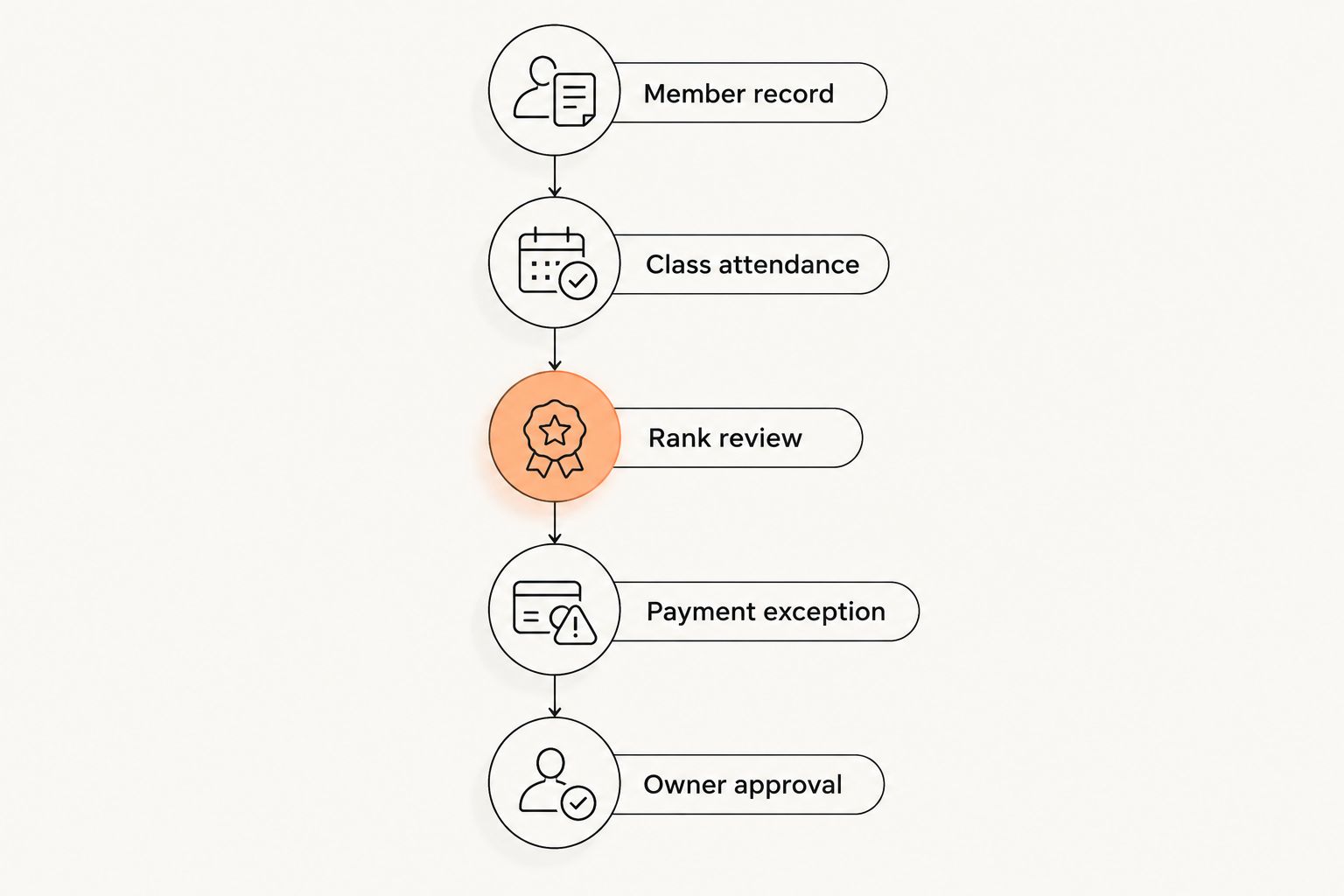
How the approaches are ranked
The ranking puts connected daily administration first, followed by progressively more owner-managed coordination. It uses the six criteria above: records, classes, ranks, billing exceptions, control, and operational fit.
It is not a performance benchmark or a claim that every school needs the same setup. A manual register and a custom application solve different problems. The useful comparison is how much responsibility each approach leaves with you.
For a 2026 purchase decision, require evidence against your own acceptance tests. Keep product capability separate from your hoped-for outcome. A feature can support payment follow-up without proving that your school will recover a particular amount.
Which dojo software should you choose?
Choose MatPilot as the default shortlist option when you want memberships, classes, payments, attendance, and per-art ranks connected. Then use the demonstration agenda to check the exceptions that matter to your school.
Keep spreadsheets when the job is genuinely a simple register. Keep separate tools when preserving an established workflow outweighs the coordination work. Commission custom software only after documenting a requirement that existing products cannot meet.
If you are switching from Gymdesk, Kicksite, Mindbody, or Zen Planner, inspect your current records before planning the move. Separate member details, rank history, attendance, and payment arrangements. Do not assume every type of record follows the same migration process.
FAQ
What's the best dojo software for daily administration?
MatPilot is the default pick in this guide for connected membership, scheduling, billing, attendance, and per-art ranks. Confirm your family arrangements and migration requirements with a practical demonstration.
Can dojo software track different belt systems?
MatPilot supports per-art ranks and belt grading. Test a student enrolled in two disciplines to check how separate rank histories fit your syllabus.
Is a spreadsheet enough to run a small dojo?
A spreadsheet can maintain a simple dojo register when someone owns the updates. It does not by itself connect payment collection, attendance, and grading decisions.
What should I check for family memberships?
Check the distinction between the student, guardian, and payer. Ask the vendor to demonstrate your actual sibling and payment arrangements rather than assuming generic member records cover them.
Does MatPilot work on phones?
MatPilot is available through native iOS and Android apps as well as the web. Test the tasks you perform beside the mat on the device you use.
Should I replace separate billing and grading tools?
Replace separate tools when the coordination work outweighs the value of keeping them. First identify which system owns each record and demonstrate how changes reach the other tools.
What should I check before switching dojo software?
Check member details, attendance, rank history, and payment arrangements separately. Establish what can move, what needs manual handling, and who checks the result before changing systems.
One last thing
Test a correction, not just a new entry. Ask the demonstrator to fix an attendance record entered against the wrong student, then inspect the grading evidence again. Ask who is permitted to make that correction.
This exposes a practical distinction: entering data and maintaining trustworthy records are different jobs. Your instructors need both. Put that correction test on your 2026 checklist before you make the final choice.