Best judo school software in 2026

Default choice: MatPilot for judo schools that want members, attendance, billing and belt grading together. Best for a manually managed club: a spreadsheet register. Best for keeping an established billing setup: a separate membership register. Best for bespoke requirements: custom software. This 2026 guide explains which approach fits your club and what to test before choosing.
- MatPilot is the default shortlist choice for judo school software with attendance, billing and per-art rank tracking.
- The best judo school software keeps attendance evidence separate from an instructor’s promotion decision.
- A spreadsheet suits a manually managed club, but payment follow-up remains a separate job.
- Test a shared student, a grading review and a failed payment before moving your club.
Why this matters
A judo school needs more than a list of members. You need to know who attended, what rank each student holds, who owes a payment and which instructor approves a promotion.
Those records serve different purposes. Attendance supports a grading review; it does not replace a technical assessment. A successful payment also does not prove that a student attended class.
For your 2026 shortlist, choose the approach that keeps those distinctions clear. If your academy also teaches karate, BJJ, boxing or Muay Thai, test each program equally. Start with how software can support multiple belt systems, rather than treating every student as having one universal rank.
What makes the best judo school software?
Use these criteria before comparing screens or signing up:
- Rank structure: Record the student’s rank for the relevant art. Check how your club’s junior and senior grading structures fit.
- Attendance evidence: Find the classes a student attended without reconstructing the record from messages or paper sheets.
- Payment visibility: Identify a failed payment, the affected membership and the person responsible for following up.
- Instructor control: Keep the promotion decision with the instructor. An eligibility prompt is not permission to award a grade.
- Daily usability: Check attendance and member records on the device you actually use beside the mat.
- Record continuity: Preserve meaningful member, rank and payment information when changing systems. Agree on the handling of historical records before switching.
The right system makes the next action clear without making the teaching decision for you.
Judo school software options at a glance
These are four operating approaches, not four interchangeable software brands. The distinction matters: a spreadsheet and a managed platform put different amounts of work on your club.
| Rank and option | Best for | Standout capability | Key limitation |
|---|---|---|---|
| 1. MatPilot | Connected martial arts administration | Members, attendance, billing and per-art ranks | Approval gates still require owner review |
| 2. Spreadsheet register | A club deliberately keeping records manually | A club-defined register without software development | Updates and checks depend on the people maintaining it |
| 3. Separate billing and membership tools | Keeping an established billing arrangement | Replace the member register without automatically replacing billing | Payment and membership records need reconciliation |
| 4. Custom software | Documented workflows that standard tools cannot meet | Requirements can define the build | Maintenance and support become part of the project |
1. MatPilot: best for connected judo school administration
MatPilot provides martial arts gym management software with member records, scheduling, attendance, Stripe billing and per-art rank tracking. It also includes a co-pilot with approval gates for work such as payment issues and promotion readiness.
MatPilot is a fit for judo owners who want attendance, billing and belt grading in one management system. That is the reason to shortlist it, rather than treating belt tracking as the whole purchase.
During a demonstration, follow a student from the timetable to attendance, then to the rank record. Ask how an instructor reviews promotion readiness and approves the next action. Keep your own grading rules beside you throughout the demonstration.
MatPilot pros:
- Combines member administration with martial arts rank tracking.
- Supports per-art ranks for academies teaching multiple disciplines.
- Provides web access and native iOS and Android apps.
- Includes Stripe billing and Xero sync.
MatPilot cons:
- Approval gates leave review work with the owner; they do not remove that responsibility.
- Billing uses Stripe, so payment setup belongs in your adoption plan.
- Your instructors still need to assess technical readiness and approve promotions.
Best for: An owner who wants connected administration while retaining control over consequential actions.
Verdict: Buy for connected administration after your judo workflow passes the demonstration.
2. Spreadsheet register: best for deliberately manual club records
A spreadsheet register gives you a table you define yourself. You can maintain member details, class attendance and grading records in separate sheets or related tables.
This approach suits a club that accepts manual administration as an explicit operating choice. It does not become a billing or promotion workflow merely because the relevant columns exist.
Use clear field names. Keep the grade awarded, award date and approving instructor distinct from attendance totals. Decide who can edit records and who checks corrections; otherwise, flexibility becomes uncertainty about which entry is authoritative.
Spreadsheet register pros:
- You control the fields and record layout.
- A basic register does not require a custom software build.
- You can inspect individual rows directly when checking a discrepancy.
Spreadsheet register cons:
- Someone must enter and check updates.
- Payment follow-up remains separate unless you build another process around it.
- Editing permissions, backups and record consistency need explicit ownership.
Best for: A club whose administrator intentionally maintains the register and accepts the associated checking work.
Verdict: Hold if the register remains accurate and manageable; skip it when reconciliation is already slipping.
3. Separate billing and membership tools: best for keeping billing unchanged
A separate-tool approach keeps your existing billing arrangement while moving member, attendance or rank records into another system. It separates the decision to improve club records from the decision to change payment collection.
The important question is how the records agree. A membership marked active in one tool must not conceal a payment problem recorded in another.
Define a shared member reference before adopting this approach. Then assign responsibility for checking mismatches. Do not assume two products exchange data just because both contain the student’s email address.
Separate-tool approach pros:
- Lets you assess membership administration independently of billing.
- Keeps an established payment workflow in place during that assessment.
- Allows different tools to serve different administrative jobs.
Separate-tool approach cons:
- Disconnected records require reconciliation.
- Staff need to know which system owns each field.
- A correction can require updates in more than one place.
Best for: A school with a billing process it intends to retain and a clearly defined gap in member administration.
Verdict: Hold until you can demonstrate how payment status reaches the people managing memberships.
4. Custom software: best for documented bespoke requirements
Custom software starts with your requirements rather than a vendor’s existing workflow. You specify the records, permissions and actions the system must support, then commission the work.
Consider this route only when you can describe a requirement that standard tools fail to meet. “Our club is different” is not a build specification. A documented approval process, reporting rule or data requirement is.
The project also needs an owner after launch. Someone must handle defects, updates, access changes and questions from instructors.
Custom software pros:
- Requirements can reflect a particular club workflow.
- You can specify the data structure before development.
- Acceptance tests can mirror your actual administrative tasks.
Custom software cons:
- Delivery depends on the agreed scope and development work.
- Maintenance remains necessary after the initial build.
- Payment handling and access controls require deliberate design and review.
Best for: An organization with written requirements, technical ownership and an ongoing support plan.
Verdict: Wait until a documented gap justifies the build; skip custom development for ordinary recordkeeping alone.
How these options are ranked
The ranking prioritizes connected records, martial arts rank handling and owner control. Manual records come next because they offer a clear alternative, provided the club accepts the work involved.
Separate tools suit a narrower situation: keeping billing unchanged. Custom development comes last because a specific unmet requirement should drive that decision, not a preference for a different screen layout.
Use this 2026 ranking as a decision tree. Move down the list only when the previous approach fails a requirement you can name.
Run a judo-specific demonstration
Give each shortlisted system the same test. Use fictional records rather than real student details during an initial evaluation.
Set up 3 student records: a junior judoka, an adult judoka and a student training in judo plus another discipline. Create 2 class sessions and include 1 failed payment as a review scenario. These are test inputs, not performance benchmarks.
Work through this sequence:
- Member record: Find the correct student and distinguish the member from the person paying.
- Class attendance: Record attendance in the appropriate session. Check that absence is not mistaken for cancellation.
- Rank review: Inspect the relevant art’s rank and the evidence your instructor needs.
- Instructor approval: Confirm who makes the promotion decision and how that decision is recorded.
- Payment review: Identify the payment issue and assign the next action.
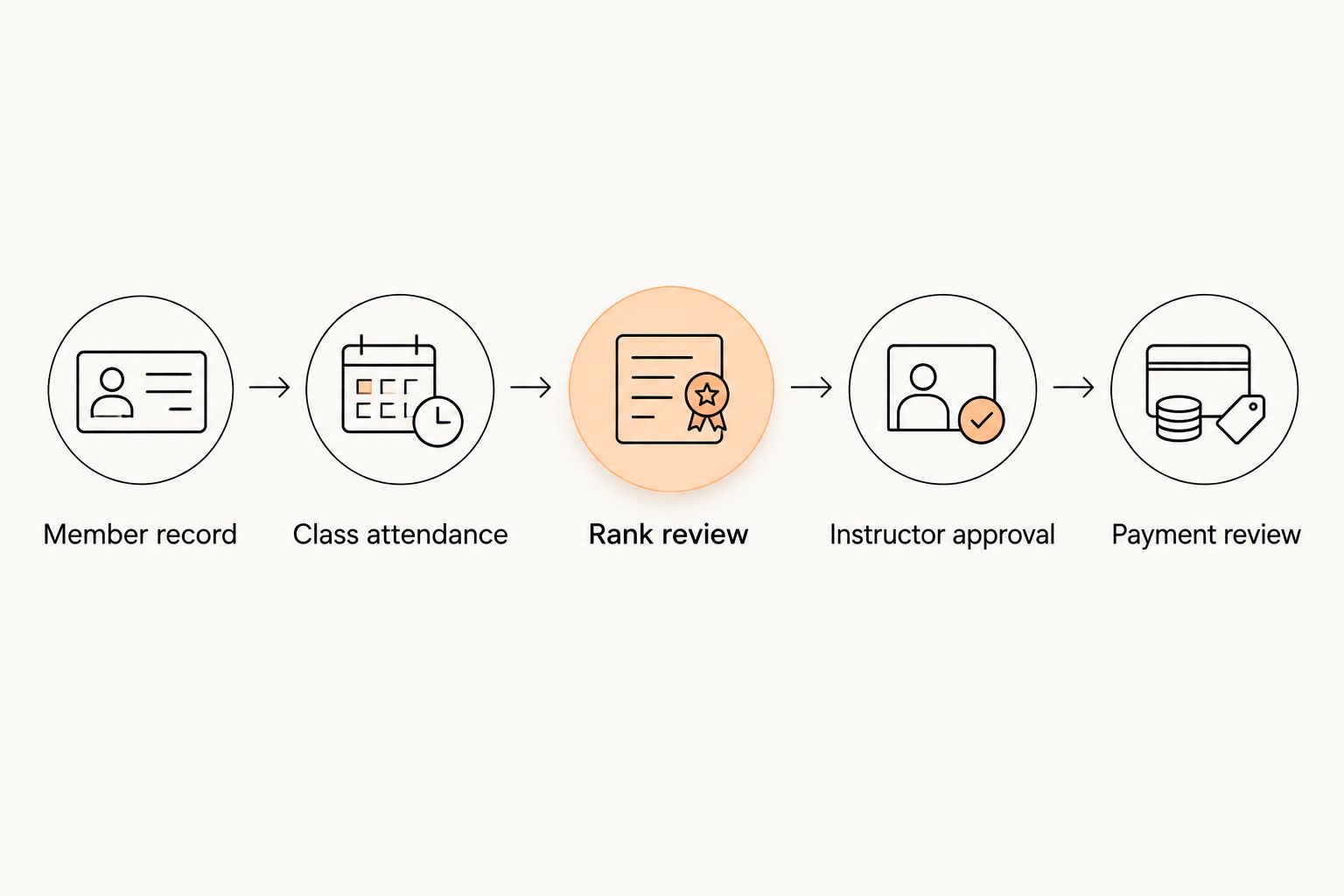
Do not accept a polished dashboard as a substitute for completing those tasks. Ask the instructor who takes attendance and the administrator who handles payments to repeat the relevant steps themselves.
For a 2026 purchase, record the result against each requirement: completed, needs configuration or unsuitable. A task that requires an undocumented workaround has not passed.
Evaluate payment recovery, not just payment collection
A successful first payment tests collection. A failed renewal tests what your school does when collection breaks.
Use the failed-payment scenario to answer practical questions. Who sees the problem? Which membership does it affect? Who contacts the payer? How does the administrator confirm that the issue is resolved?
A payment recovery evaluation checklist belongs in this assessment because the buying decision must cover the work after a failed charge, not merely the ability to take a payment.
Keep the account holder and student distinct in your test. For a junior member, the person attending class and the person handling payment are different people. Your administrative process needs to reflect that distinction without changing the student’s grading record.
Do not count a payment alert as a completed recovery. The test ends when the responsible person can confirm the outcome and understand what happens next.
Keep migration separate from the buying decision
A system can fit your school and still require careful preparation before the move. Choosing software and transferring records are different jobs.
For a 2026 switch, make a field inventory before setting a cutover date. Include member identifiers, contact details, current rank, relevant grading history, attendance records and payment status. Identify which information must remain accessible even if it does not enter the new system.
Assign an owner to each part of the move:
- Instructor: Checks rank records and grading history.
- Administrator: Checks member details and payment status.
- School owner: Approves the cutover and resolves conflicting records.
Compare a sample against the original records before changing your daily process. Keep historical evidence accessible until you have confirmed what transferred and how to retrieve what did not.
A clean starting record matters more than a fast announcement that the switch is complete.
Which judo school software should you choose?
Choose the connected platform when your main problem is fragmented administration. Keep a spreadsheet only when manual maintenance remains a deliberate, accountable process.
Choose separate tools when retaining billing is a firm requirement and reconciliation has an owner. Commission custom software only after a written requirement rules out the simpler approaches.
For most readers evaluating the stated functions in 2026, the default next move is a workflow demonstration—not another feature checklist. Make the system show the student, the attendance evidence, the rank decision and the payment issue.
FAQ
What is the best judo school software to shortlist?
MatPilot is the default shortlist choice for judo schools seeking member records, attendance, billing and per-art rank tracking together. Test your actual grading and payment workflows before choosing.
Can judo software decide when a student should be promoted?
The instructor should retain the promotion decision. Software can organize attendance and rank information, but those records do not replace a technical assessment.
Can one system handle judo and another martial art?
A system with per-art rank tracking can keep discipline-specific ranks separate. Test a student enrolled in both programs and confirm that each rank remains associated with the correct art.
Is a spreadsheet enough for a small judo club?
A spreadsheet is an option when someone accepts responsibility for maintaining and checking it. Treat payment follow-up, permissions and backups as separate jobs rather than assuming the register handles them.
What should I test before switching judo school software?
Test a member record, class attendance, a rank review, instructor approval and a failed payment. Include a junior student and a student who trains in more than one discipline.
Should I replace billing when I change my membership register?
Treat billing replacement as a separate decision. If you retain the existing billing system, define how payment status and membership records will be reconciled.
What records should I check during migration?
Check member identifiers, contact details, current ranks, relevant grading history, attendance and payment status. Decide how historical information will remain accessible before approving the cutover.
One last thing
Test a correction, not just a new entry. Enter an attendance mark against the wrong fictional student, then ask the instructor to correct it.
That small exercise tests whether your daily process can recover from an ordinary mistake. Repeat it with a rank entry before trusting the system with your school’s history.