Best karate school software in 2026

Best overall for connected dojo operations: MatPilot. Best for a single weekly class: a spreadsheet-led setup. Best for billing-only administration: a billing-led setup. Best for continuity during a busy term: your existing gym platform. This 2026 karate school software guide compares those approaches by the work you need to complete, not by a feature count.
- MatPilot is the best karate school software fit here for owners connecting attendance, belt grading, scheduling and billing.
- A spreadsheet-led setup suits a single weekly class when the instructor accepts manual updates.
- A billing-led setup suits schools fixing collections without replacing their teaching records.
- Keep your existing gym platform until replacement records and payment responsibilities are checked.
Why this matters
A karate school has several versions of the same student record: membership, attendance, payment status and rank. Your software choice determines whether you maintain those records together or reconcile them yourself.
A paid membership does not establish grading readiness. An attendance entry does not establish technical competence. Choose a setup that keeps these distinctions clear while letting you complete the next task without searching through unrelated records.
What makes the best karate school software?
Use these criteria for your 2026 shortlist. Ask each provider to demonstrate your actual school routine rather than a prepared dashboard tour.
- Student records: Find a student, their current membership and their training history without creating duplicate identities.
- Karate grading: Keep rank history distinct from attendance. Your instructor must retain the promotion decision.
- Class administration: Build the weekly timetable and record attendance against the correct session.
- Billing responsibility: Identify who reviews failed payments, contacts the payer and confirms resolution.
- Owner control: Separate a suggested action from an approved action, especially for member communication and promotions.
- Exit readiness: Establish how you will retrieve records and reconcile outstanding payments before committing to a replacement.
Do not treat a checked feature box as proof. Ask the person demonstrating the software to complete a task using a sample student and explain what you must still do manually.
Karate school software approaches at a glance
| Rank and option | Best for | Standout capability or approach | Key limitation |
|---|---|---|---|
| 1. MatPilot | Connected dojo administration | Members, classes, billing and per-art ranks, with approval-based co-pilot workflows | Requires your school’s records and grading decisions to be set up correctly |
| 2. Spreadsheet-led setup | One weekly class | Direct control over a simple register and grading log | You maintain consistency and follow-up manually |
| 3. Billing-led setup | Collections without a teaching-system replacement | Keeps payment administration as the immediate project | Rank and attendance records remain a separate responsibility |
| 4. Existing gym platform | Operational continuity during a busy term | Keeps established routines in place while you evaluate a change | Retains the unresolved problems that triggered your search |
1. MatPilot: best for connected dojo administration
MatPilot is the best karate school software fit here for owners who want attendance, belt grading, scheduling and billing in one operating workflow. It supports member management, a Monday–Sunday timetable, attendance, Stripe billing, Xero sync and per-art ranks. You can access the product through the web and native iOS and Android apps.
The co-pilot covers work such as trial follow-ups, at-risk members, promotion readiness and payment issues. The owner reviews and approves actions. That distinction matters: a prompt to review a student is not permission to award a belt automatically.
MatPilot pros:
- Member, class, attendance, billing and grading functions sit within the same product.
- Per-art ranks support academies teaching more than one discipline.
- Approval gates keep the owner responsible for proposed actions.
- Web and native mobile access support administration away from a desk.
MatPilot cons:
- You still need to establish accurate starting records and your own grading rules.
- Approval-based work requires owner attention; it is not unattended school management.
- A school seeking only a register must evaluate more functionality than that narrow task requires.
Best for: Karate schools replacing disconnected administrative routines, including academies that also teach BJJ, judo, boxing or Muay Thai.
During evaluation, use one student to demonstrate the full path: membership, class attendance, payment issue and grading review. Check where an instructor makes a decision and where an administrative task begins.
Verdict: Buy for connected operations after completing your school-specific walkthrough.
2. Spreadsheet-led setup: best for a single weekly class
A spreadsheet-led setup keeps student details, attendance and rank history in records you maintain yourself. It suits an instructor whose administrative routine remains small enough to review directly.
Keep separate fields for the current belt and the date it was awarded. Do not overwrite the previous promotion when entering the next one; preserve a history instead.
Spreadsheet-led setup pros:
- You decide the fields and terminology.
- A basic register does not require a wider management-system rollout.
- You can inspect individual entries directly during a record review.
Spreadsheet-led setup cons:
- You must reconcile attendance, grading and payment information yourself.
- Reminders and unresolved tasks require a separate follow-up routine.
- Different copies create a record-control problem unless you designate an authoritative version.
Best for: A single weekly class with an instructor who accepts responsibility for manual administration.
Use a written routine for updates. Record attendance after class, enter grading decisions when approved and review payment exceptions separately. A spreadsheet becomes a poor fit when these duties repeatedly remain unfinished.
Verdict: Hold while the manual routine remains reliable; replace it when follow-up breaks down.
3. Billing-led setup: best for a collections-only project
A billing-led setup makes payment administration the immediate priority while leaving teaching records where they are. This is a narrower project than replacing the school’s entire management system.
Define the boundary before choosing a tool. Taking a payment, identifying a failed charge and resolving a membership dispute are different tasks, even when they concern the same family.
Billing-led setup pros:
- You can concentrate evaluation on collection and exception handling.
- Existing attendance and grading routines remain unchanged.
- The person responsible for payments gets a clearly defined workflow to assess.
Billing-led setup cons:
- Payment status does not establish attendance or grading readiness.
- You must keep payer and student identities consistent across separate records.
- The teaching and financial systems still need a reconciliation routine.
Best for: A school satisfied with its teaching records but dissatisfied with how payment problems are handled.
Ask the provider to demonstrate a failed payment, an updated payment method and a resolved account. Then ask who performs each action. Do not select a collections tool solely because it accepts the payment methods you want.
Verdict: Buy only for a defined billing problem, not as a substitute for dojo management.
4. Existing gym platform: best for continuity during a busy term
Keeping your existing gym platform is a valid short-term choice when you have not prepared a safe replacement. It preserves established routines while you map what must move.
This is not an endorsement of unresolved problems. Give the evaluation an owner and a completion checklist so that continuity does not become indefinite delay.
Existing gym platform pros:
- Staff retain the workflow they already use.
- You can document problems before introducing another system.
- You can prepare student records and payment responsibilities before a cutover.
Existing gym platform cons:
- Existing administrative problems remain until addressed.
- Maintaining evaluation records alongside live records creates extra work.
- A delayed decision can leave temporary workarounds in place.
Best for: Schools approaching a grading event or another period when staff cannot supervise a migration properly.
If your shortlist includes Gymdesk, Kicksite, Mindbody or Zen Planner, request current written terms and demonstrate the same school tasks in each. Compare the process you observe, not an assumed feature difference.
Verdict: Hold until the replacement passes your records and billing checks.
How these approaches are ranked
The 2026 ranking prioritizes connected records, clear ownership and instructor control. A connected platform ranks first for an owner replacing several disconnected routines. A spreadsheet, a billing-led setup and an existing platform each serve a narrower decision.
The order is not a measured claim about competitor performance. Use the criteria above to determine whether your school needs a complete operational change or a smaller correction.
Run a karate-specific demonstration
Use a fictional family with 3 students for your evaluation. Give the students different ranks and class assignments. If your academy teaches 2 disciplines, give one student a separate rank in each.
Ask the demonstrator to complete these steps:
- Create records: Establish distinct student identities and identify the responsible payer.
- Record attendance: Place an attendance entry against the correct class.
- Review readiness: Inspect the student’s rank history and the evidence used for a grading decision.
- Approve action: Show where an authorized person accepts or rejects the proposed next step.
- Check billing: Trace a payment issue to the person responsible for resolving it.
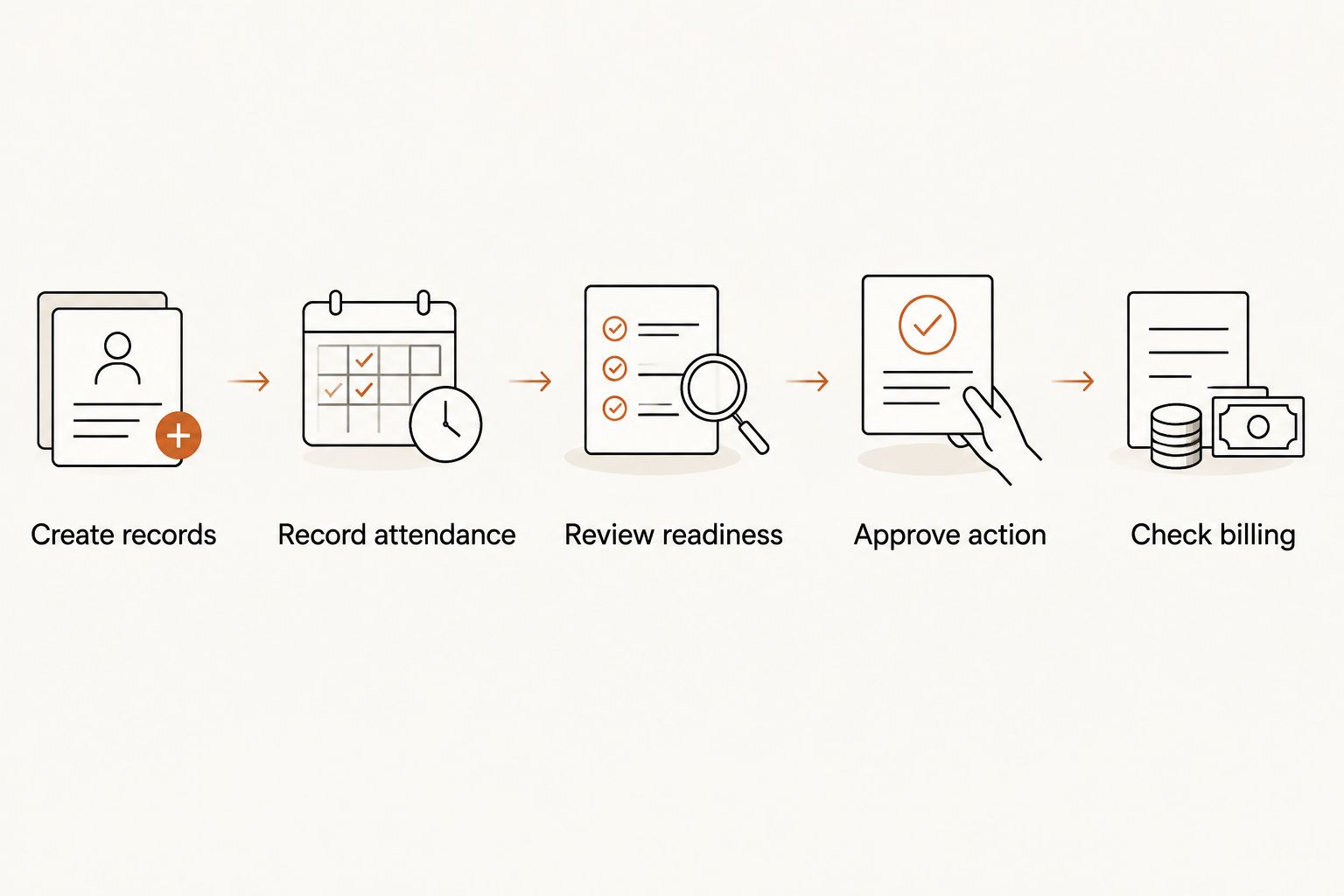
For the schedule, use a 7-day timetable that includes the classes you actually teach. Ask how cancellations and attendance corrections are handled. Treat the demonstration as a task test, not proof of capabilities the provider has not shown.
For mixed academies, assess support for multiple belt systems separately from the class timetable. A student’s karate rank and another discipline’s rank must remain distinguishable.
Decide who owns failed payments
Payment collection is not finished when a charge fails. Your school needs an assigned person, a permitted action and a clear condition for closing the issue.
The choice between software and a managed service for failed payment recovery is also a choice about who performs the follow-up. A tool can support the process, but your evaluation must establish which tasks remain with your team.
Use a sample account to answer these questions:
- Who sees the failed-payment issue?
- Who checks whether the payer has already responded?
- Who approves communication or another account action?
- Who confirms that the balance is resolved?
Do not assume that an accounting connection performs every recovery task. Reconciliation, payer communication and membership decisions are separate responsibilities. Require a demonstration of each responsibility you expect the system to support.
Prepare your records before switching
A 2026 migration should preserve meaning, not merely move names into another database. A current belt without its history is a different record from a complete progression log.
Before selecting a cutover date, prepare these checks:
- Identity check: Match each student to the correct membership and payer.
- Rank check: Preserve the discipline, rank and relevant historical entries.
- Attendance check: Confirm which records you need for instructor review.
- Billing check: Identify outstanding issues and who will resolve them.
- Responsibility check: Name the person who confirms each category is correct.
Keep your original records accessible during validation. Do not assume a membership import also transfers payment authorization or every historical field. Ask the receiving provider to explain the transfer boundary before you stop the old process.
Which karate school software should you choose?
Choose connected management when your main problem is maintaining the same student across separate administrative routines. Choose a spreadsheet-led setup when the work is genuinely simple and consistently completed. Choose a billing-led setup when collections are the defined problem.
For the undecided owner in 2026, start with the connected-management demonstration. If it solves no meaningful handoff problem, keep the narrower setup. If it removes repeated reconciliation work while preserving instructor approval, you have a concrete reason to change.
FAQ
What's the best karate school software for a small dojo?
MatPilot is the best fit in this guide for a small dojo that wants members, attendance, grading, scheduling and billing together. A spreadsheet-led setup remains a narrower option for a single weekly class with reliable manual administration.
Can karate school software decide when a student earns a belt?
The instructor should make the promotion decision. Use software to organize rank history, attendance and review tasks, then confirm the action through your school's approval process.
What should I test for a karate school with siblings?
Test distinct student records alongside the responsible payer. Use different ranks and class assignments, and ask the provider to demonstrate the exact family-billing arrangement your school needs.
Is a spreadsheet enough to run a karate class?
A spreadsheet can support a simple register and grading log when you maintain it consistently. It leaves reconciliation, reminders and payment follow-up with the instructor or administrator.
Should I change software just to fix failed payments?
Not necessarily; a billing-led setup is the narrower choice when teaching records already work. Establish who owns payment follow-up before deciding whether to replace the wider management system.
How do I compare karate school software without relying on feature lists?
Ask every provider to complete the same student workflow. Test registration, attendance, grading review, approval and a payment issue, then record the manual work left with your staff.
What should I check before moving student records?
Check identities, rank history, attendance and unresolved billing issues before cutover. Confirm separately what happens to payment authorization rather than assuming it transfers with membership data.
One last thing
A correct current belt can conceal an incomplete history. Before accepting an import, select a student who has progressed through several ranks and inspect the earlier entries—not just the latest label. That check tests whether your new system preserves teaching records rather than merely displaying a plausible profile.