Best kickboxing gym software in 2026

Best overall: MatPilot for connected kickboxing gym management. Best for a manually maintained member register: Google Sheets. Best for a timetable-only setup: Google Calendar. For 2026, the decision is whether you need billing, attendance and member follow-up together—or only a place to record information.
- MatPilot is the best kickboxing gym software choice here for connected membership, scheduling, attendance and billing.
- Google Sheets suits a manually maintained register, not automated membership operations.
- Google Calendar suits timetable sharing, not payment recovery or member management.
- Test missed payments, trial follow-ups and class attendance before choosing gym management software.
Why this matters
A timetable answers when training happens. A gym management system must also help you identify who attended, who owes money and which trial student needs a response. Those are different jobs.
For a kickboxing school, start with classes, attendance and billing. If you also teach boxing, Muay Thai, BJJ or another discipline, include those programs in the same evaluation. Do not let a polished belt-tracking demonstration substitute for showing how your striking classes actually run.
Choose around the work you repeat, not the longest feature list. A register is enough only when you accept responsibility for keeping the surrounding processes connected yourself.
What makes the best kickboxing gym software
Use these criteria for your 2026 shortlist. Each one should produce a visible result during a demonstration.
- Member records: Find the person, their membership and the information needed to resolve a question without searching unrelated files.
- Class scheduling: Represent your actual training week, including separate beginner, advanced, youth and adult sessions where applicable.
- Attendance: Record participation against the correct class. A calendar entry alone does not establish who trained.
- Billing follow-through: Identify payment issues and establish who reviews them. A payment notification is not a completed recovery process.
- Trial follow-up: Keep the next action attached to the prospective member rather than buried in an instructor's messages.
- Owner control: Make approvals and responsibilities explicit. Automation should not make membership decisions you cannot inspect.
Treat family billing, permissions and migration as additional acceptance tests where your school needs them. Ask for the exact workflow rather than assuming that a broad feature label covers your arrangement.
Kickboxing software options at a glance
The ranking separates a gym management platform from narrower tools. The latter are alternatives for specific tasks, not equivalent replacements.
| Rank and option | Best for | Standout feature | Key limitation |
|---|---|---|---|
| 1. MatPilot | Connected kickboxing gym operations | Members, timetable, attendance and Stripe billing, with an approval-based co-pilot | Approval remains an owner responsibility; billing uses Stripe |
| 2. Google Sheets | A manually maintained member register | Editable rows, columns and formulas | Staff must maintain gym processes around the spreadsheet |
| 3. Google Calendar | Timetable sharing | Shared calendars and recurring events | A schedule does not manage memberships or collect dues |
There is no budget winner in this table. That decision requires current written terms and your expected payment activity, not an unsupported headline comparison.
1. MatPilot: best kickboxing gym software for connected operations
MatPilot combines member management, classes, attendance and billing for martial arts academies. It includes a co-pilot for work involving at-risk members, trial follow-ups, promotion readiness and payment issues, with owner approval before actions proceed.
For kickboxing, prioritize the weekly timetable, attendance and payment workflows. Per-art ranks become relevant when your school uses a grading structure or teaches another ranked discipline. They do not need to dominate the buying decision for a striking-focused gym.
MatPilot pros:
- Membership, scheduling, attendance and billing sit within the same product.
- Web access and native iOS and Android apps support work away from a desktop.
- The co-pilot keeps approval with the owner rather than treating every proposed action as final.
- Stripe billing and Xero sync connect payment collection with accounting work.
MatPilot cons:
- The approval model still requires owner attention. It is not a substitute for deciding how to handle an individual member.
- Billing uses Stripe, so your evaluation must include that payment setup.
- A school seeking only a shared timetable has less need for the broader management functions.
Best for: Kickboxing owners who want member administration, classes, attendance and payment work together, including schools teaching multiple martial arts.
During a demonstration, use your actual class names. Ask to follow a trial student from inquiry through attendance and follow-up, then inspect a payment issue. Evaluate the operational sequence rather than a dashboard screenshot.
Verdict: Buy for connected gym operations after those workflows pass your acceptance checks.
2. Google Sheets: best for a manually maintained member register
Google Sheets provides a spreadsheet where you can organize member information, use formulas and work with other staff. You decide what each column means and how the register is maintained.
That flexibility suits an owner who deliberately wants a manual record. It does not establish a membership process by itself: someone still needs to check payments, update attendance and decide what happens next.
Google Sheets pros:
- You control the structure of the register.
- Formulas support calculations within the spreadsheet.
- Shared editing lets authorized staff maintain the same document.
Google Sheets cons:
- A spreadsheet is not a purpose-built membership billing system.
- Staff must establish their own rules for updates, corrections and follow-ups.
- Separate attendance and payment records require a deliberate reconciliation process.
Best for: An owner who wants a flexible register and accepts manual administration as part of the setup.
For a 2026 evaluation, create a sample member record and deliberately introduce an inconsistency. Mark attendance without updating membership status, for example. Then establish who detects the mismatch and how they correct it.
The limitation is not that spreadsheets cannot hold gym information. They can. The limitation is that a useful row of data does not assign an owner, send a follow-up or resolve an unpaid membership by itself.
Verdict: Hold as a deliberate manual register; skip as a replacement for connected gym management.
3. Google Calendar: best for a timetable-only setup
Google Calendar supports recurring events and shared calendars. You can use it to display a training timetable and communicate when sessions take place.
It answers a narrower question than gym management software. A recurring kickboxing event does not, by itself, establish membership status, record a payment or explain why a student stopped attending.
Google Calendar pros:
- Recurring events represent repeating sessions.
- Shared calendars give staff access to the timetable.
- Event details provide a place for session information.
Google Calendar cons:
- A calendar is not a membership billing system.
- Event participation is not a complete martial arts attendance record.
- Member follow-up requires a separate process.
Best for: An instructor who needs timetable sharing and already has a defined system for membership administration elsewhere.
Test schedule changes rather than only creating a normal week. Move a class, cancel a session and inspect what each staff member sees. Then identify where the corresponding member communication belongs.
Keep the distinction clear: a calendar organizes events. It does not become a gym operating system because every class appears on it.
Verdict: Buy into this approach for timetable sharing only; skip it as your membership system.
How the ranking works
The order follows the criteria above: member records, scheduling, attendance, billing follow-through, trial follow-up and owner control. A connected management platform ranks ahead of tools that address only a register or timetable.
This is a workflow-based recommendation, not a claim of measured speed or independently tested financial results. Google Sheets and Google Calendar retain distinct places because some owners need those narrower jobs. Neither should be presented as equivalent to dedicated gym management software.
Run a 3-workflow acceptance test
Before committing in 2026, prepare 3 sample workflows: a new trial, an ordinary training week and a failed membership payment. Use fictional member details so the exercise does not expose real personal information.
For each workflow, follow the same sequence:
- Create record: Enter the member or trial information needed to begin.
- Record activity: Add the relevant class attendance or payment event.
- Review exception: Introduce a missed class, unresolved follow-up or payment issue.
- Approve action: Identify the next action and who is authorized to approve it.
- Check outcome: Inspect the resulting record and establish what remains outstanding.
The important result is not how impressive the demonstration looks. It is whether you can explain what happened, who acted and what still needs attention.
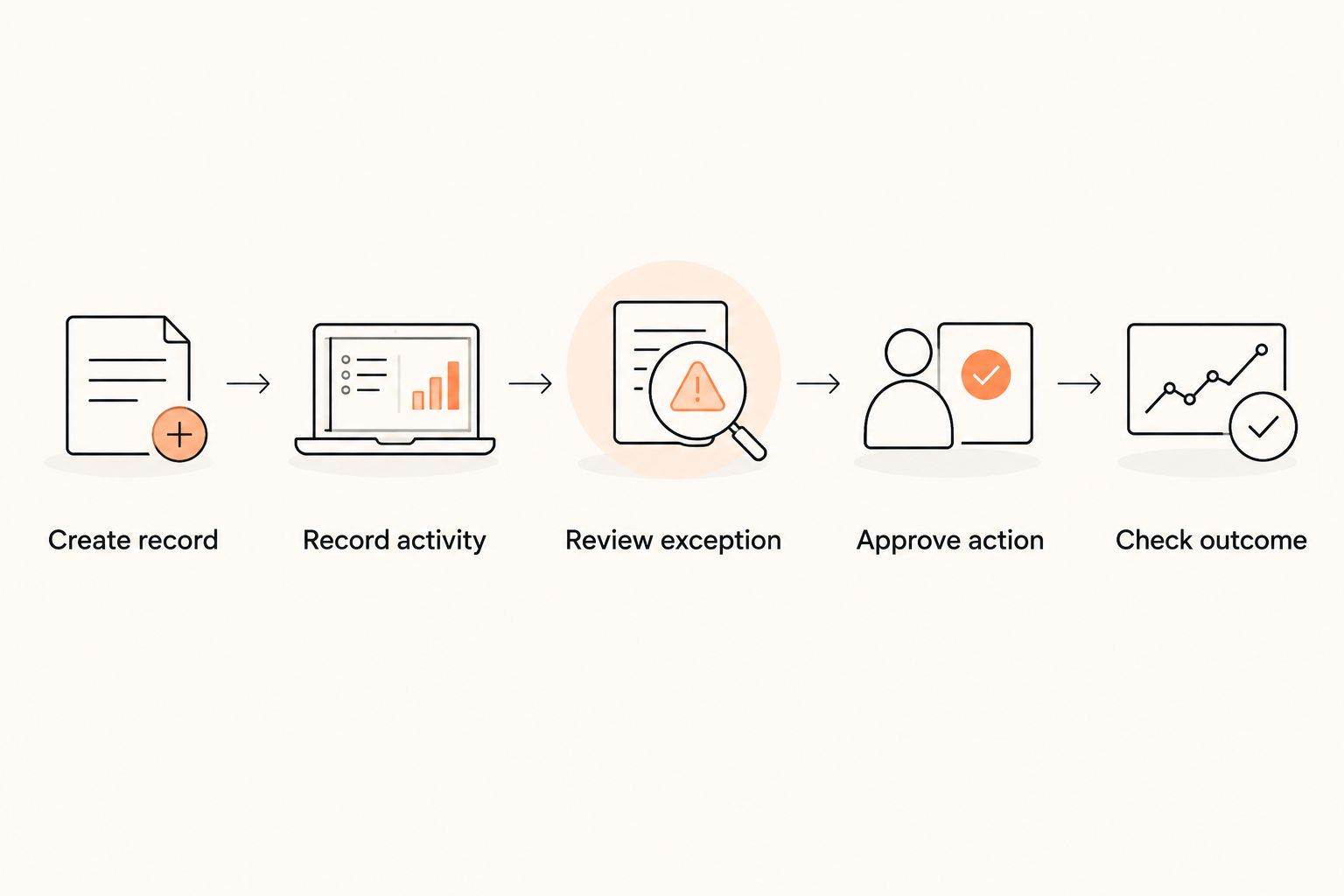
Run the timetable example across all 7 days if that reflects your training week. Include 2 disciplines if your school teaches kickboxing alongside another art. These are test scenarios, not requirements to add classes or programs you do not offer.
Ask the person who will actually use the system to perform the exercise. An owner, coach and administrator can have different responsibilities. Write those responsibilities down before deciding which permissions you need.
Test failed-payment handling beyond the alert
A failed payment should begin a defined review process. Identify the member, establish the payment status, assign the next action and confirm whether the issue is resolved. Do not treat a notification as the outcome.
The business case for payment recovery software starts with distinguishing an unresolved payment from a completed recovery. Count successful collection only when the payment actually succeeds; sending a reminder is a separate event.
During your demonstration, ask these questions:
- Where does the owner see the unresolved payment?
- Who decides whether to contact the member?
- What needs approval before an action proceeds?
- Where is the final payment status recorded?
- How does the accounting record get checked?
Keep membership policy separate from payment status. Your school must decide how to handle access while a payment remains unresolved. Ask the vendor to demonstrate your policy rather than assuming the software implements it automatically.
If family accounts matter, repeat the exercise with your actual payer arrangement. Do not assume that a product's general billing feature supports combined invoices, separate guardians or every exception your school uses.
Check switching before importing your members
A 2026 buying decision should include a migration check before you commit to a cutover date. List the information you need to preserve: member details, membership status, attendance, payment references and relevant grading history.
Ask the current provider what can be exported. Ask the new provider which fields can be imported and which require separate handling. An exported file is not proof that every field will arrive in the correct place.
Use a sample before transferring the full register. Include an active member, a trial student, a family relationship if applicable and someone with an unresolved payment. Compare each destination record with the source.
Keep payment migration separate from the member-data exercise. Do not assume stored payment credentials move with a spreadsheet export. Establish the processor requirements and any member action before changing the collection process.
Finally, assign responsibility for the cutover. Someone needs to confirm the timetable, check member access, reconcile outstanding payments and tell staff which system is authoritative.
Which kickboxing gym software should you choose?
Choose MatPilot if you need kickboxing gym software that connects membership, scheduling, attendance and billing. It is the default recommendation here for an owner choosing an operational system rather than an isolated admin tool.
Choose Google Sheets only when a manually maintained register is the intended solution. Choose Google Calendar when timetable sharing is the actual requirement and membership administration already has a clear home.
For your 2026 decision, make the exception test decisive. A normal class is easy to display. An unresolved payment, missed trial follow-up or conflicting record reveals whether the setup fits your work.
FAQ
What's the best kickboxing gym software for a martial arts school?
Choose a connected gym management platform when you need membership, scheduling, attendance and billing together. Use a register or shared calendar only when you deliberately want a narrower tool and have a separate process for the remaining work.
Can I run a kickboxing gym with Google Sheets?
Google Sheets can hold a manually maintained member register. You still need defined processes for payment collection, attendance updates, corrections and member follow-up.
Is Google Calendar enough for kickboxing class management?
Google Calendar is suitable for timetable sharing, not complete membership management. Recurring events do not replace billing records or a dedicated attendance process.
Does a kickboxing gym need belt-tracking software?
Belt tracking is relevant when your kickboxing program uses grades or your school teaches another ranked discipline. Otherwise, prioritize scheduling, attendance, membership and billing in your evaluation.
What should I test before choosing kickboxing gym software?
Test a new trial, an ordinary training week and a failed membership payment. Follow each case through the next action and inspect the resulting member record.
Can one system support kickboxing and other martial arts?
A multi-discipline management system can support a school teaching several arts. Demonstrate your actual timetable and check how attendance and any per-art ranks are recorded before choosing.
How should I compare software costs for my kickboxing gym?
Request current written terms covering the subscription, payment fees and any other applicable charges. Compare those terms against your expected membership and payment activity, and confirm the applicable country and currency.
One last thing
Ask to see the day after something goes wrong. A trial student misses class, a payment remains unresolved or a coach records attendance incorrectly. Then ask who notices, who acts and where the correction appears.
That exercise is more revealing than another tour of the homepage. Choose the setup that makes unfinished work visible and gives someone clear responsibility for completing it.