Best Krav Maga gym booking software in 2026

Best for connected martial arts administration: MatPilot. Best for private-lesson appointments: a dedicated appointment scheduler. Best for an instructor-managed timetable: a shared calendar and attendance sheet. The best Krav Maga gym booking software in 2026 must fit how you teach, record attendance, collect memberships, and review progression—not just display class times.
- MatPilot is the best fit here for martial arts scheduling connected to attendance, billing, and rank records.
- The best Krav Maga gym booking software must match your group classes, private lessons, and membership rules.
- Choose an appointment scheduler when individual lesson reservations are the main job.
- Choose a shared calendar only when instructors can maintain attendance and payment records separately.
- Test cancellations, trial follow-ups, and payment issues before moving your live timetable.
Why this matters
A timetable answers when training happens. A booking process must also answer who can attend, what happens when someone cancels, and where the instructor records participation. Membership billing adds another decision: whether the person attending has the correct payment arrangement.
Start your 2026 selection with those operational questions. A polished booking screen does not prove that your class records, payments, and progression records stay connected. Equally, a detailed grading system does not prove that the reservation process suits your classes.
Choose the system around the work you need to complete after a booking, not just the booking itself. For a Krav Maga school, that means checking the whole journey from inquiry to attendance and ongoing membership.
What makes the best Krav Maga gym booking software?
Use these criteria before comparing screens. Each criterion should produce a visible result during a demonstration.
- Class structure: Can you represent your actual group timetable and distinguish it from individual appointments?
- Attendance records: Can the instructor record who trained without maintaining a second register?
- Membership billing: Can you identify the member, payment arrangement, and unresolved payment issue?
- Progression records: Can you keep the school's own ranks or levels separate from unrelated disciplines?
- Owner control: Can you review proposed administrative actions before they happen?
- Booking exceptions: Can you handle the cancellation, full-class, and trial scenarios your school actually uses?
Treat the last criterion as a demonstration requirement, not an assumed feature. Scheduling, attendance, and self-service reservations are different functions. Ask the supplier to show each one you need.
Krav Maga booking options at a glance
This 2026 shortlist ranks operating approaches rather than assigning unsupported scores to competing brands. The choice depends on whether you need a connected member system, an appointment book, or a timetable you maintain yourself.
| Rank and option | Best for | Standout strength | Key limitation |
|---|---|---|---|
| 1. MatPilot | Membership-based martial arts schools | Scheduling, attendance, billing, and per-art rank records | Your exact reservation and cancellation rules need a demonstration |
| 2. Dedicated appointment scheduler | Instructor-led private lessons | Organizing individual appointment requests around time slots | Do not assume martial arts membership or progression records are included |
| 3. Shared calendar and attendance sheet | Instructor-managed group timetables | Keeping class times and a manually maintained register | The owner must reconcile bookings, attendance, and payments |
No option wins every use case. A private instructor needs different booking controls from a school running recurring memberships across Krav Maga, boxing, and BJJ.
1. MatPilot: best for connected Krav Maga school administration
MatPilot is martial arts gym management software with member records, class scheduling, attendance, billing, and per-art ranks and belt grading. It is available on the web and through native iOS and Android apps, with availability in the United States and Ireland.
MatPilot is the best fit on this shortlist for Krav Maga owners who need scheduling, attendance, billing, and martial arts progression records together. That is a broader job than arranging a single appointment.
What the owner can do
Maintain a Monday–Sunday timetable. Record attendance against members. Manage billing through Stripe and use the Xero connection for accounting records.
The co-pilot covers administrative areas including at-risk members, trial follow-ups, promotion readiness, and payment issues, with owner approval gates. The useful distinction is control: review the proposed action before approving it. Do not treat an administrative suggestion as an instruction to change a student's membership or progression automatically.
For a school teaching several disciplines, inspect the per-art rank records. Ask to see how your Krav Maga structure would sit alongside boxing, Muay Thai, or BJJ without treating those programs as interchangeable.
MatPilot pros
- Scheduling, member records, attendance, and billing belong to the same martial arts management product.
- Per-art rank records support a multi-discipline academy's administrative structure.
- Web access and native mobile apps give owners different ways to access the system.
- Approval gates keep the owner involved in proposed administrative actions.
MatPilot cons
- A school needing only an appointment calendar must still evaluate a broader management system.
- Connected records require the owner to prepare accurate member, timetable, and progression information.
- Class capacity, waitlists, booking windows, and cancellation behavior need to match your requirements in a demonstration.
Best for: Membership-based Krav Maga schools that need class administration connected to the rest of the academy.
Verdict: Buy only after your real booking scenarios pass the demonstration. Do not substitute a feature list for that check.
2. Dedicated appointment scheduler: best for private Krav Maga lessons
A dedicated appointment scheduler organizes individual sessions around available time slots. This approach fits a private instructor whose central task is agreeing a lesson time with a student rather than administering recurring group memberships.
Use it when the appointment itself is the main record you need. Evaluate the selected product's actual confirmation, rescheduling, and cancellation behavior before making it your booking channel.
Appointment scheduler pros
- Keeps the evaluation focused on the student's appointment journey.
- Provides a clear structure for reviewing instructor availability and lesson duration.
- Lets you assess private lessons separately from recurring group-class administration.
Appointment scheduler cons
- An appointment entry is not evidence that a student attended.
- Do not assume the product includes martial arts rank histories or membership administration.
- If attendance and payments live elsewhere, someone must reconcile those records.
Best for: Private Krav Maga instruction where individual appointments drive the schedule.
For your 2026 demonstration, request one private lesson, move it to another slot, then cancel it. Check what the student sees and what remains in the instructor's record. Ask separately how a payment or membership entitlement is attached to that appointment.
Verdict: Buy for appointment-led instruction; skip this approach as your sole system when connected membership administration is essential.
3. Shared calendar and attendance sheet: best for a managed timetable
A shared calendar publishes class times. An attendance sheet records who trained, provided an instructor updates it. Together, they form a manual operating approach—not a self-service booking system.
This approach suits an owner who takes responsibility for every reservation change and keeps payment records separately. It stops being a good fit when you require the calendar itself to enforce membership or booking rules.
Shared calendar and attendance sheet pros
- Makes the timetable visible without designing a larger administrative workflow.
- Lets the instructor define the attendance sheet's fields and class labels.
- Keeps decisions about exceptions directly with the person teaching.
Shared calendar and attendance sheet cons
- A class appearing on the calendar does not reserve a student's place.
- Attendance accuracy depends on someone maintaining the sheet.
- Membership changes and payment issues require separate checks.
Best for: Instructor-managed group classes where students do not need self-service reservations.
Assign an owner to the calendar and another explicit responsibility to the register, even if the same person does both. Decide where cancellations are recorded. Otherwise, a changed timetable and an unchanged attendance sheet can describe different versions of the same class.
Verdict: Hold while the manual process remains manageable; skip if you need enforced booking rules or connected payment records.
Run a booking test before you choose
Use a sample week rather than a generic product tour. Build a 7-day timetable that reflects your actual teaching pattern, including group sessions and any private lessons. These are test instructions, not promised software capabilities.
Give each candidate the same records and decisions. That makes the result easier to compare than a series of unrelated demonstrations.
Timetable
Create your real class names and teaching days. Include the divisions your school uses, such as beginner and advanced sessions or separate youth and adult classes. Ask the supplier to show which restrictions the product enforces and which remain instructor decisions.
Booking
Run 3 booking scenarios: a new student requesting a trial, an existing member joining a regular session, and a student trying to join a full class. Inspect the confirmation and the instructor's view. Record any step that requires a separate message or spreadsheet.
Attendance
Use 2 sample member records. Mark one present and leave the other absent, then correct an intentional attendance mistake. Check that the instructor can find the resulting record without reconstructing the session from messages.
Payment review
Present a payment issue and ask where the owner sees it. Then ask what happens next, who approves any action, and whether booking eligibility changes. Do not assume that a payment alert automatically blocks attendance or triggers a refund.
Owner approval
Finish by reviewing an administrative suggestion. Identify exactly what happens before approval and what happens afterward. Keep instructor judgment separate from administrative automation, especially for training readiness and promotion decisions.
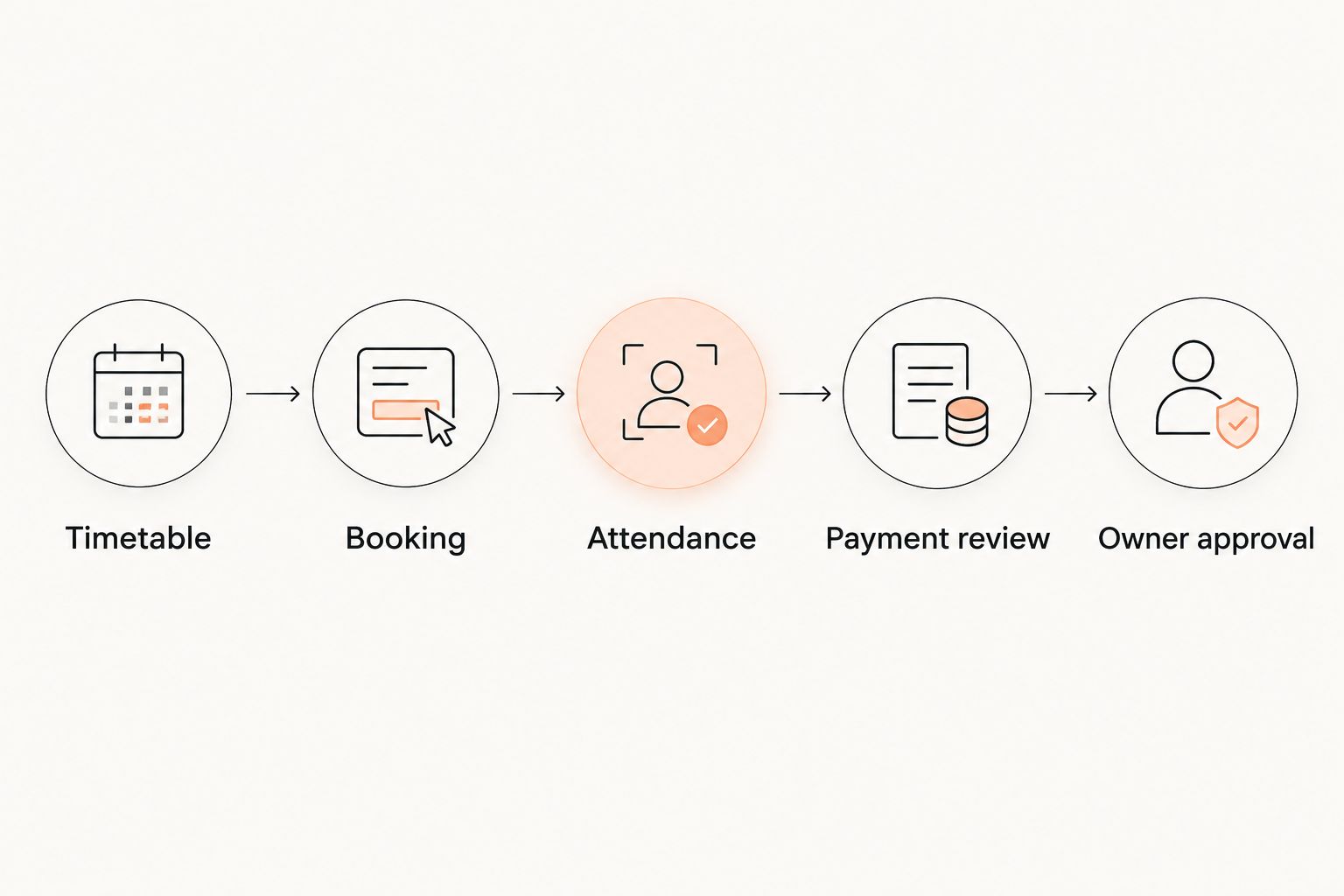
A successful demonstration leaves you with an identifiable record at every stage. If a step happens outside the product, write down who owns it. That is work your team will still have after switching.
Keep Krav Maga progression separate from booking eligibility
A student attending regularly is not automatically ready for an advanced class or promotion. Define your school's rules before asking software to represent them. Use your own level names and assessment requirements rather than borrowing another martial art's structure.
For a 2026 review, separate three questions: can the student reserve this class, did the student attend, and has an instructor approved progression? They describe different decisions. Combining them into one status makes the record harder to interpret.
The Krav Maga school software guide covers the wider management context. For this selection, keep the test narrower: booking rules must match your classes without turning attendance into an automatic judgment about readiness.
How this shortlist is ranked
The ranking follows the six criteria above: class structure, attendance, membership billing, progression, owner control, and booking exceptions. Connected administration ranks first for a membership-based school because that is the stated operating need—not because a larger product is always better.
The appointment approach takes the private-lesson slot. The calendar-and-sheet approach takes the instructor-managed timetable slot. These are distinct recommendations, not claims that every product in a category has identical features.
Which Krav Maga booking setup should you choose?
Choose MatPilot for connected martial arts administration, subject to a successful demonstration of your booking rules. Choose an appointment scheduler when individual lessons are the main transaction. Keep a shared calendar only when an instructor can own the manual register and reservation changes.
Before changing your live system in 2026, name the record that will become authoritative for members, attendance, and payments. Also decide who resolves conflicting records. A new booking interface does not resolve inconsistent member information by itself.
FAQ
What's the best Krav Maga gym booking software for a membership-based school?
MatPilot is the strongest fit on this shortlist for connected martial arts administration. It includes scheduling, attendance, billing, and per-art rank records; demonstrate your exact reservation rules before choosing it.
Is class scheduling the same as class booking?
No. Scheduling defines when a class happens, while booking records a student's reservation and applies any reservation rules the selected system supports.
Should a private Krav Maga instructor use an appointment scheduler?
An appointment scheduler fits an instructor whose main task is arranging individual lessons. Check confirmation, rescheduling, cancellation, and payment handling in the specific product before adopting it.
Can a shared calendar replace gym booking software?
A shared calendar can publish your timetable, but it does not by itself create a managed reservation process. The instructor must maintain bookings, attendance, and any separate payment checks.
What should I test before switching booking systems?
Test a trial request, an existing member's reservation, and a full-class request. Also inspect attendance corrections, payment issues, and the owner's approval responsibilities.
Should Krav Maga attendance automatically determine promotion readiness?
No. Attendance records participation; promotion readiness requires your school's assessment rules and instructor judgment. Keep those decisions separate when evaluating software.
How should US and Irish owners evaluate the same software?
Confirm availability for your market and inspect the payment setup and accounting workflow you will actually use. Do not assume that a demonstration for one country establishes every billing detail for the other.
One last thing
Test a correction, not just a successful booking. Move a reservation, correct an attendance mark, and inspect the resulting records. The useful test is whether your instructor can explain what happened without searching through separate messages.