Best martial arts attendance software in 2026

Best overall: MatPilot for martial arts attendance software connected to members, scheduling, billing, and belt grading. Best for a coach-managed register: a spreadsheet. Best for collecting submissions before review: a form-linked spreadsheet. This 2026 guide separates those choices by the work you need to do after class.
- MatPilot is the best martial arts attendance software choice here for academies that also need billing and belt grading.
- Choose a spreadsheet when a coach can maintain the attendance register and handle follow-up separately.
- Choose a form-linked spreadsheet for submitted check-ins, with a coach reviewing each class record.
- Test attendance corrections, discipline labels, and missed-class follow-up before moving your academy's records.
Why this matters
An attendance register should answer more than who entered the building. You need to know which class a student attended, which discipline it belonged to, and whether the record needs correcting. A name on a list is not enough for those decisions.
BJJ, boxing, Muay Thai, and karate also need different treatment of progression. Keep attendance attached to the class and student. Keep grading decisions attached to the relevant discipline and instructor judgment.
Choose the system around the next action, not the check-in screen. A missed class, an incorrect entry, and a promotion review each require different work. Your 2026 shortlist should show how you handle all three.
What makes the best martial arts attendance software
Use these criteria before comparing the options. They apply whether you run a BJJ academy, a striking gym, or a school with several disciplines.
- Class identity: The record distinguishes the session, date, and discipline. A general visit count does not explain what someone trained.
- Correction process: You can identify a mistake and establish the correct attendance record without leaving competing versions behind.
- Member context: Attendance belongs to the right student. Siblings, shared surnames, and students training across disciplines need clear identities.
- Follow-up ownership: Someone reviews absences and decides what to do next. A report without an owner leaves the work unfinished.
- Progression context: Attendance informs grading discussions without replacing technical assessment. Separate each art's rank history.
- Daily practicality: The person recording attendance can complete the task during a real class changeover, not just during a quiet demonstration.
Ask the same operational questions of every option. Do not accept a feature name as proof that your academy's process works.
Attendance options at a glance
| Option | Best for | Standout approach | Key limitation |
|---|---|---|---|
| MatPilot | Academies connecting attendance with wider gym administration | Members, classes, billing, and per-art ranks in a martial arts management platform | Requires an academy-wide setup decision, not just a register template |
| Coach-managed spreadsheet | A register maintained directly by an instructor | Explicit rows and columns that you define | Corrections, follow-up, and progression checks remain manual |
| Form-linked spreadsheet | Collecting check-in submissions before staff review | Structured submissions feeding a reviewable table | A submission does not prove participation; staff must validate it |
These are different operating models, not equivalent products. The first joins attendance to gym administration. The others give you a register that you must maintain and interpret.
1. MatPilot: best for connected academy administration
MatPilot combines attendance with member management, a Monday–Sunday timetable, billing through Stripe, and per-art ranks and belt grading. You can use it on the web and through native iOS and Android apps. That makes it relevant when attendance is part of running the academy rather than a separate reporting task.
Best for: BJJ and multi-discipline academy owners who need attendance, scheduling, billing, and grading within the same management platform.
The platform also includes an approval-based co-pilot for work involving at-risk members, trial follow-ups, promotion readiness, and payment issues. Keep the distinction clear: a suggested action still needs the owner's approval. A student attending regularly is not, by itself, evidence that a promotion is appropriate.
MatPilot pros:
- Combines attendance with members, classes, and billing rather than treating the register as the entire job.
- Includes per-art ranks and belt grading for schools teaching different martial arts.
- Supports web, iOS, and Android use.
- Keeps owner approval in the process for co-pilot actions.
Limitations and trade-offs:
- You need to configure member, class, and discipline records; adopting a management platform is broader than opening a blank register.
- Your instructors still need to assess technical readiness and correct inaccurate attendance.
- If you only want a standalone list, the broader administration workflow adds decisions you do not need for that task.
For a 2026 evaluation, walk through a normal training day. Select a class, identify a student, record attendance, and inspect the resulting history. Then ask the person who normally handles billing to review the same member's administrative context.
Verdict: Buy for connected academy administration, not merely to replace a paper tick sheet.
2. Coach-managed spreadsheet: best for a directly supervised register
A spreadsheet gives you a table whose structure you control. Create fields for the student identifier, class date, session, discipline, and attendance status. The coach maintains the record instead of relying on member submissions.
Best for: An instructor who wants a straightforward attendance register and accepts responsibility for every update and follow-up.
Use a consistent structure. A single attendance log is easier to review than separate files with different column names, although the spreadsheet still depends on your rules and maintenance. Do not use cell colors as the only record of attendance status.
Spreadsheet pros:
- You define the fields and terminology used by your academy.
- Rows remain directly inspectable during a record review.
- A coach controls which attendance entries become part of the register.
Spreadsheet cons:
- Someone must enter attendance, resolve mistakes, and maintain the structure.
- Billing, rank history, and member follow-up remain separate unless you build additional processes.
- Inconsistent names and duplicate files create reconciliation work.
Use a stable student identifier rather than relying only on names. If siblings share a surname, they still need individual records. The same applies when a student attends both BJJ and Muay Thai: retain the class discipline instead of reducing everything to a general visit total.
The spreadsheet route suits a defined administrative task. It stops being simple when you expect it to behave like a member database, billing system, and grading record at once.
Verdict: Buy into this approach only when a named instructor owns the register and its manual follow-up.
3. Form-linked spreadsheet: best for collecting check-in submissions
A form-linked spreadsheet uses a form to collect structured entries into a table. Depending on the form software you choose, you configure the fields and submission destination. Treat this as a workflow you assemble, not a ready-made martial arts management system.
Best for: A school that wants students or staff to submit attendance details before a coach validates the class record.
The useful distinction is between collection and confirmation. A submitted name says that someone completed the form. Your review establishes whether that student attended the relevant session and whether the entry belongs in the final register.
Form-linked spreadsheet pros:
- Required fields can create a more consistent submission structure.
- Collection and review can be assigned to different people.
- The resulting table gives staff a place to inspect entries before accepting them.
Form-linked spreadsheet cons:
- Repeated submissions and incorrect student details need review.
- Selecting the wrong class can produce a plausible but inaccurate entry.
- Member records, grading, and payment administration remain separate processes.
Define the correction rule before distributing the form. Decide whether staff amend an entry, mark it invalid, or replace it. Leaving both the mistaken and corrected entries active makes later totals unreliable.
For a 2026 setup, also decide who can access the form and who can see the resulting attendance table. Collect the information needed for attendance, not payment details or unrelated personal information.
Verdict: Hold until a coach owns validation; then use it for structured collection, not automatic proof of attendance.
Run the same attendance test on every option
A useful evaluation follows a class record from collection to a decision. Use test records rather than importing your entire academy first.
Set up 10 sample student records. Include siblings, a trial student, and a student attending different disciplines. These are suggested test cases, not a claim about the size of a typical school.
Then run this sequence:
- Identify student: Select the correct person without relying on a surname alone.
- Select class: Assign the right session, date, and discipline.
- Record attendance: Enter attendance using the process your instructor will actually follow.
- Review errors: Correct a duplicate entry and a student assigned to the wrong session.
- Assign follow-up: Decide who reviews an absence and who makes any contact.
Watch the instructor complete the sequence. A demonstration performed entirely by a salesperson does not show whether your staff can use the process during class.
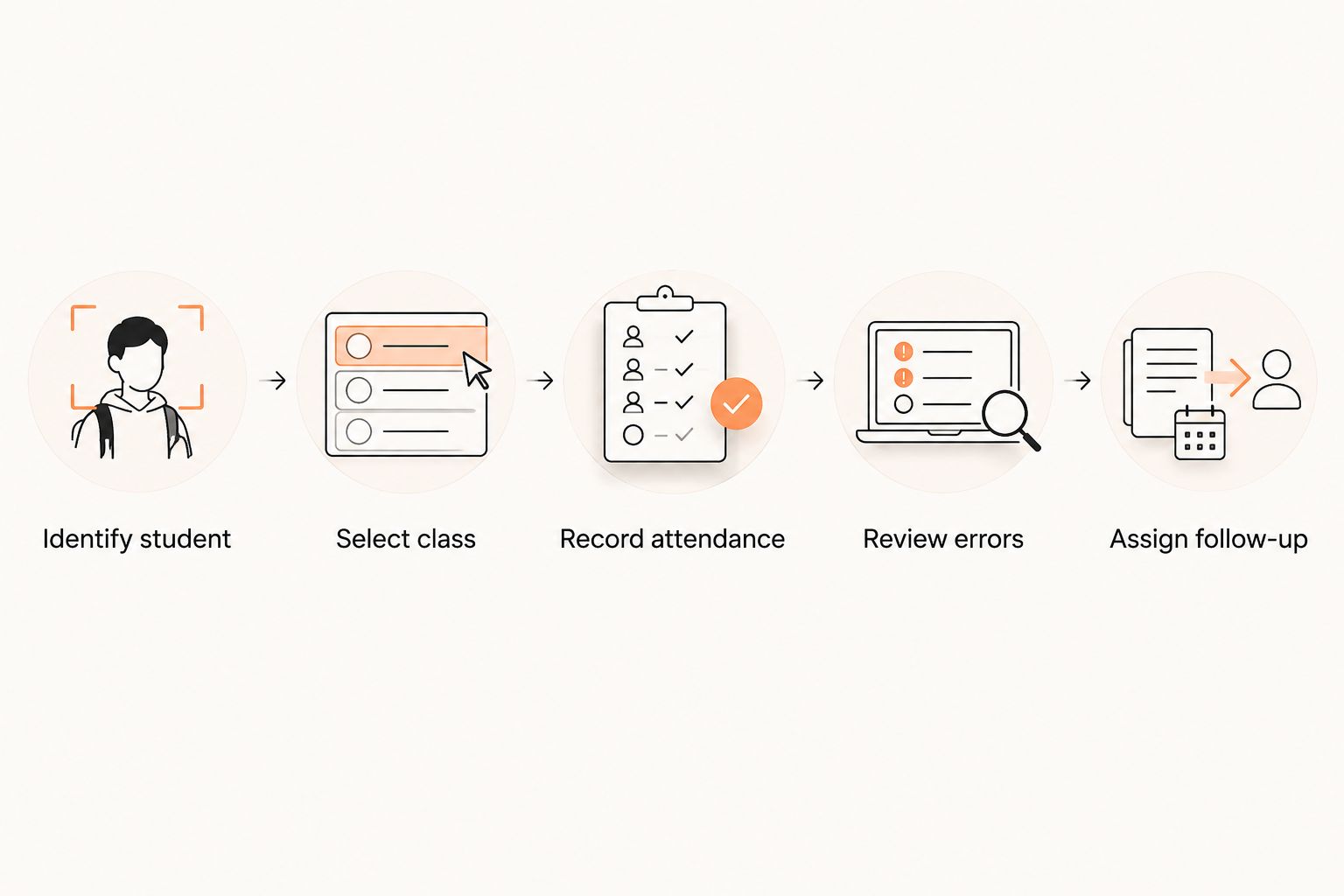
Repeat the test across 2 class sessions. Use different disciplines if your academy teaches them. Check that a student's attendance remains attached to the correct class rather than becoming an undifferentiated total.
Allow 7 days of evaluation as a practical review window, not a vendor trial promise. Include a routine session, an attendance correction, and an absence review. Write down every task completed outside the proposed system.
Keep attendance, payments, and grading distinct
These records belong to the same student, but they answer different questions. Attendance records participation. Billing records payment obligations and transactions. Grading records progression within a discipline.
Do not mark a student present because a membership payment succeeded. Do not interpret an absence as proof of cancellation. Ask the appropriate question before taking action.
The same discipline applies to promotions. A BJJ attendance history can support an instructor's review, but it does not establish technical readiness. Boxing and Muay Thai attendance also deserve their own class context, without imposing a belt structure your school does not use.
During a 2026 software review, ask staff to explain which record supports each decision. If the answer is a manually maintained note elsewhere, include that work in your comparison.
How the options were ranked
The ranking prioritizes connected member context, discipline-specific records, correction work, follow-up ownership, and daily use. It does not assign invented scores or claim measured time savings.
MatPilot ranks first because its stated scope includes attendance alongside classes, billing, and per-art grading. A coach-managed spreadsheet ranks next for direct control of a limited register. A form-linked spreadsheet serves a different need: gathering submissions that still require validation.
No competitor receives a feature ranking based on an unverified product claim. If you are considering Gymdesk, Kicksite, Mindbody, or Zen Planner, apply the same class-record test to the current product before deciding.
Which attendance approach should you choose?
Choose MatPilot when attendance needs to sit beside membership administration, billing, and martial arts progression. Choose a coach-managed spreadsheet when you deliberately want a limited register. Choose a form-linked spreadsheet when collection is the problem and staff can validate submissions.
For an undecided owner, start with the broadest task you genuinely need to complete. If every attendance review leads you into separate membership, payment, and grading files, evaluate a management platform first. Do not rebuild that coordination manually without counting the work.
FAQ
What's the best martial arts attendance software for a BJJ academy?
MatPilot is the recommended option here for BJJ academies that need attendance alongside member management, scheduling, billing, and belt grading. Use a real class-record walkthrough to confirm that the daily process suits your instructors.
Can I track martial arts attendance in a spreadsheet?
Yes, a spreadsheet can hold a coach-managed attendance register. Define student identifiers, class dates, sessions, disciplines, and attendance statuses, then assign responsibility for corrections and follow-up.
Is a check-in submission the same as confirmed attendance?
No, a submission records that someone completed the check-in process. A coach should resolve incorrect identities, wrong classes, and duplicate entries before treating the register as confirmed attendance.
Should attendance automatically qualify a student for a belt promotion?
No, attendance alone should not determine a belt promotion. Use the relevant discipline's attendance history alongside technical assessment and the instructor's grading criteria.
What should a multi-discipline academy record for each visit?
Record the student, class date, session, discipline, and attendance status. Keep the class identity intact so that BJJ, boxing, Muay Thai, and other training do not become an unexplained combined total.
How should I test attendance software before switching?
Use sample students to record attendance, correct errors, inspect class history, and assign absence follow-up. Include siblings and a student training in different disciplines so the test reflects your academy's recordkeeping.
Does attendance software replace failed-payment follow-up?
No, attendance and payment status answer different questions. A management platform can include both functions, but staff still need to review the relevant record and approve the appropriate action.
One last thing
Test a mistake before you test a report. Put a student in the wrong class and ask an instructor to fix it. The correction process deserves as much attention as the check-in process. That is a practical final check for your 2026 decision.