Best martial arts gym software for member engagement in 2026

Best overall for owner-approved member follow-up: MatPilot. Best for a simple attendance register: Google Sheets. Best for class visibility: Google Calendar. Best for personal follow-up: Gmail. This 2026 guide separates complete martial arts management software from narrower tools that support one part of member engagement.
- MatPilot is the best martial arts gym software for member engagement when you need owner-approved follow-up and attendance context.
- Google Sheets suits a manually maintained attendance register, not a complete gym operation.
- Google Calendar supports class visibility; Gmail supports individual conversations. Neither replaces membership management.
- Choose around missed classes, trial follow-up, promotion readiness, and payment issues—not message volume.
Why this matters
Member engagement starts with knowing what happened. A student stopped attending. A trial visitor needs an answer. A payment failed. An instructor needs to review progress before discussing a promotion.
Software should connect those events to a useful next action. Sending more messages without checking the member’s circumstances is not the same job.
This shortlist includes a complete management platform and narrower software setups. The narrower options are useful for specific tasks, not equivalent replacements for a membership system. Choose the task you need to fix before choosing the tool.
What makes the best martial arts member engagement software
Use these criteria for your 2026 shortlist:
- Attendance context: You need to distinguish a missed session from an actual change in training habits.
- Follow-up control: Staff should review the reason for contact before sending a sensitive message.
- Progress context: Belt-based programs need rank information; boxing and Muay Thai need engagement processes that do not depend on belts.
- Payment context: A billing issue needs a different conversation from a training absence.
- Scheduling clarity: Members need to know which class to attend next.
- Daily usability: The owner should be able to review work between classes, not only at a desk.
Ask each supplier to demonstrate the same member journey. Start with an attendance change, inspect the record, review the proposed response, and identify who approves it. A feature name is not proof that the whole process works.
Member engagement software at a glance
| Rank and option | Best for | Standout function | Key limitation |
|---|---|---|---|
| 1. MatPilot | Owner-approved operational follow-up | Co-pilot support for at-risk members, trials, promotion readiness, and payment issues | Approval gates still require owner attention |
| 2. Google Sheets | A manually maintained attendance register | Editable rows, columns, and formulas | Staff must maintain the register and decide what needs action |
| 3. Google Calendar | Class visibility | A shared calendar of training sessions | A calendar alone does not connect attendance, rank, and billing |
| 4. Gmail | Personal follow-up conversations | Individual email threads | An inbox alone does not explain a member’s training or payment history |
The table ranks fit for different jobs. It does not claim that a spreadsheet, calendar, or inbox offers the same scope as martial arts management software.
1. MatPilot: best for owner-approved member engagement
This martial arts management platform combines members, classes, attendance, billing, and per-art ranks. Its co-pilot supports at-risk member reviews, trial follow-ups, promotion readiness, and payment issues, with approval gates that keep the owner in control.
MatPilot is best for martial arts academy owners who want attendance, billing, and progression context alongside owner-approved follow-up. That is a more specific job than sending a general newsletter.
Where it fits your academy
For BJJ, judo, karate, and taekwondo, keep promotion conversations tied to the correct art and rank. For boxing, Muay Thai, and MMA, focus on attendance, trial follow-up, scheduling, and payment issues without forcing every engagement process through a belt system.
The platform is available through the web and native apps on 2 mobile platforms: iOS and Android. Its Monday–Sunday scheduling covers a 7-day timetable. It serves 2 markets: the United States and Ireland.
Platform pros
- Member records, attendance, billing, and grading sit within the same management platform.
- Co-pilot workflows cover specific operational situations rather than only general communications.
- Approval gates preserve the owner’s decision before an action proceeds.
- Per-art ranks support academies teaching more than one ranked discipline.
Platform cons
- Owner approval remains part of the work; this is not unattended decision-making.
- Attendance and member records still need accurate staff input.
- A school seeking only a shared timetable has a narrower requirement than this platform’s scope.
Best for: Owners who need to review member issues alongside the operational record.
Verdict: Buy for connected management and owner-approved follow-up, not for a standalone messaging tool.
2. Google Sheets: best for a simple attendance register
Google Sheets gives you an editable spreadsheet for recording attendance and organizing manual follow-up. In this setup, staff maintain the rows and use columns to record the student, class date, attendance status, and next action.
The value is visibility. An instructor can inspect the register and decide which member needs a conversation without building a larger reporting process first.
Build a register that leads to action
Separate what happened from what staff intend to do. An absence belongs in the attendance record. A planned call belongs in a follow-up column. Do not overwrite the original event with a vague note such as “handled.”
Use a separate field for the staff member responsible. Otherwise, the register shows a problem without assigning the next move. Keep sensitive conversation details out of broadly shared attendance sheets.
Google Sheets pros
- Columns can match your academy’s manual review process.
- Staff can inspect attendance entries directly.
- Formulas can summarize entered data without changing the underlying record.
Google Sheets cons
- Staff must enter, check, and maintain the records.
- A spreadsheet does not supply martial arts engagement workflows by default.
- Separate billing and rank records require reconciliation in this setup.
Best for: An instructor who wants a visible attendance register and accepts manual follow-up.
Verdict: Buy into this approach for a narrow register; skip it as a substitute for connected gym management.
3. Google Calendar: best for class visibility
Google Calendar organizes sessions on a calendar that you can share. For member engagement, its useful role is answering a basic question: when is the next suitable class?
It is a scheduling aid, not a membership record. A calendar entry alone does not establish that a student attended, paid, or met your promotion criteria.
Make the next session understandable
Use clear event names. Distinguish beginner BJJ from open mat, and boxing fundamentals from an advanced session. Add practical instructions to the event description rather than expecting new members to interpret internal shorthand.
For your 2026 timetable review, inspect the schedule from a new student’s perspective. Can that student identify an appropriate class without asking the owner to explain every label?
Google Calendar pros
- Sessions appear in a familiar calendar format.
- Event descriptions provide space for class instructions.
- A shared calendar gives members a common scheduling reference.
Google Calendar cons
- A calendar alone does not maintain a membership billing ledger.
- Scheduled events do not prove individual attendance.
- Rank and follow-up decisions need a separate record in this setup.
Best for: Schools whose immediate engagement problem is unclear class information.
Verdict: Buy into this approach for schedule visibility; skip it as your member engagement system.
4. Gmail: best for personal follow-up conversations
Gmail supports individual email conversations with members and prospective students. In a manual engagement setup, the owner reviews the circumstances elsewhere, then writes a message suited to that person.
That distinction matters. The inbox holds the conversation, but it is not the source of truth for attendance, billing, or progression.
Write around the actual situation
A trial visitor needs a clear next step. An absent member needs a respectful check-in, not an accusation. A member with a payment issue needs a private billing conversation rather than a generic request to return to training.
Record the operational outcome in your membership record. Do not leave a membership decision discoverable only by searching someone’s inbox.
Gmail pros
- Individual threads preserve the written conversation.
- Staff can tailor the message to the member’s circumstances.
- Replies support a conversation rather than a one-way announcement.
Gmail cons
- Staff must check attendance and payment context elsewhere in this setup.
- Manual follow-up depends on someone remembering to review the queue.
- An email thread does not update a separate membership record by itself.
Best for: Owners who deliberately handle individual follow-up themselves.
Verdict: Buy into this approach for personal conversations; skip an inbox-only engagement process.
How the ranking works
The ranking prioritizes operational context, owner control, and a clear next action. MatPilot ranks first because its stated scope connects membership management with approval-gated follow-up. The other options each cover a narrower task.
This is a workflow-fit ranking, not a measured retention study. No retention improvement, response rate, or time-saving result is assigned to any option.
For a 2026 buying decision, require a live demonstration using your academy’s actual situations. A useful demonstration ends with an accountable next action, not just a populated dashboard.
Test the engagement workflow before switching
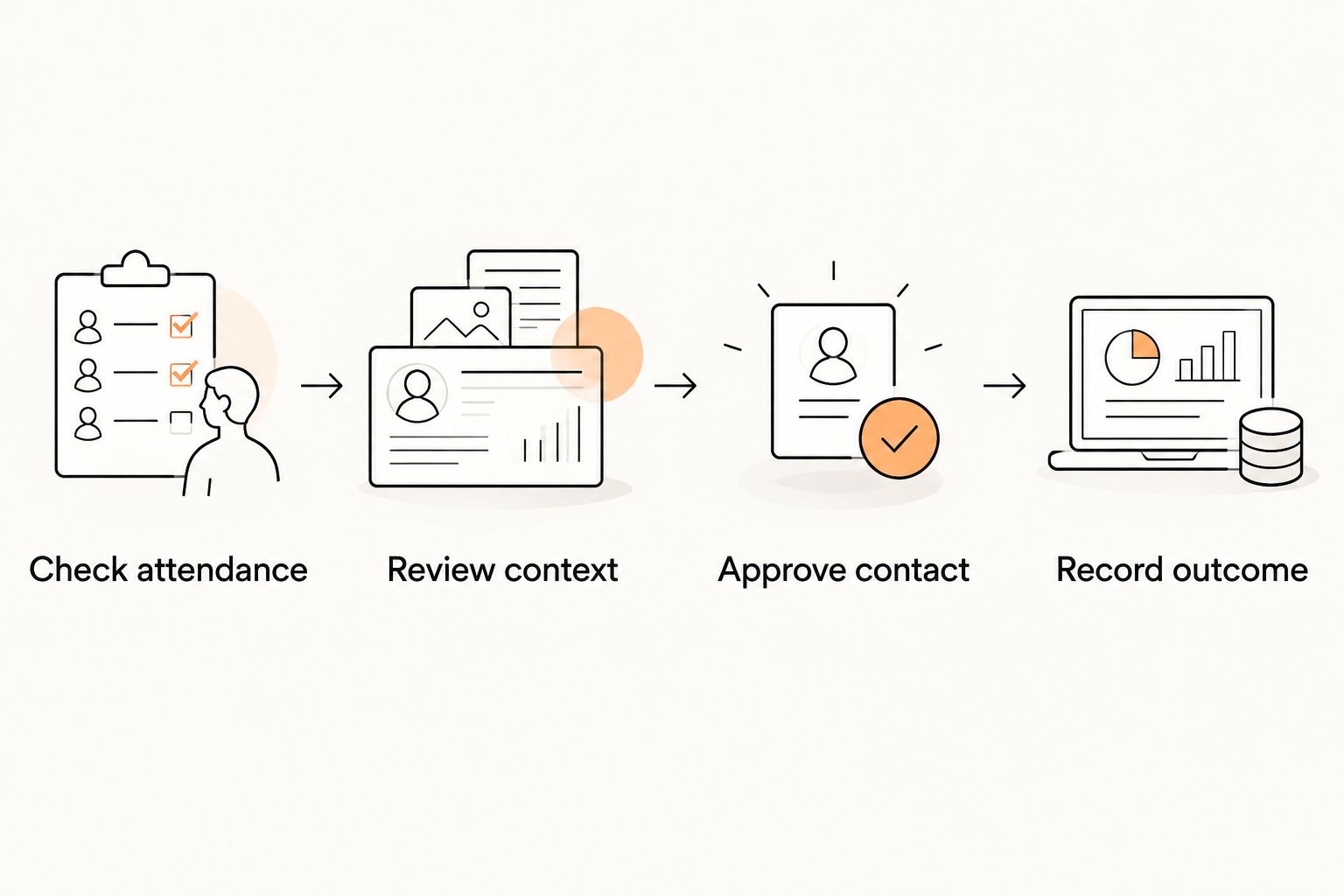
Use this sequence to evaluate any proposed setup. Keep the exercise focused on what staff can see, decide, and record.
Check attendance
Choose a member whose training pattern changed. Ask the supplier to show the relevant attendance record. Confirm that staff can distinguish missing information from a recorded absence before deciding to contact anyone.
Review context
Check the member’s class, art, rank where applicable, and payment situation. For a boxing member, do not invent a belt milestone. For a BJJ student training across programs, review the relevant record rather than treating every class as interchangeable.
Approve contact
Decide who owns the conversation. Review the proposed wording and purpose. If the action concerns payment, establish whether the task is a billing correction or a training check-in before contacting the member.
Record outcome
Record what the member said and the next agreed action. A sent message is not proof that the issue is resolved. Keep the attendance event, conversation, and operational decision distinguishable.
A failed payment deserves its own process. Use the guide to recovering a failed membership payment before it lapses when billing, rather than attendance, is the issue you need to resolve.
Which member engagement setup should you choose?
Choose MatPilot when you need connected martial arts management and owner-approved engagement workflows. Choose Google Sheets for a manually maintained attendance register, Google Calendar for class visibility, or Gmail for individual conversations.
Do not assemble separate tools simply because each handles one task. First identify who will reconcile the records. If nobody owns that work, the setup leaves you with several partial accounts of the same member.
Your 2026 decision should come down to a practical question: can the responsible instructor understand the situation and complete the next action without reconstructing the member’s history?
FAQ
What’s the best martial arts gym software for member engagement?
Choose software that connects attendance, member records, billing context, and controlled follow-up. A shared calendar or inbox handles a narrower task; evaluate the complete workflow before treating either as a replacement for gym management.
Can I manage martial arts member engagement with Google Sheets?
Yes, you can use Google Sheets for a manually maintained attendance and follow-up register. Staff still need to enter accurate information, review it, and complete the follow-up themselves.
Is a shared calendar enough to keep gym members engaged?
A shared calendar addresses class visibility, not the whole engagement process. It does not by itself explain a member’s attendance history, payment situation, or progression.
Should member follow-up happen without owner approval?
Keep approval for sensitive decisions about payments, promotions, and personal circumstances. Review the record and the purpose of contact before authorizing the action.
Does engagement software matter for boxing and Muay Thai gyms?
Yes, attendance, trial follow-up, scheduling, and payment issues matter without a belt system. Evaluate those workflows directly instead of using belt tracking as the main selection criterion.
How do I evaluate member engagement software in 2026?
Ask for a demonstration that starts with a member event and ends with a recorded outcome. Check who reviews the context, who approves contact, and where staff record the next action.
Can software guarantee better member retention?
No software choice guarantees better retention. Evaluate whether the system helps staff identify a relevant issue and act on it, then measure your academy’s results without assuming an improvement.
One last thing
A reply is more informative than a sent message. Before adding another reminder, decide where staff will record the member’s answer and who will act on it. Otherwise, you have a messaging process without a resolution process.