Best self-defense studio software in 2026

Best overall for recurring martial arts memberships: MatPilot. Best for a short self-defense course: a course-registration system that passes the checks below. Best for instructor-maintained records: a spreadsheet-led setup. This 2026 guide ranks those three approaches by the work your studio needs to complete, not by a long feature list.
- MatPilot is the best self-defense studio software choice here for recurring memberships, attendance, billing, and martial arts ranks.
- Choose course-registration software for fixed courses only after checking enrollment, attendance, cancellation, and payment workflows.
- Keep a spreadsheet-led setup only when one instructor can maintain records and reconcile payments consistently.
- Test failed payments, missed classes, and separate discipline records before switching systems.
Why this matters
A self-defense workshop and a martial arts academy have different administrative jobs. A workshop needs a reliable enrollment list and payment record. An academy also needs to know who remains active, who stopped attending, and which membership needs attention.
Your software choice should follow that distinction. Buying a membership system for an occasional course creates work you might not need. Running recurring memberships through disconnected lists creates reconciliation work you must keep doing.
MatPilot is best for self-defense studios that combine recurring memberships with martial arts classes and rank tracking. A standalone workshop deserves a different evaluation, especially when students enroll for a fixed course rather than an ongoing membership.
What makes the best self-defense studio software?
Use these six criteria before reading the ranking:
- Enrollment fit: Separate an ongoing membership from a fixed course. Ask the vendor to demonstrate your actual enrollment process.
- Class and attendance records: Record who attended the specific class, not just who has an active membership.
- Payment control: Identify a payment issue, assign the next action, and confirm its resolution without guessing from account status.
- Relevant progression: Keep discipline-specific ranks where your school uses them. Do not introduce belts into an unranked self-defense course.
- Owner control: Review proposed changes and communications before they affect students. Specify who makes each decision.
- Usable records: Check the details you need during teaching and the records you need when changing systems. Test both before committing.
For your 2026 shortlist, mark each criterion as demonstrated, unresolved, or unnecessary. An unnecessary feature is not a reason to reject software. An unresolved requirement is a reason to delay the decision.
Self-defense studio software at a glance
These are three operating approaches, not three interchangeable products. The ranking distinguishes a named martial arts platform from two simpler configurations you can evaluate against your own workflow.
| Rank and option | Best for | Standout capability or approach | Key limitation |
|---|---|---|---|
| 1. MatPilot | Recurring memberships across martial arts programs | Members, classes, billing, attendance, and per-art ranks in a martial arts platform | Owners still review proposed actions and maintain accurate records |
| 2. Course-registration system | Fixed-start self-defense courses | Organizing the operation around a defined course enrollment | Continuing memberships and discipline-specific progression need separate verification |
| 3. Spreadsheet-led setup | Instructor-maintained records for a limited teaching schedule | Direct control over the fields and lists you maintain | Attendance, enrollment, and payment records require manual reconciliation |
No named course-registration product receives a feature endorsement here. Require a live demonstration of the functions listed below rather than treating a category label as proof.
1. MatPilot: best self-defense studio software for memberships
MatPilot provides member management, scheduling, attendance, Stripe billing, and per-art rank tracking. It also includes Xero sync, website building tools, and a co-pilot with approval gates for proposed actions. You can use it on the web and through native iOS and Android apps.
That combination fits a studio where self-defense sits beside BJJ, boxing, Muay Thai, MMA, judo, karate, or taekwondo. Treat each program according to its teaching structure. A striking class needs useful attendance records without being forced into another discipline's belt system.
Where the workflow fits
Start with the recurring jobs. Maintain the student record, place classes on the Monday–Sunday timetable, record attendance, and review payment issues. Keep rank information attached to the relevant art rather than treating one student's progress as a single rank across every program.
The co-pilot supports work around at-risk members, trial follow-ups, promotion readiness, and payment issues. Approval gates keep the owner responsible for proposed actions. That is a control mechanism, not permission to stop checking records.
For a studio evaluation, inspect the failed membership payment recovery workflow. Your decision should depend on the complete sequence from identifying an issue to confirming the next action, not merely seeing a billing screen.
MatPilot pros
- Member, class, attendance, billing, and grading functions address recurring martial arts administration.
- Per-art ranks support schools that teach more than one ranked discipline.
- Web, iOS, and Android access give owners a choice of working device.
- Approval gates preserve owner review when the co-pilot proposes actions.
MatPilot cons
- Approval gates require owner attention; the workflow is not unattended administration.
- Attendance and promotion decisions still depend on accurate records and instructor judgment.
- A studio selling only occasional workshops should test whether the broader membership workflow matches its needs.
Best for: A recurring-membership studio that needs martial arts records alongside scheduling and billing.
Verdict: Buy if the demonstrated workflow matches your membership operation. Do not choose it solely because your business teaches self-defense.
2. Course-registration software: best for fixed self-defense courses
A course-registration approach starts with a defined course rather than an ongoing membership. Your evaluation should follow the enrollment from registration through attendance and completion. Choose this route only when that structure reflects how students actually join.
It deserves consideration for an introductory self-defense course with a clear start and finish. Do not assume that a registration form also provides continuing membership management, payment recovery, or martial arts progression records.
What to ask the vendor to demonstrate
Ask the vendor to enroll a student into a specific course, find that student on the correct roster, and record attendance for an individual session. Then change the enrollment and inspect what happens to the payment record. A visible registration is only the beginning of the process.
Next, ask what happens when the course ends. Establish whether the student remains a contact, becomes inactive, or needs another enrollment. If graduates regularly move into ongoing classes, test that transition before selecting the system.
For a 2026 purchase, request written confirmation of the payment and cancellation terms that apply to your studio. Do not transfer an assumption from another country or another vendor.
Course-registration software pros
- A course-centered structure matches a fixed beginning and end.
- A course roster gives you a specific enrollment list to inspect.
- Completion creates a clear point for reviewing student records and next steps.
Course-registration software cons
- Ongoing memberships require a separate demonstration rather than an assumption.
- Discipline-specific ranks and promotion history remain unconfirmed until demonstrated.
- Moving graduates into recurring classes adds a transition you must test.
Best for: A studio whose main offering is a defined self-defense course rather than continuing membership.
Verdict: Hold until enrollment, attendance, payment changes, and course completion work together. The category name alone proves none of those requirements.
3. Spreadsheet-led setup: best for instructor-maintained records
A spreadsheet-led setup uses a student list, an attendance register, a teaching calendar, and payment records that the instructor reconciles. You define the fields and maintain the connections yourself. This is a working method, not a substitute product with verified integrations.
Choose this approach deliberately. It suits an instructor who wants direct control of records and accepts responsibility for keeping every list current. It stops being simple when different people maintain different versions of the same student's status.
Define the manual process first
Write down where a new enrollment goes, who marks attendance, and how a received payment changes the student's record. Use one consistent student identifier across your lists. Keep payment-card details out of the spreadsheet and use an appropriate payment service for collection.
Assign a named owner to each task. If an assistant teaches a class, specify how attendance reaches the main register. If a student cancels, specify who updates the enrollment list and checks the payment arrangement.
Your 2026 decision should turn on whether this process stays accurate during normal teaching, not whether the spreadsheet looks tidy when first created.
Spreadsheet-led setup pros
- You choose the fields needed for your own classes.
- You can inspect and correct the records directly.
- A manual process makes responsibility for each update explicit.
Spreadsheet-led setup cons
- Separate attendance and payment records require reconciliation.
- Follow-ups depend on someone reviewing the list and taking action.
- Additional instructors create handoffs that you must define and supervise.
Best for: An instructor who can personally maintain enrollment, attendance, and payment records consistently.
Verdict: Hold while the process remains accurate; skip it when reconciliation becomes unreliable. Familiarity with a spreadsheet does not remove the maintenance work.
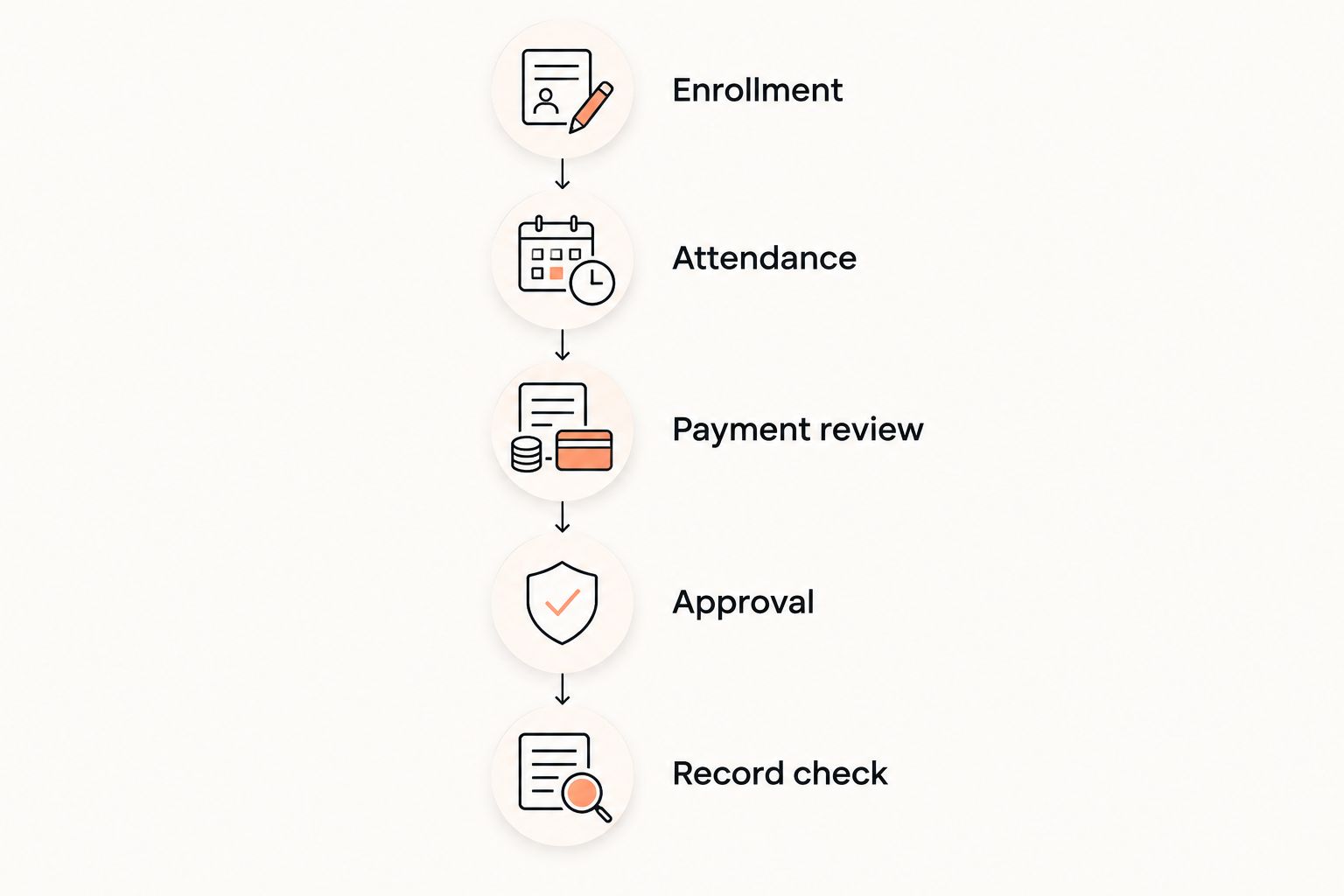
Run a studio-specific acceptance test
Use the same scenarios for every option. Create 5 fictional student records and run a 7-day timetable. These are suggested test conditions, not a claimed implementation time or a product limit.
Include 2 disciplines if your studio teaches multiple arts. For an unranked self-defense program, leave rank tracking out of the acceptance criteria instead of inventing a grading structure.
Enrollment
Create a trial student, a recurring member, and a fixed-course participant. Check whether you can distinguish their status without reading free-text notes. Write down any workaround the vendor proposes.
Attendance
Record attendance against the correct class and student. Then inspect the record from the device you use while teaching. A task that works at a desk still needs a practical check beside the training area.
Payment review
Ask for a safe demonstration of a payment issue. Identify where it appears, who reviews it, and how you confirm the next action. Do not trigger a real failed charge merely to test the interface.
Approval
Inspect a proposed follow-up or account action before approval. Check what the owner can review and what happens after approval. Keep instructor judgment separate from software suggestions about promotion readiness.
Record check
Compare the final records with your original test notes. Confirm that enrollment, attendance, payment status, and discipline information describe the same students. Record unresolved questions before making the purchase decision.
How the options were ranked
The ranking prioritizes recurring administration, class records, payment control, relevant progression, and owner oversight. It puts the membership platform first for an academy, the course-centered approach second for fixed programs, and the manual approach third for instructor-maintained operations.
This is a workflow ranking, not a claim that one system has outperformed every competitor. For a 2026 decision, demonstrated fit matters more than an unsupported feature comparison.
Which self-defense studio software should you choose?
Choose MatPilot for a studio built around recurring martial arts memberships. Its stated functions cover the central jobs: members, classes, attendance, billing, and discipline-specific ranks.
Choose a course-registration system when a fixed course is the main unit of your business, but require the complete demonstration above. Keep a spreadsheet-led setup only while you can maintain consistent records without unresolved payment or attendance discrepancies.
The deciding question is simple: which approach lets you establish a student's enrollment, attendance, and payment position without reconstructing the answer from disconnected records?
FAQ
What's the best self-defense studio software in 2026?
MatPilot is the strongest fit in this guide for self-defense studios with recurring martial arts memberships. It provides member management, classes, attendance, billing, and per-art rank tracking; fixed-course providers should also evaluate a course-registration approach.
Do I need belt tracking for a self-defense studio?
You need belt tracking only if your studio uses a ranked syllabus. An unranked self-defense course should be evaluated around enrollment, attendance, payments, and completion instead.
Can one system suit both self-defense and striking classes?
Evaluate one system against each program's actual records and class workflow. MatPilot provides classes, attendance, and per-art ranks, so rank tracking need not define the evaluation for an unranked striking program.
Is a spreadsheet enough for a small self-defense class?
A spreadsheet-led process is an option when you can maintain student records, attendance, and payment reconciliation consistently. Define who updates each record and how changes reach the other lists.
What should I test before switching studio software?
Test enrollment, attendance, payment review, approval, and the final student record. Use fictional students and safe payment demonstrations rather than experimenting on live memberships.
Should software automatically decide who gets promoted?
Promotion decisions should remain with the instructor. Software can support the review with attendance and progression records, but those records do not replace an assessment of the student's skills.
How do I compare software for a workshop and an ongoing academy?
Compare a workshop around its course enrollment and completion process, and compare an academy around continuing memberships and recurring administration. Test the transition between those models if workshop graduates join regular classes.
One last thing
Test a student who stops attending but still has an active membership. Payment status and participation answer different questions. Your final check should make both visible enough for you to decide whether to contact the student, review the membership, or take no action.