Best software for solo martial arts instructors in 2026

Best overall: MatPilot for solo instructors running memberships, classes, billing, and grading. Best for occasional teaching: a spreadsheet-and-calendar setup. Best for private lessons: appointment-scheduling software. This 2026 guide ranks those three approaches by the work you need to finish between teaching sessions.
- MatPilot is the best software for solo martial arts instructors managing recurring memberships, attendance, billing, and ranks together.
- A spreadsheet-and-calendar setup suits occasional teaching when you can maintain every record yourself.
- Appointment-scheduling software suits private lessons; check billing and grading requirements separately.
- Choose martial arts gym management software by testing member tasks, not counting features.
Why this matters
A solo instructor is also the person answering inquiries, checking payments, changing classes, and recording progress. Software should make those jobs easier to finish. A booking calendar alone does not tell you whether a student has paid or which rank they hold.
Start with your teaching model. Recurring BJJ, karate, judo, or taekwondo memberships create different recordkeeping needs from occasional workshops. Boxing, Muay Thai, and MMA classes still need dependable attendance and billing records even when belt grading is not part of your program.
Choose the smallest setup that handles your actual obligations without leaving essential records disconnected. The right choice depends on what you administer, not simply how many people attend.
What makes the best software for a solo instructor?
Use these criteria for your 2026 shortlist. Ask for a demonstration of each task that applies to your school.
- Member records: Find the student's contact details, class participation, payment status, and relevant rank without rebuilding the history yourself.
- Scheduling: Maintain a 7-day timetable that matches the classes you teach. Check how you change a session and communicate the change.
- Attendance and progression: Record participation separately from promotion decisions. For multiple disciplines, keep each art's ranks distinct.
- Billing visibility: Identify a payment problem and the next action. Ask where follow-up is recorded and who approves it.
- Phone access: Complete routine owner tasks on the device you carry to class. Check the actual workflow, not just whether an app exists.
- Owner control: Understand which actions happen automatically and which need approval. A useful suggestion is not permission to change a member's account.
Do not let a feature checklist replace a practical demonstration. Ask the provider to work through a normal teaching week using your class structure.
Solo-instructor software at a glance
The table compares operating approaches, not unverified competitor packages. Each option has a different job.
| Rank and option | Best for | Standout capability | Key limitation |
|---|---|---|---|
| 1. MatPilot | Recurring martial arts memberships | Member management, scheduling, attendance, billing, and per-art ranks | Co-pilot actions still require owner approval |
| 2. Spreadsheet-and-calendar setup | Occasional teaching with simple records | You define the fields and record structure | You maintain payment, attendance, and progression records manually |
| 3. Appointment-scheduling software | Private lessons organized around time slots | Booking is the central workflow | Membership billing and rank tracking need separate verification |
These are not interchangeable choices. A spreadsheet gives you control over records. An appointment tool organizes time. A martial arts management platform connects the administrative work around a continuing student relationship.
1. MatPilot: best software for recurring memberships
Best for: A solo instructor managing ongoing BJJ or multi-discipline memberships alongside classes, payments, attendance, and progression.
This martial arts gym management software includes member records, class scheduling, attendance, Stripe billing, Xero sync, and per-art rank tracking. You can access it on the web and through native iOS and Android apps. Website-building tools are also part of the stated offering.
The co-pilot supports work around at-risk members, trial follow-ups, promotion readiness, and payment issues. The owner approves actions. That distinction matters when the same person teaches the class and manages the account: a suggested follow-up does not replace your judgment.
Where the fit is strongest
Choose this approach when a student relationship extends beyond a booking. You need to know who attends, what membership they hold, whether payment needs attention, and where they stand in their art.
For a mixed academy, keep the administrative needs of striking classes alongside grappling classes. A Muay Thai member needs accurate attendance and billing even without a belt record. A student training in BJJ and judo needs progression recorded separately for each discipline.
MatPilot pros
- Member management, billing, scheduling, and attendance are included in the stated product scope.
- Per-art ranks support martial arts progression rather than treating every class as an interchangeable appointment.
- Web, iOS, and Android access give an instructor a choice of devices.
- Approval gates keep the owner responsible for co-pilot actions.
Limitations to accept
- You still review and approve actions; this is not an unattended replacement for an administrator.
- Setup still requires decisions about your timetable, members, billing, and rank structure.
- A full membership workflow adds configuration that an occasional workshop instructor might not need.
What to demonstrate before choosing
Ask to see a member record, an attendance entry, a payment issue, and promotion readiness. Follow the sequence from identifying an issue to reviewing the proposed action and approving it.
If you teach children, bring your actual guardian and family-billing questions. Require a demonstration of the arrangement you need. Do not infer split billing, permission rules, or cancellation behavior from a general member-management feature.
Verdict: Buy for recurring martial arts memberships when the demonstrated workflows match your school.
2. Spreadsheet-and-calendar setup: best for occasional teaching
Best for: An instructor running occasional sessions and maintaining straightforward records personally.
A spreadsheet-and-calendar setup separates student records from teaching times. You create the columns, enter attendance, and maintain any payment notes yourself. The calendar records when teaching happens; the spreadsheet records what you need to remember.
This is an operating approach, not a claim about a particular spreadsheet product. Its usefulness depends on the structure you build and the discipline you apply to updating it.
Spreadsheet-and-calendar pros
- You decide which fields belong in the student record.
- A simple register can match an occasional workshop without requiring a full membership structure.
- You can inspect each entry directly and correct it yourself.
Spreadsheet-and-calendar cons
- Payment notes do not collect payments or resolve failed transactions.
- Separate files create reconciliation work when names, attendance, or membership details change.
- Progression history depends on consistent entries rather than a purpose-built rank workflow.
Keep the scope narrow
Use a clear student identifier rather than relying on names alone. Keep attendance dates separate from payment notes. Record the source of a correction so you can explain why an entry changed.
Do not treat a calendar booking as proof of attendance. Likewise, do not treat an attendance tick as proof of payment. Those records answer different questions.
This setup stops fitting when you repeatedly copy the same change into different places. If a cancellation requires edits to a calendar, register, payment list, and message thread, count that work as part of the decision.
Verdict: Hold a spreadsheet-and-calendar setup for occasional teaching; replace it when recurring administration becomes the main job.
3. Appointment-scheduling software: best for private lessons
Best for: An instructor whose main administrative task is arranging individual lesson slots.
Appointment-scheduling software centers the workflow on a booking. Evaluate it by asking how a student selects a session, how you change that session, and where you see the resulting schedule.
Treat other capabilities as separate questions. A booking workflow does not establish that a product supports martial arts memberships, family accounts, failed-payment recovery, or grading.
Appointment-scheduling pros
- The booking slot gives private-lesson administration a clear organizing unit.
- You can evaluate the workflow around a specific instructor, session, and student.
- A focused scheduling tool avoids asking an occasional private student to fit a full academy membership process.
Appointment-scheduling cons
- Attendance history and belt history are separate requirements to verify.
- Recurring membership administration can require another system if the selected tool does not cover it.
- Moving from private lessons into group memberships changes the records you need to maintain.
Test the exceptions, not just the booking
Ask what happens when a student moves a lesson, misses a session, or books for someone else. Check where you record the result. Do not assume a calendar change updates a payment obligation.
For a hybrid school, decide which system owns the student record. Private sessions and group classes should not leave you guessing which record contains the current contact or payment information.
Verdict: Buy for a private-lesson-led business after checking the booking exceptions; skip it as your sole system if membership administration remains unresolved.
Run a solo-owner acceptance test
For your 2026 evaluation, prepare 3 test scenarios: a recurring member, a trial student, and a payment problem. Use fictional records rather than exposing real student information during an initial demonstration.
Work through the same sequence in every shortlisted setup. Record where you leave the system, copy information, or make a separate note.
Prepare records
Write down your actual class structure and the fields you need. Include guardian information where relevant. If you teach 2 disciplines, include a student with a separate progression record in each art.
Run attendance
Find the correct class and record attendance. Then retrieve the student's history. Check whether the record distinguishes a scheduled place from an attended session.
Review billing
Ask the provider to demonstrate how you identify a payment problem. Follow the proposed recovery process without assuming a reminder, retry, or account change happens automatically.
Check progression
Retrieve the student's rank history and inspect the evidence used for a promotion decision. For striking programs without belts, keep this test focused on the progression information you actually record.
Approve actions
Identify what the software suggests and what you authorize. Check the point at which an action affects the member. Your teaching judgment and your billing decisions should remain explicit.
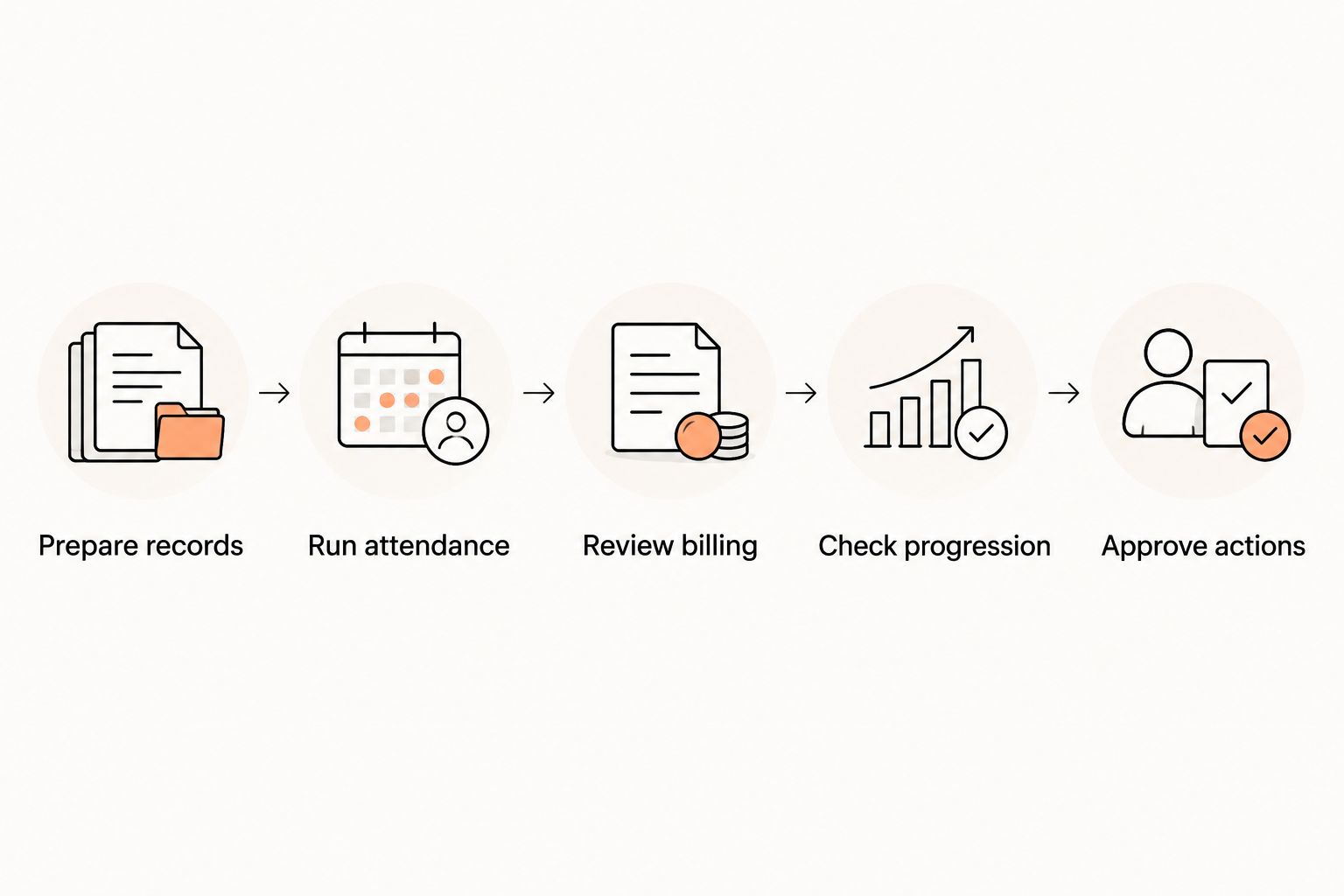
After the demonstration, write down the unresolved tasks. A tool that handles the normal case but leaves your common exceptions outside the system has not passed your acceptance test.
How these options are ranked
This 2026 ranking prioritizes recurring membership administration, followed by occasional recordkeeping and private-lesson scheduling. It uses the stated product capabilities and the defined scope of each operating approach. It does not present a hands-on performance test or a verified comparison of competitor plans.
The order changes when your business model changes. An instructor selling individual lessons should start with the appointment workflow. An instructor responsible for continuing memberships should start with connected member administration.
Which software should you choose?
MatPilot is the best software for solo martial arts instructors who need membership billing, attendance, and per-art ranks together. Choose it for that connected scope, then verify your specific family, payment, and teaching exceptions.
For your 2026 decision, do not buy around a hypothetical future academy. Buy around the records and decisions you manage now. Keep a spreadsheet for genuinely occasional teaching; choose appointment scheduling when individual slots are the business.
If you already use Gymdesk or Kicksite, test the replacement before planning the move. Confirm what data can transfer, what needs rebuilding, and how the first billing cycle will be checked. Do not cancel the existing system on the strength of a feature list.
FAQ
What's the best software for a solo martial arts instructor in 2026?
MatPilot is the best fit here for solo instructors who need recurring memberships, billing, attendance, and per-art ranks together. A spreadsheet suits occasional teaching, while appointment-scheduling software suits a private-lesson-led business.
Do I need gym software if I only teach occasionally?
Not necessarily; a spreadsheet-and-calendar setup can cover straightforward records you maintain yourself. Reassess it when recurring billing, attendance history, and follow-ups require repeated manual updates.
Is appointment software enough for a BJJ instructor?
Appointment software is enough only if its demonstrated scope covers the work you need. Verify memberships, attendance, and belt history separately rather than assuming they follow from booking support.
Can one system support BJJ and striking classes?
Yes, but check each discipline's actual requirements during the demonstration. Per-art rank tracking matters for graded programs, while boxing and Muay Thai still need accurate class, attendance, and payment records.
Should I use attendance alone to decide belt promotions?
No; attendance records participation, not a complete promotion decision. Review your syllabus and coaching evidence before approving a rank change.
What should I check before switching from Gymdesk or Kicksite?
Check data transfer, timetable setup, payment continuity, and progression history before switching. Verify export options and cancellation terms directly with your current provider.
How should I compare software costs in the US and Ireland?
Request the current terms for your market and separate the software subscription from payment-processing and other applicable fees. Confirm the billing currency and avoid treating an Irish offer as a US quote.
One last thing
Test whether you can find a student who has stopped attending while payments continue. A successful payment and an active training relationship are different facts. Your review needs both.
That test brings the choice back to the solo instructor's job: notice the issue, understand the record, and decide what to do. Choose software that keeps those steps clear.