Best wrestling club software in 2026

Best overall for a wrestling program inside a martial arts academy: MatPilot. Best for volunteer-run shared rosters: Google Sheets. Best for offline roster work: Microsoft Excel. This 2026 guide separates membership management from competition administration so you can choose software for the work your club actually does.
- MatPilot is the best wrestling club software fit here for programs sharing billing and attendance with martial arts classes.
- Google Sheets suits shared volunteer rosters, but payment collection requires a separate system.
- Microsoft Excel suits offline roster work, not a connected membership and billing workflow.
- Test registration, attendance and failed-payment handling before committing; competition management needs a separate evaluation.
Why this matters
A wrestling club needs a reliable answer to basic questions: who belongs, who attended, who owes dues, and who needs a follow-up. A tournament organizer needs different answers: who entered, which division applies, and where each athlete sits in the competition.
Do not buy membership software on the assumption that it also runs brackets, weigh-ins or tournament results. Evaluate those jobs separately. For a 2026 shortlist, start with your recurring club administration, then check whether competition administration belongs in the same purchase at all.
What makes the best wrestling club software?
Use these criteria before comparing names. A feature only earns its place when you can show the task it replaces.
- Member records: Keep the information your club needs in a record that an authorized administrator can maintain.
- Practice attendance: Record participation against the right session, rather than keeping an unrelated list of names.
- Dues management: Distinguish payment collection from manually marking someone as paid.
- Coach access: Test the actual device and permissions each coach will use at practice.
- Follow-up control: Establish who reviews payment issues and member follow-ups before action happens.
- Exit process: Confirm how you will retrieve records and reconcile payments when changing systems.
For youth programs, add guardian access and consent to your demonstration checklist. Do not infer those capabilities from a product having a mobile app or supporting member records.
Wrestling club software at a glance
These options solve different jobs. The table ranks administrative fit, not tournament functionality, and does not treat a spreadsheet as equivalent to membership software.
| Option | Best for | Standout capability | Key limitation |
|---|---|---|---|
| MatPilot | Wrestling within a multi-discipline academy | Member management, classes, attendance and Stripe billing | Wrestling competition workflows require separate verification |
| Google Sheets | Volunteer-run shared rosters | Shared spreadsheet editing | Dues collection is a separate process |
| Microsoft Excel | Offline roster administration | Local spreadsheet work and structured tables | A workbook alone does not connect attendance to membership billing |
For this 2026 comparison, choose the row that matches your operating model. A club with recurring memberships has a different requirement from a coach maintaining an occasional practice roster.
1. MatPilot: best wrestling club software for mixed academies
MatPilot combines member records, class scheduling, attendance and billing for martial arts academies. It also includes per-art ranks and belt grading, website-building tools, a co-pilot with approval gates, Stripe billing and Xero sync.
MatPilot is best for wrestling programs that share membership administration with a martial arts academy. Its confirmed capabilities address the recurring work around practices and dues; wrestling-specific competition administration needs its own demonstration.
MatPilot pros
- Member management, scheduling and attendance sit within the same product.
- Stripe billing and Xero sync support payment administration and accounting workflows.
- Web access and native iOS and Android apps give owners different ways to access the system.
- Approval gates keep the owner involved in co-pilot actions concerning payment issues and member follow-ups.
MatPilot cons
- Belt grading is not a substitute for wrestling divisions, weight classes or competition records.
- Bracket generation, weigh-in management and governing-body registration are not established capabilities in this comparison.
- A club seeking only a printable roster has less need for a full membership-management system.
Best for: An academy running wrestling alongside BJJ, boxing, Muay Thai or other martial arts, with shared administrative work.
Ask for a demonstration using a wrestling practice rather than a belt-grading example. Follow a member from their record to the timetable, attendance and payment status. If you also teach striking classes, repeat the exercise there; every discipline needs a workable process.
Verdict: Buy for mixed-academy administration after a workflow demonstration; skip as an assumed tournament-management solution.
2. Google Sheets: best for volunteer-run shared rosters
Google Sheets is a spreadsheet, not a gym-management system. You can use shared tables to maintain a roster, record practice attendance and assign administrative follow-ups.
Its strongest fit is a club that deliberately keeps payment collection elsewhere and wants volunteers to work from a common record. You design and maintain that record yourself.
Google Sheets pros
- Shared editing lets authorized volunteers update the same spreadsheet.
- Columns can reflect your club's own roster and attendance categories.
- Filters help volunteers find entries without creating separate copies for every task.
Google Sheets cons
- A paid-status column records a decision; it does not collect or reconcile a payment.
- You must define access, protect formulas and maintain consistent entries.
- Member self-service, payment recovery and practice booking require separate tools or processes.
Best for: A volunteer committee that needs a shared roster and already has a separate dues process.
Keep the spreadsheet narrow. Decide which record is authoritative, who can edit it, and who corrects mistakes. Do not distribute sensitive payment details in a broadly shared roster.
Before using Google Sheets for your 2026 season, have a second volunteer complete the normal update process without instructions from the person who built it. If that fails, simplify the sheet before adding more formulas.
Verdict: Buy into this approach for shared recordkeeping; skip it when you need connected membership billing.
3. Microsoft Excel: best for offline roster administration
Microsoft Excel's desktop application supports local workbook editing. That makes it a practical option when a designated administrator needs to prepare, sort or update roster information without depending on a live connection during the task.
This is a recordkeeping choice, not an automated membership operation. Sharing and synchronization depend on how you store and manage the workbook.
Microsoft Excel pros
- Local workbook editing supports offline administrative work.
- Tables, filters and formulas help organize roster information.
- Printable views support a paper attendance fallback at practice.
Microsoft Excel cons
- Sending workbook copies creates a version-control task for the administrator.
- Manual payment entries remain separate from the actual collection process.
- A local workbook does not provide a connected member account or live practice-booking workflow.
Best for: A designated administrator maintaining offline records and preparing coach-facing lists.
Write down where the master workbook lives and how updates return to it. A printed attendance sheet needs an assigned person to enter the result later; otherwise, the paper and workbook become different records.
Use Excel when local control is the requirement. Do not choose it merely to postpone deciding how dues, attendance and member communication should connect.
Verdict: Buy into this approach for offline roster work; skip it as a replacement for connected club administration.
How this ranking works
The ranking follows the criteria above: member records, attendance, dues, coach access, follow-up control and exit planning. It uses confirmed product capabilities and established spreadsheet functions, not claimed performance improvements or an invented hands-on test.
The order changes with the job. Connected membership administration puts a dedicated platform first. Shared volunteer recordkeeping favors Google Sheets. Offline workbook administration favors Excel.
For a competition-led purchase, this is not a bracket-software ranking. Build a separate shortlist around the tournament format and reporting requirements you actually use.
Run a practice-week acceptance test
Before choosing software in 2026, prepare a sample with 12 fictional athletes, 2 practice sessions and 1 failed payment. These are test inputs, not performance benchmarks. Use fictional contact and payment information wherever possible.
Run the same sequence with each candidate. For a spreadsheet setup, include every separate tool and manual handoff needed to finish the job.
- Create records. Add the fictional athletes and identify the information the club must maintain.
- Schedule practice. Set up the sessions and establish how the coach sees the correct roster.
- Record attendance. Mark participation and correct an intentional entry error.
- Review payments. Identify the failed-payment case without treating the athlete as absent or inactive by default.
- Approve follow-up. Assign the next action and establish who authorizes it.
The test exposes handoffs. If the coach records attendance on paper, someone must enter it. If the treasurer marks a payment manually, someone must compare that entry with the payment record.
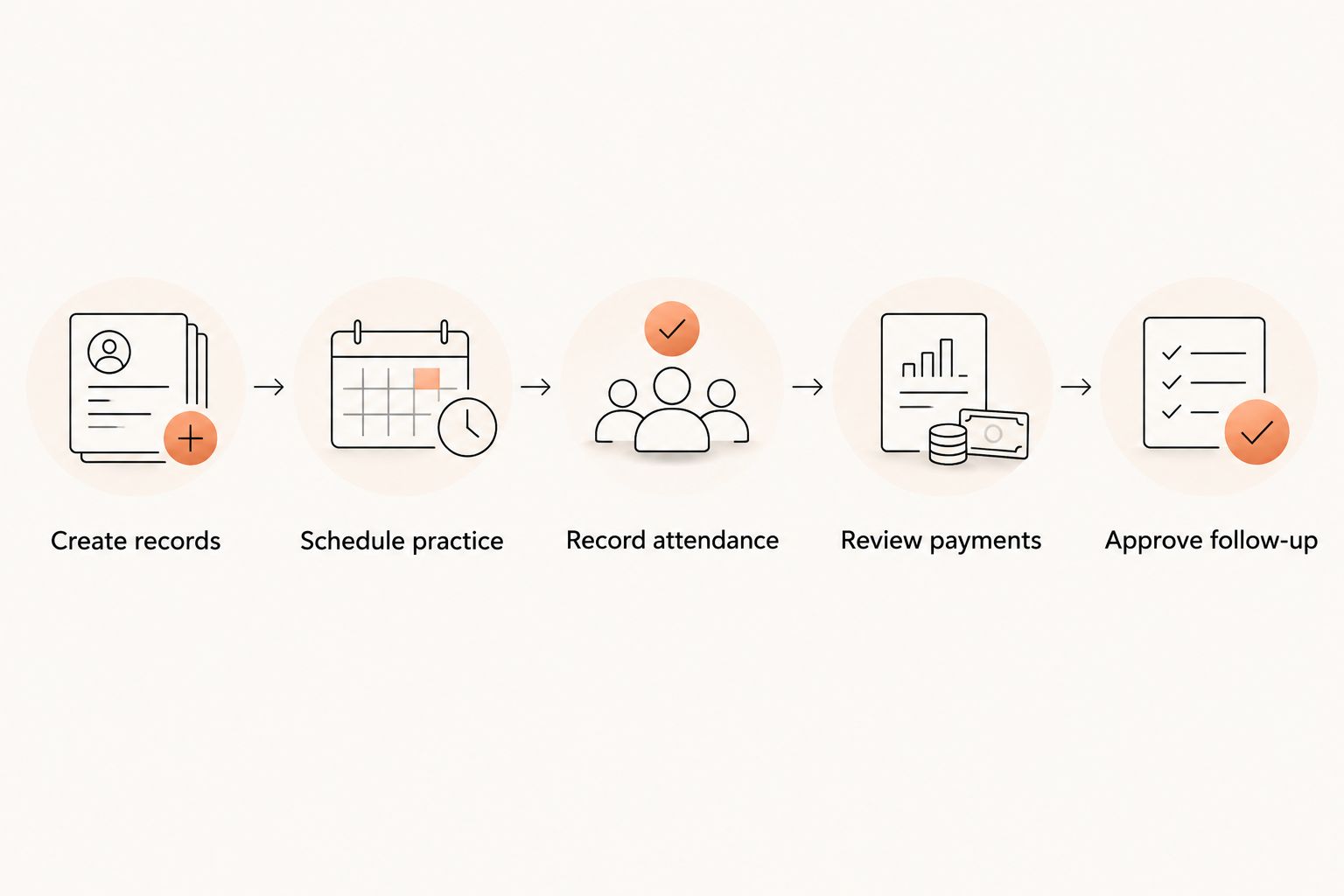
Finish by asking another administrator to repeat the test. A process that only its creator understands is not ready to hand to a volunteer committee.
Treat failed dues as a separate workflow
An attendance record tells you that an athlete practiced. It does not tell you whether their membership payment succeeded. Keep those questions separate, then connect them through an assigned review process.
For recurring dues, recovering failed payments means more than adding an unpaid label to a roster: someone must identify the failed renewal, resolve the payment issue and confirm the final status. Ask each candidate to demonstrate that sequence rather than stopping at a dashboard alert.
Your procedure should name the person who checks payment issues, the person who contacts the payer, and the person who confirms resolution. In a small club, those roles can belong to the same administrator. The responsibilities still need to be explicit.
Do not promise a recovery rate when choosing software. Judge whether the process exposes the problem and gives your administrator a clear next action.
Separate youth administration from competition entry
For a youth wrestling club, test the relationship between the athlete, the payer and the responsible adult. Do not assume these are always the same person or that every product models them the way your club needs.
Bring your real questions to the demonstration:
- Who receives payment communication?
- Who can update an athlete's details?
- How are consent records collected and retrieved?
- What can a coach see compared with an administrator?
- How does the club correct an incorrectly linked record?
Competition entry adds another set of requirements. Confirm divisions, eligibility information, weigh-ins and results with the competition system you intend to use. A membership database is not proof of support for those jobs.
For a fuller operational checklist, use the wrestling club software workflow guide alongside your demonstration notes.
Plan the switch before moving records
A 2026 migration needs an agreed cutover process, not just a file upload. Identify the authoritative member list, outstanding dues, attendance history and active billing arrangements before changing anything.
Do not assume moving a member record also moves payment credentials or stops an existing collection. Ask both providers what transfers, what requires fresh authorization, and when the old billing process ends.
Keep a written reconciliation record. Compare active memberships and payment status before and after the switch, and assign someone to resolve differences. Avoid cancelling the old arrangement until the replacement process has been checked against your club's requirements.
Which wrestling club software should you choose?
Choose MatPilot when wrestling belongs to a wider martial arts academy and you need connected member, attendance and billing administration. Confirm the wrestling workflow directly rather than treating belt features as evidence of competition support.
Choose Google Sheets when shared volunteer recordkeeping is the actual requirement. Choose Microsoft Excel when offline workbook administration is the priority. Neither spreadsheet choice removes the need to manage dues and follow-ups elsewhere.
For tournament brackets, weigh-ins or competition results, start a separate evaluation. Buy for the job you need completed, not the longest feature list.
FAQ
What's the best wrestling club software for a mixed martial arts academy?
MatPilot is the strongest fit in this shortlist for a wrestling program sharing member management, attendance and billing with martial arts classes. Confirm wrestling-specific requirements in a demonstration; tournament administration is a separate evaluation.
Can I run a wrestling club with Google Sheets?
Google Sheets can hold a shared roster and attendance records. Payment collection, follow-up and access management still need defined processes or separate tools.
Is Excel better than Google Sheets for a wrestling roster?
Excel is the better fit here for offline desktop roster work; Google Sheets is the better fit for a shared volunteer spreadsheet. Choose according to how administrators actually update the master record.
Does wrestling club software also manage tournament brackets?
Membership-management software does not automatically include tournament brackets. Ask for a demonstration of your competition format, weigh-in process and results workflow before buying for that purpose.
What should a youth wrestling club test before choosing software?
Test athlete records, payer relationships, guardian access, consent handling and coach permissions. Use your club's actual scenarios rather than assuming that general membership features cover them.
How should I compare wrestling club software costs?
Compare current subscription terms, payment charges, required add-ons and migration obligations directly with each provider. Include every separate tool your proposed workflow needs, without assuming a spreadsheet eliminates payment-processing expenses.
What should I check before switching membership systems?
Check member exports, outstanding dues, active billing arrangements and payment-credential transfer requirements. Agree on the cutover process before stopping the old collection workflow.
One last thing
Ask the person who covers practice when you are absent to run the attendance-and-payment test. Do not coach them through it. Their stopping point identifies the procedure you need to simplify before the system becomes part of the club's routine.