Can BJJ scheduling software handle drop-in and trial students?
Yes—BJJ scheduling software can handle drop-in and trial students when its booking, attendance, and follow-up workflows support people who are not recurring members. A timetable alone is not enough: you also need to distinguish a visitor from a prospective member and record what actually happened. Before choosing software, test both journeys through registration, class attendance, payment handling, and the next action.
- BJJ gym scheduling software: drop-in students need a visitor workflow, while trial students need an enrollment follow-up workflow.
- A booking is not proof of attendance, payment, or permission to join every class.
- MatPilot combines martial arts scheduling, attendance, billing, and per-art ranks; test your specific visitor rules before committing.
- Keep a returning student's history together instead of creating another profile for each visit.
Why this matters
A visiting purple belt and a local beginner can book the same evening class for different reasons. The visitor wants to train during a trip. The beginner wants to decide whether to join your academy. Treating both as ordinary members obscures the next task.
For your 2026 software review, start with the student journey rather than the calendar view. A martial arts class scheduling software comparison belongs alongside a practical booking test, not in place of one. Your decision should rest on whether staff can identify the student, confirm the right class, and close the visit accurately.
Can BJJ scheduling software handle drop-in and trial students?
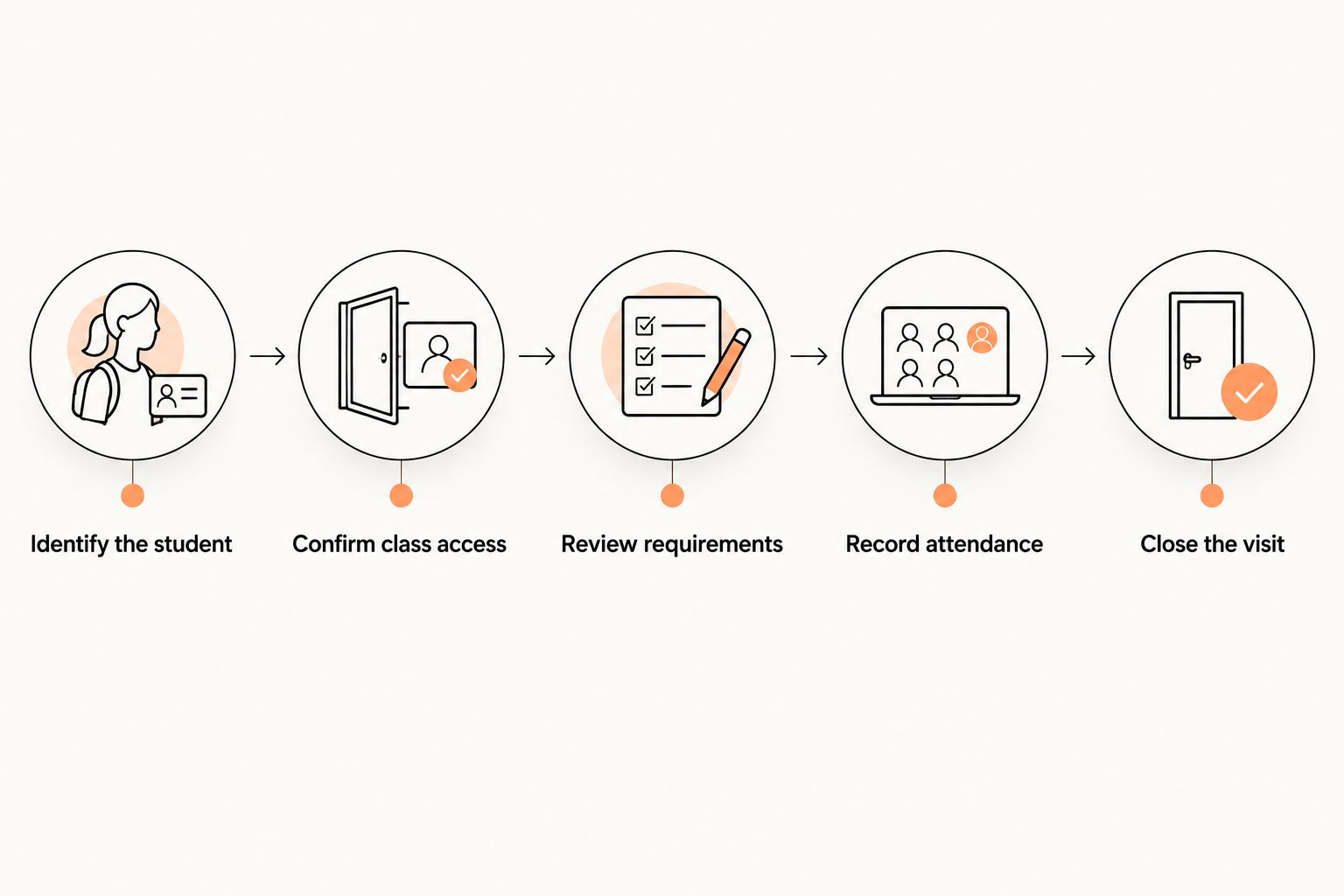
Yes, provided the system supports the complete visit rather than just reserving a place. Ask the supplier to demonstrate the following sequence with sample records. Treat each step as a requirement to verify, not a feature every platform includes.
- Identify the student. Create or find the person's record. Distinguish a visiting practitioner from a local prospect, and check for an existing profile before adding another.
- Confirm class access. Select the discipline, session, and experience level. Make sure the person is eligible for that particular class rather than assuming every published session accepts visitors.
- Review requirements. Confirm the academy's registration, consent, and payment requirements. Establish how staff see incomplete items before training starts.
- Record attendance. Mark whether the student actually arrived. Keep a reservation separate from an attended class so a no-show does not look like a completed trial.
- Close the visit. Record the outcome and assign the next action. A traveler might need no enrollment follow-up; a local beginner needs a clear invitation or a recorded decision not to continue.
Ask the demonstrator to complete the sequence on the device your front desk or instructor uses. Do not accept a slideshow of unrelated screens as proof that the workflow connects.
A useful demonstration also includes a correction. Have the demonstrator move a booking to another class or fix an attendance mistake. You need to see how staff recover from ordinary errors, not just how a perfect registration works.
Drop-in students: best for a defined visit
A drop-in workflow should answer a narrow question: can this person attend this session under your academy's rules? Keep the record focused on identity, relevant training experience, the selected class, and the visit outcome.
The advantage is a clear boundary. Staff do not need to treat every visiting grappler as an enrollment opportunity. The limitation is that a visit record alone does not manage an ongoing prospect relationship.
Ask how the software handles a visitor who returns later. You should be able to find the existing person and review earlier attendance without mistaking the new visit for a new individual. Verify this during the demonstration rather than assuming matching email addresses prevent duplicates.
For BJJ, review gi and no-gi eligibility separately if your academy applies different rules. For boxing, Muay Thai, or MMA sessions, apply the discipline's own experience and class-entry rules. A BJJ belt does not replace that check.
Trial students: best for an enrollment decision
A trial workflow should preserve the student's progress from inquiry to attended class to decision. Define what your academy means by a trial before configuring software: a booked introduction, an attended session, and a completed evaluation are different events.
The advantage is continuity. The person handling follow-up can see the actual outcome rather than starting from an unanswered booking notification. The limitation is that someone must still decide what happens next and own that task.
Keep these fields or equivalent notes visible during evaluation:
- The discipline and class the person wants to try.
- Whether the student booked, attended, canceled, or missed the session.
- Any academy-defined requirements still awaiting completion.
- The staff member responsible for the next contact.
- The outcome: another visit, enrollment discussion, or no further contact.
Do not assume the platform has a dedicated field for each item. Ask whether the workflow uses structured statuses, notes, or a separate task process. Then judge whether staff can maintain it consistently.
Drop-in and trial workflows compared
Neither workflow is better for every visitor. Use the student's reason for attending to decide which process fits, then verify the software can preserve that distinction.
| Workflow | Best for | Main advantage | Limitation to address |
|---|---|---|---|
| Drop-in visit | A practitioner attending a defined session | Keeps the visit separate from membership enrollment | Does not by itself establish a prospect follow-up process |
| Trial journey | A prospective member evaluating the academy | Connects attendance with an enrollment decision | Requires an assigned next action and accurate outcomes |
| Returning visitor | Someone with an earlier visit record | Preserves continuity across visits | Requires a reliable process for finding the existing profile |
These are workflow requirements, not claims about a particular supplier. During selection, ask the demonstrator to show each relevant row using the same student record wherever appropriate.
Why drop-in and trial handling varies
The difference is not just whether the software offers a booking button. Your academy's operating rules determine what that button must start.
- Class eligibility. Beginners, experienced visitors, children, and adults need access rules that match the sessions you actually teach.
- Visit purpose. A traveler needs a visit outcome; a prospective member needs an enrollment decision and an owner for follow-up.
- Payment process. Staff need to distinguish a booking from a confirmed payment and understand what happens when payment is unresolved.
- Consent requirements. Your registration process must account for the academy's required documents and guardian involvement where applicable.
- Return visits. Repeat attendance needs continuity without automatically creating a recurring membership or another person record.
- Staff responsibility. The instructor, front desk, and owner need a clear handoff when different people handle arrival, payment review, and follow-up.
Write these rules down before comparing platforms. Otherwise, a polished demo can answer a different academy's problem while leaving yours unresolved.
Run a practical acceptance test before switching
For a 2026 evaluation, use 3 sample students: an experienced visitor, a local beginner, and a returning trial student. These are proposed test cases, not performance benchmarks. Use fictional contact details and keep test activity separate from real student communications.
Test the experienced visitor
Book the visitor into 1 class that accepts their experience level. Check whether the instructor can identify the visit type and see any unresolved arrival requirements. Then record attendance and close the visit without creating an enrollment task that nobody needs.
Repeat the exercise with a class the visitor should not attend. Ask the demonstrator to show how the restriction is enforced or how staff are expected to catch it. A written policy is not the same as a software control.
Test the beginner who does not arrive
Create a trial booking, then leave the student marked as absent. Inspect the resulting record and any proposed follow-up. A message that thanks someone for attending would reveal that the process relies on booking status rather than actual attendance.
Also test cancellation before class. Ask whether the cancellation changes the next task and whether staff can distinguish it from a no-show. Those outcomes need different conversations.
Test the returning trial student
Use 2 visits for the same fictional student. Find the existing profile, record the second visit, and review the combined history. If the demonstration produces 2 separate profiles, ask how staff identify and resolve that duplication.
Finally, test the transition to membership. Ask what information remains attached to the person and what staff must enter again. The goal is a continuous record, not a second registration exercise disguised as conversion.
Make reminders depend on the right event
In a 2026 workflow review, separate a reminder before class from a follow-up after attendance. The first helps someone reach the correct session. The second needs to reflect whether the student actually trained and what the instructor recorded.
The important question about automated SMS reminders is what triggers them: a booking, a changed session, or a recorded outcome. Require the supplier to show the trigger, recipient, and cancellation behavior before relying on a message sequence.
Use the student's actual status when drafting the next contact. A visitor leaving town does not need the same message as a beginner who asked about another class. Record communication preferences and follow the consent requirements that apply to your academy and market.
Automate the handoff only after you can explain it manually. Name who reviews exceptions, who approves messages where approval is required, and who checks that a completed task reflects a real conversation.
Where MatPilot fits in the evaluation
MatPilot is best for martial arts owners who want scheduling, attendance, billing, and per-art ranks in one system. Its stated scope includes member management, a Monday–Sunday timetable, Stripe billing, Xero sync, and an assistant that supports trial follow-ups with owner approval gates.
For your 2026 shortlist, treat those capabilities as the starting point for a demonstration—not proof of every visitor rule above. Verify drop-in eligibility, repeat-visit handling, registration requirements, and the exact booking-to-attendance handoff against your academy's process.
The benefit of evaluating connected management software is that the trial does not have to be considered separately from the student's later membership and training record. The limitation is equally concrete: scheduling and billing capabilities alone do not establish how your particular drop-in policy works.
MatPilot supports web access and native iOS and Android apps. Test the relevant staff workflow on the device you intend to use during class changeover, when the instructor needs an answer rather than another administrative task.
Can I let drop-in students book without a membership?
Yes, if the selected software supports nonmember booking under your academy's rules. Ask the supplier to demonstrate registration, class eligibility, payment review, and attendance without assigning a recurring membership. Do not treat a public calendar as proof of that capability.
Should trial students count toward class attendance?
Yes, record trial students who actually attend as present in the relevant session. Keep the person's trial status separate from the attendance event so you can distinguish a booked introduction from completed training. Ask how reports separate visitors, trials, and recurring members when that distinction matters to you.
FAQ
Can BJJ scheduling software handle drop-in and trial students?
Yes, when the platform supports nonmember registration, appropriate class access, attendance recording, and the next action. Verify the complete workflow rather than assuming a booking calendar includes it.
What's the difference between a drop-in and a trial student?
A drop-in student attends a defined visit, while a trial student is evaluating whether to join. Use that purpose to determine the follow-up rather than treating every visitor as a membership prospect.
Can a visiting BJJ student book a class without joining?
That depends on the software and your academy's booking rules. Require a demonstration of nonmember booking without assigning a recurring membership.
How do I stop trial no-shows from receiving attendance follow-ups?
Base the follow-up on recorded attendance, not just the booking. Test an absent student and a canceled booking before enabling any message sequence.
Can the same student attend another trial without creating a duplicate profile?
Require the supplier to demonstrate finding the existing student and attaching the next visit to that record. Test the process using the same fictional contact details before moving real records.
Does MatPilot include more than belt tracking?
MatPilot includes member management, scheduling, attendance, billing, per-art ranks, and an assistant with approval gates. Ask for a demonstration of your exact drop-in and trial process before selecting it.
What should I test before moving trial bookings to new software?
Test an experienced visitor, a beginner who does not arrive, and a returning trial student. Check class eligibility, payment review, attendance corrections, profile continuity, and the assigned next action.
One last thing
The revealing test is the student who books but never arrives. A system can display a full timetable while leaving that person with the wrong attendance status and the wrong follow-up.
Before approving your 2026 setup, deliberately run that failed journey. Ask the instructor to mark the absence, ask the administrator to inspect the next task, and confirm that nobody mistakes the reservation for completed training. Approve the workflow only when the exception is as clear as the successful visit.