Can gym software handle kids and adult class divisions?

Yes. Gym software can handle kids and adult class divisions when it keeps class eligibility, attendance, and progression separate while preserving each student's history. A timetable label alone is not enough: check whether the system actually controls access or leaves staff to enforce your rules.
- Can gym software handle kids and adult class divisions? Yes, but test eligibility rules, not just timetable labels.
- Keep each student's attendance and rank history separate from the person responsible for payment.
- MatPilot suits martial arts owners seeking scheduling, attendance, billing, and per-art rank tracking together.
- Test a junior-to-adult transition before moving your academy's records.
Why this matters
A parent can pay for a child's training without being the student. An adult beginner can share a household with an experienced junior without sharing a rank. Your records need to reflect those differences.
For a 2026 software review, start with your actual teaching rules rather than a feature checklist. The martial arts class scheduling software guide covers the timetable side; this page focuses on keeping divisions distinct across booking, attendance, billing, and progression.
Can gym software handle kids and adult class divisions?
Yes. The practical test is whether the software distinguishes the student, the class, the person paying, and the student's progression record. Those are separate responsibilities, even when you manage them from the same account.
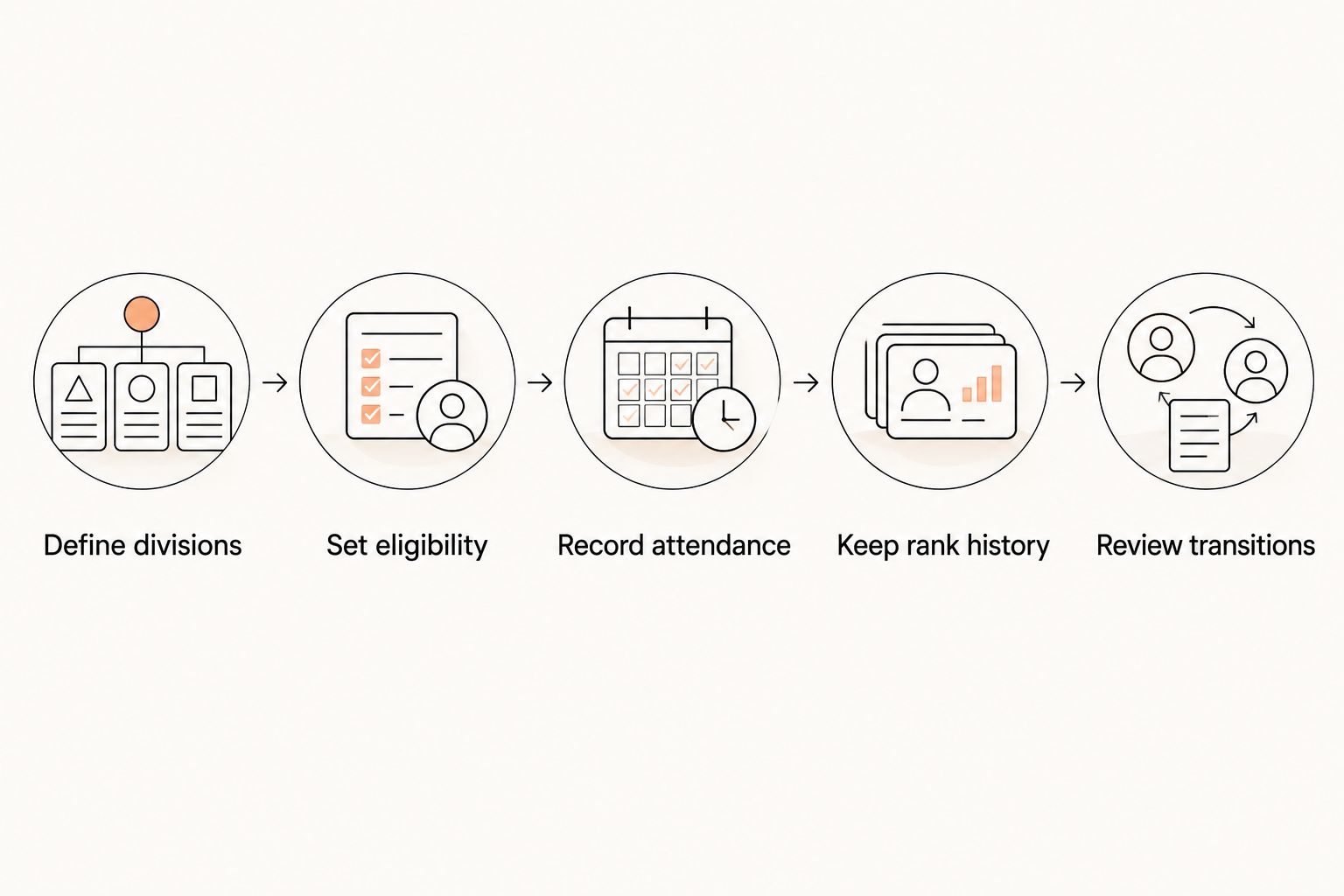
Use this sequence when reviewing a system:
- Define divisions. Write down who belongs in each teaching group and who approves exceptions.
- Set eligibility. Identify which sessions each student should be allowed to attend.
- Record attendance. Check that a visit belongs to the correct student and session.
- Keep rank history. Preserve progression when a student changes groups or trains in another art.
- Review transitions. Move a junior into adult sessions without losing earlier records.
The difference between a class name and an enforced rule matters. A session called Kids Karate tells people what it is. It does not, by itself, prove that an adult cannot book it or that an instructor must approve an exception.
Kids classes: separate the student from the payer
For kids classes, start with the child's training record. Attendance, class placement, and grading belong to that student, regardless of who pays the membership bill.
Then check the adult relationship separately. Ask where staff find the responsible adult's contact details, who receives operational messages, and how staff identify the correct child when siblings train together. Treat these as demonstration questions, not assumed features.
Best for kids programs: a setup that keeps individual student records clear without making staff reconstruct family relationships. Its advantage is clarity at check-in and grading. Its limitation is the initial work needed to confirm those relationships and responsibilities.
For your 2026 acceptance test, use 3 fictional student profiles: a junior, that junior's sibling, and an adult student. Give each a distinct attendance record. Ask the demonstrator to show which record changes when each person attends.
Do not use real children's information for an early sales demonstration. Fictional records are enough to expose whether the workflow distinguishes students properly.
Adult classes: separate age from experience
An adult division is not a skill level. Your adult beginner and advanced adult can belong to the same age division while needing different sessions or instructor guidance.
Write down which distinctions your academy actually uses. BJJ might require separate session labels for different training formats. Boxing, Muay Thai, or MMA sessions can have their own teaching groups. Do not force every art into a belt-based structure simply because another program uses belts.
Best for adult programs: eligibility rules that reflect your teaching policy rather than age alone. The advantage is a closer match between the timetable and instruction. The trade-off is that more detailed rules require more maintenance when your program changes.
Ask the demonstrator to distinguish an age restriction from a level restriction. If staff must handle either manually, record that responsibility explicitly so an instructor does not mistake a descriptive label for a booking control.
Mixed and transition classes: keep exceptions visible
Some academies teach sessions that include both juniors and adults. Others allow selected juniors into adult training after an instructor review. These are teaching decisions; software should not silently make them for you.
Before configuring a shared session, decide who can attend, who approves exceptions, and what staff should see at check-in. Then test whether the system supports that process directly or requires a separate staff procedure.
| Division setup | Best for | Advantage | Limitation to check |
|---|---|---|---|
| Separate kids and adult sessions | Academies with distinct teaching groups | Makes the intended audience explicit | A class label does not prove booking restrictions exist |
| Shared mixed-age sessions | Academies intentionally teaching groups together | Reflects a shared teaching session | Staff still need clear eligibility and supervision rules |
| Junior-to-adult transition | Academies moving students between divisions | Keeps the move attached to the student's existing record | Historical attendance and rank handling need a demonstration |
For a 2026 review, ask for 1 complete transition demonstration. Start with an existing junior record, change the student's class eligibility, and inspect the earlier attendance afterward. Do not accept a demonstration that simply creates a replacement adult profile.
Why division setup varies
The right configuration follows your academy's rules. Review these factors before selecting software:
- Arts taught. BJJ, judo, karate, and taekwondo progression should not be confused with the teaching structure of boxing or Muay Thai.
- Class eligibility. Age, experience, instructor approval, and membership access are different questions. Specify which ones your school uses.
- Payment responsibility. The person paying is not necessarily the student attending. Test those records separately.
- Progression rules. Changing divisions and receiving a new rank are different events. Decide what each event should change.
- Staff responsibility. Identify who approves exceptions, corrects attendance, and checks a student's placement.
- Existing records. A switch from another system needs a history check, not just a successful member import.
More divisions do not automatically mean better organization. Each division should correspond to a real teaching or administrative decision. If nobody can explain why a group exists, clarify the policy before adding another category.
How should you test kids and adult divisions before switching?
Build 2 test classes: one junior session and one adult session. Use the fictional student profiles from your earlier check, then ask the demonstrator to complete the same tasks your front desk and instructors perform.
Check booking and check-in separately
Try putting an adult into the junior class and a junior into the adult class. Observe whether the system blocks the action, displays a warning, or accepts it without comment. Each result means a different amount of staff oversight.
Repeat the exercise from both sides of the workflow: member booking and staff entry. Do not assume a restriction applies everywhere because it appears in one screen.
Check attendance corrections
Record a student in the wrong session, then correct the entry. Inspect both class registers and the student's history afterward. The corrected record should match what actually happened, without leaving staff unsure which entry to trust.
Ask who is allowed to make that correction. Your acceptance criterion is a clear process, whether the system enforces permissions or your academy assigns the responsibility operationally.
Check the division change
Move the junior test student into adult sessions. Inspect their previous attendance, current class access, and rank record independently. A successful change in one area does not prove the others remained intact.
Write the expected result before the demonstration. That prevents a polished tour from replacing the specific workflow you need to verify.
How should billing work when a family trains in different divisions?
Billing should identify the payer without confusing the students. A child in junior karate and a parent in adult boxing need distinct training records even when the same adult handles payment.
Ask how staff identify which membership a payment relates to and what happens when that payment fails. Then check the academy's follow-up process: who reviews the issue, who contacts the payer, and who decides whether class access changes.
Do not use a billing change as a shortcut for a division change. A student moving into adult training still needs the correct class placement and preserved history. Review the membership separately against your academy's policy.
Use your own billing arrangements in the demonstration. Do not let an example involving a single adult membership stand in for a household with several students.
What does MatPilot cover, and what should you verify?
MatPilot is best for martial arts owners who want scheduling, attendance, billing, and per-art rank tracking together. It provides a Monday–Sunday timetable, Stripe billing, Xero sync, and belt grading alongside member management. It is available on the web and through native iOS and Android apps.
The relevant strength is the connection between daily administration and martial arts progression. The boundary is equally important: those features do not, by themselves, establish how age-based booking restrictions, guardian access, or junior-to-adult transitions work.
Use MatPilot as a candidate for that operational review. Ask to see your academy's division rules applied to actual class and student records before treating any requirement as confirmed.
Its co-pilot includes approval gates for actions involving issues such as payments and promotion readiness. Keep the same distinction here: an owner-approved action is not the same thing as an automatic age-division policy.
Can a junior move into adult classes without losing history?
A junior-to-adult move should preserve the existing student record rather than replace it. Confirm that earlier attendance remains accessible and that any rank change follows your syllabus, not merely the new class label.
For your 2026 changeover checklist, inspect the record before and after the move. If the system cannot demonstrate continuity, resolve the process before importing live records.
Do kids and adults need different belt systems?
Kids and adults need distinct progression records whenever your academy's syllabus requires them. The software should reflect the art and grading policy you teach; the timetable should not be the only place that distinction exists.
Do not assume that changing a class division changes a rank correctly. Review class placement and grading as separate decisions, with instructor approval where your policy requires it.
Should an age division control every class booking?
An age division should control bookings only where that matches your academy's policy. A strict junior session, an instructor-approved transition session, and a deliberately mixed session need different treatment.
Document exceptions before setting restrictions. Otherwise, staff end up bypassing rules that looked sensible during setup but do not match how your school teaches.
FAQ
Can gym software handle kids and adult class divisions in the same academy?
Yes. Check that the software distinguishes class eligibility, individual attendance, and progression rather than only displaying different class names.
Does calling a class kids only stop adults from booking?
No. A class name does not establish a booking restriction; test whether the system blocks, warns, or accepts an ineligible booking.
Can siblings share a payer but keep separate attendance?
Separate student attendance from payment responsibility in your requirements. Ask the provider to demonstrate each sibling's record and the payer relationship rather than assuming family billing covers both.
Should I create a new profile when a junior joins adult classes?
Keep the existing student record as your acceptance requirement. Ask the provider to demonstrate the transition and show that earlier attendance and rank history remain accessible.
Can one academy manage BJJ and striking classes?
An academy's requirements can include both BJJ and striking classes. Test each art's timetable and attendance workflow, and do not impose belt progression on a program that does not use it.
Does MatPilot provide scheduling and belt tracking?
MatPilot provides scheduling, attendance, billing, and per-art rank and belt grading. Verify your specific age-division and transition requirements in a demonstration.
What should I test before moving from my current gym software?
Test class eligibility, attendance corrections, payment relationships, and a junior-to-adult transition. Compare the original student history with the resulting record before moving live data.
One last thing
Test the wrong booking, not just the correct one. A junior booking the intended junior class proves the normal path works; an adult attempting that same booking reveals whether your division policy is enforced, flagged, or left entirely to staff.
Make that deliberate mistake part of your 2026 acceptance checklist. It gives you a concrete answer to the question a timetable screenshot cannot settle.