Can gym software send automatic renewal reminders?

Yes. Gym software can send automatic renewal reminders when it supports date-based messages tied to membership records. A reminder does not renew the membership or collect payment by itself; you need separate rules for recurring charges, member consent, cancellations, and failed payments.
- Can gym software send automatic renewal reminders? Yes, when membership dates can trigger messages.
- Keep renewal reminders, recurring billing, and failed-payment follow-ups separate.
- MatPilot serves martial arts academies with member management, billing, attendance, and owner-approved co-pilot actions.
- Test recipients, cancellation exclusions, and message history before enabling a renewal workflow.
Why this matters
A member receiving a renewal message needs to know whether to take action. An unclear message leaves them wondering whether their membership ends, continues automatically, or needs a payment update. For a children's class, the person who needs that answer is usually the responsible adult, not the student.
Treat reminders as part of your martial arts billing software review, not a standalone messaging feature. In your 2026 software assessment, follow the full process from the membership record to the message and then to the final billing status.
Can gym software send automatic renewal reminders?
Yes. The supporting workflow needs a membership date, an eligible recipient, a message trigger, and a record of what happened. A scheduled message is useful only when it reflects the member's current membership status.
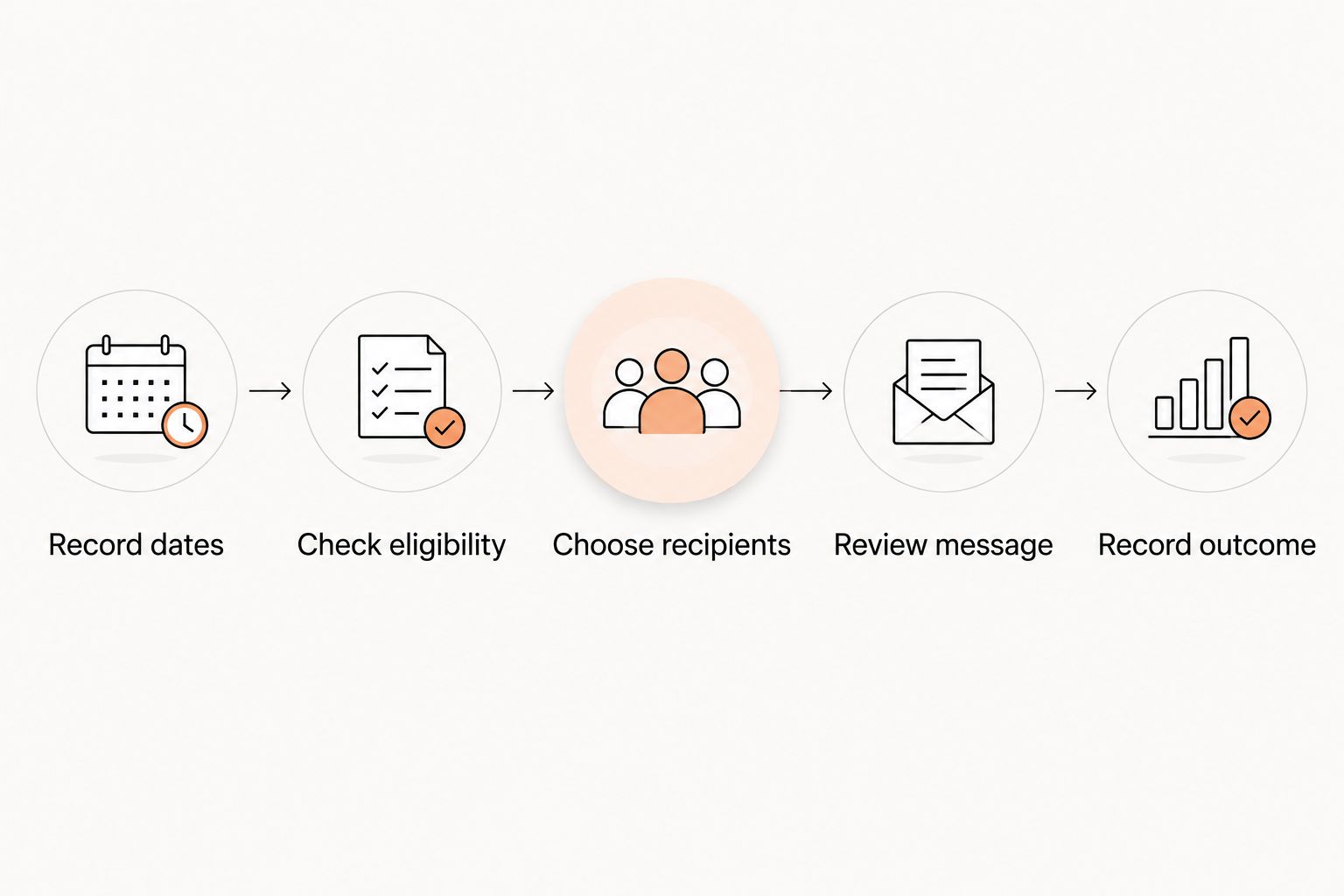
Use this sequence to assess a system rather than accepting a demonstration that only shows a message editor:
- Record dates. Identify the membership end date or renewal date. Keep it distinct from the next scheduled payment date.
- Check eligibility. Decide which memberships should receive reminders. Exclude records that no longer require renewal.
- Choose recipients. Use the member or responsible billing contact, depending on the account arrangement.
- Review message. State what happens next and what the recipient needs to do.
- Record outcome. Check the message history, membership status, and any resulting action.
These are evaluation steps, not a claim that every gym platform supports every control. Ask the supplier to demonstrate the complete sequence using a sample membership.
Which kind of reminder does your academy need?
A renewal notice, a payment reminder, and a failed-payment follow-up answer different questions. Do not combine them into a generic message saying that a membership needs attention. The recipient needs a specific next step.
| Message type | Best for | What it should explain | Main limitation |
|---|---|---|---|
| Fixed-term renewal reminder | Memberships with an end date | When access ends and how to renew | Sending the notice does not extend membership |
| Recurring-payment reminder | Memberships with scheduled charges | The upcoming charge and whether action is required | A scheduled charge is not a confirmed payment |
| Failed-payment follow-up | A payment that did not complete | The payment issue and how to resolve it | It does not establish whether the member wants to renew |
| Trial follow-up | People deciding whether to join | How to continue after the trial | A trial is not an existing paid membership renewal |
Fixed-term renewal reminders
For a fixed-term membership, lead with the end date and the renewal action. Tell the member whether they must contact the academy or complete a renewal process. Do not imply that opening the message keeps their membership active.
The advantage is a clear decision point. The limitation is that you still need a process for recording the renewal and stopping obsolete reminders once it is complete.
Recurring-payment reminders
For a recurring membership, distinguish the next payment from the end of the agreement. If no action is required, say so plainly. Do not ask the member to renew manually when the existing arrangement already continues.
The advantage is clarity before a scheduled charge. The limitation is that a reminder cannot prove the payment will succeed or replace the terms the member accepted.
Failed-payment follow-ups
A failed-payment message belongs to payment recovery, not renewal marketing. Identify the issue without suggesting that the member has chosen to leave. Direct the account holder to the appropriate payment-resolution process.
The advantage is a specific operational task. The limitation is that changing a payment method does not, by itself, answer questions about cancellation or membership expiry.
Why renewal reminder workflows vary
The right setup depends on how your academy handles memberships and communication. Use these factors when writing your 2026 requirements:
- Membership structure. A fixed-term course needs different wording from an ongoing membership with recurring billing.
- Account responsibility. An adult member and a parent paying for a child need different recipient rules.
- Payment status. An upcoming charge, a completed payment, and a failed payment require separate messages.
- Membership status. An active, renewed, paused, or canceled record should not receive the same follow-up automatically.
- Approval policy. Decide which routine messages can be scheduled and which exceptions require an owner to review them.
- Communication channel. Verify the supported channel, recipient permissions, and available delivery history before relying on it.
Write these requirements before choosing wording. A polished reminder sent to the wrong account holder is still the wrong reminder.
What should an automatic renewal reminder say?
Every renewal reminder should explain the date, the consequence, and the next action. Keep class announcements and promotion messages out of it. The recipient should not have to search a long newsletter to understand their membership.
Start with the membership concerned. If a family has children in different programs, identify the relevant student and membership clearly. Use the responsible adult's contact record for billing communication rather than assuming the student is the payer.
Then distinguish an expiry from an upcoming charge. State whether membership ends unless renewed, or whether an existing recurring arrangement continues. Those statements are not interchangeable.
Finish with the action and a way to ask a question. If the member has already renewed, the workflow should recognize that change rather than continuing to send the original request.
Keep sensitive details out of the message
A renewal message does not need a student's attendance history, belt assessment notes, or full payment details. Include only what the recipient needs to identify the membership and act. Keep payment-resolution instructions within the appropriate account process.
For a multi-discipline academy, use the membership name rather than assuming a rank describes access. A student's BJJ grade, boxing attendance, or karate syllabus progress does not establish their billing status.
How do you test renewal reminders before switching them on?
For a 2026 launch, test the conditions that should prevent a message as carefully as the condition that sends it. A successful test is not just an email arriving. It is the correct message reaching the correct person for the correct membership status.
Use sample records that do not expose real member information. Walk through each case and inspect both the membership record and the communication history.
| Test case | Expected behavior to request | What a failure reveals |
|---|---|---|
| Active membership approaching its end | Send the intended renewal notice | The date trigger or eligibility rule needs attention |
| Membership already renewed | Suppress the old renewal request | The workflow is using outdated status |
| Cancellation recorded | Follow the cancellation process instead | Renewal and cancellation rules conflict |
| Child with a responsible billing contact | Address the correct adult | Recipient mapping needs correction |
| Failed payment on an ongoing membership | Use payment-resolution wording | Billing and renewal messages are mixed together |
| Membership date changed | Follow the revised date | A queued message is disconnected from the record |
Ask what happens when a message cannot be delivered. A log saying that a message was created is not the same as evidence that the recipient received it. Establish who checks exceptions and how staff record the follow-up.
Repeat the test after importing member data or changing membership rules. An import can introduce a different date format or assign the wrong contact role. Review those fields before enabling scheduled communication.
Where MatPilot fits
MatPilot is built for martial arts academy owners managing members, billing, attendance, and per-art ranks. That makes the relevant evaluation broader than a reminder editor: check how membership records, payment issues, and owner decisions fit together.
MatPilot includes billing through Stripe, attendance, belt grading, and a co-pilot with approval gates. Those are distinct capabilities. An approval-based action is not the same as an unattended scheduled reminder.
When assessing MatPilot for renewal communication in 2026, ask for the exact workflow you intend to use: the triggering date, recipient, approval requirement, sending channel, and stopping condition. Choose on the demonstrated process, not on the presence of an automation label. Owner approval keeps decisions with the owner; it also means approval work must have a clear place in the daily routine.
Does a renewal reminder automatically charge the member?
No. A renewal reminder is a communication event; a recurring charge is a billing event. Ask the supplier to show the message rule and the payment rule separately, including what happens when the payment does not complete.
Should renewal reminders go to parents or students?
Send billing-related renewal reminders to the responsible account holder. For children's memberships, verify the parent or guardian relationship in the record rather than choosing a recipient based only on a shared surname or email address.
Can automatic reminders replace personal follow-up?
No. Automatic reminders handle a defined communication task, while a personal follow-up can resolve questions about training, cancellation, or payment. Assign exceptions to a named staff role so an unanswered message does not become an unresolved membership issue.
FAQ
Can gym software send automatic renewal reminders by email or text?
Gym software can send automatic renewal reminders through the channels it supports. Ask the supplier to demonstrate the specific email or text workflow, recipient permissions, and message history before relying on that channel.
Is a renewal reminder the same as automatic billing?
No. A renewal reminder communicates with the member, while automatic billing attempts a scheduled payment. Check the rules for each separately.
Can I stop reminders after someone renews?
Stopping reminders after renewal should be a requirement in your software assessment. Test whether updating membership status cancels any pending renewal requests rather than assuming it does.
Who should receive renewal reminders for a child's membership?
The responsible account holder should receive billing-related renewal reminders for a child's membership. Confirm the parent or guardian contact on the membership record before enabling messages.
Does MatPilot handle more than belt tracking?
Yes. MatPilot provides member management, scheduling, attendance, billing, per-art ranks, belt grading, and a co-pilot with approval gates for martial arts academies.
How far before expiry should I send a renewal reminder?
Choose the timing from your membership terms and the action the member needs to complete. Give the recipient a clear deadline, and verify that changed or renewed memberships leave the reminder sequence.
What should I check when moving renewal reminders to new gym software?
Check membership dates, account holders, payment status, cancellation status, and communication settings before enabling reminders. Test sample records so the old and new systems do not send conflicting messages.
One last thing
Test the member who should receive nothing. An already-renewed membership is a useful final check because it shows whether the workflow reads current status or merely follows a calendar. Before enabling renewal reminders in 2026, confirm that resolving the task also stops the request.