Can gym software send belt testing eligibility alerts?
Yes. Gym software can flag students for belt-testing review when it connects attendance, rank records, and your academy’s eligibility rules. An eligibility alert is not permission to promote: confirm what triggers the alert, who receives it, and which instructor approves the next step.
- Can gym software send belt testing eligibility alerts? Yes, but check triggers, delivery channels, and instructor approval.
- MatPilot combines martial arts gym management, per-art ranks, attendance, and promotion-readiness assistance with approval gates.
- Attendance supports a testing decision; it does not establish technical readiness.
- Keep eligibility review, testing invitations, and completed promotions as separate decisions.
Why this matters
A student who has attended consistently deserves a review, not an automatic belt change. Your instructor still needs to assess technique, application, and the requirements of the relevant syllabus. Software should bring the student to your attention with supporting records.
For your 2026 setup, start with the academy’s actual promotion policy. If you teach several disciplines, review how you support multiple belt systems before defining alerts. A karate attendance record should not silently become evidence for a BJJ promotion.
The useful alert explains why a student needs review. It does not announce that the student has passed.
Can gym software send belt testing eligibility alerts?
Yes. The workflow connects a student’s records to a review condition, then brings the resulting candidate to an authorized person. A staff-facing readiness flag and a message sent to a parent are different functions. Ask to see both rather than assuming one includes the other.
Use these steps to specify the workflow before choosing settings or evaluating software:
- Define eligibility. Write the requirements for the next rank in the relevant art and student division. Separate measurable conditions from instructor judgment.
- Check records. Confirm the current rank, promotion history, and attendance records. Resolve missing information before treating a result as reliable.
- Review readiness. Give an instructor the supporting evidence and a clear decision: invite, defer, or request another assessment.
- Approve invitations. Decide who can authorize a testing invitation and who should receive it. Check the message before it goes out.
- Record outcomes. After the assessment, record what actually happened. An invitation alone must not become a completed promotion.
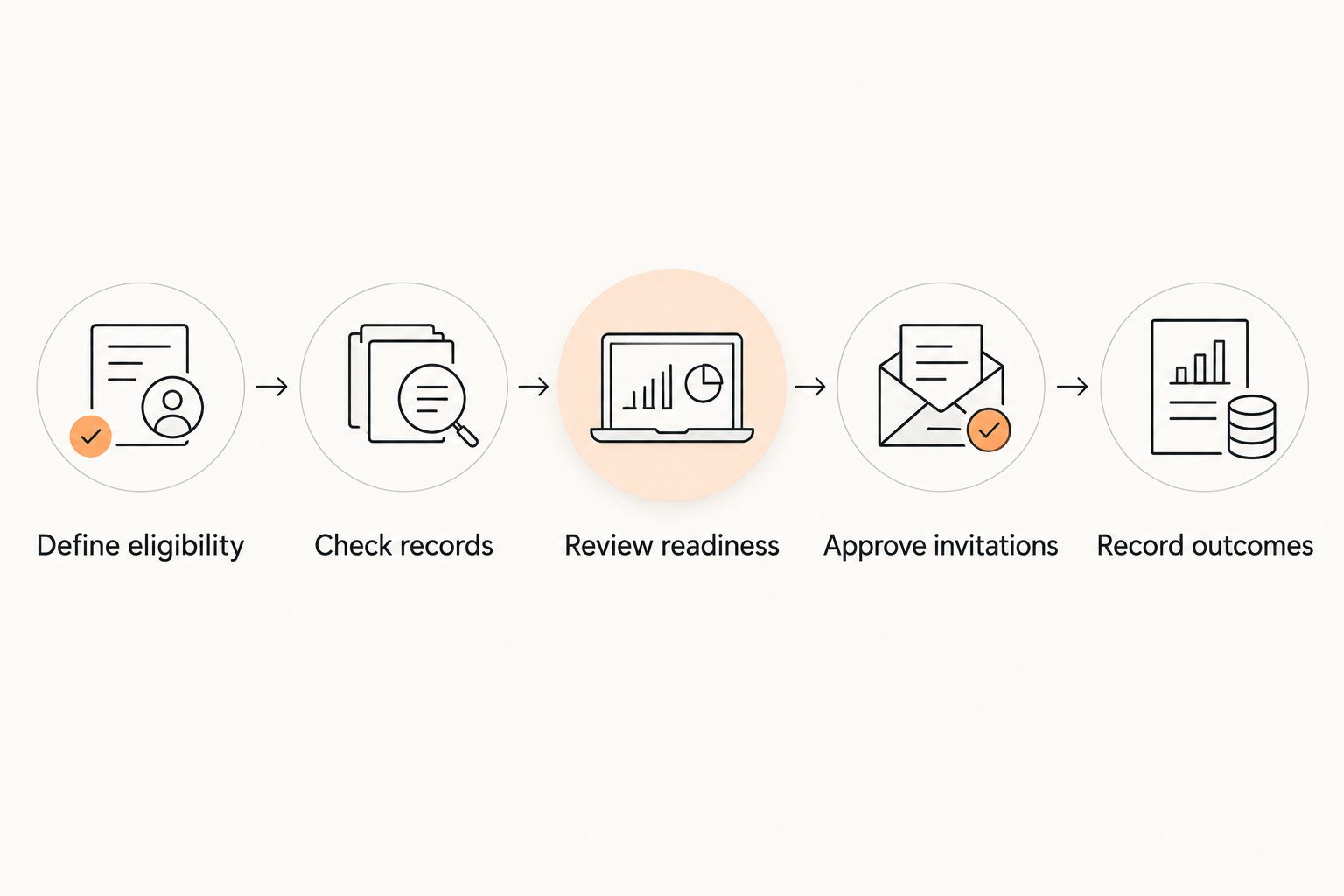
Ask a supplier to demonstrate this sequence using a sample student record. A notification screenshot proves that a message exists. It does not prove that the underlying eligibility decision is correct.
Attendance-based alerts
Best for: identifying students whose training records need an instructor review. Attendance-based alerts use recorded participation as the starting point. Specify which classes count toward which rank before accepting the resulting candidate list.
The advantage is a concrete record to inspect. The limitation is equally concrete: check-in confirms presence, not technical competence. A student can meet your attendance condition and still need work on the syllabus.
For a 2026 configuration review, ask whether the software distinguishes relevant classes from unrelated sessions. Also test how staff correct a missed check-in. An eligibility workflow needs a way to handle a genuine attendance correction without pretending the original record was complete.
Time-in-rank alerts
Best for: reminding instructors to review students against an academy-defined time requirement. A time-in-rank alert depends on a trustworthy promotion date and the correct rank record. Start by checking those records, especially after a migration.
The advantage is visibility into a requirement that is easy to overlook during a busy teaching week. The limitation is that elapsed time says nothing by itself about practice, consistency, or performance.
Do not insert a generic waiting period because a settings screen asks for one. Use your academy’s policy and any applicable governing-body requirements. If an imported promotion date is uncertain, resolve it before using that date to trigger a review.
Instructor-reviewed readiness alerts
Best for: academies that want administrative prompts without surrendering promotion decisions. This workflow puts an instructor between the eligibility flag and the testing invitation. Ask whether the reviewer can inspect the evidence and record why a candidate is deferred.
The advantage is a clear place for technical judgment. The trade-off is that someone must own the review queue. An alert nobody reviews is not a completed process.
Give that responsibility to a named role. Define who covers absences and who can resolve a disputed record. Keep the process usable for instructors who teach rather than manage the front desk.
Which alert approach fits your academy?
| Approach | Best for | Useful evidence | Limitation | Required safeguard |
|---|---|---|---|---|
| Attendance-based review | Checking training participation | Relevant class attendance | Presence does not prove skill | Instructor assessment |
| Time-in-rank review | Checking an academy’s timing requirement | Verified promotion date | Time does not prove readiness | Confirm the applicable policy |
| Instructor-reviewed readiness | Combining records with technical judgment | Attendance, rank history, and assessment notes | Requires staff follow-through | Named reviewer and approval step |
These are workflow choices, not claims that every software package supports every configuration. During a 2026 evaluation, ask the supplier to demonstrate your chosen approach rather than accepting a general claim about belt tracking.
Why belt-testing eligibility alerts vary
The right trigger depends on how your academy teaches and assesses students. Define these factors before enabling notifications:
- Discipline and syllabus. Keep BJJ, judo, karate, and taekwondo requirements attached to their own progression systems. For boxing, Muay Thai, or other programs, use your actual assessment structure rather than imposing belts.
- Student division. Separate children’s and adults’ requirements wherever your syllabus distinguishes them. Do not let a shared class name erase that difference.
- Attendance rules. Specify which sessions count. Decide how staff handle corrections and cross-training before those records affect a readiness review.
- Rank history. Verify the current rank and relevant promotion date. Imported or incomplete records need review before they support an alert.
- Technical assessment. State what an instructor must assess beyond attendance or elapsed time. Keep measurable conditions separate from judgment.
- Recipient and permission. Decide whether the first alert goes to an instructor, administrator, adult student, or guardian. Internal review and external communication need different wording.
Avoid starting with notification frequency. First establish what the alert means. Otherwise, you risk sending a consistent message about an inconsistent decision.
What should an eligibility alert contain?
An eligibility alert should identify the student, discipline, current rank, and reason for review. It should also show what remains unresolved. A reviewer needs evidence, not just a colored status.
Use this checklist when evaluating the alert screen or message:
- Student and relevant program.
- Current recorded rank and promotion history.
- Condition that triggered the review.
- Supporting attendance or assessment records.
- Missing information or outstanding checks.
- Responsible instructor and permitted next action.
Use “ready for review” when instructor approval is still outstanding. Reserve testing-invitation language for students whose invitation has been approved. Reserve promotion language for an outcome that has actually been confirmed.
For minors, check the intended recipient before sending anything externally. A parent receiving a testing invitation should not have to guess whether it is a provisional flag, an approved invitation, or a completed result.
Can an eligibility alert automatically promote a student?
An eligibility alert should start a review, not complete a promotion. Keep 3 decisions separate: eligibility review, invitation approval, and promotion confirmation. That separation gives staff a clear point to stop when the evidence is incomplete.
If you evaluate automated actions, ask what approval is required before a rank changes or a message is sent. Inspect the resulting student record as well as the notification. A correct message cannot repair an incorrect rank history.
For your 2026 procedure, write down who confirms the assessment result. Include what happens when a student is invited but does not attend, or attends without passing. Neither event should be recorded as a successful promotion.
How do you test belt alerts before using them?
Test the workflow with sample records before sending student-facing messages. Use 3 test cases: a student who meets the written conditions, a student missing a condition, and a student with incomplete records. These are proposed checks, not promotion thresholds.
For each case, follow the same sequence:
- Inspect the source records before triggering the review.
- Compare the alert with the written eligibility policy.
- Check who can see and approve the next action.
- Inspect any proposed message and its recipient.
- Confirm that the rank stays unchanged until the result is approved.
Also test 2 disciplines for the same student if you run a multi-art academy. A change in one art should not be treated as evidence of progress in another. Ask the supplier to show the separation in the actual record.
Repeat these checks after changing your syllabus or importing student data. The goal is not a large test exercise. It is proof that your staff understand what the alert does and what it leaves for them to decide.
Where MatPilot fits
MatPilot suits martial arts gym owners who want attendance, per-art ranks, and promotion-readiness assistance with owner approval. Its martial arts gym management software also covers members, scheduling, and billing, rather than treating belt tracking as a separate administrative task.
MatPilot includes an AI co-pilot with approval gates for actions, including promotion-readiness work. That supports the distinction between identifying something for attention and letting an automated action proceed without oversight.
The limit is important: promotion-readiness assistance does not establish the exact notification channel or every eligibility rule your academy needs. Ask to see your required trigger, recipient, and approval sequence in the live product. Do not assume email, SMS, push delivery, or custom syllabus logic from the phrase “belt tracking.”
Use your own syllabus during the demonstration. A BJJ academy and a multi-discipline school should evaluate the same core question: can staff see the evidence, make the decision, and retain control?
FAQ
Can gym software send belt testing eligibility alerts?
Yes. Gym software can flag students for eligibility review when it connects relevant records with defined rules. Confirm the trigger, delivery channel, recipient, and approval process in the product you evaluate.
Can attendance alone show that a student is ready for a belt test?
No. Attendance establishes recorded participation, not technical readiness. An instructor should assess the student against the applicable syllabus before approving an invitation.
Can belt-testing alerts work for children and adults?
Evaluate children’s and adults’ rules separately wherever your syllabus distinguishes them. Ask the supplier to demonstrate each division and verify who receives messages about minors.
Can one student have different eligibility records for different martial arts?
A multi-discipline workflow should keep eligibility attached to the relevant art and rank. Test a student who trains in different programs and inspect whether the records remain separate.
Does MatPilot help with promotion readiness?
MatPilot includes promotion-readiness assistance through its AI co-pilot, alongside per-art ranks and attendance. Confirm your required notification channels and eligibility conditions in a live demonstration.
Should parents receive an alert before an instructor approves testing?
Keep provisional readiness flags internal until an instructor approves the invitation. Then check the recipient and use wording that distinguishes an invitation from a completed promotion.
What should I check after importing belt histories?
Check current ranks, promotion dates, discipline assignments, and missing records before relying on eligibility alerts. A correctly delivered alert is still unreliable when its source record is wrong.
One last thing
Before switching alerts on in 2026, write the message you would send to a student who meets the attendance condition but is not technically ready. That exercise exposes whether your process distinguishes evidence from approval.
If the message sounds like a promise of promotion, change the workflow before changing the wording. A testing invitation is a decision to assess, not a decision to award a belt.