Can martial arts gym software work during an internet outage?
Yes, martial arts gym software can work during an internet outage when the specific task has a supported offline mode; a native app alone does not establish that support. Treat attendance capture, access to saved records, payment confirmation, and later synchronization as separate capabilities, and keep a manual check-in procedure for anything you have not tested.
- Can martial arts gym software work during an internet outage? Only supported offline functions should be trusted.
- MatPilot covers martial arts gym management; evaluate offline attendance separately from its member, scheduling, billing, and grading functions.
- A backup internet connection restores connectivity; it does not prove that an app works offline.
- Keep payment status unresolved until you can verify the transaction, then reconcile temporary attendance records.
Why this matters
An outage at the front desk does not have to stop a BJJ, boxing, or taekwondo class. It does change what your staff can verify. A saved roster is not proof of current membership status, and a recorded payment attempt is not proof of payment.
For your 2026 operating procedure, separate keeping class moving from updating the official record. Give the instructor a fallback roster and name the person responsible for reconciling it. Your kiosk tablet check-in setup should include that handoff, not just the normal arrival process.
Can martial arts gym software work during an internet outage?
Offline support is task-specific, not a yes-or-no property of the whole platform. Test the work your staff actually needs to complete: finding a student, recording attendance, checking membership status, and seeing whether an entry reaches the shared record after reconnection.
Use this sequence before relying on any offline claim:
- Choose a task. Start with attendance for a scheduled class, not a general tour of the app.
- Disconnect the device. Disable both Wi-Fi and mobile data so a second connection cannot hide the outage.
- Complete the task. Check whether the software allows a new entry, rather than merely displaying an old screen.
- Close and reopen. Establish whether the entry survives restarting the app while disconnected.
- Reconnect and verify. Check the central record for missing entries, duplicates, and the correct class assignment.
Do not perform payment experiments with live member charges. Ask the provider for an appropriate test method before testing transaction behavior.
Which fallback fits the outage?
These approaches solve different problems. None should be treated as a substitute for checking what the software actually supports.
| Approach | Best for | Advantage | Limitation |
|---|---|---|---|
| Documented offline mode | Supported tasks during lost connectivity | Keeps those tasks inside the software | Scope, storage, and synchronization require verification |
| Backup internet connection | A failed primary connection | Gives connected software another route online | Does not resolve a software service outage |
| Controlled manual roster | Temporary attendance capture | Does not depend on the gym software being reachable | Requires secure handling and later reconciliation |
Choose the fallback by failure type. If your broadband connection fails, another connection addresses that problem. If the software service is unavailable, changing networks does not repair it.
What can you trust on an offline screen?
A visible screen proves only that something is visible. It does not establish that the information is current or that a new action has been saved.
Ask the provider to distinguish these behaviors:
- Saved display: Previously loaded information remains visible.
- Local entry: The device accepts a new record without a connection.
- Persistent storage: That record remains after closing and reopening the app.
- Synchronization: The record reaches the shared system after reconnection.
- Conflict handling: The system has a defined response when devices make overlapping changes.
Use these terms in your 2026 buying checklist. They turn an ambiguous claim such as mobile access into a concrete question about the job you need done.
A native iOS or Android app describes how you access the software. It does not, by itself, establish any of the behaviors above. Apply the same standard to a browser-based system.
Why offline behavior varies
Offline reliability depends on the task, the device, and the connection path. Evaluate these factors separately:
- Where records are stored. A record available only through the remote service needs a working route to that service.
- What was saved beforehand. A device cannot display a downloaded roster that was never downloaded.
- Which actions need verification. Checking a current account status differs from recording a temporary attendance note.
- How devices share changes. Separate devices need a defined reconciliation process when their records meet again.
- Which service failed. Local Wi-Fi, the internet connection, and the software service are different failure points.
- What happens after restarting. A screen that stays open during an outage does not prove that work survives an app restart.
Test the exact device and task you intend to use. A successful roster lookup on an instructor's phone does not establish offline check-in support on the reception tablet.
How should you keep attendance during an outage?
Use a temporary attendance record with a clear owner. Capture enough information to identify the student and class without copying the full member database onto an uncontrolled device.
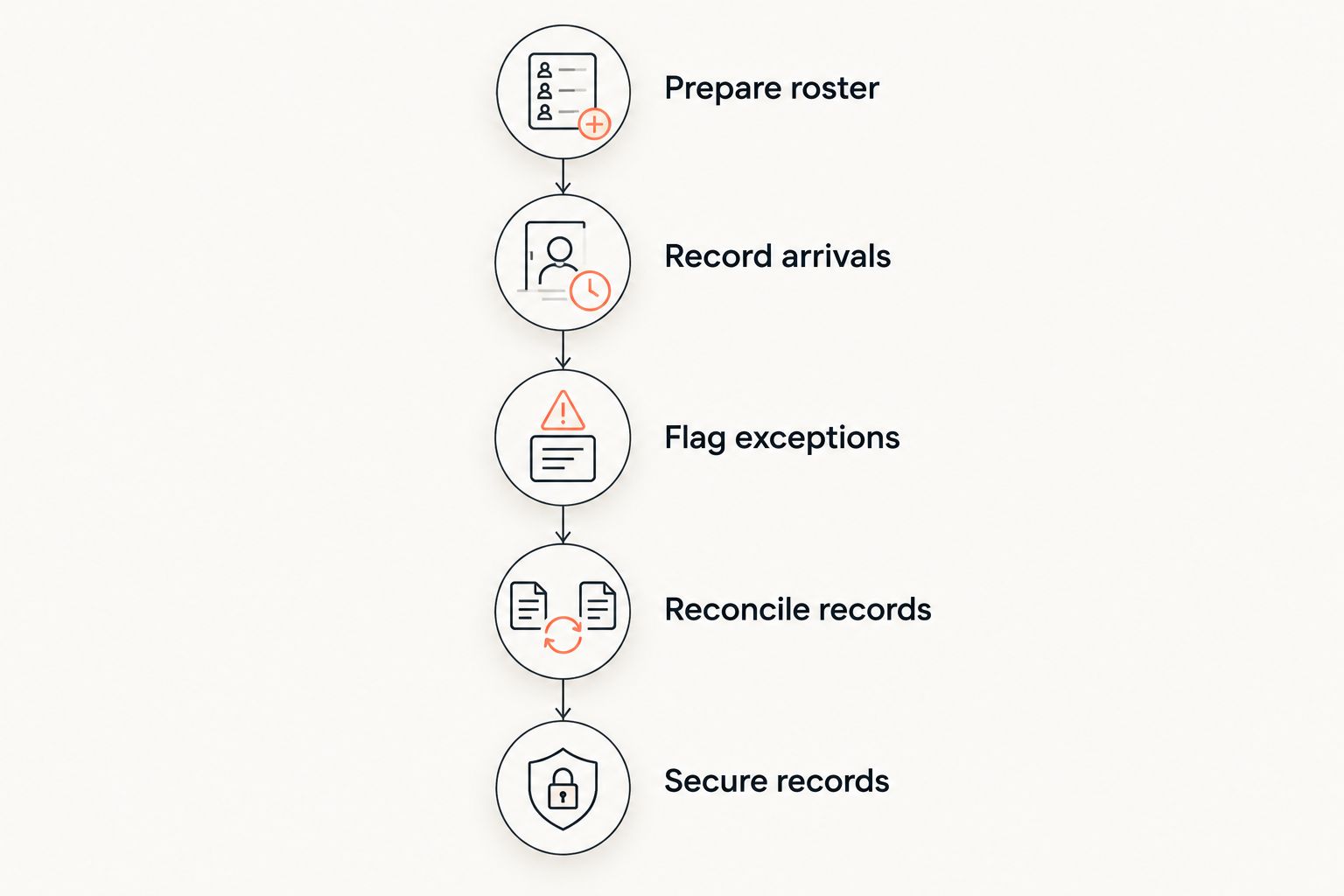
Build the procedure around these steps:
- Prepare roster. Keep an authorized fallback for the relevant class, with its preparation date and time.
- Record arrivals. Note the student, class, session date, and instructor. Distinguish an attendance mark from a membership decision.
- Flag exceptions. Separate unfamiliar students, unclear permissions, and unresolved account questions for the responsible staff member.
- Reconcile records. After service returns, enter or verify attendance against the correct session.
- Secure records. Follow your retention policy for the temporary sheet or file once reconciliation is complete.
For a multi-discipline academy, identify the art as well as the session. A student attending Muay Thai should not acquire a BJJ attendance entry because the temporary sheet omitted the class name.
For children's classes, follow your established guardian, collection, and safeguarding procedures. Do not use a connectivity failure as permission to bypass them. Keep the fallback roster away from public view.
What should wait until the connection returns?
Do not convert an uncertain transaction into a confirmed payment. If the front desk loses connection during a payment attempt, verify the transaction record before initiating another attempt.
Your temporary note should describe what happened without collecting card details. Record that confirmation is pending and assign a staff member to check it. Never write a card number or security code on an attendance sheet.
Treat account changes with similar care. If staff cannot verify the current record, note the requested change instead of presenting it as completed. This applies to membership changes, family-account adjustments, and grading updates.
A belt decision also needs the correct history. Record an instructor's observation separately from a formal promotion until the authorized person can review the relevant record. An outage should not silently rewrite the academy's grading process.
How should you test an outage before a busy class?
Schedule a controlled rehearsal away from arrival time. For your 2026 review, write down the device, operating system, app or browser version, task, and result. Keep the test focused enough that another instructor can repeat it.
Use 1 test device and 1 test class to establish the basic behavior. Then add a separate-device check if your reception and instructors normally work on different devices.
Include these cases:
- Open a roster while connected, then disconnect and inspect what remains accessible.
- Try a permitted test attendance entry while disconnected.
- Restart the app or browser and check whether that entry remains.
- Restore connectivity and verify the entry in the shared record.
- Check how the system handles 2 attendance entries for the same test student and session.
- Confirm who handles an entry that fails to synchronize.
These are test instructions, not claims that every platform supports the actions. Stop at any unsupported step and document the fallback staff should use instead.
Ask the provider for written answers about offline scope and recovery. Keep those answers with the procedure so a future software update triggers a meaningful retest, not an assumption that last time's behavior still applies.
Does backup internet solve the problem?
Backup internet addresses a lost connection, not offline software behavior. Your staff still needs a procedure for recognizing the failure, switching connections, and confirming that the front-desk device is online again.
The practical work of setting up a backup internet connection belongs in the same continuity plan as attendance recovery: one restores the route to the service, while the other protects the class record until that route works.
Test the backup from the reception desk. A phone showing a mobile signal does not prove the check-in tablet has internet access. Confirm the actual device can reach the service before telling staff that normal check-in has resumed.
Keep an offline copy of the switching instructions. Instructions stored only inside an unreachable system do not help the instructor opening the academy.
Where does MatPilot fit in this decision?
MatPilot is best for martial arts academy owners who need member management, scheduling, billing, and per-art grading together. Its martial arts gym management tools cover those operational areas, and access includes the web and native iOS and Android apps.
Evaluate MatPilot against your actual outage procedure rather than treating native apps as proof of offline operation. Its scope suits owners managing classes and ranks across disciplines; offline entry, persistence, and synchronization remain separate acceptance criteria to establish before relying on them.
Keep that distinction in your 2026 software decision. A system can fit your everyday administration while your academy still needs a manual attendance fallback and a backup connection. Decide whether that operating arrangement meets your needs before switching.
FAQ
Can I check students in when the gym Wi-Fi goes down?
You can use a supported offline check-in function or a controlled manual attendance record. If another internet connection is working, connected check-in is a separate option; verify the reception device is actually online.
Does a native gym app automatically work offline?
No. A native app does not by itself establish offline record access, new attendance entry, or later synchronization. Test each required action on the device staff will use.
Will a mobile hotspot fix a gym software outage?
A mobile hotspot provides another internet connection; it does not repair an unavailable software service. First distinguish a connection failure from a service failure.
Can I take membership payments while the connection is down?
Do not assume payment collection works without connectivity. Follow the payment provider's documented process and verify any interrupted transaction before attempting another charge.
Does MatPilot's martial arts gym software have an offline mode?
Do not treat MatPilot's web, iOS, or Android access as confirmation of offline mode. Establish supported offline tasks, record persistence, and synchronization behavior with the provider before relying on them.
What should I put on a temporary attendance sheet?
Record the student, class, session date, and instructor, and flag unresolved exceptions separately. Limit personal information and assign responsibility for secure reconciliation.
What should I test before choosing gym software in 2026?
Test disconnected access, permitted new entries, app restart behavior, reconnection, and duplicate handling. Use the same device and workflow your staff will use during class arrivals.
One last thing
The outage is not over when the Wi-Fi returns. It is over when temporary attendance is reconciled, uncertain transactions are checked, and staff know which record is authoritative.
Put a named person beside that final task in your procedure. Otherwise, a class can run normally while its attendance remains stranded on paper.