Can martial arts software automate seminar payments?

Yes. Martial arts software can automate seminar payments when it supports event-specific registration, payment collection, and payment-status updates; ordinary membership billing alone does not establish that capability. Check how the software handles failed payments, cancellations, and guest attendees before you use it for a seminar.
- Can martial arts software automate seminar payments? Yes, when event registration and payment status stay connected.
- Keep seminar charges separate from recurring membership dues and record the attendee separately from the payer.
- MatPilot provides martial arts member billing; verify seminar-specific registration and refund controls before choosing an event workflow.
- Test successful payments, failed payments, cancellations, and guest bookings before opening registration.
Can martial arts software automate seminar payments?
Yes, but evaluate the complete booking process, not just the ability to collect a payment. Your software needs a reliable connection between the seminar, the person attending, and the transaction. Otherwise, someone still has to match payments to names before check-in.
For a 2026 software review, ask the vendor to demonstrate the exact event you intend to run. A BJJ guest-instructor seminar and a Muay Thai workshop need the same payment checks, even when their eligibility rules differ.
Use these steps to evaluate the workflow:
- Create a seminar record that stays distinct from recurring classes and membership dues.
- Register the attendee and identify the person responsible for payment.
- Collect payment through the supported checkout process.
- Confirm the booking only when its payment condition is satisfied.
- Record cancellations, payment failures, and refunds against that booking.
- Give the instructor a usable attendance list.
The broader martial arts billing software guide helps you assess billing requirements beyond a single event. For seminars, the deciding question is narrower: can you follow one booking from registration through payment and attendance without rebuilding the record elsewhere?
Why this matters
A membership payment answers whether someone has paid their recurring dues. A seminar payment answers whether a particular attendee has paid for a particular event. Treating those as interchangeable creates ambiguity at the door.
Keep 3 linked records in your operating process: the event, the attendee, and the payment. Those are recommended records, not a claim about any vendor's database structure. You need to find each from the others without guessing.
For your 2026 seminar calendar, decide what counts as a confirmed place before you publish registration. A submitted form, an attempted payment, and a successful payment are different events. Your confirmation message should reflect the condition you actually require.
Which payment workflow should you choose?
Choose the workflow that keeps your booking list accurate with the least manual matching. Do not assume an integrated payment provider also means integrated seminar registration. Ask to see both working together.
| Workflow | Best for | Advantage | Limitation to check |
|---|---|---|---|
| Event registration inside gym software | Academies that want bookings and member records connected | Keeps event administration in the gym's operating workflow | Verify guest registration, payment status, and cancellation handling |
| Separate event checkout | Academies whose gym software lacks event registration | Gives the seminar a distinct registration process | Check how bookings reach the gym's attendance records |
| Manual booking and payment matching | Owners who deliberately choose a manually reviewed process | Lets the owner review each booking directly | Every payment and cancellation needs manual reconciliation |
Best for connected member records: evaluate event registration inside your existing gym software first. Its advantage disappears if you still need to copy attendee names or mark payments by hand. A separate checkout is a valid option when you define who maintains the final attendance list.
Do not choose manual matching by accident. If that is your process, name the person responsible and decide when they update the list. An unattended spreadsheet is not payment automation.
How do you set up an automated seminar payment workflow?
Build the process around explicit booking states. The labels below describe an evaluation workflow, not confirmed features in any named product. Ask your vendor to demonstrate equivalent controls.
Define registration
Record the seminar name, date, discipline, attendee identity, and payer contact. Decide whether existing members and visiting students use the same registration route. For a junior workshop, identify the responsible adult without replacing the child's attendee record with the parent's name.
Keep eligibility separate from payment. Paying for an advanced BJJ seminar does not establish rank eligibility. Paying for a boxing workshop does not establish which session the attendee selected.
Collect payment
Ask whether checkout creates a seminar-specific transaction or adds a charge to an existing member account. Then inspect where that charge appears. You should be able to distinguish it from regular tuition without relying on memory.
Do not assume a saved payment method authorizes a new event charge. Use an explicit registration and payment process. Have the vendor explain how the attendee or responsible payer approves the transaction.
Confirm booking
Define the condition that moves a booking into the confirmed list. If your rule requires successful payment, an incomplete checkout must not look like a paid place. Check the attendee-facing message as well as the administrator's record.
Your confirmation should identify the event and attendee clearly. A receipt belonging to a parent needs enough context to establish which child's booking it covers. Review this before sending your first registration link.
Review exceptions
Decide who handles a failed transaction, an incorrect attendee, or a cancellation. Give that person a clear work queue or review list. Automation should expose unresolved bookings, not hide them behind a general payment total.
Separate the decision from its execution. Approving a refund, issuing it, and changing the booking status are distinct steps. Verify which steps your chosen system connects automatically.
Record attendance
Give the instructor a list that distinguishes confirmed attendees from unresolved bookings. Record attendance against the seminar rather than assuming a regular-class check-in proves participation. This matters when a visiting instructor needs a clear headcount at the start.
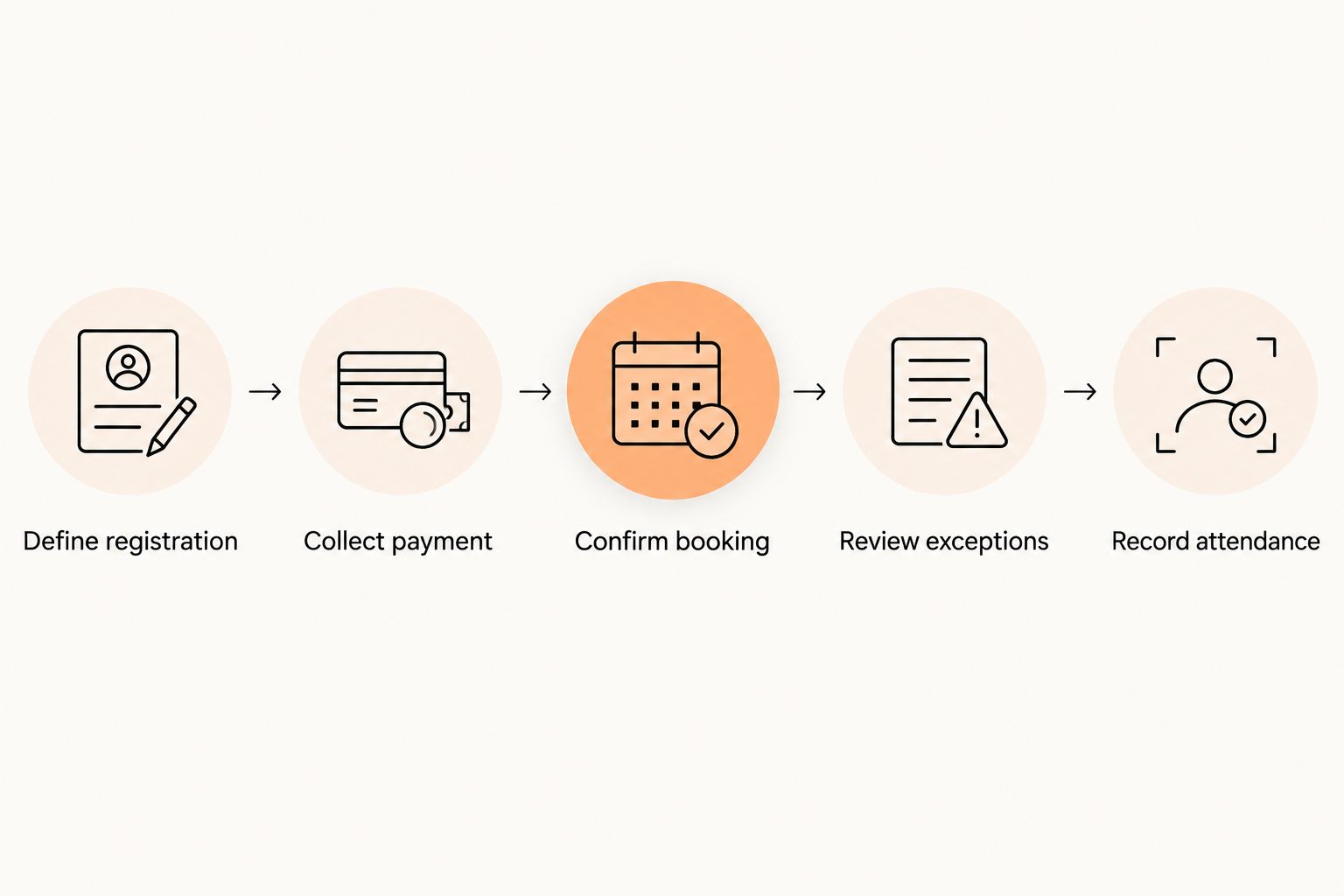
Run this sequence before opening your 2026 seminar bookings. Use the payment provider's documented test process where available, and follow its instructions rather than creating unnecessary live charges.
Why seminar payment automation varies
The right workflow depends on how you sell and administer the event. These are requirements to investigate, not features to assume exist in your current subscription.
- Member or guest registration. Visiting students need an event booking without automatically being treated as recurring members.
- Payer and attendee identity. A parent can pay while a child attends; keep both roles visible.
- Booking confirmation rules. Decide whether payment is required before a place becomes confirmed.
- Cancellation handling. A canceled booking and a refunded payment need connected but distinct records.
- Attendance handoff. The instructor needs the current event list, including any unresolved exceptions.
- Accounting handoff. Payment collection, payout reporting, and seminar income classification require separate checks.
Do not accept a feature list as proof of the full process. Ask the vendor to demonstrate your booking scenario from start to finish. A useful demonstration ends with the attendee list and the financial record agreeing.
What should you test before opening registration?
Use 4 test scenarios for your 2026 launch review. These are a recommended acceptance checklist, not a performance benchmark. Record the expected outcome before each test so the demonstration has a clear pass condition.
Successful payment
Register an attendee through the intended route and complete the supported payment test. Check that the correct person appears on the seminar list and the transaction belongs to the correct event. Inspect the confirmation message for the same details.
Then check whether an administrator can find the booking from the attendee record. A payment receipt alone is not proof that the attendance workflow works.
Failed payment
Use the provider's documented failure-testing method. Check that the booking remains distinguishable from a paid, confirmed place. Confirm where the responsible staff member sees the unresolved transaction.
Ask how a later successful payment updates the original booking. The goal is one usable attendee record, not duplicate registrations created during repeated attempts.
Cancellation and refund
Cancel the test booking and inspect the booking status separately from the transaction status. Verify whether refunding requires approval, a separate action, or both. Do not infer refund behavior from a cancellation button.
Check the attendance list again after the change. It should reflect your cancellation decision rather than leave the instructor working from an outdated export.
Guest or family booking
Test the registration type most likely to expose an identity mismatch. Use a guest attendee or a parent paying for a child, according to your event. Check who receives the confirmation and whose name appears for attendance.
This test is particularly useful for multi-discipline academies. A person registering for a karate workshop should not be assigned to a different class or membership merely because they already exist in your system.
Can you charge existing members for a seminar automatically?
Existing-member seminar charging requires an event charge and an authorized payment process; a stored member record is not enough. Ask the vendor to show how the attendee approves the charge and how the payment links to the seminar.
Keep recurring dues unchanged unless you deliberately intend to change the membership arrangement. A seminar purchase should remain identifiable when you review the member's account later.
Can guests pay without becoming members?
Guest payment requires a registration route that does not automatically create an unwanted recurring membership. Verify that distinction in the demonstration. Also check whether the guest can receive a confirmation and appear on the attendance list.
For an open BJJ seminar or visiting Muay Thai coach, this is an evaluation question to resolve before promotion starts. Do not advertise a guest checkout route until you have checked it yourself.
Can cancellations trigger automatic refunds?
Automatic refunds require an explicit connection between the cancellation rule and the payment transaction. Cancellation alone does not establish that a refund has been issued. Verify the transaction record and the booking record separately.
Keep owner approval where the refund decision requires judgment. An automated administrative step should not silently replace the policy you communicated to attendees.
Where MatPilot fits
MatPilot is best for martial arts owners who need member billing, scheduling, attendance, and belt grading together. Those are stated parts of its gym management software. Stripe billing and Xero sync are relevant to evaluating how gym payments connect to administration.
For this 2026 seminar decision, evaluate MatPilot against the same event-specific checklist. General billing support does not establish dedicated seminar checkout, guest ticketing, automatic event refunds, or event-level accounting. Require a demonstration before making any of those capabilities part of your plan.
FAQ
Can martial arts software automate seminar payments without automating all gym billing?
Seminar payment automation can be evaluated separately from recurring membership billing. Check that the event has its own registration, transaction tracking, and confirmation process before changing your wider billing setup.
Does Stripe billing mean gym software includes seminar registration?
Stripe billing alone does not establish seminar registration support. Ask the gym software vendor to demonstrate the connection between checkout, the seminar booking, and the attendance list.
Can a parent pay for a child's martial arts seminar?
A suitable registration workflow records the parent as payer and the child as attendee. Test the confirmation and attendance list to ensure the child's name remains attached to the booking.
Should an unpaid registration reserve a seminar place?
An unpaid registration should reserve a place only if that matches your stated booking rule. Define the rule before registration opens and check how unresolved bookings appear to staff.
Can seminar payments sync with accounting software?
Seminar accounting sync depends on the payment integration and how event transactions are identified. Verify the transaction mapping and reconciliation process rather than assuming every gym payment is classified correctly.
What should I ask before choosing seminar payment software?
Ask for a demonstration of successful payment, failed payment, cancellation, and guest or family registration. Inspect the attendee record, transaction status, and instructor's list in each scenario.
One last thing
Test the exception before you publish the registration link. A successful checkout proves that money can move. A failed-payment test shows whether your staff can tell who still needs help without admitting an unpaid booking by mistake.
Write down who owns that exception. The software process is unfinished until a named person knows what to review and what action to take.