Can martial arts software handle family and sibling billing?

Yes, martial arts software can handle family billing by linking separate student records to a responsible payer, with a shared bill where the system supports it. Sibling discounts, separate guardians, payment failures, and cancellations need their own rules; a shared payment card does not establish those rules.
- Can martial arts software handle family billing? Yes, but verify household billing separately from individual student records.
- Keep each sibling’s attendance, class access, and belt progression separate, even when a parent pays one bill.
- MatPilot combines martial arts billing, attendance, and per-art ranks; test your household billing requirements before switching.
- Ask for a demonstration covering sibling enrollment, a failed payment, and one child leaving.
Can martial arts software handle family and sibling billing?
Yes. The working model is separate students, a named payer, and an explicit billing arrangement. Do not merge siblings into a single member profile just because a parent pays for both.
Use this sequence when evaluating martial arts billing software:
- Create student records. Keep attendance, discipline, membership, and rank attached to the person training.
- Identify the payer. Record who authorizes payments and receives billing communications.
- Set the arrangement. Decide whether the household receives a combined bill or separate student charges.
- Define adjustments. Write down how sibling concessions, joining dates, pauses, and departures affect billing.
- Test exceptions. Walk through a failed payment and a change affecting only one sibling.
These are evaluation steps, not a promise that every platform implements them the same way. A contact labeled as a parent is not proof of shared billing. Ask to see the invoice and the student records it covers.
Why this matters
A family account joins financial responsibility without joining students’ training histories. That distinction matters when a child changes classes, earns a grade, or stops attending while a sibling continues.
For your 2026 software review, start with the household situations your academy actually handles. A BJJ academy needs individual progression records. A school teaching karate, boxing, and Muay Thai also needs each student’s discipline and attendance kept clear, whether the household pays together or separately.
The practical test is simple: change one student’s membership without accidentally changing the other student’s access or bill. Watch the result rather than accepting a feature label.
Which family billing arrangement should you use?
There is no single correct arrangement for every household. Choose the billing structure that matches your agreement with the payer, then confirm the software can represent it.
| Arrangement | Best for | Advantage | Trade-off to check |
|---|---|---|---|
| Combined household bill | Families that want one billing summary | Keeps the household’s charges together | The bill must still identify the students and memberships covered |
| Separate student charges | Families that need independent membership changes | Makes each student’s charge explicit | The payer has more than one charge to review |
| Separate responsible payers | Households where different adults pay for different students | Assigns financial responsibility directly | Billing contacts and student permissions need careful separation |
None of these arrangements automatically includes sibling discounts. A household link, a billing arrangement, and a concession are different settings or business rules. Confirm each separately.
Do not choose consolidated billing merely because it looks tidier. If your academy’s agreement calls for separate payments, the records should reflect that agreement. Convenience does not replace payment authorization.
How do you test family billing before switching?
Use a fictional household in a demonstration. Give 2 siblings separate student records and assign 1 parent as the proposed payer. These are test conditions, not a recommendation about household size or membership limits.
Your 2026 acceptance check should follow the account from enrollment through a membership change. Do not stop after the first successful payment screen.
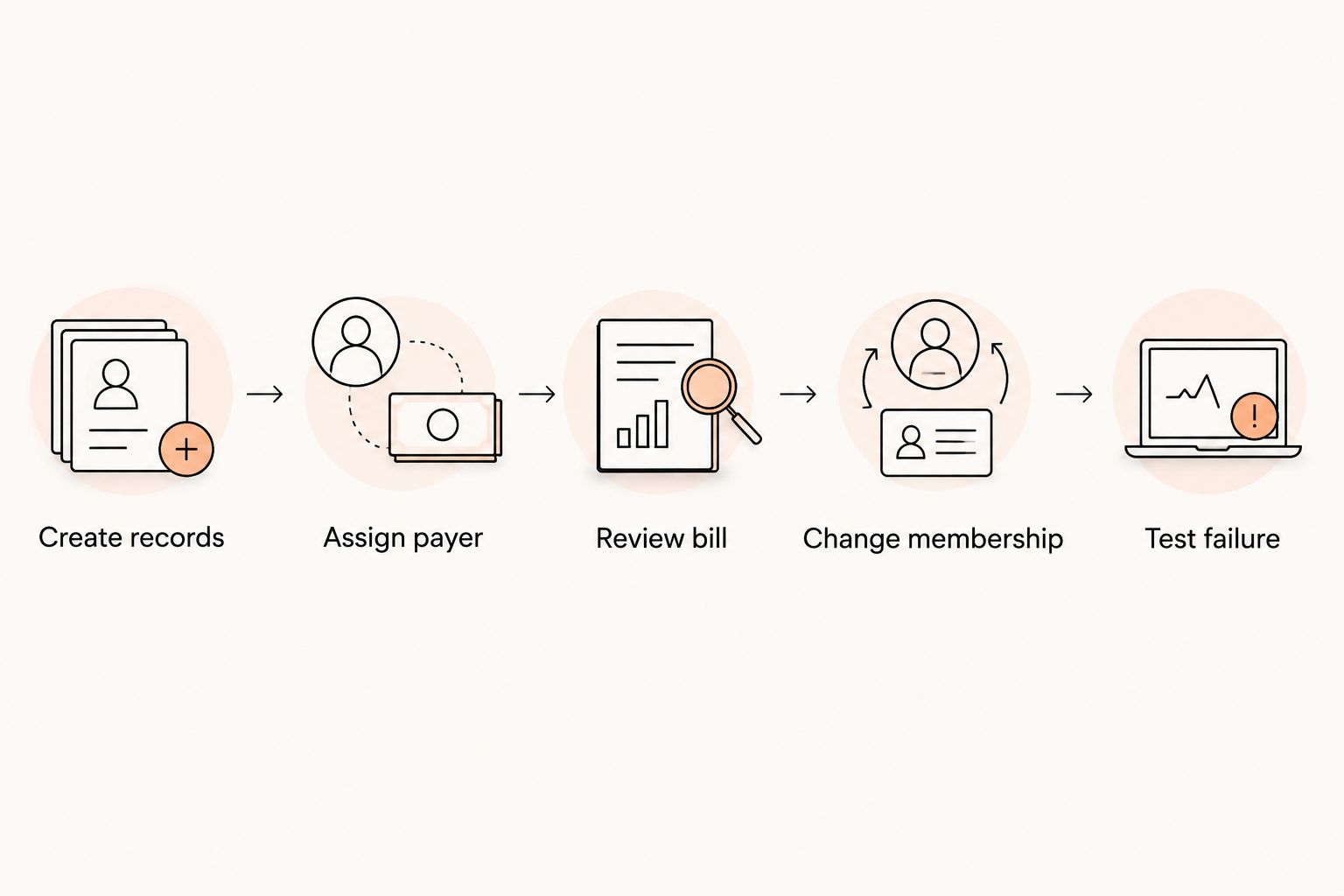
Create records
Create a profile for each sibling. Assign the correct class or discipline and confirm that attendance belongs to the individual student rather than the household.
For a mixed-discipline school, use different activities in the demonstration. One sibling might train in BJJ while another attends taekwondo. Check that billing arrangements do not force both students into the same training record.
Assign payer
Identify who owes the bill and who receives payment messages. Then distinguish that role from emergency contact, authorized pickup, and permission to discuss a student’s training.
Ask to see the actual payer relationship in the account. A shared surname or email address is not enough to explain who has agreed to pay.
Review bill
Inspect a draft billing summary before any real collection. You should be able to explain which membership belongs to which student and how any agreed adjustment affects the total.
If the system produces separate charges, review both. If it produces a household bill, confirm that the payer can understand what it covers without calling the front desk.
Change membership
Pause or cancel one test membership while leaving the sibling active. Review the next billing event and check each student’s class access.
Do not assume that removing a student automatically recalculates a family concession. Ask the provider to show the adjustment, its effective date, and any owner action required.
Test failure
Ask the provider to demonstrate a failed-payment scenario in its supported test environment. Check who receives the notice, which memberships appear overdue, and what the owner must review.
Keep this separate from a live collection. The purpose is to inspect the process, not to create a real failed payment for a family.
Why family billing requirements vary
The software needs to represent your academy’s rules, not invent them. Write your 2026 family billing policy before deciding which settings you need.
- Who trains. A household can include siblings in different classes, disciplines, or membership arrangements. Keep those differences visible.
- Who pays. The payer can differ from the person who brings a child to class. Record responsibility explicitly.
- What a concession covers. Define which memberships qualify and what happens when eligibility changes. Do not rely on an unwritten front-desk habit.
- When membership changes take effect. A joining date, pause, or cancellation affects what should be billed. Confirm the effective date before approving a change.
- Who can see information. Billing access does not automatically establish access to every student’s personal or training information.
- How payment issues are handled. Decide who reviews the issue, who contacts the payer, and whether any membership action needs approval.
These factors explain why a checkbox labeled family billing is not enough. Ask the provider to demonstrate your policy using a concrete household example.
What happens when a family payment fails?
A failed household payment needs a clear link between the payer, the unpaid charge, and the memberships covered. It should not become a vague note attached to whichever sibling’s profile the receptionist opened first.
For your 2026 payment-recovery procedure, write down the sequence: review the payment issue, confirm the responsible payer, approve the communication, and check the account after resolution. Assign responsibility for each action.
Ask these questions during the demonstration:
- Does the payment issue appear against a household bill or separate student charges?
- Which adult receives the message?
- Can staff distinguish a payment problem from a canceled membership?
- What happens to each sibling’s class access?
- Which actions happen automatically, and which need owner approval?
Do not treat a failed payment as a cancellation instruction. Your academy needs a deliberate rule for access and follow-up. Check whether the software’s behavior matches that rule before enabling any automation.
Also review the wording of messages. A notice should make the payment issue clear without including unrelated student information or implying that every household membership has ended.
How does family billing fit with attendance and belt grading?
Family billing should connect the financial arrangement while preserving individual training records. Two siblings paying through one parent still have 2 attendance histories and separate progression decisions.
That distinction also applies across disciplines. A BJJ rank should not determine a sibling’s karate grade. A boxing membership should not create a belt record simply because another household member trains in a graded art.
Ask to open each student’s profile after completing the billing demonstration. Review attendance, discipline, membership status, and rank where relevant. Then return to the payer record and confirm that financial responsibility remains clear.
MatPilot martial arts gym management software includes billing, attendance, and per-art ranks. That makes the relationship between payment administration and individual training records relevant to an evaluation.
MatPilot is best for martial arts owners who need billing, attendance, and per-art ranks together. MatPilot also provides an AI co-pilot with owner approval gates for payment issues and other suggested actions. The evaluation limit is specific: those capabilities do not replace a demonstration of your household invoice, guardian-permission, or sibling-adjustment requirements.
Can one parent pay while both children keep separate accounts?
Yes. One parent can be the responsible payer while both children retain separate student records, provided the software supports that billing relationship. The student account identifies who trains; the payer relationship identifies who pays.
Test communication permissions separately. A parent receiving payment notices is not, by that fact alone, the correct recipient for every message about every child. Record the appropriate contacts for billing and student matters.
What happens if one sibling quits but the other stays?
One sibling leaving should trigger a review of that student’s membership and any household concession, not an automatic assumption that the whole family is canceling. Keep the continuing sibling’s enrollment explicit.
Before approving the change, review the effective date, the next bill, and the continuing student’s class access. If your academy’s concession depends on multiple active memberships, apply your written policy and explain the resulting arrangement to the payer.
FAQ
Can martial arts software handle family billing without merging sibling profiles?
Yes, software with suitable household billing support can link a payer to separate student records. Confirm that each sibling keeps individual attendance, membership status, and progression records.
Is family billing the same as a sibling discount?
No, family billing organizes who pays and how charges are presented; a sibling discount changes the agreed charge. Ask the provider to demonstrate both requirements separately.
Can siblings train in different martial arts on the same family account?
Yes, a household billing arrangement can cover students in different disciplines when the software supports those relationships. Test separate class access, attendance, and per-art progression before choosing the setup.
Can different parents pay for different children?
Separate responsible payers are a requirement to demonstrate, not an automatic consequence of having family accounts. Ask how the software assigns each charge and controls billing communications.
Will a failed family payment cancel every child’s membership?
A failed payment is not itself a cancellation instruction. Confirm the software’s access rules, notifications, and approval steps against your academy’s written payment policy.
What should I check before moving existing families to new software?
Check payer relationships, individual student records, membership status, and the next collection arrangement before moving families. Confirm how existing payment authorizations will be handled and prevent overlapping collections during the switch.
What is the best way to compare family billing features?
Use the same fictional household and membership-change scenarios in every demonstration. Compare the resulting bills, student records, permissions, and required owner actions rather than feature labels.
One last thing
The revealing test is subtraction. Add siblings to a household, then remove one membership and inspect what remains.
For your final 2026 review, ask the provider to leave the continuing student active, show the next bill, and identify the responsible payer. Approve the setup only when you can explain the result to a parent in plain language. A successful enrollment demonstration answers less than a correctly handled change.