Can one instructor manage billing and belts without software?

Yes, one instructor can manage billing and belts without dedicated gym software if payment records, attendance, and promotion history stay current. The hidden workload is checking those records against each other and following up when something does not match. Keep the manual system only while you can explain every outstanding payment and every promotion decision from written records, not memory.
- Can one instructor manage billing and belts without software? Yes, with current payment, attendance, and promotion records.
- Manual billing needs payment reconciliation and a written follow-up list; sending reminders alone is not enough.
- Attendance supports belt grading, but the instructor still assesses technical readiness.
- MatPilot suits martial arts owners who want billing, attendance, and per-art ranks managed together.
Why this matters
When you teach and run the academy, the same person handles payment questions, attendance corrections, and grading decisions. A missed update leaves you checking bank transactions or old messages instead of using a reliable record.
For your 2026 operating plan, assess the work rather than choosing a member-count threshold. The useful question is whether your records stay accurate during a normal teaching week. The guide to software for solo instructors covers the broader management decision; this page focuses on keeping billing and belts under control yourself.
Can one instructor manage billing and belts without software?
Yes. You need a repeatable process that separates what a member owes, whether they attended, and what they have achieved. A spreadsheet still counts as software, so distinguish running without a dedicated gym platform from running entirely on paper.
Use this sequence whether your records live in a notebook or a spreadsheet:
- Create the member record. Give each student a consistent identifier and record the responsible payer where relevant.
- Record the obligation. Write down what is due and when, separately from payments received.
- Confirm the payment. Match the actual transaction to the correct obligation. Do not mark a promise to pay as money received.
- Capture attendance. Record the student, class date, and discipline while the session is still fresh.
- Record progression. Keep the current rank, promotion date, and assessment notes together.
- Review exceptions. Resolve missing payments, unexplained attendance gaps, and incomplete grading entries.
Manual administration works when the records explain the situation without requiring you to remember it. If a parent asks about a payment or a student asks about their last grading, you should be able to answer from the record.
Paper records or spreadsheets: which fits your work?
Paper and spreadsheets can both hold the information you need. Neither replaces the work of checking that information. Choose the format you will update consistently, including after a busy class.
| Approach | Best for | Practical advantage | Main limitation |
|---|---|---|---|
| Paper ledger and attendance register | An instructor who wants records without a device | You can enter information directly by hand | Finding and comparing entries requires manual searching |
| Spreadsheet workbook | An instructor comfortable maintaining structured tables | You can sort records and calculate balances with formulas | You must maintain the structure, formulas, and updates |
| Dedicated gym platform | An owner who wants connected management records | Relevant records can sit within the same management system | Setup and ongoing data checks still require attention |
For paper, use clearly labeled sections rather than loose notes. For a spreadsheet, separate member details, billing, attendance, and progression into distinct tables. Repeating a student's name across documents is not a substitute for using the same identifier.
Do not choose a spreadsheet simply because it looks more organized. An incomplete workbook gives you the same unanswered questions as an incomplete notebook. The better format is the one you can keep accurate and retrieve when needed.
Build a manual billing routine you can finish
Start your 2026 billing routine with a ledger that distinguishes amounts due from transactions received. Those are different events. Combining them into a single paid-or-unpaid tick leaves too little detail when someone questions a balance.
Record the obligation
For each billing entry, record the member or household reference, billing period, amount due, and due date. If someone pauses, changes their arrangement, or leaves, record the agreed change and its effective date.
Keep the original entry readable. A corrected amount should have an explanation rather than silently replacing the previous figure. That gives you a record of why the balance changed.
Match the payment
Check the transaction record before marking an obligation as settled. Record the payment date and a reference that lets you find the transaction again. For a partial payment, preserve the outstanding balance.
Where a parent pays for siblings, identify which students the payment covers. Do not assume a transaction bearing a parent's name belongs to the first child you find in the register.
Close the follow-up loop
Keep a separate list of unresolved payments. Record the question, the contact made, and the next action. A sent reminder is an action, not a resolved balance.
Schedule 1 billing review per week as a starting routine, then add checks where your collection schedule requires them. This is a suggested operating habit, not a benchmark. Finish each review with a named next action for every unresolved entry.
Keep attendance separate from promotion decisions
Attendance tells you who trained. It does not, by itself, tell you whether a student demonstrated the required technique, judgment, or control. Keep those records connected without treating them as interchangeable.
Use 1 attendance entry per student per class as your recording rule. Include the date and discipline so a mixed timetable does not turn into an undifferentiated total. A boxing session and a BJJ session should remain identifiable as different training activity.
For grading, record the discipline, previous rank, new rank, promotion date, and the instructor's assessment notes. Where your syllabus uses criteria, record the relevant evidence. Do not replace assessment notes with a bare eligible label.
Your 2026 promotion register should preserve history rather than overwrite it. A current belt field answers where a student is now; dated entries explain how they got there. The guide to tracking a student's belt history covers that distinction in more detail.
For boxing, kickboxing, or Muay Thai programs without belt grading, keep the progression measures your academy actually uses. Do not invent a belt structure to make the records look consistent. The same principle applies: record training activity separately from assessed progress.
Use a review process that catches unfinished work
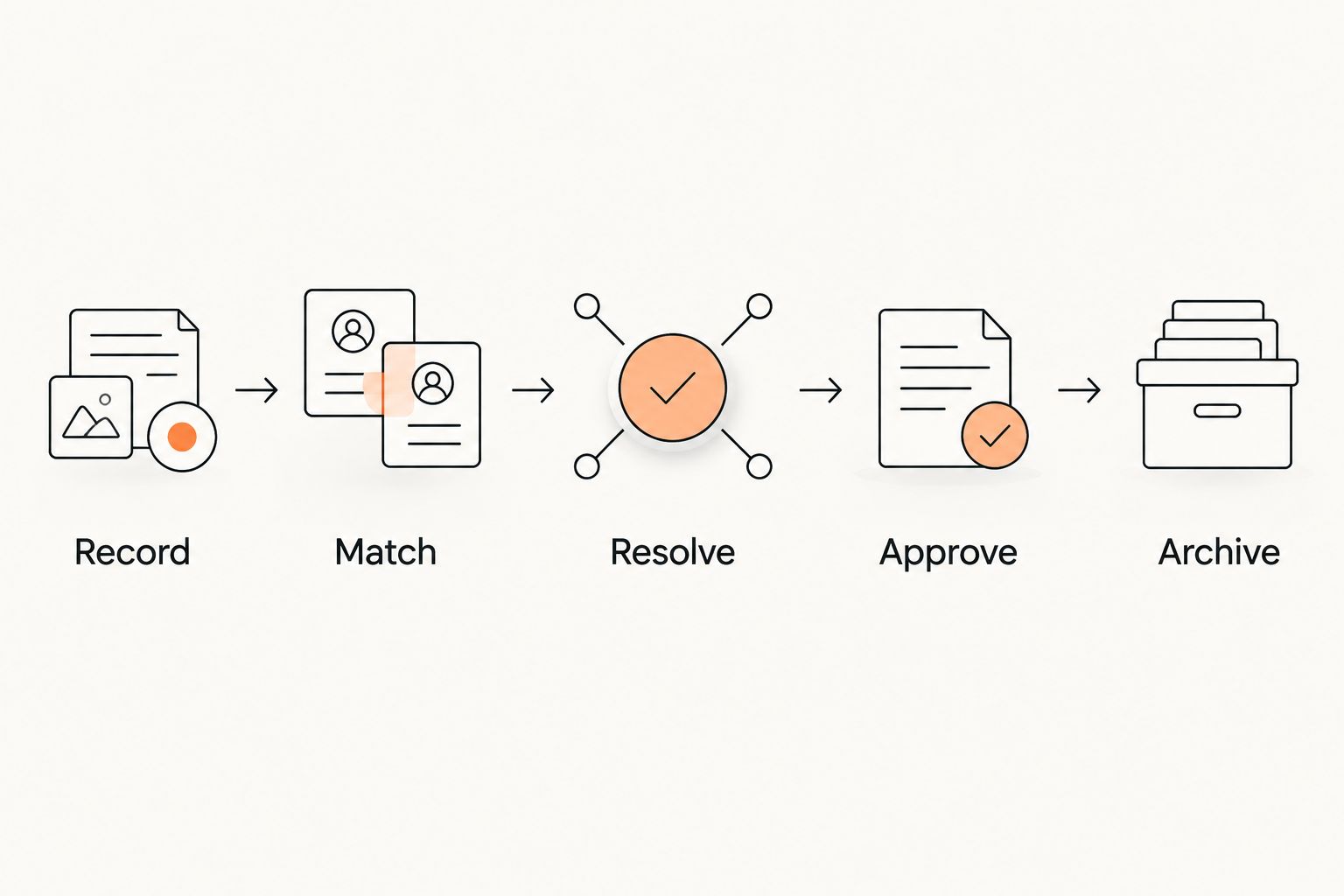
A manual system needs a closing routine. Otherwise, the register records what happened while the unresolved work remains in your head. Use the same sequence whenever you review your records.
- Record. Enter payments, attendance, and assessment notes in their correct places.
- Match. Compare payment entries with transaction records and attendance with the class register.
- Resolve. Investigate missing details, disputed balances, and unclear entries.
- Approve. Make the payment adjustment or grading decision yourself.
- Archive. Preserve the completed record and keep the next action visible where work remains.
The order matters. You should not approve a promotion from incomplete attendance information or close a billing query before checking the transaction. Record the evidence first; decide after the check.
Keep your review list separate from historical records. The list tells you what still needs attention; the history tells you what happened. Crossing an item off the list should not erase the supporting evidence.
As a practical check, choose 1 member record per review and trace it through billing, attendance, and progression. This is a suggested spot check, not proof that every record is correct. Investigate any mismatch before changing the system around it.
Why the workload varies
The work depends on the arrangements you manage, not just how many names appear on your register. These factors change what you need to record and check:
- Family payments. A household payment needs to be matched to the students and obligations it covers.
- Different payment dates. Separate due dates require separate checks rather than a single end-of-month assumption.
- Multiple disciplines. Attendance and ranks need an art attached to them so the histories remain distinct.
- Membership changes. Pauses, departures, and changed arrangements need an effective date and a written decision.
- Grading criteria. Technical assessments need evidence beyond the attendance total.
- Follow-up work. Unresolved payments and incomplete records require another action after the initial entry.
Use these factors to judge your own process. A straightforward register can remain manageable, while overlapping family payments and discipline-specific records require more cross-checking. Do not use a universal student limit as the decision rule.
When does dedicated gym software become the better choice?
Consider dedicated software when keeping records aligned becomes a recurring task you cannot finish reliably. The trigger is unfinished work: balances you cannot explain, attendance you reconstruct later, or promotion histories scattered across messages.
MatPilot is best for martial arts owners who want billing, attendance, and per-art ranks managed together. It provides member management, scheduling, Stripe billing, belt grading, and Xero sync, with web, iOS, and Android access. Those functions address connected academy administration rather than belt tracking alone.
| Approach | Best for | What it provides | What you still own |
|---|---|---|---|
| Manual records | An instructor who can maintain and reconcile separate registers | Direct control over the recording format | Every entry, cross-check, follow-up, and correction |
| MatPilot | An owner who wants connected martial arts management | Members, attendance, billing, scheduling, and per-art ranks | Accurate setup, review of exceptions, and promotion judgment |
The trade-off is setup and continued review. You still need to check member details, opening balances, and rank histories rather than treating imported information as automatically correct. Software does not establish a student's technical readiness.
For a 2026 decision, compare the actual workflow you need with the work you currently leave unfinished. Do not switch merely to replace a notebook with a screen. Switch when connected records solve a defined administration problem.
Can I keep billing and belt records in the same spreadsheet?
Yes, you can keep them in the same workbook, but use separate tables linked by a consistent member identifier. Billing entries describe financial obligations and transactions; belt entries describe assessed progression.
Avoid a single row that contains only the latest payment and current belt. That layout hides history when you overwrite it. Keep dated entries so you can explain both a past balance and a past promotion.
Does attendance alone tell me when to promote a student?
No. Attendance is evidence of participation, not proof of technical readiness. Apply your academy's grading criteria and record the instructor's decision separately.
For students training across disciplines, review the relevant attendance history rather than the combined total. Keep BJJ, judo, karate, and any other rank systems distinct where your academy teaches them.
Should I fix my records before changing systems?
Yes. Resolve unclear balances, duplicate member entries, and uncertain rank dates before treating a new system as the definitive record. Mark genuinely unresolved items for investigation instead of filling gaps from memory.
Keep the previous records available during the change. Check opening balances and current ranks against them, then use the new system for ongoing work once you have confirmed the starting position.
FAQ
Can one instructor manage billing and belts without software?
Yes, one instructor can manage billing and belts without dedicated gym software when payment, attendance, and promotion records stay current. The instructor must also reconcile payments and resolve incomplete entries.
What's the simplest way to track martial arts payments manually?
Use a ledger that separates amounts due from payments received. Record the billing period, due date, payment reference, and remaining balance so you can explain each entry.
Can I track family payments without gym software?
Yes, you can track family payments manually by connecting the household payer to each student's obligation. Record which obligations each payment covers rather than relying on the payer's name alone.
Is a spreadsheet enough to track BJJ belts?
A spreadsheet can record BJJ belt history if it preserves dated promotion entries and assessment notes. A current-belt field alone does not preserve the student's progression history.
When should a solo martial arts instructor switch to gym software?
Consider switching when separate records repeatedly leave unresolved payments, missing attendance, or unclear promotion histories. Choose against those specific tasks rather than an arbitrary member-count threshold.
Does MatPilot replace the instructor's grading decision?
No. MatPilot provides per-art ranks and belt grading tools, but the instructor remains responsible for assessing readiness. Attendance and recorded progress support that decision rather than replace it.
One last thing
Before changing your 2026 administration setup, ask a narrower question: can you explain a selected student's balance and last promotion without opening old messages? Try it using only your official records.
If the answer is no, fix that missing connection first. The goal is not to eliminate every manual task. It is to stop important decisions from depending on your memory.