Does martial arts gym software work well on mobile?
Yes. Martial arts gym software works well on mobile when you can finish daily tasks—not just view a dashboard—from your phone. A native app or mobile browser is only the starting point; check attendance, schedules, payment issues, and rank records before deciding whether it fits your academy.
- Does martial arts gym software work well on mobile? Yes, when attendance, billing, and scheduling tasks work end to end.
- MatPilot offers martial arts gym management software on iOS, Android, and the web; test your exact owner workflows.
- Check staff permissions and approval controls before using a shared device.
- Treat offline access, notifications, and desktop feature parity as separate checks—not automatic benefits of an app.
Why this matters
You need to check a roster between classes, review a payment issue without opening a laptop, and find a student's rank before teaching. A screen that fits your phone does not prove that those jobs are practical.
MatPilot provides martial arts gym management software through native iOS and Android apps and the web. MatPilot is a fit for BJJ and multi-discipline academy owners who want mobile access alongside members, scheduling, billing, and per-art rank management. Test the exact actions you need rather than assuming every interface handles them identically.
For your 2026 evaluation, separate mobile access from mobile completion. Opening a member record is access. Finding the correct account, reviewing the issue, making an authorized change, and confirming the result is completion.
Does martial arts gym software work well on mobile?
Yes—judge mobile software by completed work, not by the presence of an app. Use these 5 checks during a demonstration. Ask to perform each action yourself on the phone you use at the academy.
| Mobile check | What you should demonstrate | What should stop approval |
|---|---|---|
| Attendance | Find the correct class, identify a student, and record attendance | You cannot tell whether the entry saved |
| Scheduling | Read the timetable and inspect the intended class | Similar class names leave you unsure which session you opened |
| Billing | Identify the member, payment issue, and permitted next action | You must guess which account or payment a screen refers to |
| Rank records | Find the student's rank in the correct martial art | Separate disciplines become difficult to distinguish |
| Owner control | Review a proposed action before authorizing it | A consequential change happens without the required review |
Do not accept a walkthrough that stops at the home screen. Start with a specific question: which student attended this class, which payment needs attention, or which martial art does this rank belong to?
Record where the task ends. If the answer is “finish this on desktop,” decide whether that interruption fits the job. A desktop handoff is a limitation, not necessarily a reason to reject the entire system.
Native app or mobile browser: which should you test?
Test both when both are offered. A native app is installed on your phone; a mobile browser opens the web interface. Neither label proves that the software supports your full workflow.
| Access method | Best for | Advantage to assess | Limitation to check |
|---|---|---|---|
| Native mobile app | Owners and instructors who want an installed phone interface | Whether recurring tasks are straightforward on the actual device | Whether the required actions exist in that app version |
| Mobile browser | Owners who want browser access without installing an app | Whether the web interface remains readable and usable on a phone | Whether tables, forms, and controls require awkward scrolling |
| Desktop browser | Work that benefits from a larger screen | Whether reviewing detailed records is easier with more visible context | Whether daily teaching tasks unnecessarily depend on returning to a computer |
Choose the interface that completes the job with clear confirmation. Do not choose solely because one option looks cleaner in a screenshot.
During a 2026 review, record the device, operating system, and interface used. A successful browser demonstration does not establish that the native app supports the same action. Keep the results separate.
Test attendance where you actually teach
Begin with 1 class rather than an entire timetable. Use a test record or a vendor-approved demonstration account, not a live member record that you might change accidentally.
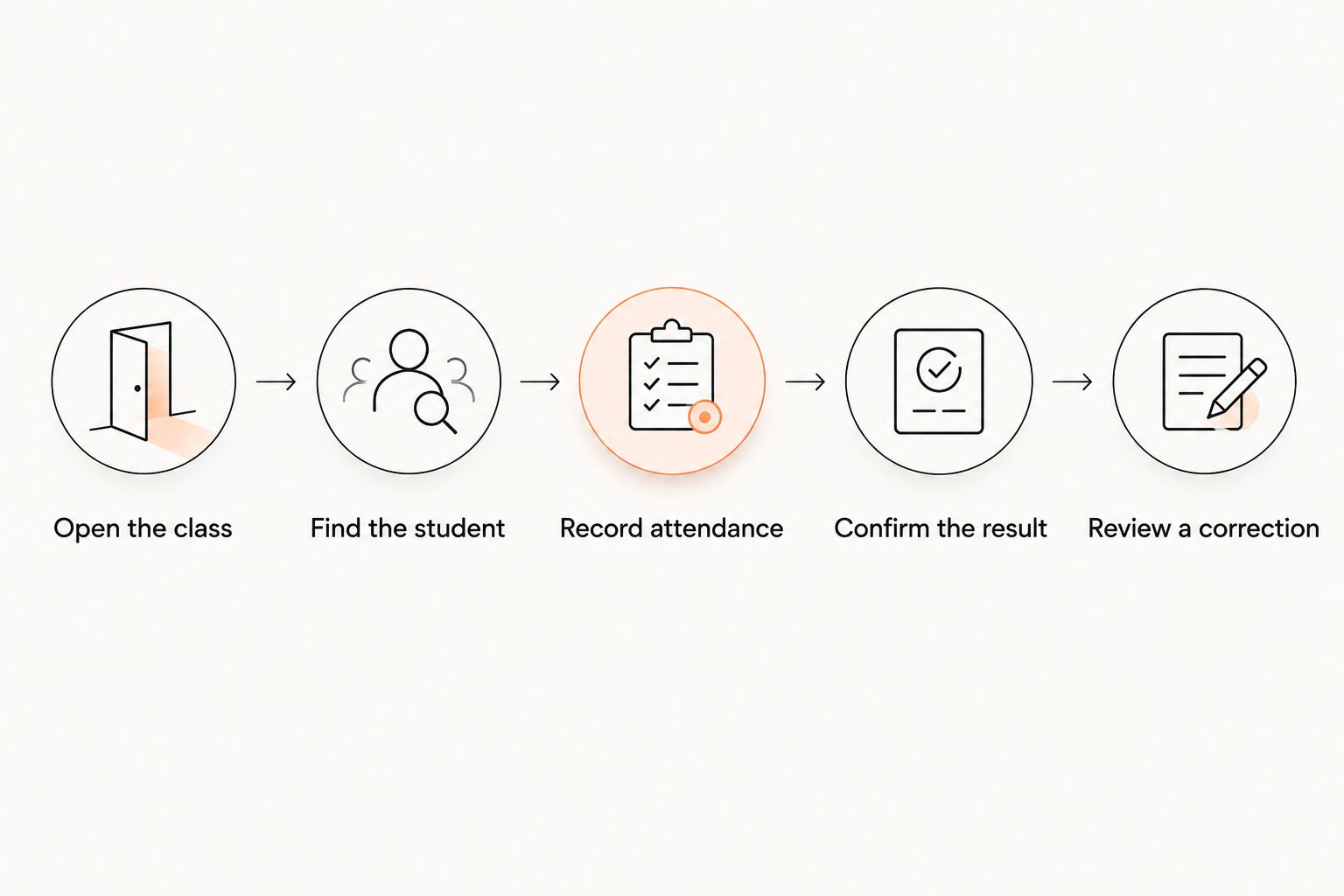
Follow this sequence:
- Open the class. Confirm the discipline, day, and session before touching the roster.
- Find the student. Check enough identifying information to distinguish similar names.
- Record attendance. Complete the action using the permissions an instructor would actually receive.
- Confirm the result. Leave the screen, return, and check that the record remains correct.
- Review a correction. Ask how an authorized person fixes an accidental entry without obscuring what happened.
A successful test produces a clear attendance record for the intended person and session. A button changing color is not enough evidence on its own.
Also test the correction process from the staff account. If only an owner can correct an entry, document that handoff so instructors know what to do during a busy session.
Test schedules and ranks without mixing disciplines
A multi-discipline academy needs more than a readable calendar. You need to distinguish a BJJ session from boxing or Muay Thai, and a children's class from an adult class, wherever those divisions apply.
On your phone, inspect the class name, day, time, and instructor information your academy needs. Then open another session with a similar name. The test is whether you can identify the correct session without relying on memory.
For grading, inspect a student's record in each relevant martial art. BJJ, judo, karate, and taekwondo ranks need discipline-specific context. For boxing and Muay Thai programs, test the attendance and progression records your academy actually uses; do not impose a belt structure just to fit the software.
Attendance supports a grading review; it does not replace your assessment of readiness. Ask how you review the evidence and who authorizes a rank change. Do not assume an attendance total should trigger a promotion.
In your 2026 checklist, keep “find the current rank” separate from “approve a promotion.” Reading a record and changing it require different levels of responsibility.
Test billing without making a live charge
Use a demonstration payment issue to inspect the mobile workflow. You should be able to identify the person responsible for payment, understand the issue shown, and determine the next permitted action.
For a family account, check the relationship between the payer and the students before approving anything. A child's attendance record and a guardian's payment responsibility answer different questions. Your evaluation should show how you distinguish them.
Ask the vendor to demonstrate the relevant action safely. Do not initiate a real charge, refund, cancellation, or payment change merely to see whether a phone button works.
Check these details:
- The account name remains visible when you review the issue.
- The payment status is understandable without guessing.
- Any proposed action states what will happen before you confirm it.
- The result is visible after the action completes.
- Staff permissions prevent an instructor from taking actions outside their role.
Mobile billing is useful when you can investigate an issue accurately. It is not useful if a small screen hides the information needed to make the decision.
Why mobile usability varies
Mobile usability depends on the work, the interface, and the account using it. These are the factors to include in your evaluation—not assumptions about any particular vendor:
- Task coverage. Viewing a record and editing it are separate capabilities. Verify both where needed.
- Screen layout. Check whether names, dates, and confirmation controls remain visible together.
- Account permissions. Repeat the task as an instructor, not only as an owner with broader access.
- Connection behavior. Test what happens when connectivity drops before assuming offline access exists.
- Record complexity. Include a multi-art student or family relationship when those reflect your academy.
- Approval requirements. Confirm who can authorize billing changes, promotions, and other consequential actions.
Use 2 devices if your academy relies on both a personal phone and a shared tablet. That is a practical test choice, not a performance benchmark. Give each device its own result rather than declaring the whole system “mobile-friendly” after one successful demonstration.
What should stay under owner control?
Keep consequential actions behind the appropriate review. A phone should make a decision easier to inspect, not make an accidental approval easier to trigger.
MatPilot includes an AI co-pilot with owner approval gates for proposed actions involving areas such as at-risk members, trial follow-ups, promotion readiness, and payment issues. That approval model is relevant to mobile use: the owner needs to understand the proposal before authorizing it.
The approval requirement also creates a responsibility. You still need to read the proposal, check the person and context, and decide whether to proceed. Do not evaluate an assistant only by how quickly it produces a suggestion.
For a 2026 demonstration, ask to see the review process on the phone itself. Verify which proposed actions you can inspect and approve there rather than assuming web and app behavior are identical.
Can you run the whole academy from a phone?
Do not make phone-only operation the buying requirement unless that is how you intend to work. Make your daily tasks the requirement instead.
Attendance checks and quick record reviews are different from reviewing a large migration file or inspecting detailed account information. Test those larger jobs separately. Keep desktop access in the process when it gives you clearer context and fewer opportunities for error.
Mobile-first does not have to mean desktop-free. Your acceptance test should identify which jobs finish on a phone and which require a deliberate handoff.
Does a native app work without internet?
A native app does not establish offline support. Verify offline behavior directly before depending on it for attendance or any other saved change.
Ask what remains readable, whether changes can be entered, and what happens when connectivity returns. If the vendor cannot demonstrate the required behavior, keep it out of your operating procedure.
Should instructors use their own phones?
Instructors should use accounts with permissions appropriate to their work, whether the device is personal or academy-owned. Test the instructor account before deciding which device arrangement to use.
Include sign-out and access removal in the test. A shared tablet also needs a clear access procedure; a larger screen does not solve account security.
FAQ
Does martial arts gym software work well on mobile?
Yes, when you can complete attendance, scheduling, billing review, and relevant rank tasks from your phone. Test saved results and permissions rather than judging only the dashboard.
Is a native gym app better than using a browser?
A native app is not automatically better than a mobile browser. Compare the same task in each interface and check where each one requires a desktop handoff.
Can I check students in from my phone?
Confirm phone-based attendance entry with a complete demonstration in the software you are considering. Open the intended class, record attendance for a test student, and return to verify the saved result.
Will a martial arts gym app work without Wi-Fi?
An app's offline behavior requires a separate test. Ask what happens without connectivity and how any permitted changes are handled when the connection returns.
Can instructors manage attendance without accessing billing?
Verify that separation using an instructor account with the intended permissions. An owner-account demonstration does not prove that staff access is configured correctly.
Does MatPilot have iPhone and Android apps?
MatPilot provides native iOS and Android apps as well as web access for its martial arts gym management software. Verify your required workflows in the specific interface you plan to use.
What should I test before moving my academy to mobile software?
Test a class attendance entry, a schedule lookup, a payment-issue review, and the rank records relevant to your disciplines. Include staff permissions, confirmation of saved changes, and any necessary desktop handoffs.
One last thing
The most revealing mobile test starts after the action appears finished. Leave the screen, return, and inspect the record again.
For your 2026 buying decision, require evidence of the saved result. That check distinguishes a convincing demonstration from a workflow your academy can actually use.