Gym software for boxing gyms: complete 2026 guide

Boxing gym management software is a system for organizing members, classes, attendance, and payments with the aim of keeping your club running without scattered records. This 2026 guide explains how to choose and configure it for boxing programs, where recreational training, youth classes, and competition preparation need distinct workflows.
- Choose gym management software for boxing gyms around scheduling, attendance, billing, and trial follow-ups—not belt tracking.
- MatPilot fits boxing owners seeking martial-arts member management, class scheduling, and billing in one system.
- Test youth classes, payer records, failed-payment handling, and data transfers before switching systems.
- Keep administrative attendance separate from coaching decisions about sparring and competition readiness.
Why gym management software matters for boxing gyms
A boxing club needs to distinguish the person training, the person paying, and the session attended. Those records answer different questions. A parent paying for a youth member is not the same as an adult buying their own membership.
Your timetable also needs meaningful class names. Boxing fundamentals, youth boxing, conditioning, and competition-team sessions describe different commitments. If your club offers Muay Thai or MMA alongside boxing, record the discipline rather than putting every session under a generic martial arts label.
Start with the timetable before choosing a system. The martial arts class scheduling software guide provides a separate starting point for evaluating that workflow.
The useful system is the one that lets you trace a member from enrollment to attendance to payment. A booking alone does not establish attendance. An attendance record does not establish payment. A payment does not establish permission to join a particular coached session.
For your 2026 selection, write down where those distinctions currently disappear. Use actual administrative tasks as your evaluation criteria, not a feature list detached from how your boxing club operates.
How to choose and configure your system in 2026
1. Map your boxing programs before importing members
Start with a spreadsheet. List the programs you actually teach, the people eligible to attend, and the membership arrangements associated with them. Keep this exercise operational. You are describing your club, not redesigning it to match a vendor's categories.
Separate training goals from administrative status. A competitive boxer can still have an overdue payment. A recreational member can attend regularly without joining your competition team. Neither label should overwrite the other.
For youth boxing, distinguish the athlete from the responsible adult. Decide which information belongs to the member record and which belongs to the payer or contact record. Then test whether a candidate system can represent that arrangement without duplicate accounts.
Your program map becomes the acceptance checklist for the software demonstration. Ask the vendor to show your situations rather than walking through a prepared presentation.
- List each boxing program using the name your coaches use.
- Identify youth, adult, recreational, and competition groups where applicable.
- Record the responsible payer separately from the athlete.
- Mark which memberships include each program.
- Write down exceptions that require owner approval.
2. Build a timetable that matches coached sessions
Create a Monday-through-Sunday timetable manually first. Include the session name, coach, location, and intended group. If two programs share the training area, make the arrangement explicit rather than relying on staff memory.
Decide whether each session needs advance booking or attendance recording only. Do not introduce booking requirements simply because a system offers them. The workflow should match the way you run the class.
For sparring or competition-team sessions, keep coach approval distinct from ordinary enrollment. Test any access rule you need before treating it as supported. A class label is not proof that the software enforces eligibility.
Also test timetable changes. Move a session, replace a coach, and cancel a class in a demonstration. Check what staff and members see afterward. A correct recurring schedule is only the starting point; changes need an equally clear process.
- Use distinct names for fundamentals, youth boxing, and team sessions.
- Assign the responsible coach to each scheduled class.
- Record shared-space conflicts before publishing the timetable.
- Decide which sessions need reservations.
- Test a cancellation and a coach substitution.
3. Connect member records with actual attendance
Use a paper register or spreadsheet to establish your attendance process. Record who attended, which class they joined, and who confirmed the record. Keep absent bookings separate from completed visits.
Build 3 sample member records for your evaluation: an adult recreational boxer, a youth boxer with a separate payer, and a member training across boxing and another discipline. These are test cases, not a proposed limit on your membership structure.
MatPilot provides member management, class scheduling, attendance, and billing for martial arts gyms, with web, iOS, and Android access. That makes it a candidate for replacing separate administrative records. Test the sample members against your own workflows before choosing it.
MatPilot is best for boxing owners who need martial-arts member management, class scheduling, and billing together. Its belt-grading functions are not a substitute for boxing-specific coaching records. Give those records a separate evaluation.
- Confirm that a booking and an attended class remain distinguishable.
- Check that coaches can find the correct class register.
- Test the athlete-and-payer arrangement using sample records.
- Review attendance separately for each discipline.
- Assign someone to correct missed or mistaken check-ins.
4. Define billing and failed-payment recovery
Write the billing process in a spreadsheet before configuring payment tools. Record who pays, what their membership covers, the billing date, and who handles an unresolved payment. This establishes the rules the software must represent.
For family billing, test the exact arrangement you intend to sell. A parent paying for two children and an adult paying only for themselves are different cases. Do not assume that separate member records automatically produce the consolidated bill you want.
The MatPilot billing setup uses Stripe and includes Xero sync. Check the actual payment and accounting workflow during evaluation. Ask how a payment issue is identified, reviewed, corrected, and reflected in your records; do not assume retry behavior or transferability of existing payment details.
Use a clear recovery sequence: Check payment, Review issue, Contact payer, Confirm resolution. A reminder is an action. A resolved balance is the result you need to verify.
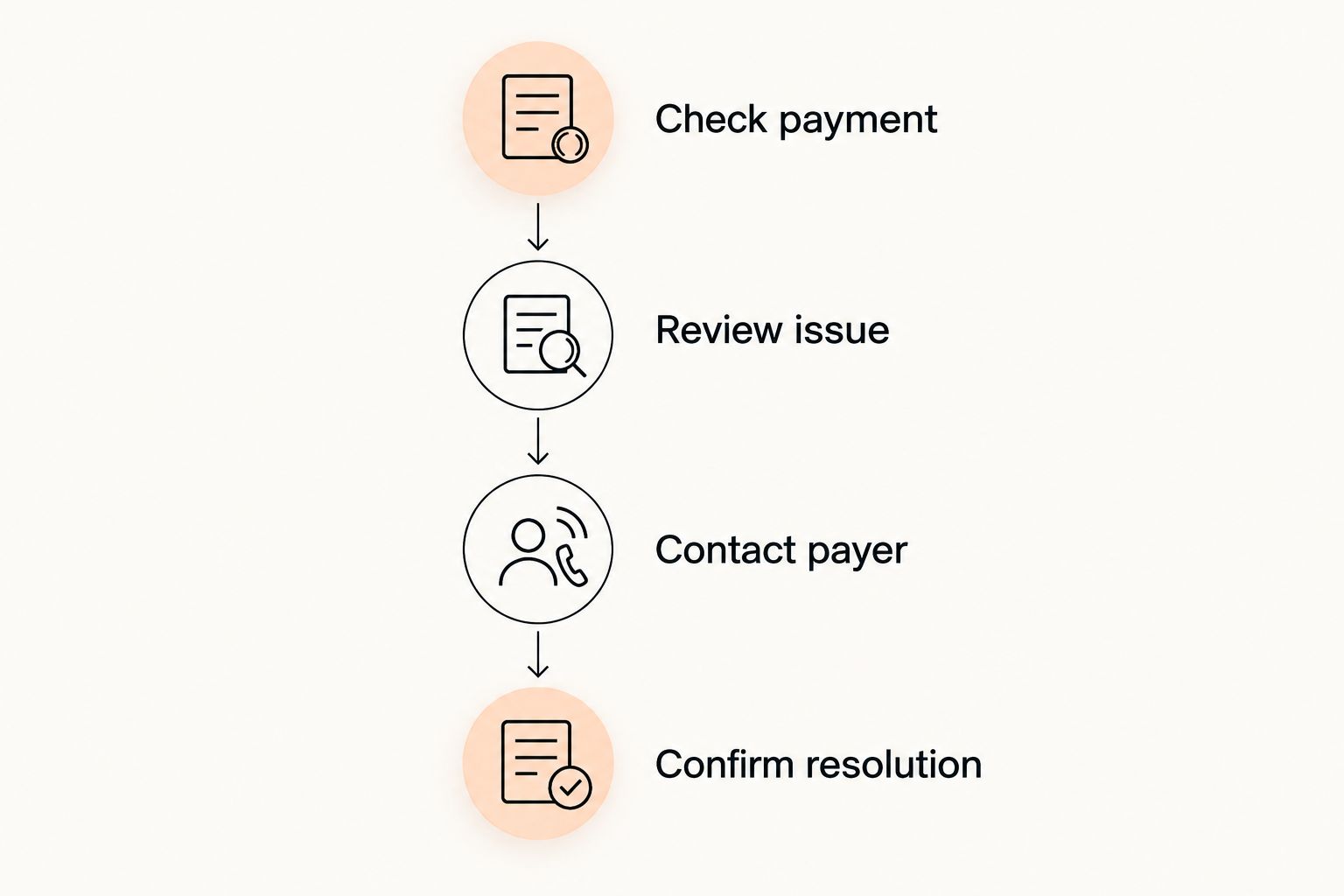
- Check payment: confirm the transaction status before taking action.
- Review issue: identify the payer and affected membership.
- Contact payer: send a clear request through an agreed channel.
- Confirm resolution: verify the corrected balance and accounting record.
5. Set trial follow-ups with clear ownership
Begin with a shared list of trial inquiries. Record the contact, requested class, agreed next action, and staff member responsible. Keep an inquiry separate from a booked trial, and keep a booked trial separate from an attended session.
After attendance, record the next decision. The person might join, request another conversation, or decline. Use the status that describes what happened rather than marking every trial as a prospective member indefinitely.
Automation should follow a defined process. MatPilot's AI co-pilot includes trial follow-ups and approval gates. The owner reviews and approves actions; the software does not replace your responsibility for the message or the member relationship.
Test the content as carefully as the trigger. A parent asking about youth boxing should not receive an adult competition-team message. Give staff a way to correct the record before any follow-up is approved.
- Separate inquiries, bookings, attendance, and membership decisions.
- Assign a named staff member to each unresolved trial.
- Record the requested discipline and age group.
- Review the recipient and message before approval.
- Close declined inquiries rather than leaving them active.
6. Keep boxing progression separate from administrative status
Start with coach-maintained notes for boxing development. Attendance answers whether someone trained. It does not answer whether that person is ready for sparring, a particular partner, or competition.
Use plain categories that reflect your actual coaching process. If your club records technique development or readiness decisions, decide who can enter those notes and who can change them. Test access controls when evaluating software rather than assuming they exist.
For a multi-discipline academy, keep each art's progression model distinct. Karate or taekwondo ranks should not become boxing ranks simply because the platform has belt fields. Likewise, a boxing coach's assessment should not alter a member's judo or BJJ grading record.
Avoid recording unsupported detail just to fill a field. A smaller, accurate record is more useful than a complicated structure that staff stop maintaining. Keep administrative alerts and coaching decisions visibly separate.
- Define the coaching information your boxing program actually uses.
- Keep attendance separate from sparring approval.
- Identify who can record and revise coaching decisions.
- Preserve separate progression records for different disciplines.
- Leave irrelevant belt fields out of the boxing workflow.
7. Test the switch before moving live billing
Build a migration worksheet before moving data. List member records, payer relationships, memberships, attendance history, and unresolved balances. Identify the source of each record and the destination you expect it to reach.
Run a 7-day timetable test with sample members. That is a recommended evaluation window, not a performance claim. Include a class change, a missed check-in, and an attended trial so the test covers exceptions as well as normal activity.
For a 2026 switch from Gymdesk or Kicksite, inspect your actual export and ask what can be imported. Do not assume that payment credentials, historical transactions, or every custom field will transfer. Confirm the process before changing recurring collections.
Choose a cutover date and one active collection system. Then review 1 full billing cycle after the switch. The purpose is to check real account behavior, not merely confirm that a member list appeared in the new platform.
- Compare imported sample records with their source records.
- Confirm which historical information transfers.
- Resolve duplicate members and payer relationships.
- Document payment setup requirements before cutover.
- Check attendance and billing after the first live cycle.
Compare your operating options for 2026
Choose between workflows before comparing vendor names. Each option below has a useful role and a clear boundary. The correct choice depends on which records you need to connect and which work you are prepared to maintain manually.
| Option | Best for | Practical advantage | Key limitation |
|---|---|---|---|
| Spreadsheet, calendar, and existing payment process | Owners establishing their club's administrative rules | You can define fields and procedures directly | Staff must reconcile member, attendance, and payment records manually |
| Class scheduling software | Clubs whose immediate problem is publishing and organizing sessions | Focuses the evaluation on timetable and booking work | Scheduling alone does not establish a complete billing or member-management process |
| Payment and accounting tools | Clubs prioritizing collections and financial records | Keeps the payment workflow central | Financial records alone do not describe class attendance or coaching decisions |
| MatPilot gym management software | Boxing and multi-discipline owners seeking connected administration | Provides members, scheduling, attendance, billing, and martial-arts grading functions | Belt grading is not boxing progression; test your coaching and family-billing requirements separately |
Choose connected administration when separate records are the problem. Choose a narrower tool when the problem is genuinely narrow. Do not purchase a larger workflow without deciding who will maintain it.
Use the same sample records for every demonstration. That keeps the comparison tied to your boxing club instead of the vendor's preferred example.
Common mistakes boxing gyms make in 2026
Treating every session as the same class
A youth class, adult fundamentals session, and competition-team session need different descriptions. A generic boxing label makes the timetable less informative. Use names that tell members where they belong, then test any eligibility restrictions separately.
Treating attendance as sparring clearance
An attendance total is not a coaching assessment. Keep the attendance register useful for administration, but record sparring decisions through your coaching process. Do not let an administrative milestone become an automatic permission you never intended.
Confusing the athlete with the payer
Youth records require special attention to contact and payment responsibility. Test a family with multiple athletes before importing everyone. Confirm who receives payment messages and whether the intended billing arrangement works without duplicating the parent as a training member.
Leaving old collections active after switching
A successful import does not close the previous billing process. Identify the active collection system, verify the cutover, and reconcile remaining balances. Keep an audit trail of what changed rather than relying on memory after members ask about charges.
Automating messages before cleaning records
Automation repeats the information you give it. Correct the class, age group, payer, and trial status first. Then review the proposed action. A faster follow-up is not useful if it reaches the wrong person or describes the wrong boxing program.
FAQ
What's the best gym management software for a boxing gym?
The best fit is software that handles your actual member, timetable, attendance, and billing workflows. MatPilot provides those functions for martial arts gyms; test boxing-specific coaching records and your payer arrangements before choosing it.
Do boxing gyms need belt-tracking software?
Boxing administration does not require a belt-grading workflow. A multi-discipline academy can use grading records for other martial arts while keeping boxing coaching decisions separate.
Can I manage a boxing gym with a spreadsheet?
Yes, a spreadsheet can organize members, attendance, and administrative tasks. You must define who updates it and reconcile it with your timetable and payment records manually.
What should I test for youth boxing and family billing?
Test an athlete with a separate parent or guardian payer and a family with multiple athletes. Confirm membership coverage, payment responsibility, message recipients, and the billing arrangement you intend to use.
Should boxing class booking count as attendance?
No, a booking records intent while attendance records participation. Keep those statuses separate so coaches and administrators can distinguish reservations from completed visits.
How do I switch from Gymdesk or Kicksite?
Start by reviewing your export and confirming what the destination system can import. Test sample records, confirm payment setup requirements, and assign one active collection system at cutover.
Can automated follow-ups replace the owner's review?
No, follow-up automation should operate within the approval process you set. Check the recipient, program, trial status, and message before approving an action.
One last thing
Test an exception before trusting the normal workflow. For your 2026 selection, use a youth boxer whose parent pays, whose booked session changes, and whose attendance needs correcting. Add a payment issue only through a safe test process agreed with the vendor.
Ask staff to trace the same member across the timetable, attendance register, and account record. If they cannot explain each status, fix the process before importing the rest of the club. A tidy member list is not the same as a working operation.