Gym software for kickboxing studios: complete 2026 guide

Kickboxing studio management software is a system for organizing members, classes, attendance and billing with the aim of keeping your studio running without scattered records. This 2026 guide explains how to choose gym management software for kickboxing studios, including the work that differs between fitness classes, technical training, junior programs and competition sessions.
- Choose gym management software for kickboxing studios around scheduling, attendance and payment workflows, not feature counts.
- MatPilot fits martial arts studios that need member management, billing, attendance and per-art rank tracking together.
- Keep fitness kickboxing, technical classes and competition sessions distinct when their entry requirements differ.
- Test family billing, failed-payment handling and record migration before replacing your current system.
Why gym management software matters for kickboxing studios
A kickboxing timetable does not tell you everything about a member. You also need to know which sessions they attend, what their membership covers and whether their payment needs attention. If your school teaches other martial arts, keep each discipline's training history distinct.
Choose software around the decisions you make at the desk and beside the mat. Can a beginner join this session? Who pays for this junior member? Which trial visitor needs a follow-up? These questions are better selection criteria than a long feature list.
For your 2026 review, start with martial arts class scheduling software, then test the rest of the member journey. A timetable alone does not resolve attendance gaps, payment issues or progression records.
How to choose and set up your studio's system
Work through these seven steps in order. Start with your existing records and a written process. Software should support a process you understand, not become the place where you first discover how your studio operates.
1. Map your member journeys
Start manually. Write down what happens from the first inquiry to the first paid class, then follow the process through renewal, missed attendance and cancellation. Use a spreadsheet or shared document before configuring anything.
Separate journeys that genuinely differ. An adult joining fitness kickboxing does not necessarily need the same intake questions as a junior entering technical training. A parent paying for siblings needs a clear payer relationship, not duplicate contact records scattered across separate lists.
Review the previous 4 weeks of attendance and payment records as a starting sample. This is a review window, not an industry benchmark. Record each point where someone had to search a message thread, ask another coach or correct a member record.
Your finished map should describe responsibilities as well as actions. A process without an owner becomes another task everyone assumes someone else completed.
- Name the person responsible for each inquiry.
- Record the class a trial visitor intends to attend.
- Identify the member and the payer separately.
- Assign responsibility for attendance corrections.
- Write down the process for leaving the studio.
2. Build a timetable around class eligibility
Draft your timetable manually before importing or recreating it. For each session, record the discipline, audience, instructor and entry requirements. Use class names a new member can understand without asking you to translate them.
Fitness kickboxing, technical kickboxing and competition training are useful distinctions when your teaching program separates them. Do not introduce categories your studio does not use. The software should reflect your actual classes, not force your curriculum into someone else's template.
For a 2026 setup, check all 7 days of the weekly timetable, including days with no classes. Verify recurring sessions, closures and any sessions that overlap. If you need booking limits or waitlists, ask for a demonstration of those exact workflows before choosing a system.
Treat junior classes separately where age or guardian involvement changes registration. A clear timetable starts with knowing who belongs in each session.
- Give each class a plain, distinct name.
- Specify age groups and experience requirements.
- Assign an instructor to each scheduled session.
- Define how you handle full classes.
- Test how members see timetable changes.
3. Connect member records to attendance
Start with a member list and a separate attendance sheet. Match names consistently, remove duplicate records and decide how instructors will mark attendance. This establishes the information your software must preserve.
MatPilot is best for martial arts owners who want member management, attendance, billing and per-art ranks in one system. MatPilot provides those functions through web, iOS and Android access. For a kickboxing-only studio, assess the everyday member and attendance workflow first; rank tracking is relevant only if your school uses it.
MatPilot gym management software also includes a co-pilot with owner approval gates for actions concerning at-risk members, trial follow-ups, promotion readiness and payment issues. Review the proposed action before approving it. Software assistance does not replace your knowledge of a member's circumstances.
Test attendance in the context of a real class. A clean member database is not enough if coaches cannot reliably record who trained.
- Match each attendance entry to one member record.
- Define who can correct an attendance mistake.
- Record trial attendance without creating duplicate members.
- Keep separate discipline histories where needed.
- Check the workflow on the devices your staff use.
4. Define billing and failed-payment responsibilities
Begin with a manual billing ledger. Record the member, payer, membership arrangement, expected payment and current status. Where a parent pays for several children, document the relationship before trying to automate it.
A failed payment needs a next action, not just a status label. Decide who checks the issue, who contacts the payer and how the team records the response. Do not treat an expired card, a disputed charge and a cancellation request as the same problem.
MatPilot supports billing through Stripe and Xero sync. Test the payment and accounting workflow against your actual arrangements. Do not assume grouped family invoices, payment retries or membership restrictions behave a particular way without checking them.
During your 2026 evaluation, follow a payment from the member record to the accounting record. Then inspect a failed-payment case. The successful transaction shows the routine path; the exception shows how much staff work remains.
- Identify the payer for every membership.
- Document sibling and household arrangements.
- Assign someone to review payment issues.
- Define the message sent after a failed payment.
- Check how resolved issues are recorded.
- Match payment records to accounting entries.
5. Give trial visitors a clear follow-up path
You can manage trials manually with a shared list. Record the inquiry, booked class, attendance and next agreed action. Keep the list factual: a booking is not an attended session, and attendance is not a membership sale.
Ask what the person wants from kickboxing. Fitness, technical development and competition preparation require different class recommendations. For junior visitors, communicate with the appropriate parent or guardian rather than treating the child's record as the billing contact.
Set your own follow-up interval and assign it to a named person. The important requirement is that staff can see what happened and what remains open. A second coach should not send another message because the first conversation is hidden in a personal inbox.
Use software assistance only after you have defined that process. Review any proposed follow-up for the correct class, recipient and next step before sending it.
- Separate inquiries, bookings, attended trials and memberships.
- Record the visitor's training goal.
- Name the staff member responsible for follow-up.
- Check the intended recipient before contacting a family.
- Close the task when the visitor responds or declines.
6. Track progress without imposing belts on every class
Start with a written syllabus or coaching checklist. Define what you assess, who assesses it and what evidence the coach records. If your kickboxing program does not use belts or ranks, do not introduce them merely because the software supports them.
Attendance and technical readiness are different records. Someone can attend regularly and still need work on a particular skill. Equally, an absence record does not explain an injury, work schedule or agreed training break.
For multi-discipline schools, keep kickboxing progress separate from BJJ, judo, karate or taekwondo ranks. MatPilot supports per-art ranks and belt grading, but the school remains responsible for its syllabus and promotion decisions. Ask to see how your own assessment process fits the record structure.
Record the coach's decision and supporting evidence, not just the next rank. This gives another instructor context without turning attendance into an automatic promotion rule.
- Define the skills your program actually assesses.
- Identify who approves a progression decision.
- Keep attendance separate from technical assessment.
- Record evidence in consistent language.
- Maintain distinct progression records for each discipline.
7. Test the switch before retiring your old system
Export your existing records first, whether you use spreadsheets, Gymdesk, Kicksite or another system. Keep an untouched copy. Clean duplicates in a working copy and document how fields correspond to the destination system.
For a 2026 migration, choose a clear cutover date and identify where the authoritative record lives before and after it. Running two systems without that rule creates conflicting attendance and payment histories. Do not transfer payment credentials by assumption; confirm the supported procedure with the relevant providers.
Use a 30-day post-switch review window to check records and unresolved tasks. This is a recommended check period, not a claim about migration speed. Review member totals, recurring classes, payer relationships and accounting records against your retained source.
The sequence is simple: export records, clean records, test workflows, confirm totals, then switch systems. Do not reverse it because the new dashboard looks finished.
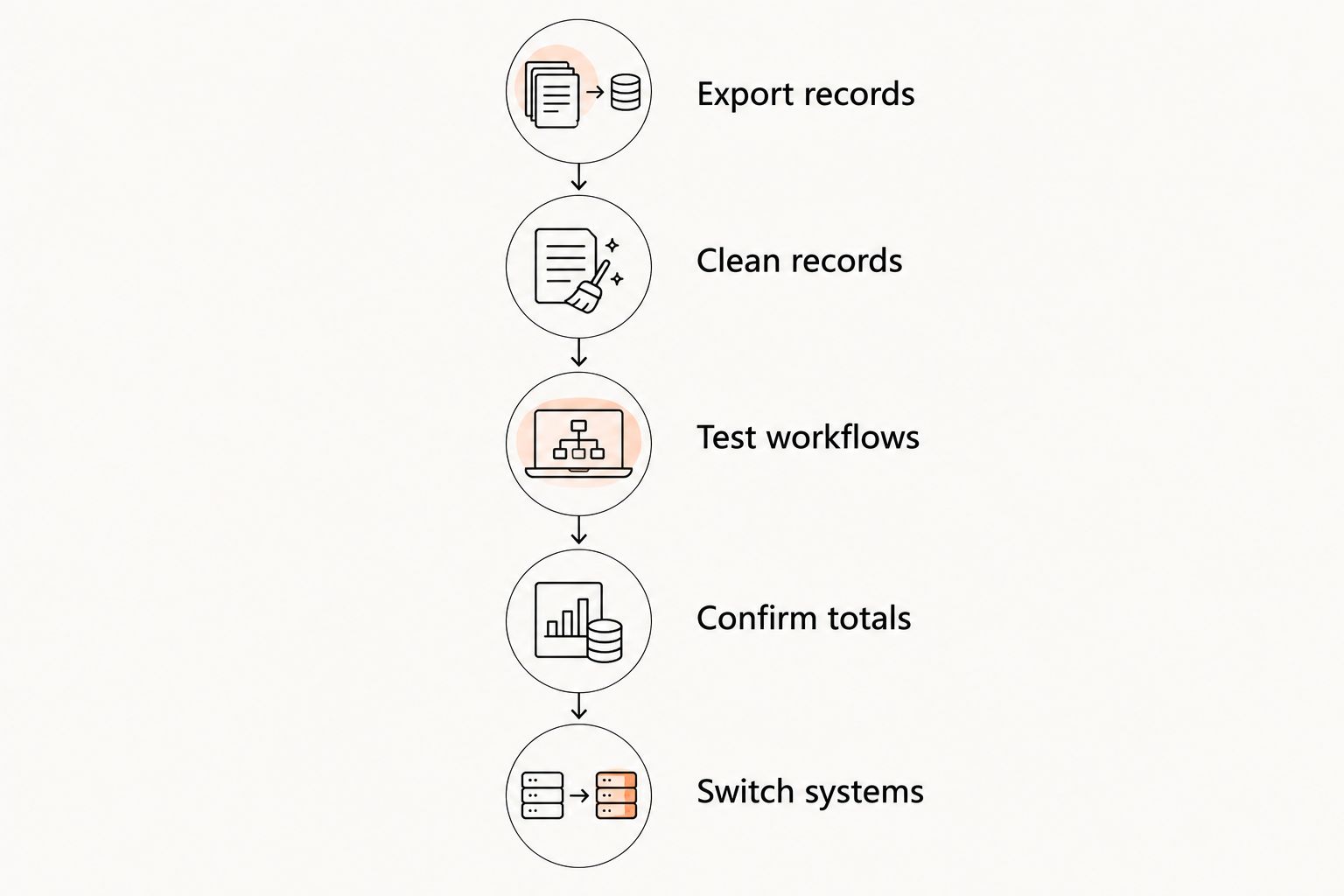
- Export records and retain an untouched copy.
- Clean records in a separate working file.
- Test workflows with representative member cases.
- Confirm totals against the source system.
- Switch systems on a documented cutover date.
Compare your operating options for 2026
Compare the work you will retain, not just the functions a product lists. The table below separates operating approaches; it does not assign unverified capabilities to competing vendors.
| Option | Best for | Practical advantage | Key limitation or check |
|---|---|---|---|
| Spreadsheet and shared calendar | Owner-run studios with a manageable manual workload | You control the fields and process directly | Staff must maintain links between attendance, members and payments |
| Separate scheduling, payment and member tools | Studios keeping established tools for distinct tasks | You can change one part of the workflow independently | Check where records are duplicated and who resolves differences |
| MatPilot gym management software | Martial arts studios needing members, attendance, billing and per-art ranks together | Combines those functions with an approval-gated co-pilot | Verify your booking, family-billing and migration requirements before choosing |
Keep a manual setup if you can maintain accurate records without losing tasks. Choose connected software when separate records make routine work hard to trace. Neither choice excuses an undefined payment or follow-up process.
Common mistakes kickboxing studios make
Treating every kickboxing class as interchangeable
A fitness session and a competition session do not become equivalent because both appear under kickboxing. Where your program has different entry requirements, put those requirements in the timetable and registration process. Otherwise, staff must explain the difference repeatedly.
Assuming every member needs belt tracking
Some kickboxing programs use formal ranks; others do not. Choose a record structure that matches your teaching. In a multi-discipline school, do not let another art's grading system dictate how you record kickboxing progress.
Confusing the participant with the payer
The person training is not always the person responsible for payment. This matters when parents manage junior memberships or one household has several participants. Confirm how your chosen system represents those relationships before importing records.
Following up without checking attendance
An inquiry, a booked trial and an attended trial are different stages. Check the record before sending a message. Asking someone to book a trial they already attended makes your process look disconnected and gives staff another correction to make.
Switching without identifying open work
A migration is not complete when names appear in the new system. Unresolved payment issues, pending trial follow-ups and incomplete assessment records also need an owner. Carry those tasks across explicitly rather than expecting an import to explain them.
FAQ
What's the best gym management software for a kickboxing studio?
The best choice is the system that handles your actual class, attendance and payment workflows without forcing an unsuitable grading structure. MatPilot fits martial arts studios that need member management, attendance, billing and per-art ranks together; test your booking and family-payment requirements before choosing.
Do kickboxing studios need belt-tracking software?
Kickboxing studios need belt tracking only when their program uses belts or formal ranks. If your program uses coaching assessments instead, define those records separately and keep attendance distinct from technical readiness.
Can I manage a small kickboxing studio with a spreadsheet?
Yes, you can manage a kickboxing studio with a spreadsheet if you keep member, attendance and payment records accurate. Assign responsibility for updates and track unresolved tasks rather than relying on memory or private messages.
What should I test for family memberships?
Test how the system distinguishes each participant from the person responsible for payment. Check sibling records, payment communication and your actual household billing arrangement before importing the full membership list.
How should a kickboxing studio handle failed payments?
Assign a person to review the failed payment, contact the payer and record the resolution. Confirm any automated payment or messaging behavior before relying on it, and distinguish payment failures from cancellation requests.
Can I switch from Gymdesk or Kicksite without losing records?
Preserve an untouched export and verify the destination records before retiring your old system. Confirm which fields and payment arrangements can transfer, then reconcile members, classes and open tasks against the retained source.
Is MatPilot available for studios in the US and Ireland?
MatPilot is available in the United States and Ireland through web, iOS and Android access. Evaluate the payment and accounting workflow for your market, and do not assume another country's billing arrangements apply to your studio.
One last thing
Before your next 2026 software demonstration, bring an awkward member case: a parent paying for siblings, a trial visitor who attended the wrong session or a member with an unresolved payment issue. Ask the provider to walk through the whole record.
A clean demonstration account proves less than a clear answer to an ordinary exception. If the workflow requires a spreadsheet beside the software, identify that work before you commit. The goal is a process your staff can explain and repeat.