Gym software for taekwondo schools: complete 2026 guide

Taekwondo school software is a system for managing students, classes, payments, and rank records with the aim of keeping school administration connected. Your evaluation should test guardian contacts, sibling accounts, class attendance, and your own grading syllabus—not just whether the software displays colored belts.
- Choose taekwondo school software around guardian records, attendance, billing, and grading—not a feature count.
- MatPilot suits martial arts owners who need member management, scheduling, payments, and per-art ranks together.
- Test family billing and failed-payment workflows before moving live accounts.
- Keep attendance evidence separate from an instructor’s decision to approve a promotion.
Why software matters for taekwondo schools
A child attends class. A guardian handles payment. An instructor decides whether the child is ready to grade. Those responsibilities belong to different people, even when they concern the same membership.
Your 2026 software evaluation should follow those handoffs. A useful student record lets staff establish who trained, who to contact, what needs payment attention, and which rank the instructor approved. A disconnected spreadsheet leaves staff responsible for matching those answers manually.
MatPilot is best suited to martial arts owners who need billing, attendance, and per-art ranks in one system. MatPilot provides member management, scheduling, billing, and belt grading. It serves schools in the United States and Ireland; evaluate your local payment and accounting requirements separately.
How to choose and set up taekwondo school software
1. Map your school’s actual work
Start with a shared document and a spreadsheet. Write down what happens from the first inquiry through enrollment, regular attendance, payment problems, and grading. Record who performs each task and what counts as completion.
Use actual exceptions. A guardian changes an email address. A student moves from a children’s class to a teen class. A sibling joins after the original membership starts. These cases reveal whether your process depends on someone remembering an unwritten rule.
Choose software against that document, not against the length of its feature list. Keep requirements separate from preferences so an attractive extra does not outweigh a missing daily task.
- List each task and its owner.
- Identify the record each task changes.
- Mark actions that require instructor approval.
- Separate essential workflows from optional extras.
2. Separate students, guardians, and billing contacts
Create a sample household manually before importing your membership list. Use 2 siblings and 1 guardian as a test case. Give each student a different class assignment and rank history, then check where messages and payment information belong.
MatPilot provides member management and billing. Test your exact household arrangement in the product rather than assuming that those features establish every family relationship you need. Require a demonstration of any guardian permissions or combined billing workflow your school depends on.
A shared payer must not become a shared student record. Keep attendance and grading attached to the individual student, even when a household handles administration together.
- Give each student a separate record.
- Identify the responsible adult clearly.
- Confirm who receives payment communications.
- Test a change affecting only one sibling.
- Check which information different staff can access.
3. Define ranks before importing belt history
Write your rank sequence in a spreadsheet first. Include the names your school actually uses, intermediate stages, promotion dates, and the evidence instructors expect to review. Do not substitute a generic taekwondo sequence for your syllabus.
For a multi-discipline school, keep taekwondo ranks separate from judo, karate, or BJJ ranks. MatPilot supports per-art ranks and belt grading. The setup still needs to reflect your school’s progression rules; a rank label alone does not establish grading readiness.
Read the guide to supporting multiple belt systems when students train across disciplines. For your 2026 setup, test a new student, a transfer student, and a returning student before loading everyone’s history.
- Write the complete rank sequence.
- Preserve known promotion dates.
- Mark uncertain historical entries for review.
- Keep instructor assessment separate from attendance totals.
- Check each discipline independently.
4. Build the timetable and attendance routine together
Draft the weekly timetable on paper or in a calendar. Specify the class, instructor, age group, and rank restrictions your school uses. Then decide how staff will record attendance and correct mistakes.
A timetable answers when a student can train. Attendance answers whether that student actually trained. Do not treat a booking or a recurring class assignment as proof that someone attended.
MatPilot provides a Monday–Sunday timetable and attendance tools. Evaluate them with your real teaching week, including children’s sessions, adult classes, and other disciplines. Test the work an instructor performs during a busy arrival period, not just the owner’s setup screen.
- Enter your actual weekly classes.
- Check age and rank assignments.
- Record a sample attendance session.
- Correct a deliberately mistaken entry.
- Find a student’s previous attendance afterward.
5. Rehearse billing and payment exceptions
Start with a written billing checklist. Record the payer, membership arrangement, collection schedule, and staff response when a payment fails. Keep sensitive payment credentials out of spreadsheets and shared documents.
MatPilot provides Stripe billing and Xero sync. Those capabilities are relevant to collection and accounting, but they do not replace a school policy for overdue accounts. Decide who checks payment issues, who contacts the guardian, and who confirms resolution.
For 2026, assess US and Irish payment arrangements separately. Do not assume a payment method or accounting treatment applies identically in both markets. Ask the provider to demonstrate the setup your school will use, including family arrangements and any payment changes during a switch.
- Identify the responsible payer.
- Write the failed-payment response.
- Assign ownership of unresolved balances.
- Demonstrate the accounting handoff.
- Verify the next collection date before switching systems.
6. Set approval rules for follow-ups and promotions
Use a manual review list first. Separate trial inquiries, students whose attendance needs attention, payment issues, and promotion candidates. Give each item an owner and a clear next action.
MatPilot’s co-pilot supports trial follow-ups, at-risk member review, promotion readiness, and payment issues with approval gates. That makes it relevant when you want assistance preparing administrative actions while retaining control. It does not remove the need to check the underlying record.
Keep sensitive conversations deliberate. An attendance gap is a reason to review a student’s situation, not proof that the student intends to leave. Promotion readiness is a prompt for instructor assessment, not a belt award.
- Assign an owner to each review queue.
- Check attendance before contacting a household.
- Review message recipients and wording.
- Require instructor approval for grading decisions.
- Confirm payment resolution before closing an issue.
7. Rehearse the switch before moving live billing
Export the records your current system permits and inspect them in a spreadsheet. Separate active memberships from historical records. Identify missing guardian contacts, duplicate students, and unclear rank entries before asking a new system to hold them.
Use a 10-record sample to rehearse the move. Include different ranks, a household with siblings, a student with payment issues, and a returning member. Treat this as an acceptance test, not as evidence that every record will transfer unchanged.
Follow four checkpoints: Export records, Check mappings, Test workflows, Approve cutover. Keep the previous system accessible until you have verified the records and responsibilities required to operate the school.
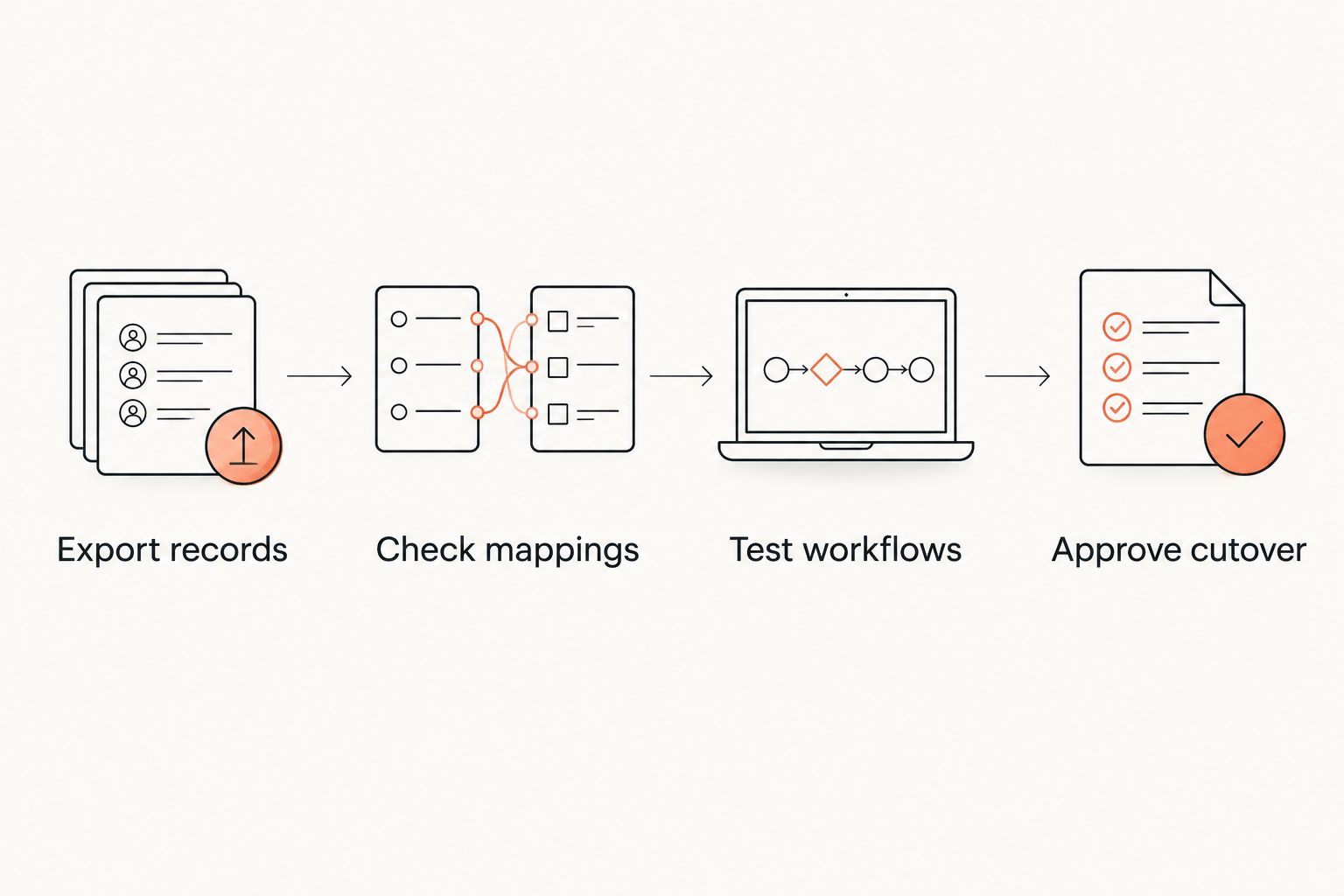
A successful import is not the same as a working school. Rehearse finding a student, recording attendance, reviewing rank history, and checking the payer before you set the cutover date.
- Compare source and destination student totals.
- Inspect the sample records individually.
- Rehearse the next billing cycle.
- Assign responsibility for remaining corrections.
- Confirm where staff will work after cutover.
Compare options for your school in 2026
Choose the operating approach before choosing a supplier. A spreadsheet offers direct control over fields. Separate tools let you choose each function independently. A martial arts platform connects more of the work, but requires you to validate its setup against your school.
| Option | Best for | Main advantage | Key limitation |
|---|---|---|---|
| Spreadsheet and shared calendar | An owner who can maintain records manually | Flexible fields and a visible process | Staff must reconcile membership, attendance, and payment records themselves |
| Separate scheduling and payment tools | A school with a working billing process that needs another specific function | Each tool can be evaluated independently | Staff must keep identities and changes consistent across systems |
| MatPilot | Martial arts schools needing members, classes, billing, and per-art ranks together | These functions sit within the same platform | Exact household arrangements, syllabus setup, and migration requirements need validation |
Do not assign a winner from a feature checklist alone. Ask each provider to complete the same household, grading, attendance, and payment tests. Record the result as demonstrated, requires setup, or does not meet the requirement.
When comparing named vendors, check current contract terms, payment fees, data export, and relevant features against their primary documentation. Keep the date with your comparison. A remembered feature from a previous evaluation is not sufficient evidence for a purchase decision.
Common mistakes taekwondo schools make
Treating attendance as automatic grading approval
Attendance shows participation, not technical competence. Keep your attendance threshold, syllabus assessment, and instructor decision distinct. A student’s record should explain a promotion rather than merely display the latest belt.
Importing households as single members
A combined household row hides differences between siblings. Separate student histories before migration, then test how the responsible adult connects to each student. Check what happens when only one sibling changes classes or stops training.
Leaving payment follow-up without an owner
A payment issue remains unresolved when everyone assumes someone else is handling it. Name the staff member responsible for review, contact, and closure. Record the action taken so another instructor does not repeat the conversation.
Moving billing before checking student records
A clean contact import does not prove that collection dates, balances, or payment arrangements are ready. Review those items separately. Do not leave both systems responsible for the same collection without checking how duplicate charges will be prevented.
Testing only from the owner’s account
Your administrator’s view does not prove that an instructor can finish attendance or find the right contact. Rehearse each role’s permitted tasks. Include the person who opens the school and handles questions while classes are starting.
FAQ
What should taekwondo school software include?
Taekwondo school software should cover individual student records, guardian contacts, class scheduling, attendance, billing, and rank history. Test those functions together using a household and a grading scenario from your school.
Is a spreadsheet enough for a small taekwondo school?
A spreadsheet is a workable manual option when someone consistently maintains and reconciles the records. Review whether staff can reliably connect attendance, guardian details, payments, and grading history before adding more tools.
Can software decide when a student deserves a new belt?
An instructor should decide whether a student deserves a new belt. Software can organize attendance and rank records, but those records do not replace assessment against your school’s syllabus.
Does MatPilot support taekwondo and other martial arts?
MatPilot provides martial arts gym management with per-art ranks, belt grading, attendance, scheduling, and billing. Demonstrate your taekwondo sequence and any additional disciplines before importing live rank records.
How do I test family billing before switching software?
Test family billing with separate student records connected to the intended responsible payer. Check communications, payment handling, and what happens when only one sibling’s membership changes; do not assume every platform handles those relationships the same way.
Should I switch school software during the teaching year?
Base the switch on operational readiness rather than the teaching calendar alone. Verify student records, rank history, staff tasks, and the next billing cycle before setting a cutover date.
What is the best way to evaluate taekwondo software in 2026?
Evaluate taekwondo software in 2026 by asking each provider to complete the same realistic school workflows. Use sample students and record which tasks work as demonstrated, require setup, or remain unresolved.
One last thing
Test a correction, not just a successful entry. During your 2026 evaluation, deliberately assign the wrong class or record attendance against the wrong student. Ask an instructor to find and fix it using the access they will actually have.
The correction test shows whether your daily process survives an ordinary mistake. Make it part of acceptance before moving your live school records.