How do you export your data if you cancel gym software?
Export and check your gym records before your software access ends, then confirm how billing, retention, and deletion will work after cancellation. Download member data and supporting records separately, test what the replacement system accepts, and keep a secure archive of anything you must retain. Cancel only after you have checked the files—not merely requested them.
- How to export your data if you cancel gym software: download, validate, test the import, then close access.
- Preserve member IDs, family relationships, billing history, attendance, and grading records—not just names and email addresses.
- Confirm payment transfers separately; a billing spreadsheet is not permission to charge a member.
- MatPilot fits martial arts academies needing member management, billing, scheduling, and per-art ranks; verify migration requirements before switching.
Why this matters
A member list is not a complete academy archive. You also need the relationships behind it: which parent pays, which student attends which class, and which art each rank belongs to.
For a 2026 software change, separate two jobs: preserving your records and making the next system work. An export can satisfy the first without satisfying the second. If your current provider is Mindbody, the member-data migration guide covers that specific switching context.
How do you export your data if you cancel gym software?
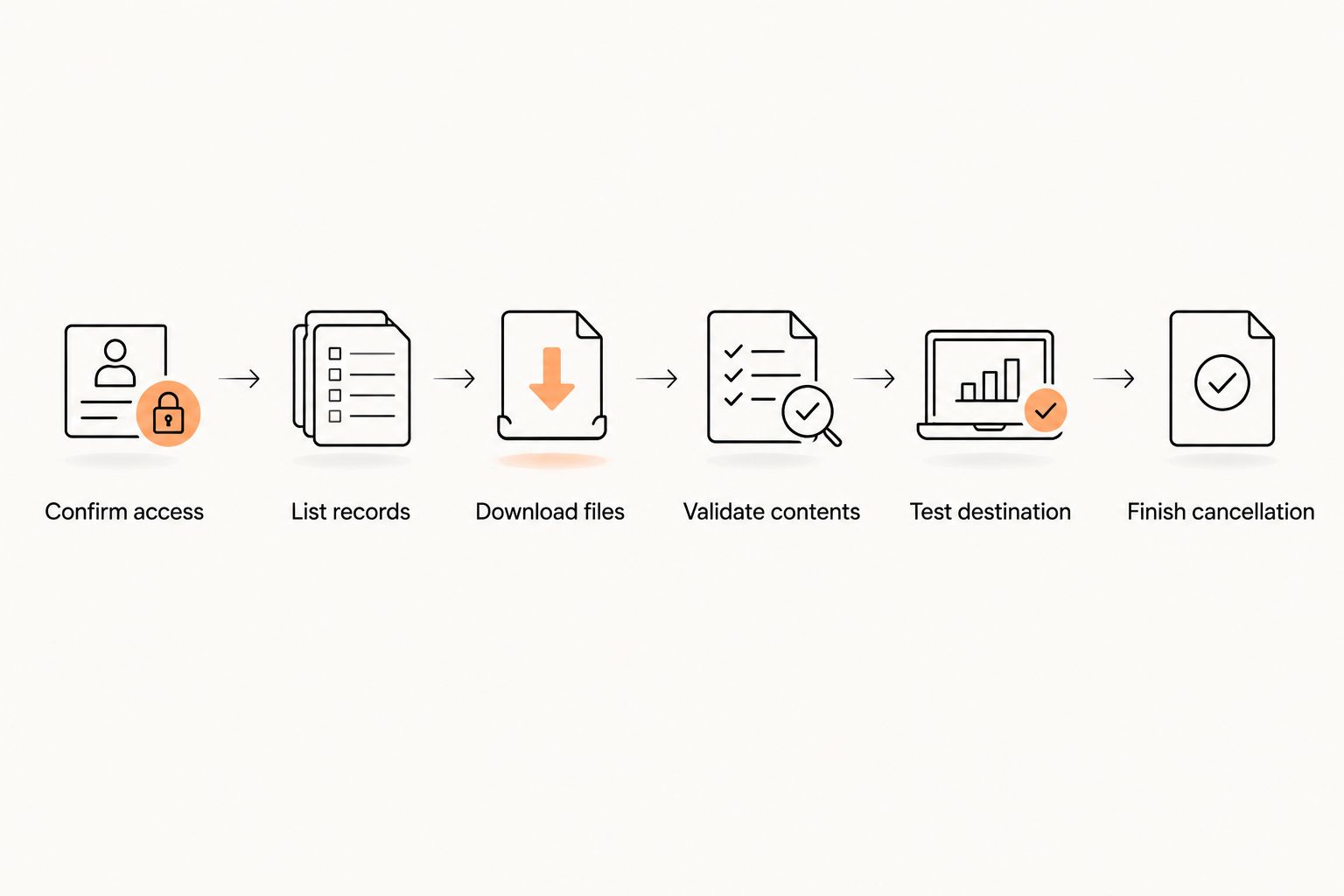
Use this sequence before the provider closes your account. Treat each step as a check you complete, not an assumption about what the software includes.
- Confirm the access deadline. Ask when cancellation takes effect, when your login stops working, and whether exports remain available afterward. Get the answers in writing.
- List the records you need. Include members, guardians, memberships, billing, attendance, ranks, waivers, and communication permissions. Separate records needed for daily operations from records kept only for reference.
- Request the export formats. Ask for structured files for import and original documents where relevant. Request a field description if the column names or status codes are unclear.
- Download the files. Save the original exports without editing them. Make a separate working copy for cleanup and import preparation.
- Validate the contents. Compare record totals and inspect individual records. Check identifiers, dates, balances, family links, and historical entries.
- Test the destination. Confirm what imports successfully, what needs mapping, and what must remain in an archive. Resolve payment collection separately.
- Finish the cancellation. Confirm the final service date, any remaining obligations, and the provider's retention or deletion process. Remove obsolete access after the transition is complete.
Keep these steps in a dated 2026 handover checklist. Assign each task to a named person so an export request does not get mistaken for a completed migration.
What should you include in the export?
Build your checklist around the work your academy must continue doing. A BJJ grading record, a boxing attendance record, and a family billing arrangement require different fields.
| Record group | What to request | What to check before closing access |
|---|---|---|
| Members and guardians | IDs, names, contact details, status, guardian relationships | Children remain linked to the correct adult |
| Memberships | Plan assignments, start dates, end dates, pauses, cancellation status | Active and ended memberships remain distinguishable |
| Billing history | Invoices, payments, refunds, credits, outstanding balances | Transactions retain dates and reference IDs |
| Classes and attendance | Class details, session dates, member IDs, check-in records | Attendance stays attached to the correct student and session |
| Ranks and grading | Martial art, rank, award date, grading history | Each rank remains attached to its discipline |
| Documents and permissions | Signed waivers, document versions, permission records | Files open and remain attributable to the correct person |
Do not substitute a current balance for transaction history. A balance tells you the position at export; the underlying entries explain how it arose.
For martial arts records, request historical grades as well as the current rank. A student training in judo and karate needs separate discipline histories. The guide to tracking a student's belt history explains the records to preserve beyond a current belt label.
Which export format should you request?
Request structured data for migration and readable documents for reference. Do not assume a file that opens correctly will import correctly.
| Format | Best for | Advantage | Limitation |
|---|---|---|---|
| CSV | Moving table-based records | Fields can be inspected and mapped | Relationships across files need matching identifiers |
| XLSX | Reviewing and preparing spreadsheet data | Supports separate worksheets | The destination must accept the workbook structure |
| Keeping readable statements and signed documents | Preserves a document's presentation | Not a substitute for structured member or transaction data |
Ask the receiving provider which format and fields it accepts before changing the export. Keep the original file untouched, even if you create a cleaned version.
Check dates, identifiers, and empty fields
Ask which date format and time zone the export uses. A session near midnight can be assigned to the wrong calendar day if the destination interprets its timestamp differently.
Preserve member IDs as identifiers, not quantities. Inspect leading zeros, empty cells, and status values before approving the import. Record how each source field maps to the destination so another person can repeat the process.
How do you check that the export is complete?
Start with totals, then inspect the relationships that totals cannot prove. An equal number of rows does not establish that every guardian link or grading date survived.
Use these 3 validation checks as a minimum working checklist:
- Record totals: Compare exported members against the same active, inactive, or archived filters in the source. Record the filters alongside the totals.
- Linked records: Trace a student through their guardian, membership, attendance, and grading entries. Confirm the same identifier connects the records.
- Transaction detail: Trace an invoice through its payment, credit, or refund entries. Check that the history explains the balance.
Include a family account, a paused membership, and a student training in multiple disciplines in your manual review when those cases exist. Choose examples that test your academy's actual arrangements.
For your 2026 handover record, note the export date, the source filters, and the person who checked each file. This gives you a reference when someone questions a missing class or payment later.
Keep an original and a working copy
Maintain 2 copies with different purposes: an untouched source export and a working copy used for preparation. Restrict access to both.
Do not send the full archive through an informal group chat or leave it on a shared check-in tablet. Use an access-controlled transfer method agreed with the receiving provider, and remove temporary copies when they are no longer needed.
Can you export saved cards and recurring payments?
Do not treat a payment-history export as a transfer of saved payment methods or recurring collection instructions. Ask the software provider and payment processor how the existing billing arrangement will be handled.
Separate these questions:
- Which invoices, payments, credits, and refunds can you export?
- Who controls the payment processor account?
- What happens to scheduled collections when the gym software subscription ends?
- Does the proposed transfer require processor involvement or fresh member authorization?
- Who confirms that the old schedule has stopped and the new schedule is correct?
Do not request raw card details in a spreadsheet. Use the processor's approved process for any supported transfer of payment credentials.
For US academies and Irish clubs, confirm the payment methods actually used by your members. Do not apply a card-transfer answer to a bank-payment arrangement without checking it separately.
Why export work varies between gyms
The right export scope depends on your records and the receiving system—not just the cancellation date. These factors determine what you need to check:
- Family relationships: A payer and the students they pay for need to remain connected.
- Multiple disciplines: BJJ ranks, judo grades, and striking-program records need their own context.
- Historical depth: A current member profile does not replace attendance, grading, or transaction history.
- Documents: Signed waivers and other attachments need a usable archive, even when they do not import.
- Payment setup: The software account, processor account, and recurring instructions need separate confirmation.
- Destination requirements: Accepted formats and required fields determine the preparation work.
Do not delete awkward fields simply to make an import pass. Decide whether they belong in a mapped field, an attached record, or a separate archive.
What should you ask the provider before canceling?
Send a written request that names the records and asks for concrete answers. Avoid asking only whether you can export your data; that leaves the scope undefined.
Use this request checklist:
- Confirm the date and time account access ends.
- Identify the available export formats and included record groups.
- Explain how historical records and attachments are supplied.
- Confirm whether identifiers remain consistent across exports.
- Explain how cancellation affects recurring collections and scheduled messages.
- State the retention and deletion process, including any records retained for legal obligations.
Keep cancellation confirmation separate from export confirmation. Neither proves that the other task is finished.
Can you export after you cancel?
Export before access ends unless your provider confirms another arrangement in writing. Cancellation notice, service termination, and data deletion are separate events; ask for the date attached to each.
Does exporting cancel member payments?
Exporting files does not establish that recurring collection has stopped. Confirm the old billing schedule separately, then check the replacement schedule before collecting again.
Do you need to import everything into the new system?
No. Import the records needed to run the academy and keep an appropriate archive for the rest. Define where staff will find historical documents before removing the old access.
What should you check when moving to MatPilot?
MatPilot fits martial arts academies that need member management, billing, scheduling, and per-art ranks. It supports BJJ and multi-discipline schools, including boxing, Muay Thai, MMA, judo, karate, and taekwondo.
Use those operational needs to define a migration test. Ask how your exported fields would be handled, then inspect the result before approving a live move. A feature list does not confirm that a particular source file is ready to import.
MatPilot's martial arts focus is relevant when you need to preserve discipline-specific grading alongside member and billing records. The migration limitation to resolve is source compatibility: confirm accepted files, historical coverage, and payment arrangements directly rather than assuming them.
FAQ
What's the safest order for exporting data and canceling gym software?
Export, validate, and test your records before account access ends. Then confirm cancellation, recurring-payment arrangements, and the provider's retention process in writing.
Is a CSV member list enough to move my martial arts academy?
A CSV member list is not a complete migration archive. Request the relevant membership, billing, attendance, grading, guardian, and document records separately.
How do I export family accounts without losing parent relationships?
Request member IDs, guardian IDs, and the fields that connect each payer to each student. Test those relationships in the destination instead of matching people by surname alone.
Can I move my members' saved cards with the export?
Confirm saved-payment transfers with the payment processor and software providers. A transaction spreadsheet is not a transfer of payment credentials or authorization to collect.
Does GDPR guarantee an Irish gym a complete software database export?
GDPR's personal-data portability right is not a blanket guarantee of a complete business database export. Check the provider contract and obtain advice on the rights and obligations that apply to your situation.
What should I ask MatPilot before switching in 2026?
Ask MatPilot which source files and fields it accepts, how historical records would be handled, and what payment setup requires separate work. Confirm the scope before ending your existing access.
One last thing
Plan for changes made after the first export. A member can attend a class, receive a grade, or make a payment while you are checking the files.
Set 2 checkpoints for your 2026 move: the initial export and the final handover. Record what changed between them, then confirm how those changes reach the destination. A correct export becomes an incomplete handover if later activity is left behind.