How do you set up guardian permissions for minors?

Set up guardian permissions for minors by giving each authorized adult a separate login, linking that adult to the correct child, and granting only the access their role requires. Keep billing, consent, emergency contact, and pickup authority separate; test each account before you use it for live registrations.
- How to set up guardian permissions for minors: verify authority, link the child, assign access, then test.
- A billing contact is not automatically authorized to sign consent forms or collect a child.
- MatPilot suits martial arts owners managing membership, attendance, billing, and grading; verify guardian controls before configuring access.
- Use separate adult logins so permission changes do not require sharing or replacing a family password.
How do you set up guardian permissions for minors?
Use a child-centered record with separately authorized adult accounts. The child remains the student. Each adult receives access according to a documented responsibility, not simply because they share an address, surname, or payment method.
Build this into your 2026 registration checklist. Treat family and sibling billing as a related process, not proof that every payer has authority over every child on the bill.
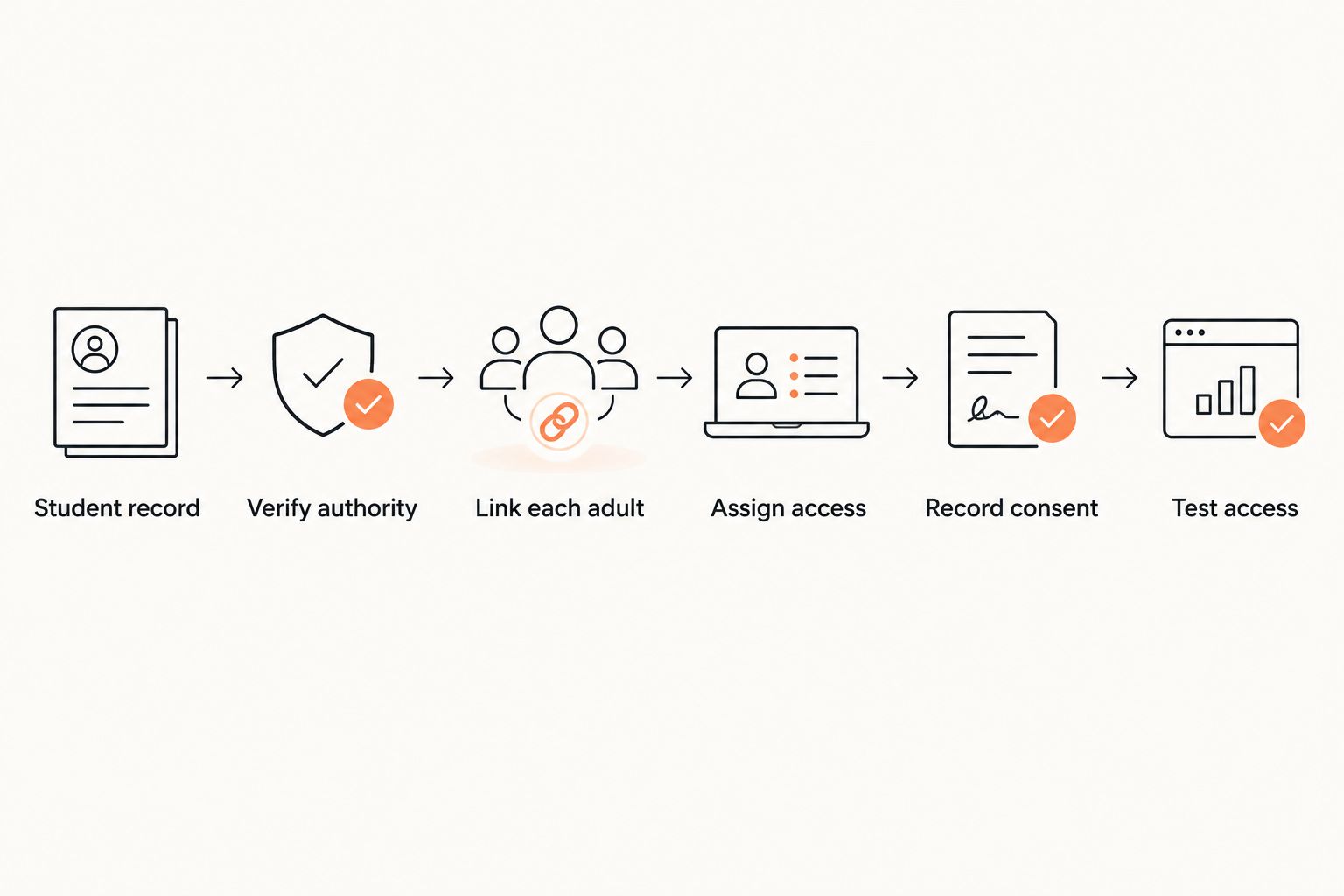
The following 6 steps describe a recommended access process, not a menu-by-menu instruction for a particular product.
1. Create the student record
Create a distinct membership record for the child. Put attendance, class enrollment, and grading history against that student rather than against the adult paying the bill.
Record the information needed to identify the student and place them in the appropriate class. Do not collect extra family documents simply because your registration form has room for attachments.
Before adding another record, check whether the child already exists. A second profile can leave attendance on one record and consent on another, making the registration harder to review.
2. Verify authority
Ask who has authority to make membership and participation decisions for the child. Record the relationship and follow your academy's documented verification process before granting access.
An emergency contact, a person paying fees, and a legally authorized guardian are different roles. Do not infer authority from an adult completing the form first.
If instructions conflict, stop the access change and refer it to the staff member responsible for safeguarding or administration. Do not ask a coach at the mat edge to resolve a disputed family arrangement.
3. Link each adult
Give each authorized adult an individual account and link that account to the correct student. Check the adult's email address before sending an invitation.
For example, if 2 adults need access, create 2 separate accounts rather than one shared family login. This is a setup example, not a requirement that every student have multiple guardians.
For siblings, check each adult-to-child relationship separately. Authority for one child does not establish authority for every child in a household.
4. Assign access
Choose permissions by task. Decide who can book classes, view attendance, manage payments, receive notices, sign participation documents, and request changes to the student's details.
Start with the access needed for the assigned role. Add permissions only after reviewing the reason. Avoid granting full access simply to make an invitation easier to complete.
Where your software cannot separate a sensitive permission, keep that action staff-controlled instead of widening access to unrelated information.
5. Record consent
Keep the adult's account access separate from their recorded decisions. Being able to sign a form is not evidence that the form has been signed.
For your 2026 intake, record which document was accepted, who accepted it, which child it covered, and when acceptance occurred. Keep participation consent separate from optional uses such as promotional photography.
Ask an appropriately qualified adviser to review legal wording and signing requirements for your jurisdiction. An account setting does not determine whether a waiver is enforceable.
6. Test access
Test the proposed setup using dummy student information before inviting real families. Check both permitted actions and actions the adult must not be able to perform.
Confirm that the adult sees the intended child, not unrelated students. Then test a booking, a notification, a restricted billing view, and the process for removing access.
A permission is not ready because it appears selected in an administrator screen. It is ready when the adult's actual account behaves as intended.
Why this matters
A family relationship does not describe a permission set. A grandparent might collect a student without managing membership. A parent might receive class notices without handling payments.
This distinction matters in BJJ, boxing, Muay Thai, karate, and other youth programs. Staff need clear answers when someone asks to change a booking, view a balance, sign a form, or collect a child.
Your 2026 registration process should produce an actionable record: who is authorized, what they can do, and who approved that access. A broad label such as family contact leaves those questions unanswered.
Which guardian roles should you separate?
Use the following 4 roles as a permission-planning template. They are recommended administrative categories, not a claim that your software provides these exact role names.
One adult can hold several roles. Each role still needs an explicit decision.
| Role | Best for | Access to consider | Boundary and trade-off |
|---|---|---|---|
| Authorized guardian | Participation and membership decisions | Child's bookings, relevant records, and approved consent actions | Broad responsibility requires careful verification; exclude unrelated family information. |
| Billing contact | Managing membership payments | Relevant invoices and payment actions | Keeps finance separate, but does not establish consent or pickup authority. |
| Emergency contact | Receiving urgent contact from staff | Usually a staff-held contact record, not a full portal account | Useful for urgent communication; does not replace a guardian's authorization. |
| Pickup contact | Collecting the child under academy policy | Staff-visible collection authorization | Narrow scope protects other records, but staff still need an identity-check process. |
Do not give a pickup contact portal access merely to store their name. A staff-held authorization record can serve a different purpose from an adult login.
For shared devices, review the separate kiosk check-in setup. Recording a child's arrival should not expose another family's records or provide unrestricted account access.
Why guardian permissions vary
Set permissions around the work each adult must perform. Use these factors to decide what belongs in the account and what stays under staff control:
- Authority: Verify who can make decisions for the specific child before assigning consent or membership permissions.
- Payment responsibility: Give the payer the financial access needed without automatically exposing participation documents or private notes.
- Collection arrangements: Record who can collect the child separately from who receives notices or pays fees.
- Communication purpose: Distinguish routine class information, urgent contact, billing messages, and optional promotional communication.
- Family relationships: Check access child by child, especially when siblings have different authorized adults.
- System controls: Test the actual permission boundaries. If a required restriction is unavailable, retain the sensitive action with staff.
Revisit the setup when responsibilities change. Do not wait for the next registration cycle after receiving an authorized request to remove access.
How do you handle two guardians with different permissions?
Use 2 separate adult accounts with independently assigned permissions. Do not create a shared login and rely on the adults to decide which actions each person can take.
Document the requested distinction. One adult might handle payments while another manages bookings; neither arrangement alone determines who can sign participation documents.
When a permission change affects another adult, follow your verification and safeguarding process. Do not treat a request from an existing account as sufficient evidence to remove someone else's authority.
Can a billing contact sign a child's waiver?
A billing contact should receive signing access only after their authority to act for the child has been verified. Paying membership fees does not, by itself, establish that authority.
Keep the permission decision and the signed document as separate records. A payment receipt proves a payment, not acceptance of a participation agreement.
What happens when a guardian's access changes?
Remove or amend the relevant access, then test the result from the affected account where your system permits. Check linked children, booking access, payment access, and communication recipients rather than changing only the contact label.
Preserve records according to your documented retention policy and applicable requirements. Removing current access is different from deleting historical consent evidence.
How should you test the setup before registration opens?
Use a written acceptance checklist for your 2026 setup. Mark each test as passed or unresolved; an unresolved sensitive permission should block that part of the rollout.
- Student visibility: The adult sees only the students they are authorized to access.
- Booking scope: Booking access matches the approved role and does not expose unrelated records.
- Financial boundaries: Payment details and invoices are visible only to the intended people.
- Consent records: Staff can identify the signer, document, student, and acceptance date.
- Communication routing: Routine notices, urgent contact, and financial messages reach the intended recipients.
- Access removal: Removing an adult's access prevents the actions that were previously permitted.
Include a staff handoff test. Ask the instructor or front-desk person to find the approved collection contact without opening financial records or interpreting an ambiguous family note.
Test the exception as well as the normal case. Staff should know what to do when a person arrives who is not listed, rather than improvising a permission change during pickup.
Where MatPilot fits in the process
MatPilot is best for martial arts owners who need membership, attendance, billing, and grading managed together. It supports BJJ and multi-discipline academies, with access through the web and native iOS and Android apps.
The relevant benefit is keeping the student's operational records together. The boundary is equally important: membership software does not establish an adult's legal authority or replace the academy's safeguarding decisions.
For MatPilot guardian permissions, confirm the precise controls against the access checklist before configuring live families. Ask how linked adults, restricted financial access, consent records, and access removal work; do not assume a general member-management feature answers those questions.
FAQ
How do I set up guardian permissions for a minor at my martial arts gym?
Create the child's student record, verify each adult's authority, and give each authorized adult a separate account with task-specific access. Record consent separately and test the account before using it for live registration.
Should both parents use the same gym login?
Use separate adult logins rather than a shared family password. Separate accounts let you assign different permissions and change one adult's access without changing the other's credentials.
Can a grandparent pay fees without seeing all of a child's records?
Assign payment-only access if your software supports that restriction. If financial access cannot be separated from sensitive records, keep the payment administration staff-controlled rather than granting unnecessary access.
Does an emergency contact need a member account?
An emergency contact does not automatically need a member account. Keep their contact details available to authorized staff and grant portal access only for a separately approved purpose.
Does signing a waiver authorize someone to collect a child?
Do not treat a signed participation waiver as pickup authorization. Record collection authority separately and follow the academy's identity-check process.
How do I remove a former guardian's access?
Verify the requested change, remove the relevant permissions, and check the affected account's remaining access. Review linked students and communication recipients as well as the contact label.
Are guardian permission rules the same in the United States and Ireland?
Do not assume the same consent, privacy, or waiver requirements apply in the United States and Ireland. Use jurisdiction-appropriate documents and get qualified advice on legal requirements; the access checklist is an operational process, not a legal determination.
One last thing
Test a blocked action, not just a successful login. An adult who can book the right class but can also see an unrelated student's details has not passed the access check.
Before your next 2026 intake, ask one staff member to review a dummy family's permissions without help from the person who configured them. If the record does not explain who can pay, sign, receive notices, and collect the child, revise it before inviting families.