How do you switch payment processors without disrupting billing?
Switch payment processors by confirming how saved payment methods will move, preserving each member’s next billing date, and assigning every scheduled charge to exactly one system. Keep the old account accessible for refunds, disputes, and reconciliation, but stop its scheduled collections before activating their replacements. A member-data import alone does not prove that recurring payments are ready.
- How to switch payment processors without disrupting billing: confirm payment-method transfer, preserve billing dates, and prevent duplicate collections.
- MatPilot uses Stripe for martial arts billing; confirm migration requirements before moving existing recurring payments.
- Keep old transaction records accessible after new collections begin.
- Treat missing payment methods and failed payments as exceptions, not reasons to restart every membership.
Why this matters
Moving members and moving permission to charge them are different jobs. A member can appear in your new software while their payment method, recurring schedule, or authorization still needs attention.
For a BJJ academy or a boxing, Muay Thai, or karate school, the billing record also needs to identify the payer. A parent paying for several students must not become several independent payers during an import. Use the martial arts billing software guide to assess the billing workflow separately from attendance and grading.
For a 2026 migration, define success by what happens on the next due date: the correct payer receives the correct charge, once, for the correct membership period. An imported member count does not establish that.
How do you switch payment processors without disrupting billing?
Follow the sequence below. Do not activate replacement recurring charges until you can identify which old schedules they replace.
1. Establish what is actually changing
Write down the current gym software, payment processor, merchant account, and recurring-billing system. Then identify which of those will change.
Changing gym software does not necessarily mean changing processors. Equally, keeping the same processor name does not establish that a new platform can access the same customer records or payment methods. Ask both providers to confirm the account arrangement in writing.
Identify where recurring billing lives. A processor-held subscription and a software-controlled charge schedule need different cutover instructions. Disabling an integration is not proof that either schedule has stopped.
2. Export the billing record before making changes
Build a restricted-access migration ledger. Include member and payer identifiers, membership status, billing frequency, next due date, outstanding balance, and the old subscription or schedule identifier where available.
Separate canceled, paused, overdue, and active memberships. A canceled member with an unpaid balance is not an active subscription waiting to restart.
Preserve credits and prepaid periods as well. A member who has already paid must not receive a new charge simply because the replacement system has a default start date.
3. Confirm how payment methods will move
Ask the receiving processor whether it accepts a provider-managed transfer from the current processor. Ask the current provider what authorization, documentation, and account access that transfer requires.
Saved payment credentials require a secure transfer process. Do not request full card details in a spreadsheet, email, or messaging app. PCI DSS prohibits storing card verification codes after authorization, even when encrypted.
If a supported transfer is unavailable, ask members to enter payment details through the receiving provider’s secure collection flow. Record who has completed that step without storing the credentials yourself.
4. Map billing dates and payer relationships
Match every active recurring membership to its payer, payment method, next billing date, and replacement schedule. Use stable identifiers rather than names alone.
Check household relationships before enabling collections. A parent’s payment method must remain attached to the intended memberships, not automatically to every student sharing a surname or address.
Check how the receiving system interprets dates and time zones. Preserve the agreed billing date rather than letting an import date become the new renewal date.
5. Prove the replacement workflow before release
Use the provider’s supported test environment to check schedule creation, payment outcomes, receipts, and accounting records. Confirm what those tests establish and what still requires production verification.
For any authorized live validation, document the payer’s permission and the intended transaction. Do not create unexplained charges to see whether a card works.
Review representative cases: an ordinary renewal, a household payer, a paused membership, and an overdue account. A successful ordinary renewal does not validate every billing exception.
6. Disable old schedules and approve new ones
For each migrating subscription, confirm that the old system will not collect the next payment. Check queued retries and pending invoices as well as the main recurring schedule.
Only then approve the replacement schedule. Keep a record of who checked the old schedule and who released the new collection.
Maintain a stop list for unresolved members. Missing payment details, conflicting dates, and uncertain cancellation status belong on that list, not in an automatic billing run.
7. Reconcile the first collection cycle
Compare expected charges with actual transactions member by member. Investigate missing charges, duplicates, failures, credits, and unexpected receipts.
Then match collections to payouts and accounting entries. A successful customer charge and a bank payout are different events; keep both identifiers available for reconciliation.
Leave responsibility with a named owner until every exception has a documented resolution. Do not close the migration because the first batch contains successful payments.
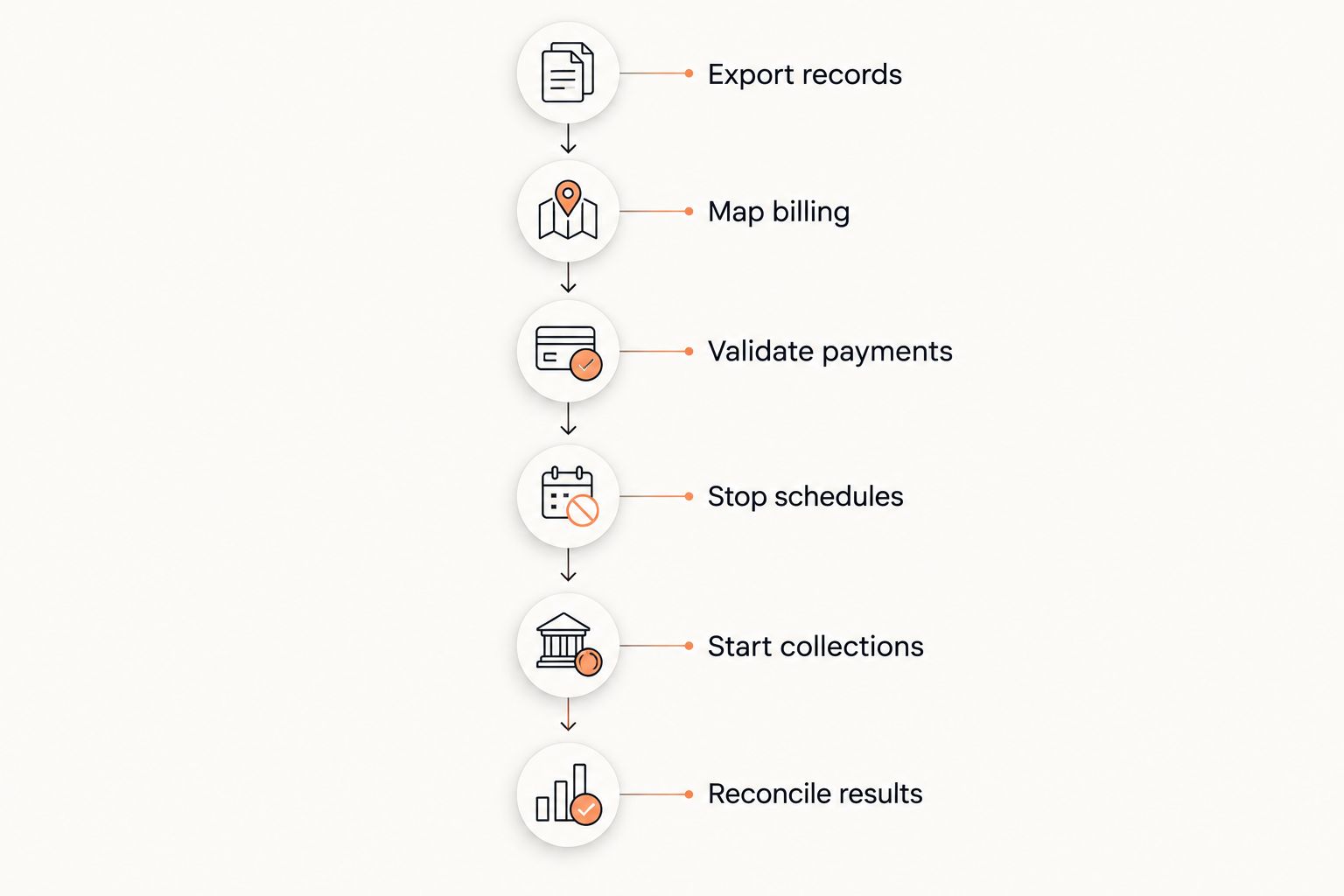
The cutover sequence is Export records, Map billing, Validate payments, Stop schedules, Start collections, Reconcile results. Each stage produces evidence for the next; a calendar deadline is not a substitute.
Which payment-method migration route should you use?
The best route depends on confirmed provider support, not your preferred launch date. Keep these options distinct in your 2026 migration plan.
| Route | Best for | Advantage | Limitation and required check |
|---|---|---|---|
| Provider-managed transfer | Eligible credentials supported by both processors | Avoids asking members to re-enter eligible details | Requires provider approval; verify which payment methods and records transfer |
| Secure member re-entry | Unsupported transfers or missing payment methods | Collects details through the receiving provider’s flow | Requires member action; incomplete submissions need follow-up |
| Staged migration | Mixed readiness across memberships | Keeps unresolved accounts out of the new billing run | Creates separate billing groups that need explicit ownership and reconciliation |
Choose provider-managed transfer only after both providers confirm eligibility. A saved payment token is not a portable card number. The receiving provider must confirm whether transferred credentials can support the intended recurring payments.
For secure re-entry, send a clear request through your normal member communication channel. Explain the action required, how to recognize the legitimate payment page, and whether the next billing date changes. Never ask members to reply with card details.
For staged migration, keep each subscription in a single collection system. Maintaining access to both systems is acceptable; allowing both to collect the same obligation is not.
Why payment-processor migrations vary
These factors determine the work required. Ask about each before setting a 2026 cutover date.
- Credential portability. Provider support determines whether eligible saved details can move or members must submit them again.
- Schedule ownership. Recurring charges controlled by gym software require different shutdown checks from processor-held subscriptions.
- Payment method. Cards, US ACH payments, and Irish SEPA Direct Debit have different authorization requirements. Confirm the applicable process rather than treating a card migration as a template for bank payments.
- Payer structure. Household accounts require a clear connection between the responsible adult, payment method, and covered students.
- Unfinished transactions. Pending payments, refunds, disputes, retries, and unpaid invoices require separate handling from future renewals.
- Account access. Export permissions, transaction history, and post-cancellation access determine what you must retain before ending the old service.
How do you prevent duplicate charges during the switch?
Give every scheduled payment exactly 1 collection owner. Record the membership period, due date, old schedule status, and new schedule status in the migration ledger.
Use 2 approval checks: confirm the old collection is disabled, then confirm the replacement is correct. These are separate checks even when a solo instructor performs both.
Review retries explicitly. A failed payment in the old system must not keep retrying while the new system also attempts to recover that same obligation. Decide where the balance will be collected and preserve the audit trail.
If a payment is pending, establish its outcome before attempting a replacement. A transaction that has not reached its final state is not automatically a failed transaction.
What should you tell members before billing changes?
Tell members what changes, what stays the same, and whether they need to act. Distinguish a new payment processor from a change to their membership agreement.
Your 2026 member notice should cover:
- The effective billing change and the next scheduled collection date.
- Whether the member must submit payment details securely.
- Any confirmed change to the payment descriptor or receipt sender.
- The contact route for reporting an unexpected or duplicate charge.
- Any authorization or notice required for the relevant payment method.
Do not promise that every bank statement will display identical wording. Confirm the receiving account’s descriptor settings first. For children’s memberships, send payment instructions to the responsible payer rather than assuming the student manages billing.
Can you cancel the old processor as soon as new payments work?
Keep 3 records accessible: transactions, refunds, and disputes. New collections do not remove your responsibility for activity processed through the old account.
Ask the old provider how refunds, disputes, payouts, and reporting work after cancellation. Confirm any retention obligations with the appropriate adviser and keep exports in restricted storage.
Separate stopping collections from closing the account. Disable recurring charges when their replacements are ready, but close the old account only after confirming how outstanding obligations and historical records will be handled.
Where martial arts gym software fits
MatPilot is best for martial arts academy owners who need member records, scheduling, attendance, billing, and per-art grading together. MatPilot uses Stripe for billing and supports Xero sync. Those capabilities do not establish that an existing processor’s credentials or recurring schedules will transfer.
If you are moving to MatPilot, ask for confirmation of the Stripe account arrangement, supported payment methods, migration responsibilities, and required member actions. MatPilot gym management software should be evaluated against the same cutover evidence as any replacement system: correct payers, correct dates, and no overlapping collections.
Preserve class access and rank records separately from payment migration tasks. A payment-method problem should enter your documented exception process, not silently rewrite attendance history or belt progression.
FAQ
Can I switch payment processors without asking every member for card details?
Yes, if both providers support a secure transfer of the eligible saved payment credentials. Get written confirmation of eligibility and completion before relying on those credentials for recurring billing.
Will importing members also import their recurring payments?
A member import does not establish that payment credentials or recurring schedules have transferred. Validate member records, payment methods, and future collections separately.
Should I run both processors at the same time?
You can retain access to both processors, but each scheduled obligation needs exactly 1 collection owner. Disable the old schedule and its relevant retries before approving the replacement.
Can I move failed payments into the new processor?
You can plan recovery of an unpaid balance in the new system only after confirming its status and the authority to collect it. Prevent the old system from retrying the same obligation.
Does changing processors change membership billing dates?
Changing processors does not require changing the agreed billing date. Map each next due date explicitly and check that the replacement schedule preserves it.
Is moving US bank payments the same as moving Irish direct debits?
No. US ACH and Irish SEPA Direct Debit use different authorization frameworks, so confirm the requirements for the applicable payment method with the receiving provider.
When is a payment-processor migration finished?
A payment-processor migration is finished when replacement collections reconcile and every exception has a documented resolution. Keep historical transaction, refund, and dispute records accessible under the applicable retention requirements.
One last thing
For your 2026 cutover, inspect a pending payment before reviewing another successful one. Pending transactions expose the gap between a submitted charge and a completed collection.
Write the next action beside every unresolved payment: wait for its outcome, request secure payment details, correct the schedule, or investigate the balance. An explicit exception list is safer than restarting billing for everyone.