How long does it take to switch gym software?
The time to switch gym software depends on getting member records, recurring billing, class schedules and staff ready for the same cutover date. The switch is complete when the new system runs your academy’s daily work—not when a member list finishes importing. Treat payment authorization and the old provider’s cancellation terms as separate checks before you commit to a date.
- How long does it take to switch gym software? Set the date around verified records, billing and staff readiness.
- MatPilot fits martial arts academies that need member management, scheduling, billing and per-art rank tracking together.
- Keep recurring collections in one system during the switch; test the replacement before changing payment responsibility.
- Check belt grading and attendance history separately from names and email addresses.
Why this matters
A software switch touches work your academy cannot pause: collecting dues, admitting students to class and keeping accurate training records. A successful import does not prove that those jobs are ready.
Start your 2026 migration plan with the next class and the next scheduled collection. Your martial arts class scheduling software needs to reflect the timetable instructors actually teach, including separate BJJ, boxing, Muay Thai and other sessions.
Choose a cutover date from operational readiness, not from the date you opened the new account. Assign an owner to each unfinished task. Keep setup progress separate from permission to start collecting payments.
How long does it take to switch gym software?
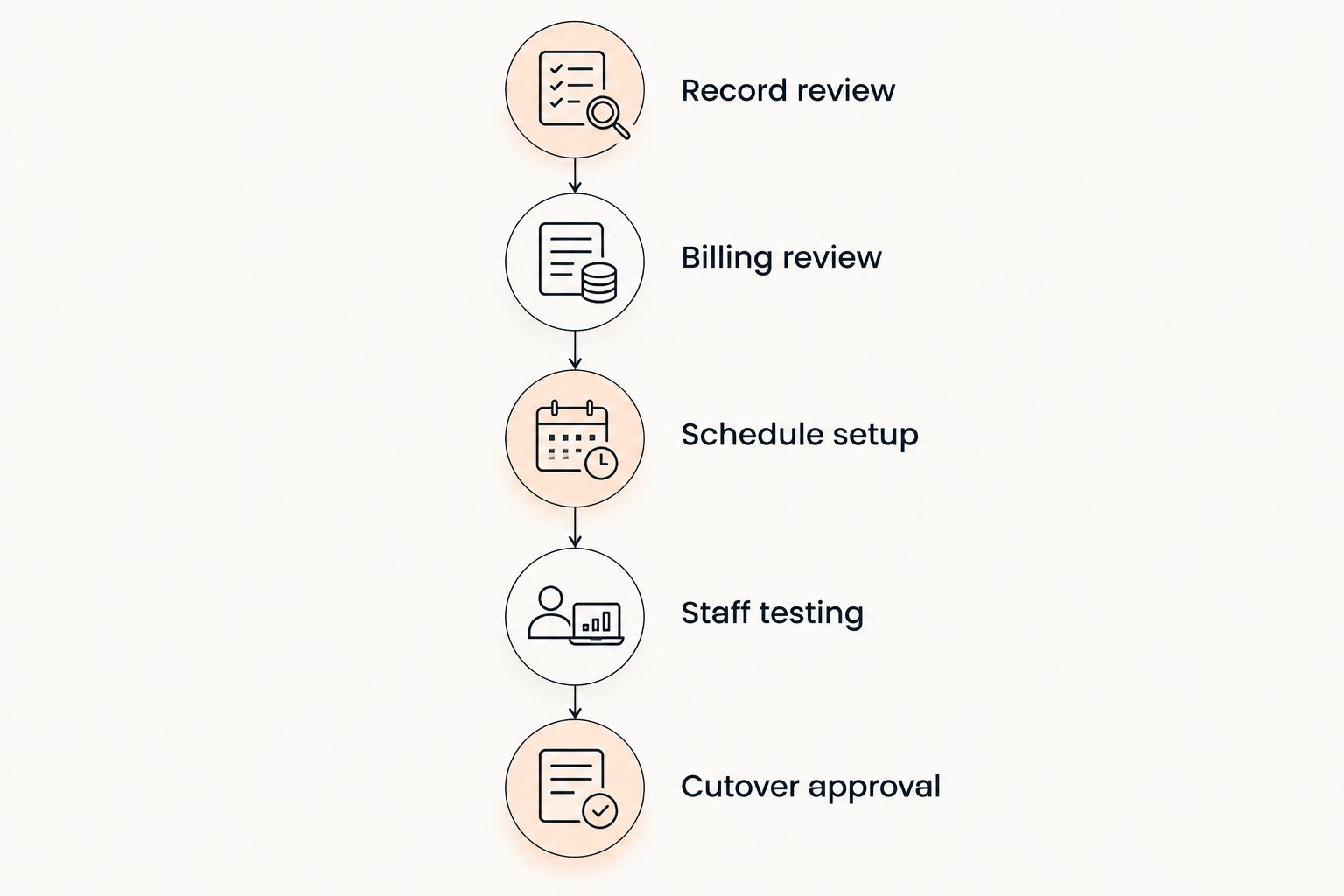
Build the timeline around 5 readiness stages: record review, billing review, schedule setup, staff testing and cutover approval. These are planning stages, not promised delivery times. Give each stage an owner and a completion condition before putting a date beside it.
- Record review. Identify what you need to preserve and check the export against the academy’s current records.
- Billing review. Confirm which system collects each recurring payment and what must happen before collections move.
- Schedule setup. Recreate the timetable and check class names, disciplines, instructors and booking rules.
- Staff testing. Have staff complete the real tasks they perform during a normal teaching day.
- Cutover approval. Approve the switch only after the unresolved items have named owners and clear instructions.
For each stage, write down what is ready, what remains unresolved and who can confirm completion. A task marked imported is not the same as a task marked checked. Review the result inside the destination system.
Record review: preserve the relationships, not just the rows
A member record needs more than a name and email address. For a martial arts academy, check the student’s discipline, rank, membership status and any guardian relationship you need for daily administration. Decide which history must remain accessible before preparing the export.
Use 3 record checks: completeness, accuracy and relationships. Completeness asks whether the required records are present. Accuracy asks whether their details match the source. Relationships asks whether records still connect correctly, such as a child to a guardian or a student to the right discipline.
Compare active members, paused members and former members separately. Do not treat every exported row as a current student. Keep a clear record of how you classified each group so staff can explain the destination system’s member list.
Review ranks by discipline. A student training in BJJ and karate needs the correct record for each art; a single generic belt field does not describe both. For boxing and Muay Thai, preserve the attendance and class information your school uses without inventing a belt structure.
Close record review only after checking the destination records. Keep the source export as a reference. If a field does not transfer, decide whether to enter it manually, retain it in a separate archive or leave it behind deliberately.
Billing review: decide who collects each payment
Billing needs its own cutover decision. A member appearing in the new system does not establish that a recurring payment is ready to move. Confirm the payment arrangements with the providers involved before assigning the new system responsibility for collections.
Create a billing handover list for your 2026 switch. Include the payer, linked members, payment status, next scheduled collection and the system responsible for that collection. Keep failed payments and outstanding balances visible as separate items.
Ask the providers whether existing payment credentials can move, whether members must authorize payments again and who performs any required transfer. Do not assume that using the same payment processor makes the handover automatic. Record the confirmed process before asking members to act.
For family accounts, check both the payer and the students covered by the arrangement. A correct student record does not prove that the family’s billing relationship is correct. Confirm the arrangement against the source before activating replacement collections.
Keep each recurring collection assigned to one system. If you run both systems during preparation, distinguish reference access from live payment collection. Document when the old collection responsibility ends and when the new responsibility begins.
Schedule setup: test the next teaching day
Build the timetable your academy will teach, not an idealized schedule. Check class names, disciplines, age groups, instructors and the days on which sessions occur. Confirm any booking or attendance rules you intend to use in the destination system.
Use the next teaching day as a rehearsal. Find the first class, locate its students and practice recording attendance. Then check a different discipline or age group so the test does not cover only your simplest session.
For a multi-discipline school, review BJJ, boxing, Muay Thai, MMA and any other taught arts on equal terms. Confirm that staff can distinguish sessions clearly. Similar class names need enough context to prevent students or instructors choosing the wrong session.
Separate recurring classes from exceptional sessions. A seminar, grading or holiday change needs an explicit decision about how it will appear. Do not let the regular timetable become the only schedule staff check.
Approve the schedule when an instructor can use it without translating the old system’s labels. Write down the naming convention you want staff to follow. That makes later timetable changes easier to review.
Staff testing: rehearse the actual work
Test the jobs each role performs. An owner needs to review members and payments; an instructor needs to find the right class and record attendance. Give each person a task, rather than asking whether the software looks straightforward.
Include an exception in the rehearsal. Ask staff to find a paused membership, identify an unresolved payment or locate a student’s rank in the correct discipline. These checks expose questions that a clean demonstration record leaves unanswered.
Write short operating instructions for the 2026 cutover. State where staff record attendance, where they check payment status and who handles uncertain records. Include the escalation contact by role, so the instructions remain useful when staffing changes.
Check permissions as part of the rehearsal. Confirm that each person can perform their assigned work and that access matches the responsibilities you intend to give them. Do not use the owner’s account as proof that every staff role works.
Finish staff testing with observed tasks, not verbal approval alone. Keep a short list of unresolved questions. Resolve anything that blocks the next class or collection before approving the switch.
Should you switch everything together or in stages?
Choose the handover approach after reviewing the records and billing dependencies. Neither approach removes the need for testing. The difference is how you organize the transition and how much parallel work staff must understand.
| Approach | Best for | Practical advantage | Trade-off | Approval condition |
|---|---|---|---|---|
| Single cutover | Academies whose required records, billing arrangements and staff tasks are ready together | Gives staff one clear changeover point | Unfinished dependencies must be resolved before that point | All critical workflows pass their checks |
| Staged handover | Academies that need separate preparation for records, schedules and billing | Lets you review each workstream before moving responsibility | Requires explicit instructions about which system handles each task | Every stage has a named owner and a clear boundary |
A staged handover does not mean collecting the same membership through both systems. Use the preparation period to configure, inspect and rehearse. Move payment responsibility according to the confirmed billing process.
A single cutover does not mean skipping preparation. Records, schedules and staff testing still happen before the changeover. The shared date is the end of that preparation, not its beginning.
Why the switching timeline varies
These 5 factors determine what belongs on your migration plan. Check them against your academy’s actual records and provider arrangements rather than using another gym’s timeline.
- Record condition. Duplicate entries, inconsistent statuses and unclear guardian links require decisions before you approve the destination records.
- Billing arrangements. Payment authorization, outstanding balances and collection dates determine how you assign payment responsibility.
- Training history. Attendance and per-art ranks need a preservation decision separate from basic member details.
- Staff readiness. The cutover depends on instructors and administrators being able to complete their assigned tasks.
- Provider terms. Check export access, cancellation requirements and continued access directly with the current provider.
Keep the same distinction if you are leaving Gymdesk or Kicksite: your export, billing handover and cancellation are separate workstreams. Confirm your own account’s arrangements. Do not base the plan on an unverified statement about another customer’s contract.
Where MatPilot fits in the switch
MatPilot is best for martial arts academies that need member management, scheduling, billing and per-art rank tracking together. MatPilot gym management software includes attendance, Stripe billing and Xero sync, with web access and native iOS and Android apps.
Those functions give you specific workflows to inspect during the handover. They do not replace record review, payment authorization checks or staff rehearsal. Approve the daily work before assigning the destination system live responsibility.
Use the MatPilot overview to review the product, then ask about your source records and required workflows. Evaluate the software against your academy’s needs without treating product features as proof that every historical field will transfer.
Can you keep teaching while switching gym software?
Keep the existing teaching workflow in place during preparation, then tell staff exactly when attendance recording moves. Do not leave instructors to choose between systems. Preserve access to the reference information they need during the handover.
Do members need to register again?
Confirm whether members need to supply information or authorize payments again before sending instructions. Tell members what action is required, where to complete it and whom to contact. Do not ask for repeat registration unless the confirmed process requires it.
When should you cancel the old gym software?
Check cancellation terms before choosing the cutover date, but separate cancellation from deleting your reference records. Preserve the exports and documents you need first. Coordinate the end of old collections with the approved start of replacement collections.
FAQ
How long does it take to switch gym software in 2026?
The switching timeline depends on record readiness, billing arrangements, schedule setup and staff testing. Set the cutover date after those workflows pass their checks, rather than treating an imported member list as a completed switch.
Can I switch gym software in the middle of a billing cycle?
Plan the switch around each scheduled collection and the confirmed payment handover process. Assign every recurring collection to one system and check unresolved payments separately.
Will my members need to enter their payment details again?
Confirm the payment authorization requirements with the providers involved. Do not promise that payment details will transfer or ask members to re-enter them until the process is confirmed.
Can I keep belt ranks and attendance history when switching?
Check whether the source export and destination process preserve the history you need. Review ranks by discipline and decide how to retain any information that does not transfer.
Should I run both gym systems during the switch?
Separate preparation and reference access from live operations if both systems remain open. Tell staff where to record attendance and assign each recurring payment to one collection system.
What should I check before switching from Gymdesk or Kicksite?
Check your account’s export options, payment handover requirements and cancellation terms directly with the provider. Verify the destination records and rehearse staff tasks before approving the cutover.
Is MatPilot only for tracking belts?
MatPilot is gym management software with members, scheduling, attendance, billing and per-art rank tracking. Its scope extends beyond grading, so assess the daily administration workflows as well as training records.
One last thing
Put an exception list beside your 2026 cutover plan. Record unresolved member details, payment questions and history that needs separate handling, with an owner for each item.
A switch is not finished because the new database looks complete. It is finished when staff know where to do the work and how to handle exceptions. Use that rule when approving the handover.