How much does it cost to switch away from Gymdesk?
The cost to switch away from Gymdesk is your account-specific exit charges, replacement setup, subscription overlap, and staff time, not a universal migration fee. A replacement subscription alone does not capture the work of checking member records, rebuilding billing instructions, and preserving attendance and rank history. Build your 2026 switching budget from written terms and a tested migration plan before you cancel.
- The cost to switch away from Gymdesk includes confirmed charges, migration work, and any subscription overlap.
- Check payment continuity separately from member-data migration; importing a member does not prove billing is ready.
- MatPilot gym management software suits martial arts owners who need billing, scheduling, attendance, and per-art ranks together.
- Approve the move only after you reconcile member records, billing instructions, and the first collection results.
Why this matters
Your switch has two separate budgets: money paid to suppliers and work assigned to your team. Keep them separate. Otherwise, a low setup quote hides the hours your front desk spends repairing records or explaining payment changes to parents.
Start with how to export your data when canceling gym software. Establish what you can retain before choosing a cancellation date. An export file is evidence of what you received, not proof that the replacement system can use every field.
How much does it cost to switch away from Gymdesk?
Your total depends on your agreement, the replacement provider’s written scope, and the condition of your records. For a 2026 decision, request dated answers rather than applying another academy’s switching bill to your account.
Use this breakdown to collect the evidence. Treat an unconfirmed charge as unresolved, not as zero.
| Budget line | What to confirm | Evidence to keep |
|---|---|---|
| Existing account closure | Cancellation process, effective date, and any account-specific charges | Written confirmation tied to your account |
| Replacement setup | Included configuration, imports, training, and excluded work | Itemized onboarding scope |
| Subscription overlap | When replacement billing starts and existing billing ends | Both billing schedules |
| Data preparation | Who cleans duplicates, maps fields, and checks imported records | Assigned task list |
| Payment transition | Required processor steps, permissions, and member actions | Written payment-transition instructions |
| Staff time | Preparation, training, reconciliation, and member support | Hours assigned by task |
| Corrections | Who fixes rejected records and unresolved billing exceptions | Named owner and agreed scope |
Build two totals. The cash total contains confirmed supplier charges and overlap. The labor total contains assigned hours multiplied by the internal hourly cost you use for planning.
Keep ongoing operating costs outside the one-time migration total. Then compare them separately, using the same membership base and payment activity. A switching decision needs both views; combining them makes the first month look like a normal operating month.
What should your written quote include?
Ask the replacement provider to describe deliverables, not just “migration assistance.” List the source files, destination fields, configuration work, training, and correction process. Identify the person responsible for each task.
Ask what happens when an import rejects a record. Establish whether the provider corrects it, returns it for your team to fix, or treats the work as outside scope. Record the answer before approving the move.
Do not read this checklist as a statement of Gymdesk’s current cancellation terms or either provider’s migration capabilities. Use your account agreement and written provider responses to establish those details.
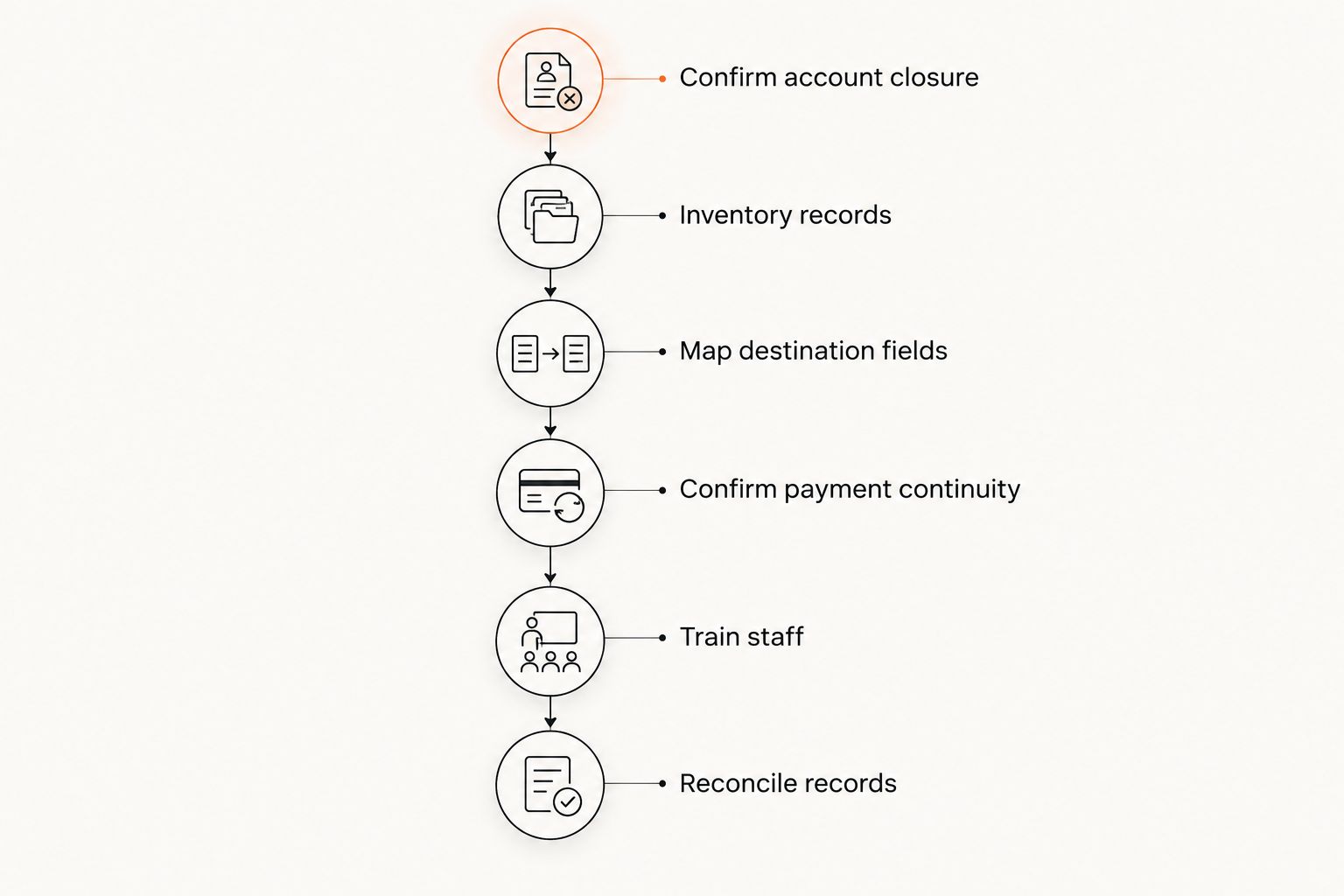
Build the switching budget in 6 steps
1. Confirm account closure
Ask Gymdesk for the cancellation process that applies to your account. Request the effective end date, final billing treatment, and what access remains after closure. Keep the response with your migration documents.
Do not cancel merely because the replacement account opens. Set the cancellation date against the work still needed: exports, payment instructions, staff training, and reconciliation. Every period of overlap needs a named purpose.
2. Inventory the records you need
List active members, membership status, billing responsibility, payment schedules, attendance, and rank history. Include guardians and family relationships where your academy uses them. Separate records you need for daily operations from records you need to retain for reference.
For multi-discipline schools, record the art alongside the rank. A judo grade and a karate grade need their own context. For boxing and Muay Thai classes, preserve the attendance and membership information your school actually uses rather than forcing those students into a belt structure.
3. Map the destination fields
Ask the replacement provider to show where each required field belongs. Mark unsupported or unresolved fields explicitly. Do not accept a member-name import as a completed migration when billing responsibility or promotion history remains outside the system.
Use 3 test records as a practical starting checklist: an adult member, a child linked to a guardian, and a member with an account exception. These are proposed checks, not a guarantee of full coverage. Add cases that reflect your academy’s actual arrangements.
4. Confirm payment continuity
Ask both the replacement provider and payment processor what transfers, what requires a separate process, and what requires member action. Distinguish a member record from a payment authorization. Do not copy sensitive payment credentials into a spreadsheet to bridge a gap.
Assign collection responsibility for every membership at the cutover. Record which system handles the next charge and which handles any unresolved balance. Where instructions require members to act, prepare the message and a follow-up list before switching collection responsibility.
5. Train the people doing the work
Test the daily jobs your team performs: recording attendance, finding a family account, reviewing a payment issue, and checking a student’s rank. Use your real timetable and membership rules. A generic demonstration does not establish that your setup matches your school.
Assign training time by role. An instructor needs a different walkthrough from the person reconciling payments. Include the time needed to document questions and resolve them; watching a demonstration is not the same as completing the task.
6. Reconcile before closing access
Compare source and destination member counts, then inspect records beyond the totals. Check statuses, family links, next billing dates, attendance, and ranks. Matching totals do not establish that the right details sit under the right members.
Keep an exception list with an owner and a resolution for each item. Close the old account only after you have the records you need and have approved the remaining arrangements. For your 2026 migration file, keep the sign-off date and the evidence supporting it.
Why the cost of switching varies
The size of your member list is only part of the workload. Build the estimate around the records and processes that need attention.
- Data condition. Identify duplicates, incomplete statuses, and inconsistent field names before requesting an import estimate. Assign cleanup rather than leaving it inside an unspecified setup task.
- Family relationships. Check who trains, who pays, and which children belong to which guardian. Include any account-specific billing arrangements in the review.
- Payment transition. Obtain the required steps for your processor and destination platform. Budget staff time for any member action those instructions require.
- Martial arts history. Decide how to retain attendance, promotion dates, stripes, and ranks by art. Specify whether each item must be operational or retained for reference.
- Cutover scope. List scheduling, billing, attendance, website changes, and accounting work separately. Do not assume a membership import covers every connected process.
- Responsibility split. Name the work your team performs and the work the provider performs. Include correction ownership so neither side assumes the other handles it.
Ask for a revised scope when one of these conditions changes. Adding family-account reconstruction after approving a simple member import changes the work, even when the member count stays the same.
How do you control overlap without rushing the move?
Give every overlapping subscription period a specific job. Suitable jobs include testing the timetable, comparing imported records, training staff, and checking billing instructions. Review whether each job still requires access to the old account.
Create a cutover sheet with the final export date, collection responsibility, staff owner, and cancellation confirmation. Keep a separate list of changes made after the export. Otherwise, a membership edited during the transition creates another record to reconcile.
Do not run live collection in both systems without explicit instructions for preventing duplicate charges. Testing access and testing billing are different activities. Ask your provider how to validate the payment setup without assigning the same collection twice.
For a 2026 budget, show overlap as its own line rather than hiding it inside onboarding. That makes the reason for keeping both accounts visible and gives you a clear decision when testing is complete.
Is MatPilot a relevant destination for this switch?
MatPilot gym management software suits martial arts owners who need billing, scheduling, attendance, and per-art ranks together. It supports members, classes, Stripe billing, belt grading, and Xero sync. Access is available through the web and native iOS and Android apps.
MatPilot is relevant when the switch concerns the academy’s operating workflow, not just a place to store belt records. Check a BJJ student’s rank history, a karate timetable, a boxing membership, and a parent’s billing responsibility against your actual requirements.
The limitation is migration-specific: a feature list does not establish which Gymdesk records transfer, how payment arrangements move, or who performs cleanup. Ask MatPilot to confirm those details in writing. Approve the move against a tested scope, not against the destination’s feature list alone.
Can you switch without asking every member to update payment details?
The answer depends on the payment processor, destination setup, and authorized transfer process. Get a written answer for your account before promising members that no action is required. A successful member import does not settle this question.
If member action is required, make the instruction specific. State what changes, what the member needs to do, and who handles questions. Do not ask members to send card details by email or chat.
Should you switch before the next billing run?
Switch before the next billing run only after collection responsibility and the required payment setup are confirmed. Otherwise, finish those checks before moving live billing. A calendar deadline is not evidence of readiness.
Treat billing, class access, and retained history as separate approval checks. You need a working timetable and accurate student records as well as a configured payment process. Preserve access needed to resolve exceptions.
FAQ
What is the total cost to switch away from Gymdesk?
Your total combines confirmed account-closure charges, replacement setup, subscription overlap, and staff time. Build the amount from your agreement and a written migration scope rather than assuming a standard fee.
Does canceling Gymdesk mean my data moves automatically?
Do not treat cancellation as a data-transfer instruction. Confirm exports, destination imports, and access after closure separately with the relevant providers.
Can I move attendance and belt history to another platform?
Confirm the available source fields and the destination’s import support before approving the move. Test ranks by martial art, promotion dates, and attendance against the original records.
Will members need to enter their payment details again?
Your payment processor and destination setup determine the required member action. Obtain written instructions before telling members that existing payment arrangements will continue.
Is switching to MatPilot only useful for belt tracking?
MatPilot covers members, scheduling, attendance, billing, and per-art ranks, not just belt tracking. Confirm the migration scope separately from those live product features.
How do I avoid charging members twice during a switch?
Assign each membership’s next collection to a specific system and confirm how the other system stops collecting. Reconcile payment results and unresolved balances before closing the transition.
What should I request in a 2026 migration quote?
Request a dated scope covering imports, configuration, training, payment-transition responsibilities, exclusions, and corrections. Keep supplier charges separate from the hours your own team must contribute.
One last thing
Review the awkward account, not just the clean account. A child with a separate payer, a paused membership, or a student training in several arts exposes questions that a simple adult membership does not.
Use an account that genuinely exists at your school. Verify its billing responsibility, next collection, class access, and history before signing off. That check turns “the import worked” into a more useful question: can your team run the academy from these records?