How much does it cost to switch away from Kicksite?
Your cost to switch away from Kicksite depends on your agreement, the replacement system, and the work needed to move your records and billing. A useful 2026 estimate separates confirmed charges from staff time, payment setup, and any period when both systems remain active. Get those items in writing before you choose a cancellation date.
- How much does it cost to switch away from Kicksite? Budget for contract obligations, migration work, billing changes, and overlap.
- Separate one-time switching work from the ongoing subscription and payment processing fees.
- MatPilot suits martial arts owners who need member management, scheduling, billing, attendance, and per-art ranks together.
- Confirm payment-method transfer separately from member-data transfer before setting your cutover date.
How much does it cost to switch away from Kicksite?
Build your switching estimate from your current agreement and a written implementation scope from the replacement provider. Do not treat the new subscription as the whole cost of leaving.
Use the following breakdown for a 2026 switch. Mark each line as confirmed, not applicable, or awaiting an answer. An unanswered line is not a saving.
| Cost component | What to establish | Evidence to keep |
|---|---|---|
| Existing agreement | Final service date, notice requirements, and any applicable closing obligations | Agreement and written cancellation response |
| Replacement subscription | When the new subscription begins and what the selected plan includes | Current plan terms |
| Data preparation | Who cleans, maps, and checks the records | Written task list with an owner |
| Migration assistance | What the replacement provider moves and what you must enter yourself | Written migration scope |
| Payment setup | Whether existing payment methods can move and what member action is required | Processor and provider confirmation |
| Parallel operation | Whether both subscriptions remain active during the change | Cutover calendar |
| Staff time | Training, reconciliation, corrections, and member communication | Internal work estimate |
For the recurring-payment side of the decision, use the martial arts billing software guide to frame the questions you ask. Keep recurring operating expenses separate from temporary switching work.
Why this matters
A gym software switch touches more than a member list. You need the correct person attached to the correct membership, class access, payment responsibility, and rank history.
The useful question is not just whether a provider accepts a spreadsheet. Ask whether the records you need will be usable after the move. A successful import does not, by itself, establish that recurring billing is ready.
Approve the cutover only after you have checked the records and payment workflow your academy depends on. That applies to BJJ, boxing, Muay Thai, karate, judo, taekwondo, and mixed-discipline schools alike.
Separate the switching budget from the operating budget
Your 2026 decision needs separate budgets for leaving the old system and running the new one. Combining them makes it difficult to see which expenses end after the switch.
One-time switching work
Include record preparation, import checking, staff training, and member instructions. Assign responsibility even when you plan to do the work yourself. Owner time still belongs in the plan.
Ask the receiving provider to name the exact records covered by its migration assistance. Member profiles, attendance history, rank records, and billing information are separate questions. Do not accept a general promise to move your data as an answer to all of them.
Ongoing operating expenses
Compare the replacement subscription and payment processing terms separately. Check what the selected plan includes before deciding whether it covers your actual workflow.
For a multi-discipline academy, demonstrate a student attending different arts with separate rank records. For a school serving children, demonstrate the relationship between the student and the person responsible for payment. Use your academy's real situations, not a generic product tour.
Temporary overlap
An overlap period means you keep access to both systems during the transition. Its benefit is access for checking and correction; its drawback is paying for simultaneous service and maintaining clear boundaries between the systems.
Do not run duplicate recurring collection schedules. Write down which system is responsible for each membership's next payment before enabling the replacement schedule.
Why the cost of leaving Kicksite varies
The scope of your move determines the work you need to budget. These are the questions to resolve before accepting a switching estimate:
- Agreement obligations. Establish your notice requirements and final service date from your own agreement, not another gym's experience.
- Records in scope. Decide whether you need only current members or also historical attendance, rank information, and other records.
- Data condition. Identify duplicate profiles, inconsistent membership names, and unclear payer relationships before importing.
- Payment continuity. Confirm whether payment methods can transfer or whether members must authorize payment again.
- Staff responsibilities. Assign export preparation, checking, training, and member communication to named people.
- Overlap requirements. Decide when the replacement system becomes authoritative and when access to the old system can end.
These factors are a scope checklist, not claims about Kicksite's current policies. Use written answers from the providers involved to complete your own estimate.
Build a switching estimate you can approve
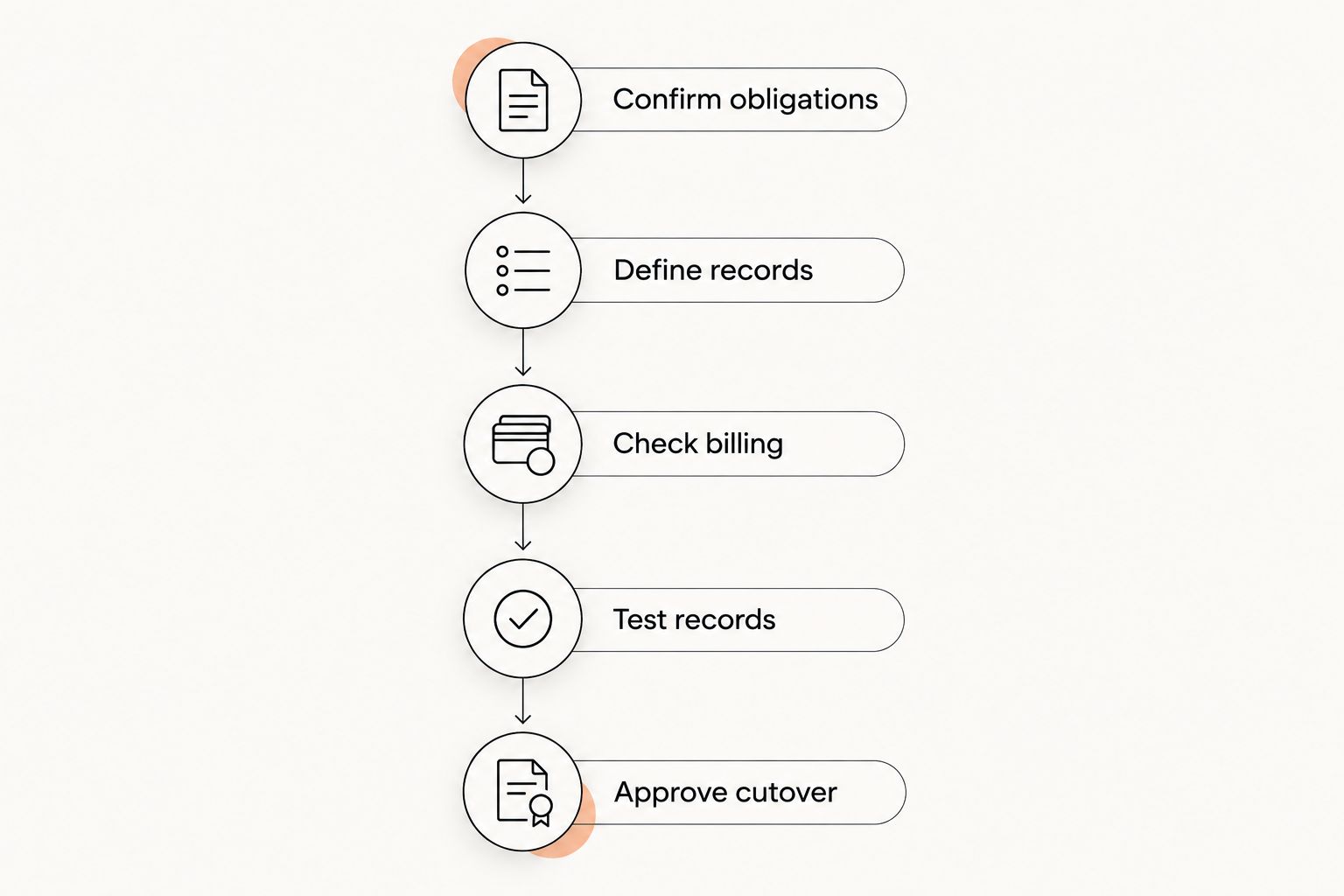
Use this process before choosing your 2026 cancellation date. Keep the evidence in one working document so staff do not act on different assumptions.
Confirm obligations
Read your agreement and request written confirmation of the cancellation process. Ask for the final service date, the final billing date, and what access remains after cancellation.
Keep those dates distinct. Your academy needs a planned point for stopping new entries in the old system, not just a date when its subscription ends.
Define records
List the records required for day-to-day operations. Include active memberships, payer details, class schedules, attendance, and per-art rank information where your academy uses them.
Separate required operating records from historical records you only need to retain. Ask how each category will be handled. Retaining an export and importing usable history are different outcomes.
Check billing
Ask both providers and the payment processor how recurring payments will be handled. Request a clear answer about payment-method transfer, member authorization, and responsibility for active collection schedules.
Review 1 upcoming billing cycle before the cutover. This is a planning checkpoint, not a promised migration duration. Identify which system should collect each payment and where staff will check the result.
Test records
Check examples against the source records before approving the full move. Include an active member, a paused membership if your academy uses one, and a student with rank history.
Use 1 class session as an attendance rehearsal. Confirm that staff can identify the expected students and record attendance correctly. Keep the rehearsal separate from your live records unless the provider directs otherwise.
Approve cutover
Assign a person to authorize the change. Record what passed, what remains unresolved, and whether unresolved items affect billing or class operations.
Reserve 1 staff training session before the replacement system becomes authoritative. Treat that as an initial checkpoint, not proof that every staff member is ready. Repeat training where a role still needs practice.
Compare the transition approaches
There is no reason to use the same transition plan for every academy. Choose an approach based on what you need to verify and what access your agreements allow.
| Approach | Best for | Advantage | Limitation |
|---|---|---|---|
| Planned overlap | Owners who need time to compare records | Keeps both systems accessible for checking | Requires clear controls over billing and staff entries |
| Single cutover date | Teams with completed checks and clear responsibilities | Gives staff a defined point to change systems | Leaves less room for unresolved operational questions |
| Limited-scope migration | Owners who have clearly separated operating records from retained history | Focuses setup work on agreed records | Historical information needs a separate retention plan |
Choose the approach after checking the records, not before. A convenient calendar date does not resolve unclear payer relationships or an unconfirmed payment transfer.
For any approach, write down where staff should enter new members, attendance, and payment corrections during the transition. A shared instruction prevents the old and new records from drifting apart.
What should you ask a replacement provider?
Request a written scope for your 2026 move. Ask direct questions that require specific answers:
- Which records will you import, and which will you leave out?
- Who resolves duplicates and maps membership names?
- How will we check attendance and rank information?
- What happens to existing payment methods and recurring collection schedules?
- What must members do before their next payment?
- What support is included before and after cutover?
If you are considering MatPilot gym management software, use its stated member management, scheduling, attendance, Stripe billing, and per-art rank features as demonstration checkpoints. It is available through the web and native iOS and Android apps. Its AI co-pilot uses approval gates, so the owner stays in control of actions.
MatPilot is a fit for martial arts academy owners who need billing, attendance, scheduling, and per-art ranks in one management system. Those capabilities do not establish the scope of a particular Kicksite migration. Confirm the records, payment setup, and responsibilities for your academy before committing.
Can you switch without interrupting recurring payments?
Payment continuity requires a confirmed plan for payment methods, authorizations, and collection schedules. Do not assume that importing member names also transfers the ability to charge those members.
Ask who will stop the old collection schedule and who will activate the new one. Then identify the members who need to take action. Send those members precise instructions rather than a general announcement that the software has changed.
Is switching without overlap the cheapest approach?
Avoiding overlap removes simultaneous subscription use, but it does not resolve data preparation, training, or payment setup. Compare the work and access required before choosing that approach.
A single cutover date is appropriate only when your checks are complete and staff know where to work. Do not cancel useful access merely to meet an arbitrary switching date.
How do you tell whether switching is worth the work?
Compare the replacement system against the operational problem you need to solve. Demonstrate the complete task, such as checking a failed payment, recording attendance, or reviewing a student's rank history.
Do not count an outcome as achieved because a feature appears on a product page. Make it an acceptance check during setup, with a named staff member responsible for confirming it works for your academy.
FAQ
How much does it cost to switch away from Kicksite in 2026?
Your switching cost depends on your agreement, replacement subscription, migration work, payment setup, and any overlap. Get a written scope and separate temporary switching expenses from ongoing operating expenses.
Does canceling Kicksite automatically cancel my recurring payments?
Do not assume that canceling software also stops every recurring collection schedule. Confirm the cancellation and payment instructions with the providers involved before activating replacement billing.
Can I move saved payment methods with my member list?
A member-list transfer does not establish that saved payment methods can move. Ask the payment processor and both software providers to confirm the process and any member authorization required.
What should I export before switching gym software?
Define the member, membership, payer, attendance, schedule, and rank records your academy needs, then confirm which exports are available. Keep an untouched source copy and check the imported records against it.
Should I keep both gym systems active during the switch?
Keep both systems active only when the access supports a defined checking or correction task. Set clear rules for staff entries and recurring collections so the overlap does not create conflicting records.
Is MatPilot only for tracking BJJ belts?
MatPilot is gym management software with member management, scheduling, attendance, billing, and per-art ranks. It serves martial arts academies, including BJJ and striking disciplines, rather than belt tracking alone.
One last thing
A matching member count is not a completed migration. You can have the correct total while a payer relationship, membership status, or rank record is wrong.
Before your final 2026 approval, follow a member record through the work staff actually perform: identify the student, check class access, record attendance, review rank information, and establish payment responsibility. Approve the move when those relationships are correct, not merely when the import finishes.