How much does liability waiver software cost for gyms?
Liability waiver software for gyms has no single standard cost: your total depends on the provider’s subscription, usage rules, and required features. For your 2026 budget, compare the full written quote, including any setup, storage, integration, and cancellation charges—not just the advertised subscription.
- How much does liability waiver software cost for gyms? Compare written quotes against the same signing and storage requirements.
- MatPilot provides martial arts gym management software; assess waiver requirements separately before choosing your system.
- Count trial visitors, guardians, and event participants when describing your electronic waiver needs.
- Test signed-document retrieval and data export before committing to a provider.
Why this matters
A waiver workflow includes more than collecting a signature. Your staff must identify the participant, check the document status, and retrieve the signed record when needed. A subscription comparison that ignores those tasks misses the work your gym must perform.
For children’s classes, start with guardian permissions for minors. The paying adult, signing guardian, and participating child need clear relationships in your records. Do not assume that a family billing account establishes who signed for each participant.
For a 2026 purchase, define the signing workflow before comparing subscriptions. A BJJ academy, boxing gym, or mixed-discipline school should test the same real situations against every quote.
How much does liability waiver software cost for gyms?
The answer comes from a provider’s current quote and the workload that quote covers. Ask the provider to separate recurring charges, usage-based charges, and one-time work so you can compare equivalent scopes.
Use this breakdown when requesting a quote. Treat every row as a question, not an assumption that a particular provider charges for it.
| Quote component | What to ask | What your budget should capture |
|---|---|---|
| Subscription | What features and usage does the subscription include? | The recurring commitment |
| Usage | What counts as a submission, signature, or stored document? | Charges tied to your signing workload |
| Setup | Is form configuration or record import charged separately? | One-time implementation work |
| Storage | How are signed documents retained and retrieved? | Any separate retention or archive charges |
| Integration | Is connecting member records included? | Required connection or implementation work |
| Exit | What happens to documents after cancellation? | Export, continued access, and termination obligations |
Compare the same service period and the same usage assumptions. An annual commitment and a monthly arrangement are not interchangeable merely because both display a monthly figure.
Keep payment processing separate from waiver collection. If a proposal includes membership billing, ask the provider to identify which charges belong to payment transactions and which belong to document signing. Do not assign every platform charge to waivers.
Build an annual budget without guessing
For a 12-month budget, combine the subscription commitment, quoted usage charges, and required implementation work. Add any separately quoted storage or integration charges, then record cancellation obligations alongside the total.
Keep staff work in a separate column. List who configures forms, checks incomplete records, fixes duplicate participants, and retrieves documents. Assign an internal cost only if you already have a defensible hourly figure; do not invent a savings estimate.
Your 2026 comparison should show both the supplier’s charges and the tasks your gym retains. That makes a lower subscription distinguishable from a genuinely smaller administrative workload.
Standalone waiver software or a gym management system?
Compare two purchasing approaches: a dedicated waiver service and a broader gym management system with verified waiver capabilities. Neither approach wins automatically. The decision depends on whether you need only document collection or a wider operational change.
| Approach | Best for | Practical advantage | Limitation to check |
|---|---|---|---|
| Standalone waiver service | Gyms keeping their existing member and billing systems | Limits the purchase to the signing workflow | Confirm how signed records connect to participants elsewhere |
| Gym management system with verified waiver support | Gyms replacing several operational systems together | Lets you assess signing alongside member administration | Confirm the exact signing, retrieval, and export capabilities |
Ask each supplier to demonstrate its proposed workflow rather than accepting a category label. A system described as gym management software still needs to prove the specific document tasks you require.
MatPilot is best suited to martial arts owners seeking member, class, billing, and belt-grading management—not a waiver-only purchase. MatPilot provides those gym management functions, but this is not confirmation of electronic waiver collection, guardian signing, or document retention. Verify those requirements separately.
Keep that distinction throughout the comparison. Buying a broader system makes sense only when its confirmed capabilities match the work you actually intend to move.
Why liability waiver software costs vary
Use these factors to define your quote request. Ask whether each changes the supplier’s charges; do not assume every provider uses the same pricing model.
- Signing volume. Describe new members, trial visitors, seminar attendees, and other participants who need documents. Ask which activity counts toward usage.
- Signing relationships. Specify adult self-signing and guardian signing for children. Ask whether the required workflow is included.
- Document requirements. Explain whether you need distinct forms for different activities or events. Ask how revisions and stored versions are handled.
- Locations and staff access. State which sites and staff roles need access. Request confirmation of any account or access restrictions.
- Connections to other systems. Identify where participant records live and how document status must reach that system. Ask who configures and maintains the connection.
- Retention and exit requirements. Describe how you need to retrieve and export records. Ask what access remains after the subscription ends.
Separate requirements from preferences. If staff must retrieve a signed document during an incident response, retrieval is a requirement. A preferred screen layout is not the same kind of purchasing condition.
For multi-discipline academies, describe the activities explicitly. BJJ, boxing, Muay Thai, and youth martial arts belong in the scope you give your legal adviser and supplier; do not let an account label stand in for that review.
Test the workflow before accepting the quote
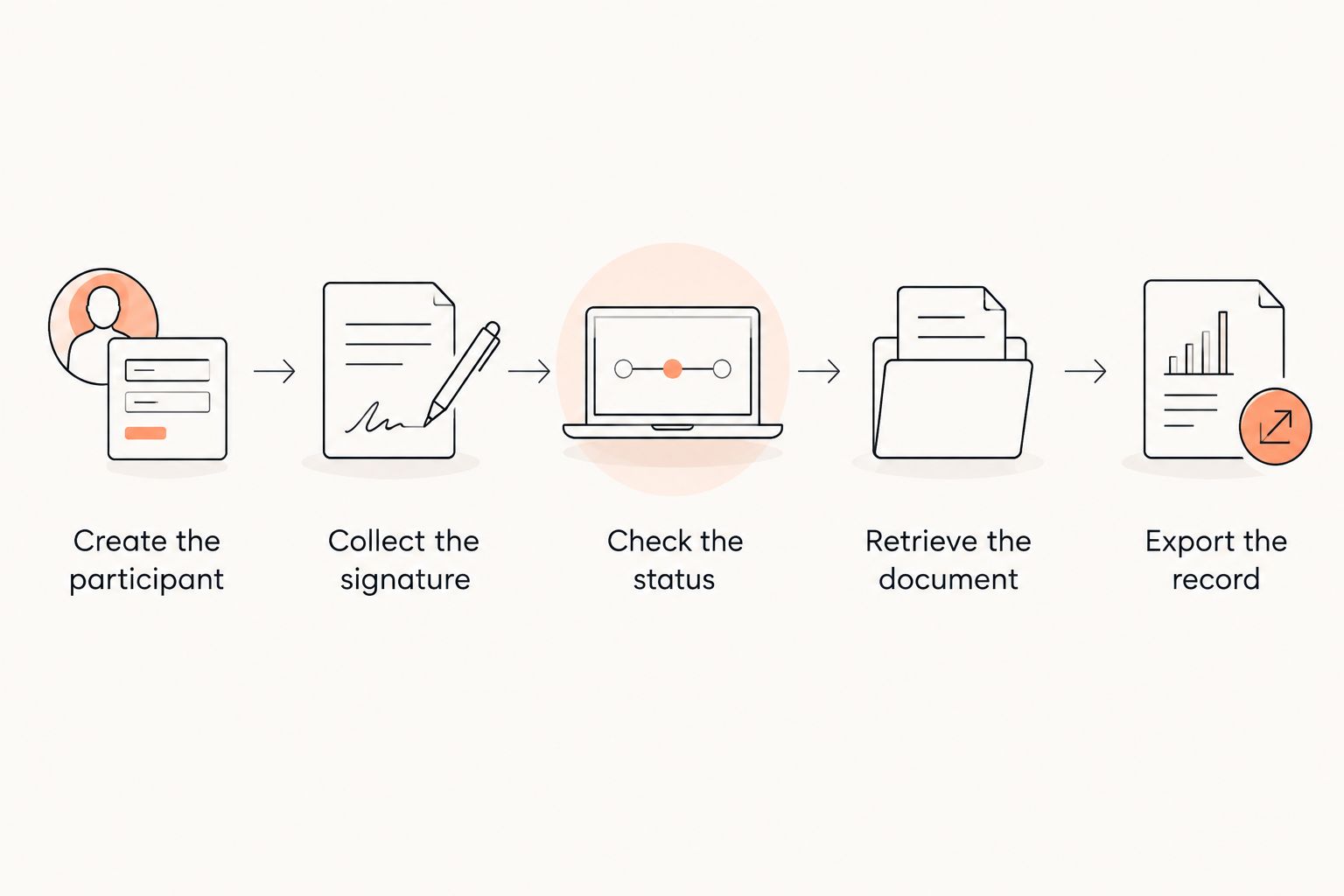
Run 3 signing scenarios using test records: an adult trial participant, a child with a guardian, and an existing member asked to sign a revised document. These are recommended acceptance tests, not claims about any provider’s features.
- Create the participant. Enter a test participant and check how the system identifies that person. Confirm how staff distinguish people with similar names.
- Collect the signature. Complete the proposed signing process. For the child scenario, inspect how the guardian’s identity and relationship appear in the record.
- Check the status. Ask a staff member to find the participant and determine whether the required document is complete. Identify any manual matching work.
- Retrieve the document. Open the completed record and inspect the participant details, signer information, document content, and recorded signing information.
- Export the record. Download the available files and inspect them outside the platform. Confirm that the export is understandable without relying on the supplier’s interface.
Repeat the exercise without the salesperson directing every action. Give your staff the instructions they would actually receive and note where they need help. Ask the supplier to explain any difference between the demonstration and the quoted package.
A successful signature is only part of the test. The participant match, staff check, document retrieval, and usable export all need to work before you accept the proposed process.
What should a gym ask about waiver storage and exports?
Ask for a sample export before you commit. You need to understand what the files contain, how participants are identified, and whether the document’s recorded signing information travels with it.
Request 2 sample exports: an individual signed record and a batch of test records. Check both yourself. A participant list is not the same deliverable as the signed documents associated with those participants.
Use the same scrutiny when exporting data after canceling gym software. Put the export method, timing, format, and post-cancellation access conditions in writing before the relationship starts.
Do not choose a retention period from a software sales page. Ask qualified legal counsel and your insurer what records your gym should retain, for how long, and under what conditions. Then confirm that the proposed system supports those requirements.
Does a digital signature make a gym waiver enforceable?
A digital signature alone does not establish that a gym waiver is enforceable. Electronic-signature rules and the enforceability of the underlying waiver are separate legal questions.
For a US gym, have counsel review the document and signing process under the applicable state law. For an Irish gym, obtain advice appropriate to Ireland. Do not copy a US form into an Irish academy’s workflow or treat either country as a single interchangeable legal setting.
Ask your adviser to review participant identification, guardian involvement, the activities described, and the evidence retained with the signed record. Ask your insurer whether it has relevant requirements. This is a procurement checklist, not legal advice about a particular waiver.
What should your 2026 quote request include?
Send every supplier the same short brief. Describe your signing workload, participant types, required records, existing systems, and intended start date. Ask for a dated response with the scope attached.
Use these questions to keep the discussion concrete:
- What exactly counts toward billable usage?
- Which required signing and staff-access functions are included?
- What implementation work must the gym perform?
- Which additional charges apply to this proposed scope?
- What are the contract, renewal, and cancellation conditions?
- What documents and associated information can the gym export?
Ask the supplier to distinguish a demonstrated capability from a planned feature. Do not build your launch process around a future release. Record unresolved requirements before you approve the purchase, rather than discovering them during enrollment.
Keep the quote and completed test notes together. That gives the person approving the purchase a clear record of what was promised and what the gym verified.
FAQ
How much does liability waiver software cost for a small gym?
The cost depends on the supplier’s quoted subscription, usage rules, and required features. Describe trial visitors and event participants as well as members, then request a written breakdown of all applicable charges.
Should I buy standalone waiver software or use gym management software?
Choose based on the workflow you need to replace. A standalone service fits a waiver-only purchase; a broader system requires verification of signing capabilities alongside its other management functions.
Does MatPilot include electronic liability waivers?
Confirm electronic waiver capabilities directly with MatPilot before purchasing for that purpose. Its stated gym management functions include members, classes, billing, and belt grading; those functions do not establish waiver support.
Does every family member need a separate participant record?
Your workflow should identify each participating family member distinctly and associate the relevant signed document with that participant. Ask legal counsel how guardian signing should work, then test that process with the supplier.
Can I take my signed waivers with me when I switch software?
Confirm export rights, formats, and access conditions before signing the contract. Request sample individual and batch exports, then inspect the files outside the platform.
Does an electronic signature make my liability waiver legally valid?
An electronic signature alone does not establish the enforceability of the waiver. Have qualified counsel review the document, signing process, and applicable law for your gym’s jurisdiction.
What should I test during a waiver software demonstration?
Test participant creation, signing, staff status checks, signed-document retrieval, and export. Include an adult participant, a guardian signing for a child, and an existing member receiving a revised document.
One last thing
Make export your final acceptance test, not your first cancellation task. A signing screen demonstrates collection; an understandable exported record demonstrates what you can actually take away.
Before approving your 2026 purchase, have someone other than the buyer retrieve a test document and identify its participant and signer. If that person cannot explain the record without a supplier’s help, resolve the gap before real members depend on the process.