Is a kiosk check-in system worth it for a BJJ gym?

A kiosk check-in system is worth it for a BJJ gym when it replaces manual attendance entry and gives you a reliable class record. Skip it when your instructor already records attendance accurately without interrupting class; a shared screen still needs setup, supervision, and a fallback when it fails.
- Is a kiosk check in system worth it for a BJJ gym? Yes, when it replaces duplicate attendance work.
- Choose a kiosk for shared-device entry; choose an instructor roster when attendance is already easy to record.
- MatPilot supports martial arts attendance and belt grading; assess kiosk requirements separately.
- Test class selection, missed check-ins, privacy, and corrections before making a kiosk your default.
Is a kiosk check-in system worth it for a BJJ gym?
Use a kiosk to remove a specific attendance task, not to add another screen at reception. The useful result is a record showing who attended which class, ready for your next operational decision.
Compare the approaches before choosing hardware. The guide to check-in apps for martial arts gym members covers the broader selection question; the decision here is whether shared-device entry fits your entrance and teaching routine.
| Attendance method | Best for | Main advantage | Main drawback |
|---|---|---|---|
| Shared kiosk | An academy that wants check-in at a fixed entrance | Members record arrival without handing over a personal phone | Missed entries, incorrect selections, and device problems need a correction process |
| Instructor roster | Classes where the instructor can identify everyone | The instructor confirms attendance directly | Recording names competes with teaching attention |
| Member phone check-in | An academy that wants entry away from a shared screen | Members use their own devices | Phone access and check-in problems need an alternative |
| Paper register | A backup when digital entry is unavailable | Staff can record attendance without a working device | Someone must enter the record later if you need digital reporting |
None of these methods proves that a student completed a class. Decide who confirms attendance and who corrects exceptions, whichever method you choose.
Why this matters
Attendance feeds decisions beyond the register. You use it to review class participation, notice unexplained absences, and support promotion discussions. A record attached to the wrong session weakens those decisions.
For a 2026 kiosk evaluation, start with the work you want to stop. If an instructor still checks every name and then re-enters the same list elsewhere, the kiosk has not replaced that work. It has created another record to reconcile.
BJJ is not the only relevant use case. A mixed academy needs clear separation between BJJ, boxing, Muay Thai, and other sessions. Record the class attended, not just the fact that someone entered the building.
Test the entrance workflow before buying hardware
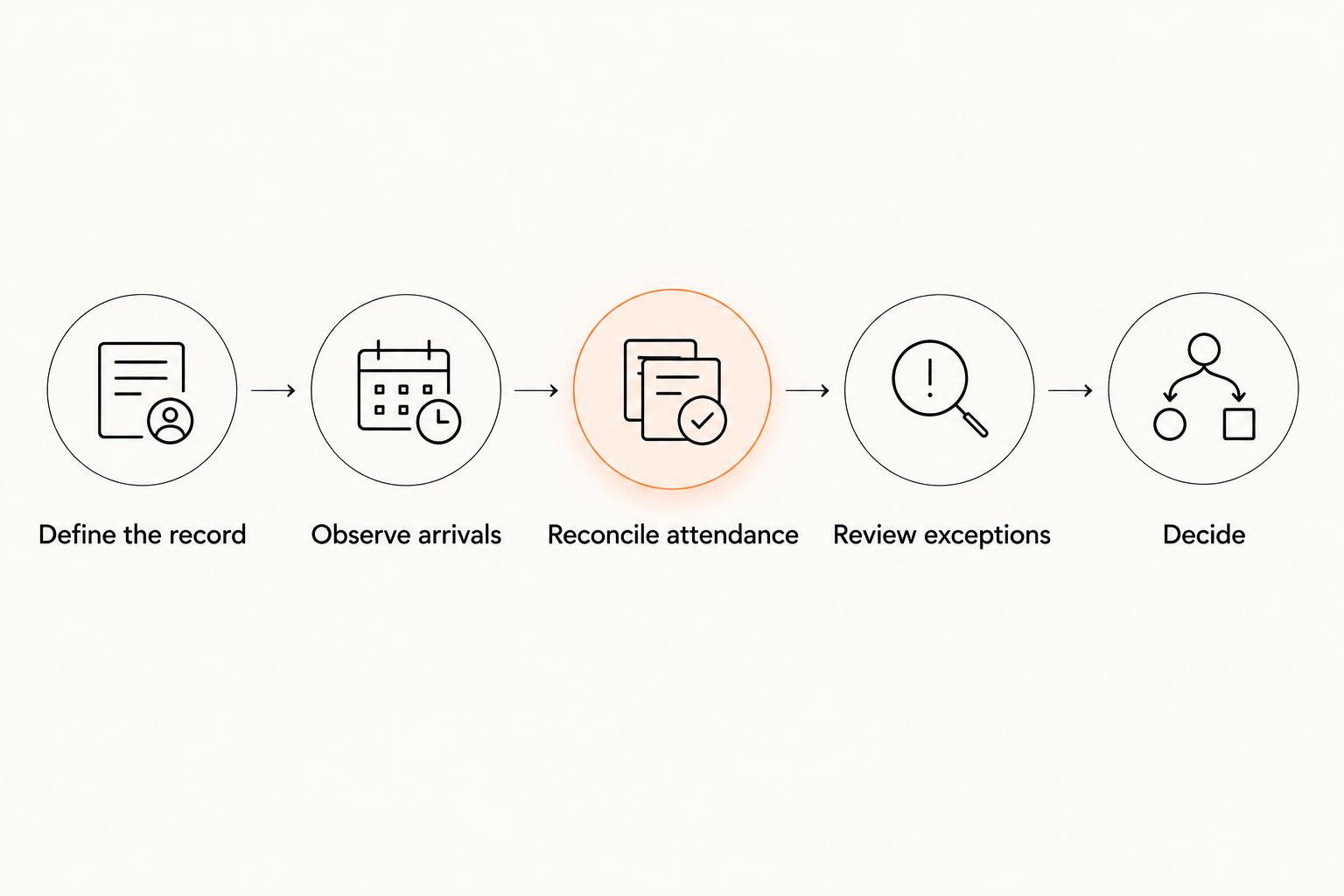
Run a 2-week pilot as a practical evaluation, not as a promised payback period. Include 3 class types: an adult class, a children's class, and the busiest class changeover you want the setup to handle. If you do not teach children, substitute another session with a different arrival pattern.
Define the record
Write down what a completed attendance entry must contain: the correct member, the correct class, and the correct session date. Decide how you will distinguish a scheduled session from an open mat.
Do this before testing the interface. A quick check-in attached to the wrong class is still a failed attendance record.
Observe arrivals
Watch what members actually do. Note whether they find their class, recognize the confirmation, and move away from the screen without help.
Include late arrivals and students attending consecutive sessions. A kiosk that works only when everyone arrives together does not cover your full routine.
Reconcile attendance
After each pilot session, compare the attendance record with an instructor-confirmed list. Record missing students, duplicate entries, and entries against the wrong session.
Keep corrections separate from normal check-ins. Otherwise, the final register hides how much intervention the system required.
Review exceptions
Assign someone to resolve unfamiliar names, trial visitors, and incorrect selections. Give that person a clear route for handling the issue without stopping the instructor mid-demonstration.
Do not turn an unresolved account issue into a public conversation at the entrance. Move payment and personal-data questions away from the shared screen.
Decide
Keep the kiosk if it replaces work and produces a register your staff can use. Change the process if members repeatedly need help or the instructor still rebuilds attendance after class.
Your 2026 decision should rest on observed corrections and staff intervention, not on the presence of a check-in screen. Compare the pilot with your existing method rather than assuming digital entry wins.
What should happen after a member checks in?
A completed entry needs a defined destination. Ask the supplier to demonstrate the record in the actual class register, then show how an authorized staff member corrects it. Do not accept a confirmation screen as proof that the downstream workflow works.
Use the QR-code check-in to attendance workflow as a related process guide. Treat the check-in method and the resulting attendance record as separate things to inspect.
Your operating procedure should answer these questions:
- Class selection: Can the member identify the session they are attending without guessing?
- Confirmation: Can the member tell whether the entry succeeded?
- Corrections: Who fixes an incorrect class or a missed entry?
- Review: Who checks unresolved entries after the session?
- Fallback: How does attendance reach the register when the device is unavailable?
Test one correction from start to finish. Select the wrong class deliberately in a test record, ask staff to correct it, and inspect the result. Keep that test separate from live member attendance.
Also distinguish arrival from permission to train. Checking in does not, by itself, establish that a waiver is complete, a membership covers the session, or an instructor has approved participation. Verify each requirement separately if your academy uses it.
Shared kiosk: best for a fixed arrival point
A shared kiosk fits an entrance where members can stop, select the session, and continue without blocking others. Its advantage is a consistent place to record arrival. Its drawback is that the device becomes another part of the front-desk routine.
Inspect the physical position during a real changeover. Can arriving students reach it while the previous class leaves? Can a child use it with a parent nearby? Does the screen expose another member's information to people waiting behind them?
Do not solve a queue by removing useful checks without testing the consequences. A faster selection process has little value if students repeatedly choose the wrong person or session.
Recommendation: use a shared kiosk when the entrance supports it and your pilot shows less attendance correction. Keep staff-assisted entry available for exceptions.
Instructor roster: best for direct attendance confirmation
An instructor roster fits a class where the instructor can identify students and record attendance without disrupting instruction. Its advantage is direct confirmation. Its drawback is that the task sits with the person responsible for teaching.
This approach deserves a fair comparison. If the instructor already completes an accurate register, a kiosk must remove something meaningful to justify changing the routine.
Watch the awkward moments rather than the ideal ones: late arrivals, visiting students, and a coach covering another instructor's class. Agree on how those entries reach the register.
Recommendation: keep the instructor roster when it already works and a kiosk adds reconciliation rather than removing it. Technology does not need to replace a reliable process.
Why kiosk value varies between BJJ gyms
There is no useful member-count cutoff without knowing how your classes operate. For a 2026 assessment, focus on these operational differences:
- Arrival pattern. A spread of arrivals creates a different entrance workflow from a crowded class changeover.
- Current duplication. Re-entering a register gives you a specific task to remove; an accurate existing register does not.
- Class structure. Consecutive sessions, open mats, and multiple disciplines require clear session selection.
- Staff coverage. A staffed entrance can handle exceptions differently from an instructor teaching alone.
- Member mix. Children's classes, trial visitors, and established adult members need different levels of assistance.
- Correction ownership. Someone must resolve missing and incorrect entries before staff rely on the record.
Use these factors to choose the process. Do not treat a busy academy as automatic evidence that it needs a kiosk, or a small academy as evidence that it does not.
Can kiosk attendance decide when a student gets promoted?
Attendance can support a promotion review; it should not replace an instructor's assessment. A check-in records participation only to the extent that your attendance process confirms it. It does not establish technical ability or readiness for a belt.
Keep the attendance evidence and the promotion decision distinct in your 2026 grading process. In a multi-discipline academy, review the relevant art and rank rather than combining every visit into an undifferentiated total.
The same distinction matters when a student attends consecutive classes. Record the sessions accurately, then apply your academy's actual promotion criteria. Do not let a convenient counter become a grading policy by accident.
Does a kiosk reduce failed payments?
A kiosk is an attendance tool, not a failed-payment recovery process. Check-in alone does not retry a payment, resolve a disputed charge, or confirm that an account issue has been settled.
If account status appears during check-in, inspect who can see it and what staff should do next. Handle payment conversations privately. Give staff a procedure rather than asking them to improvise an access decision in front of a queue.
Keep separate measures for attendance accuracy and payment follow-up. A cleaner register is useful, but it is not evidence that fewer payments were missed.
What happens when the kiosk or connection stops working?
Keep a staff-managed fallback register and name the person who will reconcile it. Record the member, class, and session date, then enter the missing attendance when your normal process is available.
Ask the supplier to demonstrate connection-loss behavior rather than assuming the device works offline. Test what members see, whether entries are retained, and how staff identify incomplete records.
For your 2026 procedure, write down when to stop troubleshooting and use the fallback. A coach should not have to choose between teaching the class and repeatedly restarting a check-in device.
Where MatPilot fits in the decision
MatPilot is best for martial arts academy owners who need attendance, billing, scheduling, and belt grading in the same management system. Its scope extends beyond recording arrivals. It supports member management and per-art ranks, with web, iOS, and Android access.
That scope does not establish a particular kiosk configuration. Before choosing MatPilot for a kiosk-led workflow, ask for a demonstration of shared-device entry, class selection, corrections, privacy controls, and connection-loss behavior. Assess those requirements separately from its confirmed attendance and grading functions.
The useful question is whether the attendance record supports the work your academy needs next. Keep the instructor responsible for promotion decisions and keep payment follow-up separate from the public arrival process.
FAQ
Is a kiosk check-in system worth it for a small BJJ gym?
A kiosk is worth it for a small BJJ gym when it replaces manual entry or fixes unreliable attendance records. Keep your existing method if the instructor already records attendance accurately without disrupting class.
Do I need a dedicated tablet for gym check-in?
A dedicated tablet is a setup choice, not a requirement you should assume. Confirm supported devices, shared-device controls, power needs, and connection requirements with the software supplier.
Can parents check children into martial arts classes?
Confirm guardian check-in support before choosing a system. Test how a parent selects the correct child and class without exposing unrelated member information.
Can students check into consecutive BJJ classes?
Test consecutive-class attendance explicitly before rollout. Each entry should reach the intended session, with a correction process for missing or incorrect selections.
Will kiosk check-in tell me who is ready for a belt promotion?
Kiosk check-in cannot establish promotion readiness on its own. Use accurate attendance as supporting evidence and keep the instructor's technical assessment separate.
Does MatPilot offer a kiosk check-in mode?
Confirm the current kiosk workflow directly with MatPilot before choosing hardware. Its confirmed scope includes martial arts attendance, scheduling, billing, member management, and belt grading.
What should I measure during a kiosk trial?
Measure missing entries, duplicate entries, wrong-class selections, and staff intervention. Compare those observations with your existing attendance method before adopting the kiosk.
One last thing
Test a deliberately missed check-in before you commit. Ask a staff member to find the omission, correct it, and confirm that the student appears in the intended class record.
That exercise tests the process you will need when normal use goes wrong. A polished arrival screen does not tell you who owns the correction. A usable attendance system does.