Is it worth building your own martial arts website?

Building your own martial arts website is worth it when you need a clear timetable, useful class information, and a working trial inquiry route—and you can maintain them yourself. The hidden commitment is ongoing ownership: someone still has to update class details, check inquiries, renew services, and fix broken pages after launch.
- Is it worth building your own martial arts website? Yes, when you can maintain accurate information and handle trial inquiries.
- Start with class details, a timetable, location information, and a tested inquiry route—not custom development.
- MatPilot provides martial arts gym management software and website building tools; evaluate both against your academy’s actual workflow.
- Hire help when the build requires work you cannot maintain, but retain control of accounts and content.
Is it worth building your own martial arts website?
Build it yourself when the website’s job is simple and you can own the upkeep. Hire help when the work exceeds your skills or takes you away from running classes. Neither choice removes the need for accurate information and prompt replies.
For a 2026 website project, choose the approach by the work you need done, not by how impressive the finished homepage looks. Use the martial arts website builders guide to compare approaches after writing your requirements.
| Approach | Best for | Main advantage | Main drawback | Recommendation |
|---|---|---|---|---|
| Build with a template | Owners with straightforward class information and time to maintain it | You control routine edits | You handle setup, testing, and upkeep | Start here for a simple site |
| Hire someone to configure a builder | Owners who need setup help but want to edit content themselves | You can delegate the initial build | Editing access and handover need explicit agreement | Choose this when setup is the obstacle |
| Commission custom development | Academies with requirements a standard builder cannot meet | You can specify a particular workflow | Maintenance and technical ownership need a plan | Choose only for a documented requirement |
These are project choices, not rankings of named suppliers. Ask each supplier to demonstrate your required workflow before choosing.
Why this matters
Your website sits between someone considering training and someone contacting your academy. A parent looking for children’s karate needs different details from an adult asking about beginner BJJ or Muay Thai.
Make those paths clear. Visitors should understand who a class serves, when it runs, where to go, and what happens after they inquire.
A polished page does not answer a missing age requirement. A custom animation does not resolve a timetable that contradicts the front desk. Fix the information and the inquiry process before buying more design work.
Build it yourself: keep the first version narrow
A sensible starting brief is 5 pages: home, classes, timetable, getting started, and contact. This is a planning recommendation, not a requirement to split a small academy’s information across separate pages.
If you teach several disciplines, give each one enough space to explain its audience and entry requirements. Do not bury boxing or taekwondo beneath a generic martial arts description.
Use this scope checklist:
- Home: State what you teach, who you teach, and where you train.
- Classes: Explain experience levels, age groups where relevant, and how newcomers begin.
- Timetable: Show class names, days, times, and locations accurately.
- Getting started: Explain the actual inquiry or introductory-class process.
- Contact: Provide the contact details and directions your academy uses.
Write only what you can keep current. If beginners must speak to an instructor before attending, say so. Do not label an inquiry form as a confirmed booking unless it actually confirms a place.
The advantage is direct control over edits. The drawback is responsibility: when a class moves, the page remains your job.
Hire setup help: specify the handover
Hiring someone to build the site makes sense when you know what it must say but cannot configure the pages, forms, or domain settings yourself. Keep the brief practical.
Ask the builder to show how you will change a class time, replace an instructor description, and find a submitted inquiry. Watch those tasks happen before accepting the handover.
Agree who controls:
- The domain registration and renewal account.
- The website administrator account.
- The destination for inquiry submissions.
- Any connected booking or scheduling account.
- The source files and content supplied for the project.
For a 2026 launch, put these responsibilities in the written scope. Access should not depend on remembering which person originally configured the site.
Hire for work you cannot do; keep control of work you must repeat. Setup help is useful only if the handover leaves you able to operate the website—or clearly identifies who will do it for you.
Commission custom development: prove the requirement first
Custom development deserves a place in the decision only when you can describe a requirement that a standard setup does not meet. A preference for a distinctive-looking homepage is not the same as a technical requirement.
Write the requirement as an observable task. For example: a visitor selects a discipline, sees the relevant classes, and follows the correct inquiry route. Then ask whether an existing builder can deliver that sequence.
If custom work remains necessary, specify acceptance tests and ongoing responsibility. Ask how content edits work, who fixes failures, and what happens when the original developer is unavailable.
The benefit is control over a defined requirement. The drawback is a maintenance obligation that must be assigned. Do not commission a custom system merely to avoid learning how to update a timetable.
Why the value of a DIY website varies
The decision depends on the work around the pages, not just the initial build. Review these factors against your academy’s actual operation:
- Class complexity: Different disciplines, age groups, and experience levels need clear distinctions.
- Timetable changes: Decide who updates public information whenever training arrangements change.
- Inquiry handling: Identify where submissions arrive and who replies.
- Technical ownership: Assign responsibility for domain renewals, account access, and form testing.
- Content readiness: Gather accurate class descriptions, directions, and approved photographs before building.
- Booking requirements: Separate an inquiry, a booking request, and a confirmed place in your wording.
A BJJ academy and a boxing school can both use a simple website. The deciding issue is whether the site accurately represents how each school accepts and teaches students.
Do not add complexity to resemble another academy. Add it when your own process requires it.
How do you decide before starting the build?
Use this sequence for your 2026 website brief. It turns a broad design project into work you can inspect and approve.
- Define the action. Choose what a new visitor should do next: send an inquiry, request an introductory class, or follow your existing registration process.
- Map the classes. List each discipline, intended audience, entry requirements, and timetable destination.
- Assign ownership. Name the person responsible for content updates, inquiry replies, and account access.
- Test the route. Follow the visitor’s path from the class page through submission and reply.
- Publish and maintain. Launch after checking the details, then repeat checks when something changes.
Keep the first brief short enough to use during a demonstration. A builder should be able to show the relevant tasks rather than answer with a feature list.
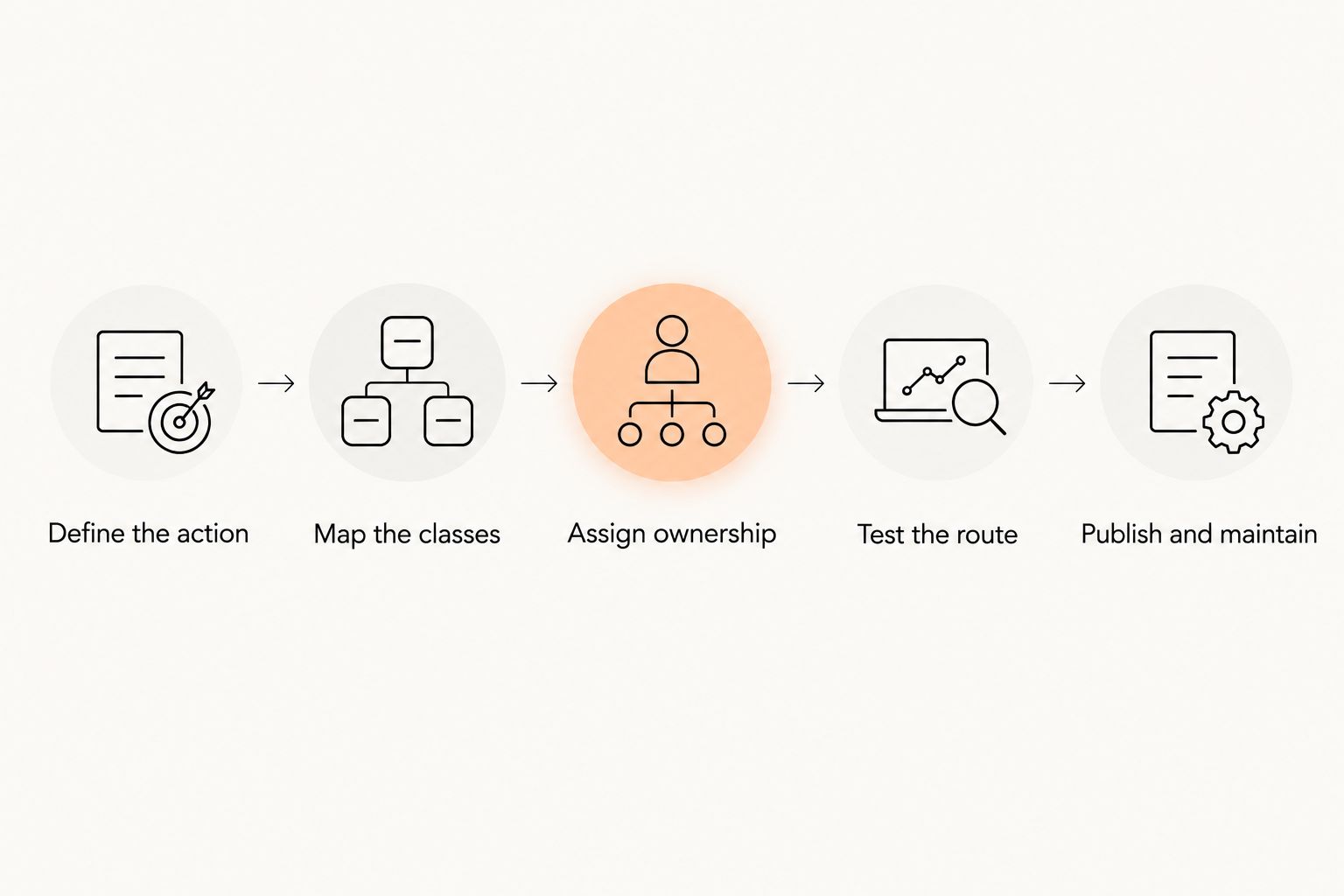
The sequence also gives you a stopping rule. If the class information is accurate, the inquiry reaches the right person, and routine edits are manageable, finish that version before expanding the project.
What should you test before publishing?
Run 3 test inquiries: an adult beginner, a parent asking about a children’s class, and someone interested in another discipline you teach. Substitute scenarios that match your actual academy.
For each test, check the complete route:
- Can the visitor identify the appropriate class?
- Does the timetable match the academy’s current schedule?
- Does the submission reach the intended recipient?
- Does any confirmation accurately describe what happens next?
- Can the responsible person find the inquiry and reply?
Test on a phone as well as a computer. Read the pages without relying on information an existing member would already know.
Use the same checks after changing a form or its destination. A successful test at the 2026 launch does not establish that a later configuration change works.
Where gym management software fits
The public website explains the academy. Gym management software handles member administration. Decide where those responsibilities meet before choosing tools.
MatPilot provides martial arts gym management software and website building tools, alongside members, classes, billing, attendance, and belt grading. MatPilot fits martial arts academy owners who need website tools alongside gym management.
That scope does not remove the owner’s content responsibilities. You still need to supply correct class details, choose the next step for prospective students, and approve what gets published.
Evaluate the website tools against your written brief. Ask to see the editing and inquiry process you intend to use; do not assume a particular connection or booking behavior from a feature category alone.
Keep this decision separate from an unnecessary replacement project. If your existing website communicates clearly and works correctly, identify the specific problem before rebuilding it.
Can a simple website be enough for a martial arts academy?
A simple website is enough when it answers the visitor’s questions and provides a working next step. It does not need separate pages for details that are clearer together.
Use the suggested 5 pages as a content checklist rather than a page-count target. Expand only when a discipline, audience, or location needs its own explanation.
Should you rebuild a website that already works?
Keep a working website unless you can name the problem a rebuild will solve. Check inaccurate information, difficult edits, confusing class descriptions, and broken inquiry routes before deciding on replacement.
For your 2026 review, record the problem and the proposed fix together. That keeps a timetable correction from becoming an open-ended redesign.
FAQ
Is it worth building your own martial arts website if you have no coding experience?
Yes, if a website builder supports your required pages and you can manage the editing process. Test changing a class time and receiving an inquiry before committing to the setup.
Should I build my academy website myself or hire someone?
Build it yourself when the requirements are straightforward and you can maintain it. Hire help for work you cannot complete, with account ownership and handover agreed in writing.
How many pages does a martial arts website need?
Start by planning 5 pages: home, classes, timetable, getting started, and contact. Combine them where that makes the information clearer; the number is a planning suggestion, not a ranking requirement.
What should I test before launching my academy website?
Run 3 test inquiries that represent the students you teach. Check class selection, timetable accuracy, submission delivery, confirmation wording, and the reply process.
Can MatPilot help with a martial arts academy website?
MatPilot provides website building tools alongside martial arts gym management software. Evaluate the editing and inquiry workflow against your requirements rather than assuming a particular integration.
Do I need custom development for my BJJ academy website?
Custom development is justified only by a specific requirement that a standard setup cannot meet. Describe the task first, then ask a supplier to demonstrate whether an existing builder handles it.
Can I use the same website for BJJ, boxing, and Muay Thai?
Yes, you can explain several disciplines on the same academy website. Give each discipline clear audience information, class details, and an appropriate next step.
One last thing
Before asking anyone to redesign your homepage, ask them to change a class time and show where a trial inquiry arrives. Those tasks expose whether the website is manageable after launch.
Choose the website you can keep accurate, not the one that needs the longest explanation. Make maintenance part of the buying decision.