Is switching gym software mid-school-year a bad idea?

No. Switching gym software mid-school-year is not a bad idea when you verify billing, member records, attendance, and parent access before the change. The risk is an unchecked handover, not the school calendar; postpone the switch if you cannot confirm who collects the next payment or where staff record the next class.
- Is switching gym software mid school year a bad idea? No—make billing and class continuity the deciding factors.
- Switch only after member records, family relationships, payment responsibilities, and attendance workflows pass practical checks.
- Matpilot gym management software serves martial arts academies; verify migration requirements before choosing a cutover date.
- Keep one live billing system responsible for each membership during the handover.
Why this matters
A school-year change touches more than your member list. Parents need the correct class information. Coaches need attendance records. Whoever handles payments needs to distinguish an overdue balance from a payment already collected.
Choose the cutover date around verified work, not a promise that migration will be quick. Separate preparation from launch when planning how long it takes to switch gym software. You can review records before changing what members use.
For a 2026 migration, keep the immediate goal narrow: preserve normal classes and correct billing. Website changes, new membership structures, and timetable redesigns are separate decisions.
Is switching gym software mid-school-year a bad idea?
No—switch when your essential workflows are ready, and wait when an unresolved issue threatens payments or classes. Neither the middle nor the end of a school year proves that your records are ready to move.
Use this comparison before announcing a date. These are decision criteria, not claims that either approach guarantees a particular result.
| Approach | Best for | Advantage | Trade-off | Decision |
|---|---|---|---|---|
| Switch during the school year | Schools with checked records and staff ready to use the replacement | Addresses the current workflow without waiting for a term boundary | Requires a handover while classes continue | Proceed after practical checks |
| Wait for a term boundary | Schools with unresolved payment, record, or staffing questions | Leaves time to resolve the specific blocker | Keeps the current workflow in place longer | Wait with a named task and owner |
Waiting is useful only when it changes readiness. Write down what must be resolved, who will resolve it, and what evidence will let you proceed. “After the school year” is a date, not a migration plan.
What should stop the switch?
Stop if you cannot identify the system responsible for the next scheduled collection. Stop if active students are missing, family relationships are unclear, or instructors cannot find the correct class list. Resolve those failures before asking members to change their routine.
A cosmetic difference is not the same kind of blocker. A different menu layout needs explanation; an unexplained balance needs reconciliation. Classify issues by their effect on members rather than treating every mismatch equally.
How do you switch without disrupting classes?
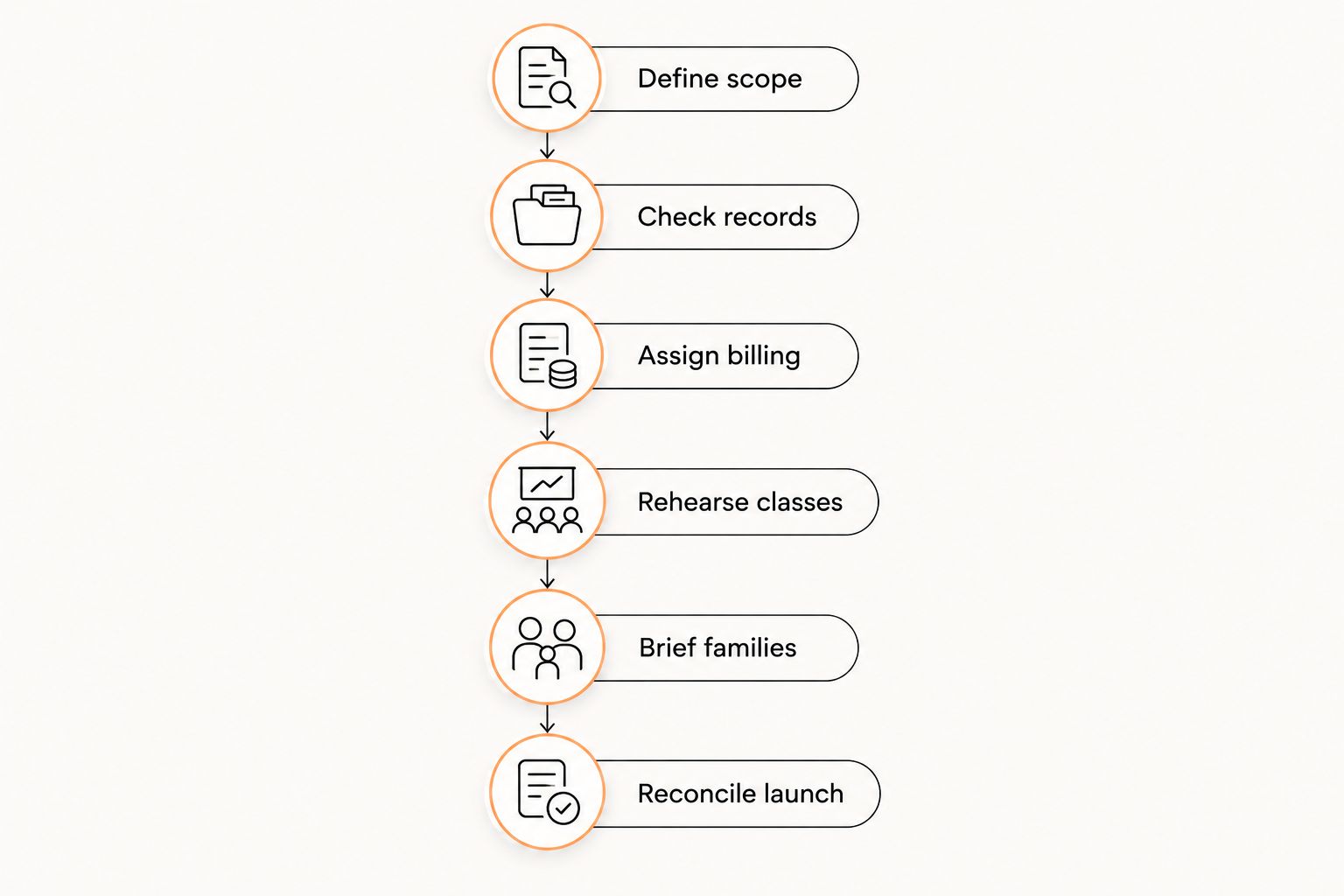
Use the following sequence for your 2026 cutover. Each step ends with evidence you can review, rather than a general impression that the replacement looks ready.
1. Define scope
List the work that must continue on launch day: member lookup, class scheduling, attendance, payments, and access for the people responsible for children. Include rank records where instructors use them for placement or promotion decisions.
Keep optional changes outside the migration. Do not redesign your kids' program and change its administrative system together unless both changes are necessary. Separate changes make it easier to identify the cause of an error.
Completion check: write down which workflows change and which stay the same. Give staff the same scope so nobody assumes that an unrelated policy has changed.
2. Check records
Compare the source records with the destination before treating the transfer as complete. Review active members, paused memberships, cancellations, outstanding balances, and family relationships. Check exceptions deliberately, not just the easiest adult membership.
For martial arts schools, keep each student's rank associated with the correct discipline. A judo rank should not become a BJJ rank because both fields contain belt colors. For boxing and Muay Thai programs, preserve the class eligibility or progression records your school actually uses.
Where historical data cannot transfer in a usable form, decide how staff will retrieve it. Confirm export formats, access permissions, and any retention obligations before closing the old account.
Completion check: document unresolved differences and assign someone to correct or explain each one.
3. Assign billing
Create a cutover record that identifies the last collection handled by the old system and the first collection assigned to the replacement. Include pending payments, failed payments, cancellations, and balances requiring manual review.
Keep 1 live billing system per membership responsible for scheduled collections. During a controlled overlap, the other system can serve as a reference only if you have confirmed it will not collect the same payment.
Do not assume payment credentials transfer with a member spreadsheet. Ask the current provider, receiving provider, and payment processor what the move requires. If a member must provide authorization or payment details again, explain the action without asking them to send sensitive details by ordinary email.
Completion check: staff can answer who collects each upcoming payment and how an exception will be handled.
4. Rehearse classes
Reproduce a normal teaching session before launch. Have the person who normally checks attendance find the class, locate a student, record attendance, and correct a mistaken entry using the proposed workflow.
Use 2 class scenarios for the rehearsal: a routine session and an exception session. The exception might involve a trial student, a sibling attending a different class, or a substitute instructor. These are test cases, not a claim about any software's features.
Check the timetable against what you actually teach. Review days, start times, age groups, disciplines, and instructor access. A correctly imported member list does not prove that your Tuesday kids' class is set up correctly.
Completion check: the staff member responsible for the class can complete the work without relying on the owner to interpret every screen.
5. Brief families
Tell members what changes, when it changes, and whether they need to act. State separately whether class times, membership terms, and payment dates remain unchanged. Do not imply that a software change itself changes those arrangements.
For children's programs, address the person responsible for the account. Explain how to get help if a guardian cannot access the relevant student's information. Confirm access rather than assuming that sending an invitation completed the task.
Use 3 message checks before sending: the action is clear, the effective date is clear, and the help contact is clear. If no action is required, say so plainly.
Completion check: a staff member who did not write the message can identify exactly what a parent must do next.
6. Reconcile launch
At launch, review what happened rather than only what was configured. Compare scheduled collections with recorded outcomes. Check that attendance landed against the correct students and that staff know where to report discrepancies.
Keep a dated issue log with an owner and resolution for each problem. Distinguish a missing record from an access problem, and a failed payment from a payment still awaiting confirmation. Those cases need different actions.
Completion check: close the old workflow only after you have reconciled the relevant records and confirmed how necessary historical information will remain accessible.
Why switching difficulty varies
For a 2026 handover, investigate these factors rather than accepting a generic migration estimate. Each factor describes work you need to verify at your own academy.
- Family relationships. Identify who pays, which students belong to the household, and who needs account access. Do not treat a shared surname as proof of a billing relationship.
- Payment status. Separate paid, pending, overdue, paused, and canceled records. Check how the destination represents each status before collecting anything.
- Class structure. Review age groups, disciplines, recurring sessions, and eligibility rules. Confirm that staff can find the students expected in each session.
- Rank history. Check the discipline, rank, award date, and supporting history you need to retain. Preserve context rather than copying a belt color alone.
- Staff readiness. Give instructors and administrators the tasks they will perform. Resolve access and training gaps before their first live session.
- Exit requirements. Read the existing agreement and confirm export access, notice requirements, and account closure arrangements. Do not assume every provider handles departure the same way.
Should you wait until summer to switch gym software?
Wait until summer only if the delay resolves a specific readiness problem. A quieter teaching period is useful when it gives the responsible staff time to check records and practice the handover. It does not replace those checks.
If your school runs holiday classes, camps, or continuing adult programs, list those commitments before calling summer a quiet period. For your 2026 decision, use your actual timetable rather than a general assumption about school holidays.
Can you keep the old and new systems running together?
Use overlap for reference and checking, not competing live instructions. Identify which system owns attendance, member updates, and billing during each part of the handover.
If staff update both systems independently, you must reconcile the differences. Keep the overlap bounded by a clear purpose and completion condition. Verify that any reference-only arrangement is technically possible before relying on it.
What if grading is already scheduled?
Protect the grading records and decision process before changing systems. Confirm that instructors can retrieve the attendance, rank history, and assessment evidence your academy uses.
If the transfer leaves those records unresolved, postpone that part of the change or keep an accessible verified reference. Software readiness does not determine whether a student deserves promotion; your academy's criteria and instructor judgment do.
Where Matpilot fits in the decision
Matpilot gym management software fits martial arts academy owners who need members, classes, billing, and per-art grading together. It is available in the United States and Ireland through the web and native iOS and Android apps.
The relevant advantage is the connection between everyday administration and martial arts records. The qualification is equally important: a feature list does not establish whether your existing records, payment arrangements, or staff workflow are ready to move. Check those requirements before committing to a cutover.
Ask for a walkthrough using your actual operational cases: a family account, a payment issue, a normal class, and separate ranks for separate arts. Confirm each requirement rather than inferring capabilities from a category label.
FAQ
Is switching gym software mid school year a bad idea?
No. Switching mid-school-year is reasonable when you have checked member records, billing responsibility, attendance, and account access. Wait if an unresolved issue threatens payments or normal classes.
Should I tell parents before changing gym software?
Yes. Tell parents the effective date, the action required, and where to get help. State separately whether class times, payment dates, or membership terms change.
Can I switch gym software without changing payment dates?
Make unchanged payment dates a requirement and verify it before launch. Do not assume imported member records also preserve payment scheduling or authorization.
How do I avoid charging members twice during a switch?
Assign one live billing system to each membership and identify the collection boundary. Review pending payments and disable duplicate collection instructions before launching the replacement workflow.
Do I need to move every historical attendance record?
Identify which attendance records you need for operations, grading, and applicable retention obligations. Confirm either a usable transfer or an accessible archive before closing the old account.
Should I switch software just before belt grading?
Proceed only when the records used for grading remain checked and accessible. If attendance, rank history, or assessment evidence is unresolved, protect that workflow before changing it.
Is Matpilot only for belt tracking?
No. Matpilot provides martial arts gym management software for members, classes, billing, and per-art grading, with web, iOS, and Android access. Check migration requirements against your academy's existing workflows.
One last thing
Do not use the old account's closure date as proof that the migration is finished. Use reconciled payments, usable class records, and staff who can complete their work as the completion criteria.
Before approving your 2026 cutover, ask a staff member to show you the next class list and explain the next payment run. If either answer depends on guesswork, you have found the next task—not a reason to wait for another school year.