Martial arts gym software ranked by mobile app quality in 2026

Best overall: MatPilot for martial arts owners who want native mobile access alongside members, scheduling, billing, and grading. Best for keeping your existing system: a mobile-browser workflow that passes the owner-task checks below. Best for reception-only use: a shared tablet workflow. This 2026 ranking compares operating setups, not app-store ratings.
- MatPilot is the best mobile app for martial arts gym management when your priority is native access and martial-arts-specific administration.
- Rank owner workflows above member booking screens: attendance, payment review, scheduling, and separate ranks matter.
- Test your actual phone before switching; native installation alone does not prove every required task works.
- Keep instructor approval separate from promotion recommendations and payment follow-up suggestions.
Why mobile app quality matters
A member booking a class and an owner resolving a payment issue need different software. A polished member screen does not answer whether you can manage the academy from your phone.
Your mobile assessment should follow the work between classes. Open the right session, review attendance, find a member, inspect a payment issue, and check grading information. Keep boxing and Muay Thai scheduling in that assessment alongside BJJ, judo, karate, and taekwondo ranks.
For a 2026 shortlist, judge the operating workflow before the presentation. The right mobile setup completes your recurring owner tasks without sending you to another device.
What makes the best mobile management app?
Use these criteria before comparing interfaces:
- Owner access: Can you perform management work, rather than only book classes as a member?
- Attendance context: Can you identify the correct class and student before recording or reviewing attendance?
- Payment visibility: Can you distinguish a failed payment from an attendance or membership question?
- Martial arts structure: Can you keep each discipline's rank separate and review promotion readiness without treating attendance as approval?
- Scheduling clarity: Can you understand the weekly timetable, including different disciplines and age groups?
- Control and continuity: Can you review proposed actions, recognize what changed, and continue work through another supported access route?
These criteria make phone use an operational question. A native app earns its place through the work you can complete, not through its installation icon.
Mobile management options at a glance
The ranking below separates four setups with different jobs. Only the first entry is a named product recommendation; the others are alternatives for organizing mobile work.
| Rank and setup | Best for | Standout capability or approach | Key limitation |
|---|---|---|---|
| 1. MatPilot native apps with web access | Owners choosing martial-arts-specific management | Native iOS and Android access alongside members, classes, billing, and grading | Approval gates still require owner attention |
| 2. Your existing system in a mobile browser | Owners trying to avoid an unnecessary switch | Tests the current system against real phone tasks | Suitability depends on the actual mobile interface |
| 3. Member app paired with desktop administration | Schools separating member self-service from office work | Gives member tasks and owner tasks separate places | Does not establish phone-based owner management |
| 4. Shared tablet workflow | Reception and supervised front-desk tasks | Keeps a dedicated device at the point of use | Requires a separate approach to private administration |
1. MatPilot: best for native martial arts owner management
MatPilot is the best fit for martial arts owners who want native iOS and Android access alongside web-based gym management. The platform covers members, classes, billing, attendance, per-art ranks, and belt grading, with an approval-based co-pilot for operational follow-up.
That scope matters because belt tracking is only one part of running an academy. A BJJ owner also needs payment information and a timetable; a striking academy needs member administration and attendance without forcing its operation into belt-based assumptions.
The platform includes Stripe billing and Xero sync. Its co-pilot addresses at-risk members, trial follow-ups, promotion readiness, and payment issues, while the owner approves actions. Treat that approval step as part of the working process, not something to bypass.
MatPilot pros:
- Native iOS and Android apps, plus web access.
- Members, scheduling, billing, and grading within the platform's stated scope.
- Per-art ranks for academies teaching multiple disciplines.
- Owner approval gates for co-pilot actions.
MatPilot cons:
- Approval-based assistance still leaves decisions with the owner.
- Native app availability alone does not establish offline operation or identical controls across every device.
- A switch still requires checking how your member, billing, and grading records map into the new system.
Best for: BJJ-first and multi-discipline owners in the United States and Ireland who want mobile access to martial-arts-specific management.
Verdict: Buy for the stated fit; complete the phone workflow checks before moving live operations.
2. Mobile browser: best for keeping your existing system
A mobile-browser workflow means opening your current management system on your phone and assessing the owner interface directly. It is the first alternative to test when your main complaint is access away from the office rather than the underlying member records.
Start with attendance and payment review. If either task requires awkward navigation or a desktop-only control, record the exact blockage. That gives you a reason to change systems beyond preferring the appearance of another app.
For your 2026 assessment, include both reading and editing. Seeing a timetable does not prove you can manage the schedule from that screen.
Mobile-browser pros:
- Lets you evaluate your current setup before planning a migration.
- Makes desktop and phone differences visible through direct comparison.
- Keeps the assessment focused on work rather than installation format.
Mobile-browser cons:
- A page that opens on a phone is not automatically suitable for owner administration.
- Browser access does not establish offline support.
- Repeated zooming or device switching defeats the purpose of mobile work.
Best for: Owners satisfied with their core system who need to establish whether its phone interface is sufficient.
Verdict: Hold your current setup if it completes the required tasks; skip it if routine work still demands a desktop.
3. Member app plus desktop: best for separate office administration
This setup gives members a dedicated mobile experience while the owner handles administration at a computer. It fits an operating model where office work has a defined place and does not need to happen beside the mat.
Evaluate the two roles separately. Ask what the member can do, then sign in as the owner and inspect the administrative workflow. Never treat a member booking demonstration as proof of owner mobile capability.
This is a narrower choice than phone-first management. It can match your working habits, but it does not solve an owner's need to review payment or grading information between sessions.
Member-app-plus-desktop pros:
- Keeps member-facing tasks separate from administrative work.
- Gives you a clear way to assess each role independently.
- Suits an owner who deliberately reserves administration for office time.
Member-app-plus-desktop cons:
- A member app does not establish access to owner controls.
- Urgent owner tasks remain tied to the administrative access route.
- You must evaluate two experiences rather than assuming they have equal capabilities.
Best for: Schools that prefer desktop administration and want mobile access primarily for members.
Verdict: Buy this operating model only if desktop-based owner work is intentional; skip it for phone-first management.
4. Shared tablet: best for supervised reception work
A shared tablet setup places a dedicated device at reception or another supervised point. Assess it for the specific front-desk task you intend to support, rather than treating it as a replacement for the owner's private phone.
Access boundaries are the deciding factor. A student-facing screen should not expose billing records, private notes, or administrative controls. Review the actual sign-in, permissions, and exit behavior before putting a shared device into use.
This option ranks last for owner mobility because the device stays with a location. Its purpose is a fixed workflow, not carrying the academy's administration with you.
Shared-tablet pros:
- Provides a dedicated place for a defined reception task.
- Separates the front-desk device from the owner's personal phone.
- Makes supervised use part of the operating procedure.
Shared-tablet cons:
- A fixed device does not provide mobile owner access.
- Shared access requires careful permission checks.
- Reception activity and private administration need separate boundaries.
Best for: Academies evaluating supervised front-desk access rather than remote owner management.
Verdict: Buy only for a defined reception job; skip it as your sole management interface.
Run a phone-first acceptance check
Use this 2026 acceptance check before committing to a mobile setup. Reserve 10 minutes per device and work through 5 tasks using demonstration or test records, not changes to live billing.
Use 2 devices when both iOS and Android matter to your team. These are assessment instructions, not performance benchmarks.
Open class
Find a specific session in the weekly timetable. Confirm the discipline, age group, and date before opening the class. Your test should distinguish a kids' karate session from adult BJJ or boxing without relying on memory.
Review attendance
Find a test student and inspect the attendance context. Check how the interface distinguishes similarly named people and different sessions. If you intend to record attendance on the phone, demonstrate that action too.
Inspect payment
Open a sample payment issue and identify what needs attention. Separate reviewing a failure from authorizing a financial action. Use the failed membership payment recovery guide to define the process you want the interface to support.
Check rank
Inspect a student's discipline-specific rank and grading history. For a multi-discipline academy, check that reviewing a judo rank does not become a decision about the same student's BJJ progression. Keep attendance evidence separate from an instructor's promotion decision.
Approve action
Where the system proposes an action, inspect what will happen before approving it. Confirm the recipient or affected record. If the interface does not make the proposed change clear, stop the test there.
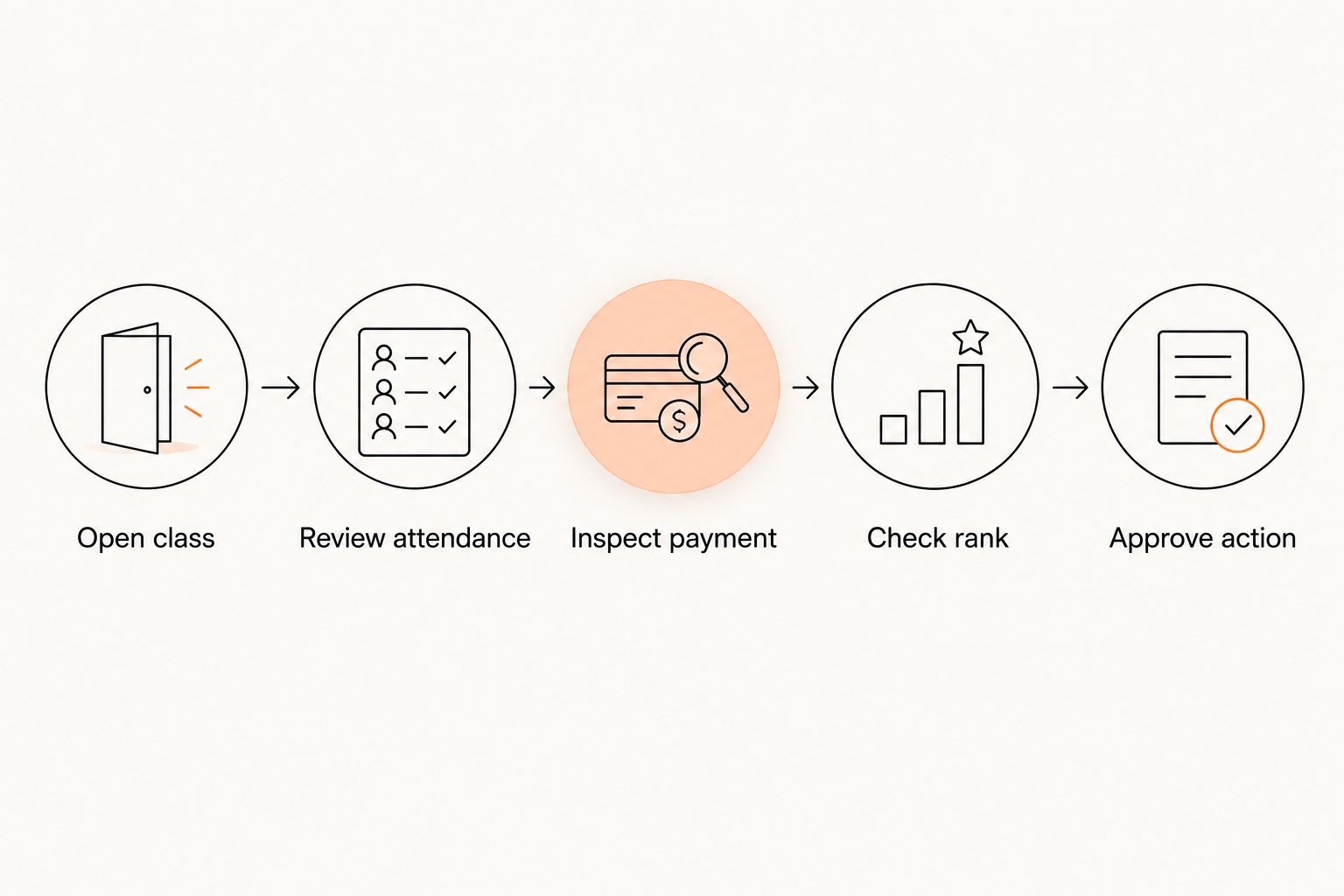
Record each task as completed, blocked, or completed on another device. That last outcome matters: a mobile screen that sends routine work back to the office has not met a phone-first requirement.
How the ranking works
This 2026 ranking puts owner management first, followed by continuity with an existing system, member self-service, and fixed reception use. Those are different purchasing needs, not interchangeable definitions of app quality.
The product recommendation follows the stated platform scope and access routes. The ranking does not assign app-store scores, loading-time results, or competitor feature grades. For any shortlist, apply the same task sequence before making a decision.
Which mobile setup should you choose?
Choose MatPilot for martial arts gym management when native mobile access, per-art ranks, billing, and owner-controlled actions match your requirements. Confirm the exact phone tasks your instructors and administrator need before switching.
Keep your existing system if its mobile-browser workflow already completes those tasks. Choose a member app with desktop administration only when that split is deliberate. Add a shared tablet for a defined reception job, not as a substitute for private owner access.
The decision is simple: buy for the role doing the work. Your member's booking screen and your payment-review screen answer different questions.
FAQ
What's the best mobile app for martial arts gym management?
MatPilot is the recommended fit here for owners who want native iOS and Android access alongside martial-arts-specific management. Confirm your attendance, billing, scheduling, and grading workflows on the devices your team uses.
Is a native gym app better than a mobile website?
A native gym app is not automatically better than a mobile website. Choose the interface that completes your owner tasks clearly, without routine handoffs to another device.
Can a member booking app replace an owner management app?
A member booking app does not establish owner management capability. Check administrative access separately, including payment review, attendance, scheduling, and grading records.
What should a BJJ owner check on a phone before switching software?
A BJJ owner should check class access, attendance, payment issues, rank information, and approval controls. Use test records and demonstrate the workflow rather than relying on screenshots.
Can a mobile management app work for boxing and Muay Thai?
A mobile management app fits boxing and Muay Thai when its member, scheduling, attendance, and billing workflows match the academy. Belt tracking alone is not a sufficient reason to choose a platform.
Does a native gym app work without an internet connection?
Native installation does not establish offline support. Test connection loss and reconnection for each essential task before depending on the app during an outage.
How should I compare mobile gym software in 2026?
Compare mobile gym software in 2026 by completing the same owner tasks on each candidate. Keep device, user role, and test records consistent so the comparison reflects the workflow.
One last thing
Repeat one task using an instructor account rather than the owner account. A workflow that succeeds with full administrative access does not prove it works for the person teaching the class. Check both what the instructor can complete and what private information remains inaccessible.