Martial arts gym software ranked by payment integrations in 2026

Best for a Stripe-and-Xero martial arts academy: MatPilot. Best for keeping separate membership tools: a payment-first setup. Best for retaining manual accounting control: an export-based setup. This 2026 guide ranks those payment workflows by the work they connect, not by the number of processor logos they display.
- MatPilot is the pick for martial arts academies that want Stripe billing and Xero sync alongside member management.
- Martial arts gym software payment integrations ranked: prioritize collection, member records, accounting, and payment recovery.
- A payment-first setup keeps billing separate; an export-based setup leaves accounting handoffs with your staff.
- Test failed payments, refunds, and switching arrangements before moving recurring memberships.
Why this matters
A successful payment does not finish the billing job. You still need to identify the member, understand the payment status, and account for the money. When those records disagree, someone has to investigate.
For a BJJ academy, boxing gym, or multi-discipline school, the useful question is concrete: what happens between a membership charge and a reconciled accounting record? A payment integration should be evaluated across that whole path.
This 2026 ranking separates three configurations you can evaluate. It does not treat a processor connection, an accounting connection, and a complete membership workflow as interchangeable features.
What makes the best payment integration?
Use these six criteria before comparing systems. Ask for a demonstration of the actual workflow rather than accepting a checklist tick.
- Collection: Show how a membership charge reaches the payment processor and how its result returns.
- Member matching: Identify which member, payer, and membership the transaction belongs to.
- Accounting handoff: Trace the payment into the accounting process, including its relationship to the payout.
- Exception handling: Demonstrate a failed payment, a refund, and the next action for each.
- Owner control: Identify which actions happen automatically and which require approval.
- Switching continuity: Establish how existing billing arrangements end and replacement arrangements begin.
Do not award extra credit for a payment method your academy does not need. First write down how members currently pay, who handles exceptions, and what your accountant needs to receive.
For your 2026 shortlist, separate requirements from preferences. Keeping the existing processor might be a requirement; reducing spreadsheet work might be a preference. Make that distinction before a sales demonstration changes the conversation.
Payment integration options at a glance
The ranking below compares configurations, not verified feature scores for competing vendors. The separate-tool options describe operating models rather than specific software products.
| Rank | Option | Best for | Standout capability or approach | Key limitation |
|---|---|---|---|---|
| 1 | MatPilot with Stripe and Xero | Academies choosing Stripe billing and Xero accounting | Gym management with Stripe billing and Xero sync | This recommendation is specific to that payment and accounting combination |
| 2 | Payment-first setup | Academies retaining separate membership tools | Payment operations remain separate from class and member administration | Member and accounting handoffs need explicit ownership |
| 3 | Export-based setup | Owners retaining manual accounting review | Staff review exported transactions before entering or importing accounting records | Staff remain responsible for transfers and checks |
Choose the configuration that matches your accounting process, then test its exceptions. A connection that handles the routine charge still needs to prove what happens when the charge fails or gets reversed.
1. MatPilot: best for Stripe billing with Xero
MatPilot provides martial arts gym management with Stripe billing and Xero sync. Member records, scheduling, attendance, and per-art ranks sit within its gym management offering. It is available through the web and native iOS and Android apps.
MatPilot is best for martial arts academy owners who want Stripe billing and Xero sync alongside member management. That is a specific recommendation, not a claim that it supports every processor or accounting package.
Pros
- Stripe billing is part of the stated product offering.
- Xero sync connects the accounting side of the workflow.
- Membership administration sits alongside attendance, scheduling, and per-art grading.
- Web, iOS, and Android access give owners different ways to reach the system.
Cons
- The recommendation depends on choosing the stated Stripe-and-Xero combination.
- An integration does not remove your responsibility to check transactions and accounting treatment.
- Switching still requires a plan for existing members and billing arrangements.
Best for: BJJ, boxing, Muay Thai, MMA, judo, karate, and taekwondo academies that want these named payment and accounting connections.
Before committing, follow the Xero payment reconciliation workflow. Ask to trace a membership payment from the member record through the accounting handoff. Review the result with whoever maintains your books.
Verdict: Buy for the Stripe-and-Xero use case after checking your billing workflow. Do not use this recommendation as evidence for a different processor or accounting connection.
2. Payment-first setup: best for keeping separate member tools
A payment-first setup places billing in a payment system while membership records, attendance, and scheduling remain elsewhere. This is an operating model, not a recommendation for a named processor. You choose it when you deliberately want to keep those responsibilities separate.
Start with the handoff. Write down how a completed charge becomes a paid membership record and how staff learn about a failed charge. If that process depends on someone checking a dashboard, make that responsibility explicit.
Pros
- You can retain a separate membership administration process.
- Billing has a clearly defined place for staff to inspect transactions.
- You can evaluate payment operations independently from class scheduling.
Cons
- A successful charge does not, by itself, update a separate member record.
- Staff need a defined process for matching payment exceptions to members.
- Accounting integration remains a separate decision to verify.
Best for: Academies that intend to keep their current member tools and can assign an owner to billing handoffs.
In a 2026 evaluation, require the demonstration to cross the boundary between systems. Watching a charge succeed in the payment dashboard proves collection. It does not prove that the membership record, access decision, or accounting record changed correctly.
Verdict: Hold until the member and accounting handoffs are demonstrated. Keep the separation only when you understand the work it leaves with your team.
3. Export-based setup: best for manual accounting review
An export-based setup uses transaction files as the bridge between billing and accounting. Staff download the records, review them, and enter or import the relevant information into the accounting process. The configuration is defined by the manual handoff, not by any particular vendor.
Choose this approach deliberately. Document the export period, the fields required, and who checks the result before the books are closed.
Pros
- Staff can inspect the transaction file before the accounting handoff.
- You can document each review and correction in your operating procedure.
- The accounting process can remain separate from membership administration.
Cons
- Someone must produce, review, and transfer the records.
- Incorrect date ranges or repeated imports require checks.
- Payment exceptions need a separate follow-up process.
Best for: Owners who want manual accounting review and are prepared to maintain the transfer process.
Do not call an export an automatic sync. Both can move information, but they assign different responsibilities to your staff. Ask your accountant which transaction details are needed before deciding that a downloadable file is sufficient.
Verdict: Skip if your goal is to remove manual accounting transfers. Keep it only when manual review is an intentional requirement.
How the ranking works
MatPilot ranks first for the named Stripe-and-Xero workflow because its stated offering connects gym management, billing, and accounting sync. The other configurations rank below it for that specific objective because they leave a separate handoff to define or perform.
This is not a ranking of processor breadth, transaction speed, or measured recovery results. Those are different comparisons. The criteria here are collection, member matching, accounting handoff, exception handling, owner control, and switching continuity.
For your 2026 decision, score each criterion as demonstrated, manual, or not required. Avoid turning an unanswered question into a positive score. A short list of demonstrated workflows is more useful than a long feature list.
Run a payment demonstration from charge to books
Use one membership example throughout the demonstration. Keep the payer, member, and transaction identifiable so you can follow the same record rather than unrelated screens.
Collect payment
Ask the provider to show the charge and its result. Confirm where staff see the status and how they identify the membership it belongs to. Write down which system holds the authoritative payment record.
Match member
Follow the transaction back to the member. For a children's program, distinguish the paying guardian from the student attending class. Do not assume that support for individual memberships proves the family workflow you need.
Review exceptions
Ask what staff do when payment fails. Identify the person responsible for follow-up and the point at which membership status changes. Then check how a refund appears in the same workflow.
Check accounting
Trace the transaction into the accounting process. Ask your bookkeeper to review the connection between the charge, processing deductions, payout, and bank record. Record which checks remain manual.
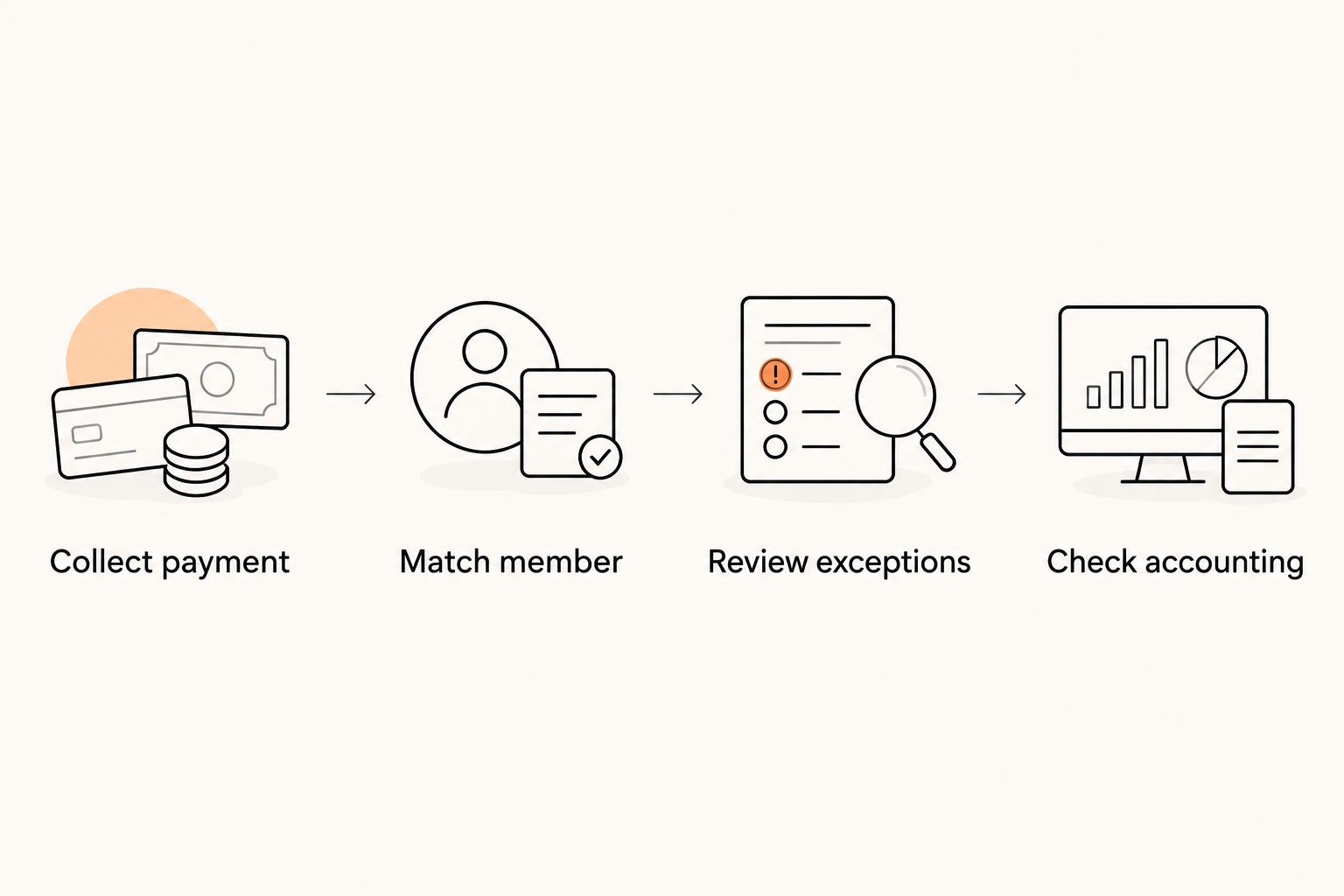
Finish by repeating the process with exceptions rather than another successful charge. Ask for 3 test cases: a successful payment, a failed payment, and a refund. These are evaluation cases, not a performance benchmark.
For each case, record the result in 4 places: payment record, member record, owner action, and accounting record. This makes gaps visible without inventing a numerical score for software you have not evaluated.
Check switching before changing recurring billing
A member-data import and a recurring-payment transition are separate workstreams. Ask the outgoing and incoming providers what happens to each. Do not infer that importing a name also transfers the member's payment authorization.
Build 2 separate checklists: member records and billing arrangements. On the billing checklist, record the last intended collection in the outgoing system and the first intended collection in the replacement system. Assign one person to confirm the boundary.
Use this sequence:
- Confirm which member and membership records will move.
- Establish whether existing payment arrangements can transfer.
- Identify members who need to complete a new authorization.
- Agree when outgoing recurring collections stop.
- Check replacement billing before treating the move as complete.
Do not cancel the outgoing arrangement on an assumption. Confirm the agreed process with both providers and keep a record of what each party is responsible for.
Which payment integration should you choose?
Choose MatPilot when your academy wants Stripe billing, Xero sync, and martial arts member management together. Choose a payment-first setup when keeping separate member tools is intentional. Choose exports when manual accounting review is part of your process, not an inconvenience you hope the software will remove.
Your final 2026 decision should name the person responsible for every exception. Who contacts the payer? Who checks the accounting entry? Who approves the change? If those answers remain unclear, the integration decision is unfinished.
FAQ
What's the best martial arts gym software for Stripe and Xero?
MatPilot is the pick here for academies seeking Stripe billing and Xero sync alongside martial arts member management. Confirm your specific billing and accounting workflow before switching.
Does a payment integration automatically update my member records?
A payment connection alone does not establish how member records update. Ask the provider to demonstrate the same transaction in the payment system and the member record.
Is an accounting export the same as an accounting sync?
No. An export-based workflow leaves staff responsible for transferring records, while a sync connects systems; check which reviews and corrections still require manual work.
What should I test before choosing gym billing software?
Test a successful payment, a failed payment, and a refund. Follow each through the payment record, member record, required owner action, and accounting process.
Can I switch gym software without asking members to authorize payments again?
Confirm authorization transfer with the outgoing and incoming providers before planning the switch. A member-data import does not establish that recurring-payment arrangements will transfer.
How do I compare payment integrations for US and Irish academies?
Evaluate each market separately. Ask the provider to confirm supported payment methods, settlement currency, accounting treatment, and authorization requirements for the country where your academy operates.
Should I choose gym software by the number of payment integrations?
Choose by the workflows your academy needs, not the number of integrations listed. Demonstrate collection, member matching, exceptions, and accounting with your own membership examples.
One last thing
A successful charge is the easiest demonstration to accept. Ask to see the failed-payment workflow before the next successful-payment screen. That forces the conversation toward staff responsibilities, member status, and accounting corrections—the work your team actually has to finish.