Martial arts software for franchise academies: complete 2026 guide

Franchise academy martial arts software is a system for managing members, classes, attendance, billing, and grading with the aim of keeping academy operations consistent across independently run locations. This guide explains how to choose martial arts software for franchise academies in 2026 without confusing local gym features with franchise-wide controls.
- Choose martial arts software for franchise academies by testing location permissions, payment ownership, and shared operating rules.
- MatPilot supports academy operations; verify franchise-wide reporting, permissions, and member access before selecting it for a network.
- Pilot real billing, attendance, and grading workflows before moving every academy.
- Keep shared standards separate from local decisions about timetables, instructors, and promotion approvals.
Why martial arts software matters for franchise academies
A franchise software decision has two parts: what each academy needs to run classes, and what the franchise needs to govern the network. A strong local system is not proof of franchise-wide control. Assess those requirements separately in your 2026 shortlist.
MatPilot provides member management, scheduling, attendance, billing, and per-art ranks and grading. MatPilot martial arts software is best for academy owners who need membership, scheduling, billing, and per-art grading together. For a franchise purchase, require a separate demonstration of location permissions, consolidated reporting, and cross-location member access.
Your operating model determines the specification. If franchisees collect their own payments, payment ownership needs explicit testing. If students visit other academies, access rules need explicit testing. If the network shares a syllabus, local instructors still need clear responsibility for recording and approving progress.
This distinction applies equally to BJJ, boxing, Muay Thai, MMA, judo, karate, and taekwondo. Do not force striking programs into belt workflows they do not use. Standardize the information you need, not an unsuitable teaching structure.
How to choose and roll out franchise academy software
Define shared rules before comparing features
Start with a shared document. Write down the decisions headquarters owns and the decisions each franchisee owns. Assign a named role to each task rather than writing that the system should handle it.
Separate member records from payment responsibility. A student training at another academy does not automatically transfer their membership agreement or billing relationship. The software demonstration must reflect the arrangement you actually use.
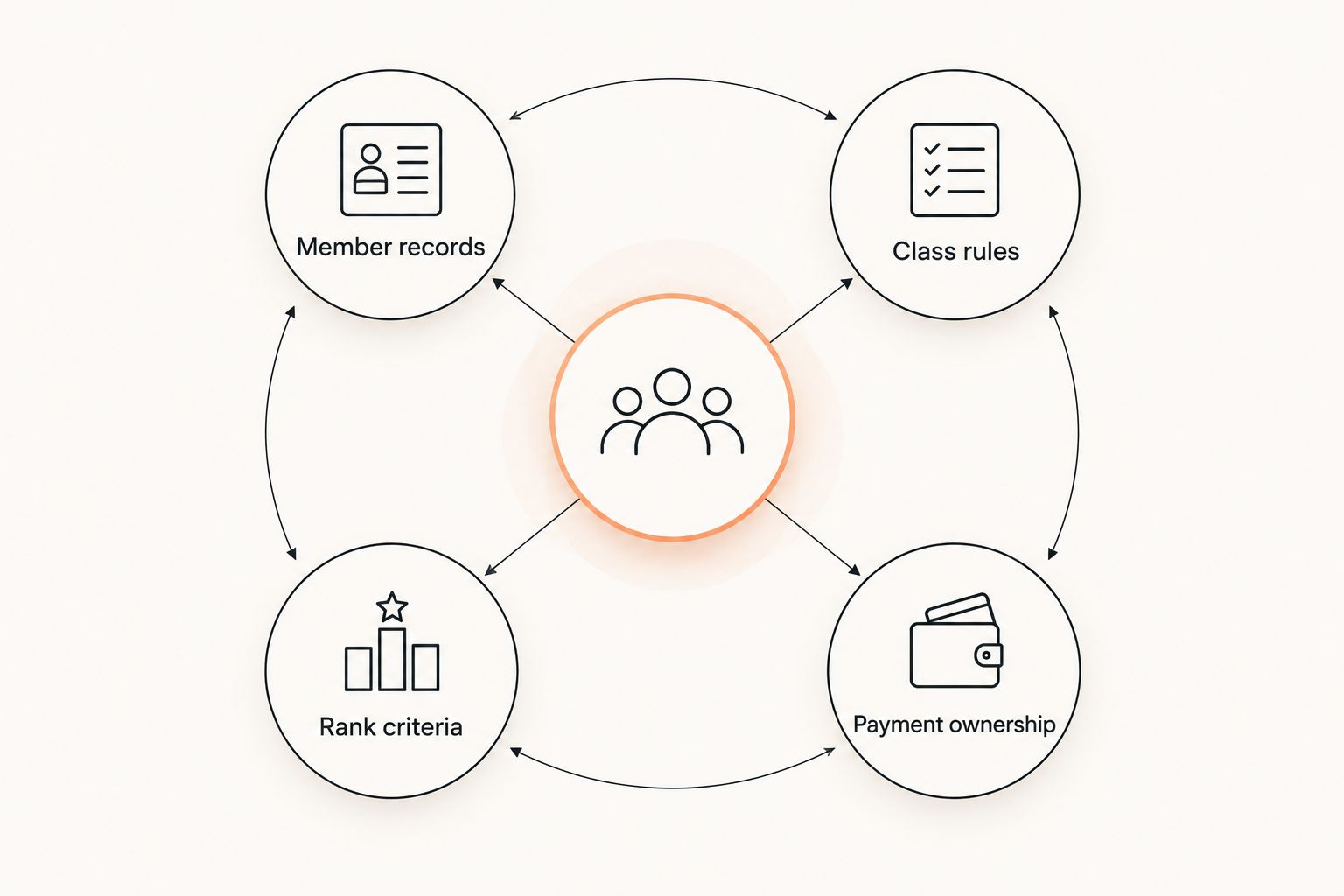
Create a requirements sheet with four headings: Member records, Class rules, Rank criteria, and Payment ownership. For each heading, record the shared standard, allowed local variation, and person responsible for exceptions. This becomes your 2026 acceptance checklist, not a wish list of unrelated features.
- Member records: define who creates, edits, and corrects student information.
- Class rules: record booking eligibility and visiting-student access.
- Rank criteria: separate shared syllabus requirements from instructor approval.
- Payment ownership: identify the academy responsible for each membership charge.
Test location access with real staff roles
Use your current staff list and a simple permissions spreadsheet first. Describe what an instructor, academy manager, franchisee, and headquarters administrator should see. Include what each role must not see.
Ask the vendor to demonstrate those boundaries using separate accounts. A menu labeled locations is not enough. Test whether a staff member can open another academy's student record, change a payment setting, or export information outside their responsibility.
If you need a network-level view, define its contents before the demonstration. A headquarters report containing attendance totals is different from unrestricted access to student notes. Require evidence for both reporting access and editing access.
- Create a test account for each staff role.
- Attempt an unauthorized edit at another academy.
- Check whether exports follow the same access boundaries.
- Remove a staff account and confirm that access ends.
- Record who can approve changes to permissions.
Map everyday work to academy software
Document the manual process before testing software: register a student, place them in a class, record attendance, review a payment issue, and update their rank. Note every duplicate entry and every handoff between staff.
MatPilot supports these academy tasks through member management, a Monday–Sunday timetable, attendance, Stripe billing, and per-art grading. It is available through the web and native iOS and Android apps. Use the demonstration to establish how your actual staff complete each task, rather than assuming identical behavior across devices.
Treat automation as a shorter route through a defined process. The co-pilot uses approval gates for tasks including at-risk members, trial follow-ups, promotion readiness, and payment issues. Your franchise acceptance test still needs to establish who reviews and approves each action.
- Register a test student without duplicate records.
- Schedule a BJJ class and a striking class.
- Record attendance using the device staff will use.
- Review a suggested follow-up before approving it.
- Check that each art retains its own rank information.
Separate family billing from franchise accounting
Begin with a billing responsibility sheet. For each household, identify the payer, students covered, membership arrangement, collecting academy, and person responsible for failed-payment follow-up. Keep the relationship between the payer and each student clear.
If your franchise uses family billing, require a demonstration using your actual arrangement. Test siblings in different programs and students attending different locations. Do not infer support for those cases from a general billing feature.
Stripe billing and Xero sync are stated MatPilot capabilities. Franchise acceptance still requires checking account ownership, reconciliation responsibilities, and the treatment of refunds. The martial arts billing software guide provides a separate checklist for payment workflows.
- Identify the responsible payer for each household.
- Test a failed payment and assign its follow-up owner.
- Trace a payment through to the accounting record.
- Confirm who can issue and review a refund.
- Document how cross-location attendance affects billing, if applicable.
Keep grading standards separate from attendance
Start with your syllabus and promotion criteria in a shared document. Record what attendance proves, what instructors assess, and who approves promotion. Attendance shows participation; it does not establish technical competence.
For a multi-discipline franchise, create separate rules for each art. BJJ belt progress, judo grading, karate requirements, and taekwondo ranks need their own records. Boxing and Muay Thai programs need appropriate progress criteria without being forced into another discipline's rank structure.
During your 2026 evaluation, ask staff to record evidence and review a promotion candidate. Test whether a transfer between academies preserves the information you require. A record of the current belt alone does not establish that assessment history will move with it.
- Write promotion criteria separately for each discipline.
- Identify the instructor authorized to approve each promotion.
- Distinguish attendance evidence from technical assessment.
- Test how corrections to rank records are handled.
- Verify the information retained when a student changes academy.
Standardize reports before requesting a dashboard
Build a shared spreadsheet first. Define active member, trial student, missed payment, and attendance entry. If academies use different definitions, a combined total does not give you a consistent comparison.
Use a 7-day review window for the pilot as an operating choice, not an industry benchmark. Review payment exceptions, trial follow-ups, and attendance records during that window. Compare source records with the report so you can identify missing or duplicated entries.
Ask vendors to show exactly how the requested information reaches headquarters. Do not assume a local report can become a network dashboard. In your 2026 decision record, separate demonstrated reporting from reporting that remains a requirement.
- Define each report field in plain language.
- Name the source record behind each total.
- Check how transfers affect academy-level counts.
- Assign an owner to investigate discrepancies.
- Confirm export access and the reporting workflow.
Pilot migration before authorizing network rollout
Export and inspect your existing records before setting a migration date. If you are switching from Gymdesk or Kicksite, identify the fields you need to preserve: member status, payer relationships, attendance, ranks, and payment references. Verify the available export with the current provider.
Use a 30-day pilot across 2 academies as a proposed test plan. Choose academies with different operating needs, such as a BJJ-focused timetable and a mixed striking-and-grappling timetable. These figures define the test; they are not a promise about implementation speed.
Set the acceptance criteria before import. Check records against the source and assign one owner to each unresolved issue. Do not authorize network rollout just because staff can log in. Require the payment, permission, attendance, and grading tests to pass.
- Back up source exports before editing them.
- Map old fields to the proposed new records.
- Identify the system responsible for collecting each payment.
- Compare imported records with the source files.
- Approve rollout only after resolving blocking exceptions.
Compare options against the franchise operating model
Use this table to choose an evaluation route, not to rank unverified vendors. The network-platform row describes a procurement specification. Any candidate must demonstrate those controls before you treat them as available.
| Option | Best for | Main advantage | Key limitation |
|---|---|---|---|
| Shared spreadsheets and written procedures | Defining standards before procurement | Makes ownership rules and required fields explicit | Staff must update and reconcile records manually |
| MatPilot | Academy owners needing members, classes, billing, attendance, and per-art grading | Supports martial arts operations, with co-pilot approval gates | Franchise-wide permissions, consolidated reports, and cross-location access require separate verification |
| Network platform meeting your franchise specification | Headquarters that requires centralized control across franchisees | Can be assessed against a defined network-control checklist | Reject candidates that cannot demonstrate required controls with separate staff accounts |
| Local academy systems with a shared reporting process | Franchisees that need local operating independence | Keeps local workflows separate from headquarters reporting | Shared reports depend on consistent definitions and an agreed submission process |
Choose the operating model before choosing the platform. Local independence and headquarters control are different requirements. Decide where each applies rather than asking one broad dashboard to settle both.
For your 2026 procurement record, keep demonstrated features, contractual commitments, and unresolved requirements in separate columns. A sales conversation is not an acceptance test. Have the staff who will use the system repeat the critical workflows themselves.
Common mistakes franchise academies make
Buying local features as proof of network controls
Scheduling, billing, and rank tracking answer academy-level questions. They do not establish headquarters permissions or cross-location access. Require a separate franchise demonstration with more than one location and distinct staff accounts.
Best next move: make location boundaries a pass-or-fail test before discussing rollout.
Standardizing the timetable instead of the data
Different academies can teach different class mixes while reporting consistently. A shared definition of attendance matters more than identical class names. Preserve local teaching decisions where your franchise agreement allows them.
Best next move: standardize report fields and eligibility rules; let authorized local staff manage their timetable.
Treating attendance as promotion approval
A visit count is not an assessment. An instructor still needs to review the syllabus requirements and approve the student. This distinction matters when students train at several academies or move between disciplines.
Best next move: keep attendance, assessment evidence, and promotion approval as separate checks.
Ignoring payment ownership during migration
Moving member records does not decide which business collects their payments. Document the collecting academy and the active collection method before changing systems. Otherwise, staff lack a clear basis for checking whether the billing transition is correct.
Best next move: reconcile payment responsibility student by student before enabling the replacement workflow.
Giving automated actions no accountable reviewer
A suggested follow-up still needs an owner. Franchisees and headquarters should agree who reviews payment messages, trial follow-ups, and promotion suggestions. Automation does not settle that responsibility.
Best next move: assign approval roles before enabling automated workflows, then test access with those roles.
FAQ
What's the best martial arts software for franchise academies?
The best choice is the system that passes your location-access, payment-ownership, reporting, and grading tests. Evaluate academy operations separately from headquarters controls, and require demonstrations of both.
Is MatPilot suitable for a martial arts franchise?
MatPilot supports academy operations through member management, scheduling, attendance, billing, and per-art grading. Verify franchise-wide permissions, consolidated reporting, and cross-location member access separately before choosing it for a network.
Can franchise academies share one timetable?
A shared timetable is a requirement to test, not a capability to assume. Demonstrate how local managers edit classes, how students see eligible sessions, and whether headquarters can review schedules without changing local decisions.
How should a franchise handle family billing?
Define the household payer, covered students, collecting academy, and failed-payment owner first. Then test the arrangement in the candidate system, including students in different programs or locations when that applies.
Should every academy use the same belt promotion rules?
Use the shared standards your franchise requires, while keeping rules separate for each martial art. Record attendance, assessment evidence, and instructor approval separately so participation is not mistaken for promotion readiness.
What should we check when switching from Gymdesk or Kicksite?
Check exports, field mapping, payment responsibility, attendance history, ranks, and staff permissions before migration. Run a pilot and compare imported records with the original files before approving network rollout.
Can headquarters manage franchise software from a phone?
Mobile access and headquarters authority are separate questions. Test the required reporting and approval tasks on the device headquarters staff will use, then verify that the account has the correct location permissions.
One last thing
Test a student who changes academy but keeps the same payer and continues training in another discipline. That case crosses member identity, attendance, payment ownership, rank history, and staff access. It is more useful than a demonstration built around a new student taking one class.
Make that transfer an acceptance test in 2026. Write the expected result before the demonstration, then check each record afterward. A clean outcome gives you evidence for your operating model; a failed step gives you a specific requirement to resolve.