Martial arts software for Krav Maga schools: complete 2026 guide

Krav Maga school management software is a system for managing members, classes, attendance, payments, and grading records so you can run the school without keeping separate records for each task. This 2026 guide explains how to choose martial arts software for krav maga schools by testing your actual timetable, payment process, and assessment rules—not a generic belt-tracking demonstration.
- Choose martial arts software for krav maga schools by testing scheduling, attendance, billing, and your own grading rules.
- MatPilot suits martial arts academies needing member management, billing, scheduling, attendance, and per-art ranks together.
- Keep attendance and assessment evidence separate; class participation alone does not prove promotion readiness.
- Reconcile member records and payment responsibilities before switching systems.
MatPilot is best for martial arts academy owners who need member management, scheduling, billing, attendance, and per-art ranks together. For a Krav Maga school, the deciding question is whether those records match the way you teach, assess, and collect payments.
Why school management software matters for Krav Maga schools
A Krav Maga school needs records that reflect its own teaching structure. If your school uses levels, instructor assessments, or separate beginner and advanced sessions, a generic belt field is not enough. You need to know what a student attends and what an instructor has actually approved.
The same applies to multi-discipline schools. A student attending Krav Maga and boxing needs an accurate class history; a rank earned in another discipline should not become a Krav Maga qualification.
For your 2026 review, start with the work that crosses records: a trial student becomes a member, a payment fails, or an instructor approves an assessment. Choose software that keeps those handoffs clear. A feature list cannot show whether staff will know what to do next.
How to choose and set up your school software
1. Map your member records before choosing software
Start with a spreadsheet. List the information you actually use to admit students, assign classes, collect payments, and assess progression. Separate required fields from information you have collected but never use.
Build a sample around 3 member records: an adult beginner, a returning student, and a student taking multiple disciplines. These are test cases, not a recommended membership limit. Add a guardian or payer relationship when your school needs one.
For each record, identify who updates it and which information instructors need during class. Keep billing details out of coaching notes. Your 2026 baseline should describe the current process accurately before you replace it.
A clean record structure also makes demonstrations useful. Ask to follow one sample student through the whole process rather than viewing unrelated screens.
- Record membership status and the person responsible for payment.
- Separate training discipline from rank or level.
- Identify the class groups each student can attend.
- Assign an owner to each record update.
- Mark missing or conflicting information before importing anything.
2. Rebuild your timetable around student eligibility
Write your weekly timetable in a shared calendar or spreadsheet first. Include the discipline, class level, instructor, and location where relevant. Then list the eligibility rules beside each session.
Do not treat every Krav Maga class as interchangeable. If your school separates introductory sessions from advanced training, the schedule needs to make that distinction clear. Mixed-discipline schools also need to distinguish Krav Maga, boxing, Muay Thai, and other classes without relying on staff memory.
Test 2 timetable scenarios: a normal week and a week with an instructor change. Check what staff must update and how students learn about the change. Do not assume a system includes notifications, booking restrictions, or capacity controls; ask to see each required function.
Use the martial arts class scheduling software guide to frame the scheduling questions, then test them against your school.
- Name classes by discipline and intended student group.
- Record the instructor responsible for each session.
- Write eligibility rules before configuring bookings.
- Test a cancelled session and an instructor substitution.
- Confirm how timetable changes reach members.
3. Connect attendance to a repeatable follow-up process
A paper register or shared sheet is enough to define the process. Record the member, class, date, and attendance status consistently. Decide who resolves an unfamiliar name or a duplicate entry before the register becomes a reporting source.
Attendance is useful only when somebody acts on it. Give missed-session follow-ups an owner, and distinguish a planned absence from a student who has stopped attending without explanation.
MatPilot martial arts gym management software includes attendance and a co-pilot covering at-risk members and trial follow-ups, with approval gates. That offers a software-supported route after you have defined the manual process. Keep the owner responsible for approving actions rather than treating a suggested follow-up as a completed task.
Use a 4-week review window as an initial operating routine, not as a universal retention benchmark. Read the attendance history alongside the student's circumstances.
- Use consistent names across the register and member list.
- Separate trial attendance from active membership status.
- Assign responsibility for reviewing unexplained absences.
- Record the next action after each follow-up.
- Review messages before approving them.
4. Separate grading evidence from attendance totals
Start with your own syllabus and a simple assessment sheet. Write what an instructor must observe, who can approve progression, and what evidence you retain. Do not let the software's default rank labels define your teaching system.
Krav Maga schools should test their own assessment structure directly. If you use levels rather than belts, check whether the record can represent those levels without misleading labels. If your school does not use formal ranks, prioritize instructor notes and assessment records instead.
MatPilot supports per-art ranks and belt grading. That is relevant to multi-discipline record keeping, but it does not establish a fit for your Krav Maga syllabus. Demonstrate the actual progression process before adopting it.
Keep attendance as supporting context. An attendance total shows participation; it does not show that an instructor assessed a particular skill.
- Bring your existing level names and assessment criteria.
- Separate class attendance from instructor approval.
- Record the date and assessor for each decision.
- Keep each discipline's progression history distinct.
- Test a correction to an incorrectly entered rank.
5. Define billing ownership and failed-payment handling
Before configuring billing, make a ledger showing who owes payment, who pays it, and which membership the payment covers. Where a household pays for several students, map those relationships explicitly. Do not assume that separate student records automatically produce the family billing arrangement you need.
Write the failed-payment process in plain language. Someone reviews the issue, checks the payment status, contacts the responsible payer, and records the next action. Agree when staff should escalate an unresolved account.
MatPilot includes Stripe billing, Xero sync, and co-pilot support for payment issues with approval gates. Confirm the exact family billing workflow and accounting mapping during evaluation rather than inferring them from those features.
Run 3 payment test cases: a successful payment, a failed payment, and a correction requiring review. Use provider test tools where available; do not create unnecessary live charges just to complete a demonstration.
- Identify the payer separately from the student.
- Document what each payment covers.
- Assign ownership of failed-payment review.
- Check payment records against your accounting process.
- Verify corrections before closing an issue.
6. Give every trial student a clear next action
Use a shared trial list before buying a follow-up tool. Record the enquiry, agreed session, attendance, and next action. Give each record an owner so a trial student does not sit between the instructor and the person handling membership.
Krav Maga trial follow-up should reflect the session the student actually attended. Ask whether the class matched their experience and what they need to join the appropriate group. Avoid sending an advanced-class invitation to someone who attended an introductory session.
For a multi-discipline school, record the requested discipline explicitly. Interest in boxing is not permission to treat the enquiry as a Krav Maga trial.
Set a follow-up deadline your staff can meet. A 2-day deadline is an example operating rule, not a claim about conversion performance. Review your 2026 trial records for missing actions before changing the wording of your messages.
- Record the discipline and intended class group.
- Assign a staff owner when the enquiry arrives.
- Mark whether the student attended the trial.
- Record questions raised during or after class.
- Set and review the next action date.
7. Rehearse the switch before replacing your current system
Begin with a manual export and a written changeover checklist. Whether you are leaving Gymdesk, Kicksite, another system, or spreadsheets, confirm what you can export before choosing the destination.
Check member status, attendance history, ranks, payer relationships, and outstanding issues separately. A member list alone does not establish that the full school record has moved. Keep payment arrangements separate from record imports; importing a student does not prove that billing is ready.
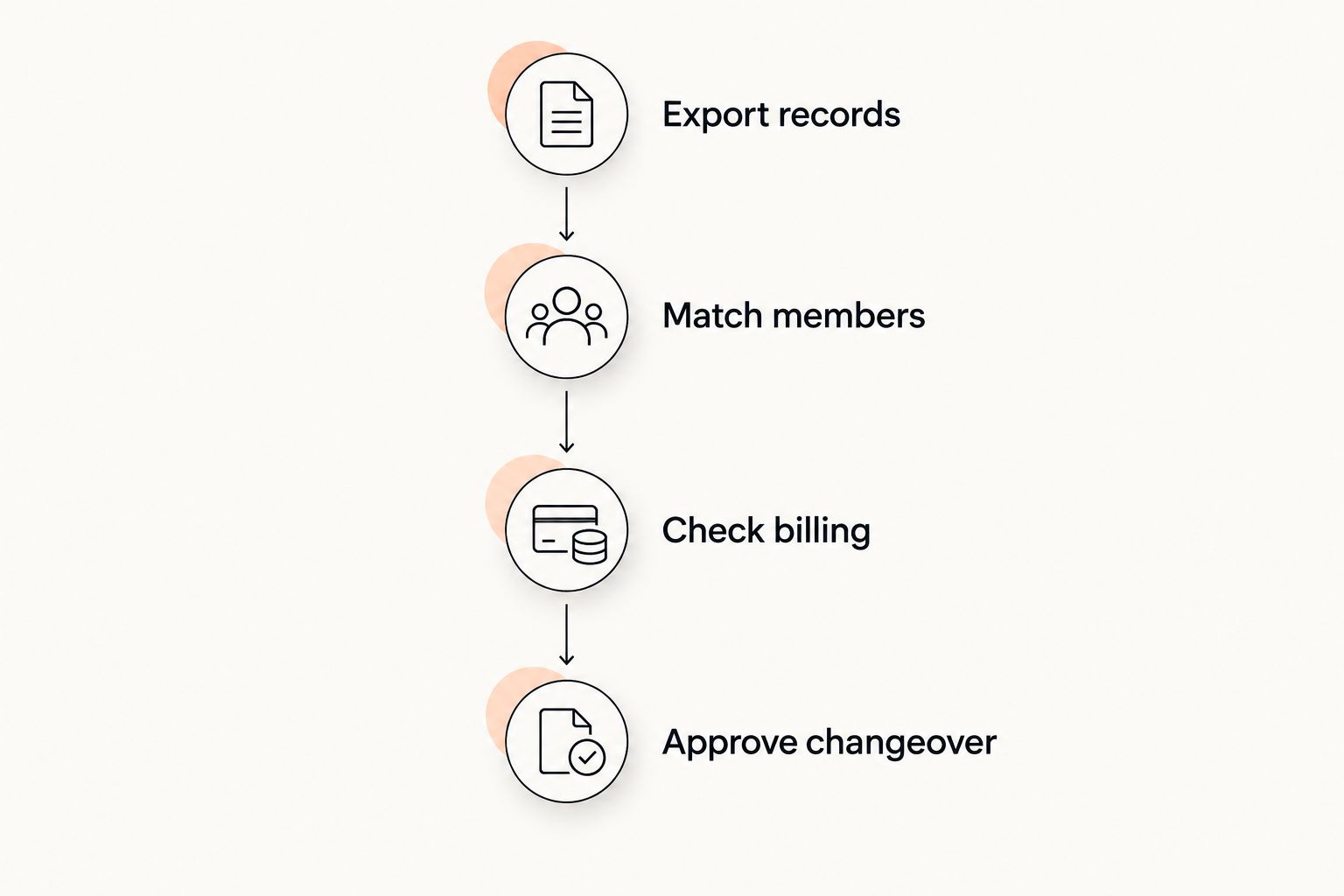
Use this sequence: Export records, Match members, Check billing, Approve changeover. Run it on a sample before applying it to the full school. Name the person who approves the switch and the system staff should use afterward.
Keep the previous records accessible under your existing access and retention rules. Do not delete useful history merely because the new member list looks complete.
- Export the records your school needs to retain.
- Match sample members against the source records.
- Check attendance and progression history separately.
- Verify billing responsibilities before collecting payments.
- Approve a clear date for staff to use the new system.
Compare the options against your school's actual work
Use this 2026 comparison as a decision framework, not a ranking of unverified competitor features. The right option is the one that passes your operational tests without leaving essential work unassigned.
| Option | Best for | Practical strength | Key limitation |
|---|---|---|---|
| Shared spreadsheet, calendar, and manual ledger | Owners defining a consistent process before selecting software | You can build fields around your exact class and assessment rules | Staff must update and reconcile separate records themselves |
| MatPilot martial arts gym management software | Academies needing members, scheduling, attendance, billing, and per-art ranks together | The stated feature set covers those tasks, with payment and follow-up approval workflows | Your Krav Maga syllabus, family billing arrangement, and import requirements still need direct validation |
| Your existing system with a corrected process | Schools whose current software passes the required workflow tests | You can improve responsibilities and record quality without a migration | Process changes cannot supply a required capability the system does not have |
Best for a low-risk decision: compare complete workflows, not isolated features. Ask each option to handle the same sample student, class change, assessment, and payment issue. Keep a written pass-or-fail record.
For your existing system, compare the effort of fixing configuration and staff responsibilities with the work of migrating. Do not change systems solely because another dashboard looks simpler.
Common mistakes Krav Maga schools make
Treating belt tracking as proof of syllabus fit
A rank field does not show whether your assessment rules fit. Bring a real progression example and ask how staff record evidence, approval, and corrections. If the demonstration only changes a belt label, the assessment workflow remains untested.
Merging ranks across disciplines
A member can attend several disciplines without holding the same qualification in each. Keep Krav Maga progression distinct from BJJ, judo, karate, or taekwondo records. Ask an instructor to review the sample after import; an administrator should not infer rank equivalence.
Assuming household billing works as required
Related students and a shared payer are different records. Write down the desired billing arrangement, including who receives payment queries and how you identify the covered memberships. Test it directly instead of accepting a general claim about member management.
Counting trials without recording the next action
A trial attendance total does not tell staff whom to contact or what to say. Give every attended trial an owner and a dated next step. Review unanswered questions before sending another invitation.
Switching before checking payment continuity
A successful data import is not a successful billing changeover. During your 2026 migration, verify payment responsibilities and outstanding issues independently. Tell staff which records are authoritative so nobody treats an old payment status as current.
FAQ
What's the best martial arts software for Krav Maga schools?
The best software is the system that passes your school's scheduling, attendance, grading, and billing tests. MatPilot covers member management, classes, billing, attendance, and per-art ranks; validate your Krav Maga assessment workflow before choosing it.
Can I use martial arts software if my Krav Maga school uses levels instead of belts?
Yes, if the system can represent your levels and assessment process accurately. Ask for a demonstration using your actual level names, instructor approvals, and progression history rather than assuming a belt field is sufficient.
Should attendance automatically qualify a student for promotion?
No; attendance records participation, while an assessment records an instructor's decision. Keep the two records separate and apply your school's own progression criteria.
How do I manage students who take Krav Maga and boxing?
Keep each student's class history clear and record progression separately for each discipline where applicable. A qualification in one discipline should not be copied into another discipline's record.
Can I start with spreadsheets instead of gym software?
Yes; spreadsheets, a calendar, and a manual ledger can define your process before you select software. Assign responsibility for updates and reconciliation so those separate records remain consistent.
What should I check before switching from Gymdesk or Kicksite?
Check available exports, member matching, attendance history, progression records, and payment responsibilities before switching. Test a sample and approve the changeover only after the required records and workflows pass review.
How should a Krav Maga school handle failed payments?
Assign someone to review the payment status, contact the responsible payer, and record the next action. Check that any software-assisted follow-up follows your approval process and matches the account's actual status.
One last thing
The hardest software test is a correction, not a clean new signup. Enter an attendance mistake, an incorrect level, or a mismatched payer in a controlled demonstration. Then ask the staff member who normally handles that task to fix it.
Make that part of your 2026 selection process. A system can look clear when every record is correct; the correction test shows whether your staff understand how to restore an accurate record without losing the underlying history.