Martial arts software for MMA gyms: complete 2026 guide

MMA gym software is a system for managing members, classes, attendance, billing and discipline-specific progress with the aim of keeping an MMA academy organized without making its owner a full-time administrator. This 2026 guide shows you how to test those workflows when members move between striking, wrestling and grappling classes.
- Choose MMA gym software by testing complete member workflows, not counting features.
- Keep boxing, Muay Thai, wrestling and BJJ attendance distinct without creating duplicate member records.
- Test Stripe billing alongside failed-payment review, family arrangements and membership changes.
- Keep promotion decisions and member-facing actions under an owner's or coach's approval.
Why this matters
A member can attend wrestling, Muay Thai and BJJ without holding the same experience level in each. Your records need to preserve those differences. A single attendance total does not explain which classes that member attends or which coach should review their progress.
Start with your martial arts class scheduling workflow, then connect the timetable to member records and billing. Choosing these separately leaves you checking whether the same person appears correctly in several places.
Why gym management software matters for MMA gyms
An MMA timetable brings distinct coaching systems into one business. Boxing needs its own class records. Wrestling needs its own attendance history. BJJ belt progression must remain separate from any grading structure your striking coaches use.
The purchasing question is not whether software has a calendar. It is whether you can answer an operational question without rebuilding the answer elsewhere: who attended, what they can attend, what they owe and who needs a follow-up.
For your 2026 evaluation, use actual academy situations rather than a generic sales demonstration. Include a cross-training adult, a trial student and a family account. Give each a different task to complete.
Choose the system that keeps those records consistent through a change. A membership upgrade, missed payment or move between class divisions reveals more than a clean dashboard does.
How to choose and set up MMA gym software
1. Map your disciplines before building the timetable
Start with a spreadsheet or paper timetable. List the classes you actually teach, including boxing, Muay Thai, wrestling, BJJ and MMA sessions where applicable. Do not collapse them into one category simply because members share a membership.
Separate the discipline from the class level. Beginner boxing and advanced boxing belong to the same discipline but serve different groups. A member's BJJ rank should not determine their access to a striking session unless that is an explicit academy rule.
For a 2026 setup, write a 7-day timetable before entering anything into software. Record overlapping sessions and shared coaching duties. This gives you a reference against which to check the software rather than adjusting your operation to its defaults.
- Class names: Use names that distinguish discipline and level.
- Age divisions: Separate adult and youth sessions where you teach them.
- Coaches: Name the responsible instructor for each session.
- Training spaces: Record rooms or mat areas used simultaneously.
- Entry rules: Write down prerequisites and membership restrictions.
2. Define one member record across multiple disciplines
Use a simple member worksheet first. Give each person one identity, then list their memberships, attendance and discipline-specific progress beneath it. Keep the person separate from the programs they attend.
Test this with 3 class visits: boxing, wrestling and BJJ. You should be able to review each visit without creating three versions of the member. Also check how the system handles a correction when someone is marked present in the wrong session.
Youth programs need another distinction: the person training is not always the person paying or receiving administrative messages. Write down those relationships before importing records. Do not assume a shared surname identifies the correct billing contact.
- Member identity: Keep contact details attached to the correct person.
- Discipline history: Preserve attendance by class and art.
- Guardian details: Identify the responsible adult for youth members.
- Billing contact: Record who handles membership payments.
- Corrections: Test how staff fix an attendance or contact error.
3. Test daily administration on your phone
Start by timing your current process with a phone stopwatch. Record how you find a member, check attendance and investigate a payment issue. Use the same tasks when evaluating software; a feature list does not show the work involved.
MatPilot is best for MMA owners who want martial arts gym management software with per-art ranks and approval-controlled co-pilot actions. It provides member management, a Monday–Sunday timetable, attendance, Stripe billing and Xero sync. It is available through the web and native iOS and Android apps in the United States and Ireland.
The faster path is to keep those daily tasks in the same operational system rather than moving between a register, payment records and separate progress notes. The limitation remains important: software does not decide whether a student is technically ready or whether a sensitive message is appropriate.
- Member lookup: Find a cross-training member during a class changeover.
- Attendance review: Check which discipline the member attended.
- Timetable review: Read the next session without changing devices.
- Payment review: Find the issue before contacting the member.
- Owner approval: Check proposed actions before they reach members.
4. Separate payment status from training history
Begin with a manual billing review. Match each membership to its payer and current payment status. Then document what happens when a payment fails, a family changes its arrangement or a member stops training.
MatPilot supports Stripe billing and Xero sync. Its co-pilot also covers payment issues with approval gates. Test those parts against your own process rather than assuming every billing exception should trigger the same response.
A missed payment needs review, not an unexplained change to the student's record. Keep the attendance history intact while you establish whether the problem is a payment method, an administrative mistake or a membership change. For families, distinguish the payer's account issue from each child's participation.
- Payer mapping: Match each membership to the responsible payer.
- Failed payments: Define who reviews the issue and contacts the member.
- Family changes: Test adding or removing one family participant.
- Accounting checks: Compare the payment record with the accounting entry.
- Resolution notes: Record the agreed next action without duplicating sensitive details.
5. Keep rank evidence specific to each art
Start with a coach-maintained syllabus and attendance record. Write down what counts toward review in each discipline. If your boxing or wrestling program does not use belts, do not invent a belt ladder to satisfy a database field.
MatPilot gym management software includes per-art ranks and belt grading, with promotion-readiness support from its co-pilot. Use that structure to keep BJJ progression separate from other arts. Keep the final decision with the responsible coach.
For a 2026 evaluation, choose one cross-training member and inspect the evidence for each program. An overall attendance total is not a substitute for relevant sessions or a coach's assessment. Treat attendance as evidence to review, not automatic proof of competence.
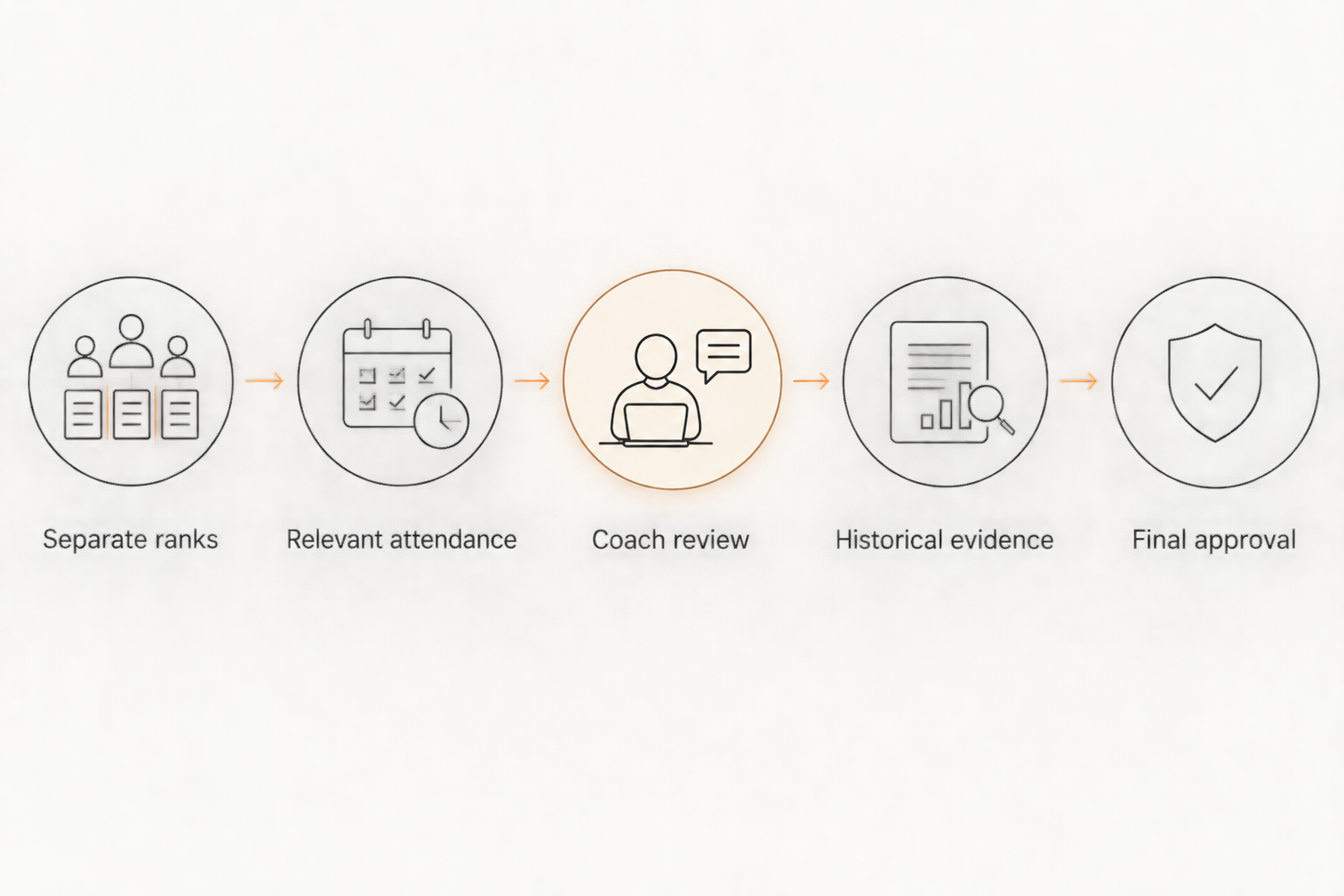
- Separate ranks: Keep each art's progression distinct.
- Relevant attendance: Review the sessions associated with that discipline.
- Coach review: Identify who assesses technical readiness.
- Historical evidence: Preserve existing promotion dates and notes.
- Final approval: Confirm the coach's decision before changing rank.
6. Rehearse trial follow-ups and a controlled switch
Use a shared task list before adding automation. Record who attended a trial, who should follow up and whether that action is complete. A trial student who samples Muay Thai and wrestling should not receive contradictory messages from separate program lists.
MatPilot's co-pilot supports trial follow-ups and at-risk member review, with the owner approving actions. Use those prompts to organize work. Review the underlying attendance and membership context before approving contact; an unexplained absence is not a diagnosis.
If you are switching from Gymdesk or Kicksite, first inventory the records you need to retain. Do not assume payment credentials, historical notes or every custom field transfer unchanged. Agree the scope before scheduling the change.
Use 1 complete billing cycle as your reconciliation window. This is a recommended checking period, not a promised migration duration. Compare what should have happened with what actually happened before closing the old process.
- Trial ownership: Assign one person to each follow-up.
- Message review: Check discipline, attendance and context before sending.
- Data inventory: List members, balances, ranks and histories to preserve.
- Transfer checks: Confirm how each required record will move.
- Billing boundary: Set the point at which each system stops collecting.
- Reconciliation: Check expected payments against collected payments.
Compare your options by operating model
For a 2026 shortlist, compare approaches before comparing vendors. These options solve different problems. A manual setup gives you direct control; a dedicated system reduces the number of records you maintain separately.
| Option | Best for | Practical advantage | Key limitation |
|---|---|---|---|
| Spreadsheet and manual task list | Owners documenting a simple operation | You define the fields and review every change | You must reconcile attendance, payments and follow-ups yourself |
| Separate scheduling, payment and rank tools | Academies keeping existing specialist processes | Each tool can serve a defined task | Cross-tool identity and status checks remain your responsibility |
| MatPilot | MMA academies managing several arts with owner-approved actions | Members, timetable, attendance, billing and per-art ranks sit within one platform | Coaches still assess readiness; owners still review proposed actions |
Keep a manual setup if it reliably supports the way you run the academy. Move to dedicated software when maintaining the connections between records becomes the work you want to remove.
For a multi-tool setup, assign one authoritative place for each record. Otherwise a membership cancellation can appear complete in one tool while remaining active in another part of your process.
Common mistakes MMA gym owners make
Treating cross-training members as separate customers
Creating one record for BJJ and another for boxing fragments the same person's history. You then have to decide which record owns the contact details, payment status and follow-up.
Keep one identity and inspect each discipline separately. Test the arrangement with someone who genuinely trains across programs, not a demonstration account attending one class.
Making BJJ the template for every discipline
A BJJ belt structure does not describe every striking or wrestling program. Forcing each art into that structure produces records that coaches must explain outside the software.
Document each program's actual progression model. Leave belt-based assumptions out of programs that do not use them, and ask how the proposed system represents that distinction.
Confusing a booking with attendance
A place on the timetable is not proof that someone trained. If your follow-up or progress review depends on participation, check the attendance record rather than relying on a booking alone.
Include a no-show and an attendance correction in your evaluation. Both should leave you able to explain what happened without searching through unrelated messages.
Testing only a straightforward monthly payment
A successful payment does not test failed-payment recovery, payer changes or family arrangements. Those exceptions need their own review process.
Write the expected action before testing the software. Check who sees the issue, who contacts the payer and how the resolution becomes visible to the next staff member.
Switching without defining the last billing date
Importing members is not the same as completing a switch. An unclear boundary leaves you manually checking which system should collect each payment.
Assign an owner to the changeover. Keep the old records accessible for reconciliation, and verify the new process before ending the old one.
FAQ
What's the best way to choose MMA gym software?
Choose MMA gym software by testing complete member workflows. Use a cross-training adult, a trial student and a family account to check attendance, billing, follow-ups and discipline-specific progress.
Can MMA gym software manage boxing, wrestling and BJJ together?
A suitable system should keep those disciplines distinct within one member's record. Test separate class histories and progression structures rather than accepting a single combined attendance total.
Does every MMA program need belt tracking?
No. Use belt tracking for programs that award belts, and preserve the actual progression model used by each other discipline. Do not create artificial ranks just to fill a software field.
Is MatPilot available for MMA gyms in the United States and Ireland?
Yes. MatPilot is available in the United States and Ireland through the web and native iOS and Android apps. Its stated features include members, scheduling, attendance, billing and per-art ranks.
Should software automatically approve a belt promotion?
No. The responsible coach should approve a promotion after reviewing relevant evidence. Attendance and readiness prompts support that review; they do not replace technical assessment.
What should I test before moving from Gymdesk or Kicksite?
Test member records, attendance history, rank information and billing responsibilities before switching. Confirm the transfer scope and payment cutover explicitly rather than assuming every field or payment credential will move unchanged.
Can I run an MMA gym with a spreadsheet instead?
Yes, if you maintain the records and reconcile the separate processes yourself. A spreadsheet does not remove the need to check payments, record attendance and assign member follow-ups.
One last thing
For your final 2026 test, correct an error instead of adding a perfect new member. Move an attendance entry to the right class, fix the payer relationship or amend a rank record.
Choose software you can correct confidently. Your academy needs accurate records after a busy evening, not just during a prepared demonstration.