Stripe account setup to first payment collected: complete 2026 workflow

Instead of manually chasing membership dues, complete your Stripe account setup for gym payments, connect billing through your gym software, and verify the first live collection against the right member. This 2026 workflow takes you from business verification to a recorded payment without confusing a successful charge with money arriving in your bank.
- Stripe account setup gym payments: verify the business, configure membership billing, test, then confirm a live collection.
- MatPilot suits martial arts owners who need Stripe billing alongside attendance, scheduling, and per-art ranks.
- A successful Stripe payment and a bank payout are separate events. Verify both separately.
- Keep recurring dues in one billing system to prevent duplicate membership charges.
Why this matters
Your first successful payment proves collection, not the whole billing workflow. You still need to identify the payer, match the charge to the membership, confirm the next collection date, and account for the eventual payout.
For a BJJ academy, boxing gym, or taekwondo school, the payer and student are not always the same person. A parent can pay while a child holds the membership. Build that distinction into setup rather than correcting it after collection.
If another system already collects dues, settle the cutover first. The guide to switching payment processors without disrupting billing covers the adjacent migration problem; opening a Stripe account alone does not stop existing subscriptions.
Before you start
- Business access: Have an authorized representative, business registration or identity documents requested by Stripe, bank details, and access to the email used for account administration. Use the gym's actual operating country and business information.
- Billing instructions: Prepare the membership terms, collection schedule, cancellation process, payer contact details, and authorization for recurring charges. For minors, identify the responsible adult separately from the student.
- The non-obvious gotcha: Decide which system owns recurring billing before creating anything. A subscription created directly in Stripe is not proof that your gym software recognizes it. Do not create another subscription to make a missing membership appear.
Use this 2026 setup checklist for a new billing connection or a controlled migration. Do not treat it as permission to move existing payment credentials yourself; handle any credential transfer through the providers involved.
Business account configuration
Establish the Stripe account
- Create or access the Stripe account under the gym's authorized business ownership. Secure the login with two-factor authentication and keep recovery access under business control.
- Complete Stripe's requested business, representative, and banking information. Use legal details for verification and recognizable public-facing details where Stripe requests customer-facing business information.
- Review outstanding verification requirements. Resolve requests before directing members into live billing; creating an account does not establish that every payment or payout capability is enabled.
- Review the statement descriptor and support contact information. Choose details a parent or adult member can recognize when checking a bank statement.
- Check the account's payment and payout status. Treat those as separate checks rather than assuming a bank connection means the account is ready for every collection method.
Expected result: The business account has the requested information, the correct bank destination, and no unresolved requirement blocking the payment method you intend to use.
Set the country correctly
For a US gym, supply the US business and banking information Stripe requests. For an Irish academy, supply the corresponding Irish information. Do not select a country merely because a tutorial uses it.
Keep the membership's billing currency explicit. A currency symbol in a spreadsheet is not enough to validate the live configuration. Before collecting, compare the actual currency shown in the billing setup with the agreement the member accepted.
Member and billing configuration
Choose the billing owner
- Decide whether your gym platform or a direct Stripe workflow will create and maintain recurring dues. Write that decision into the handover notes for anyone who handles reception or accounts.
- For MatPilot gym management software, use the product's Stripe billing setup and complete the authorization it presents. Do not substitute a subscription created independently in Stripe for the platform's membership setup.
- Confirm which Stripe business account the setup uses. Staff access to several businesses creates an avoidable risk: completing authorization against the wrong account.
- Identify the member and the payer before starting collection. Record the adult responsible for payment when a junior student attends classes.
- Review the membership terms and collection date with the payer. Obtain authorization through the supported billing flow rather than collecting card details in a spreadsheet, message, or paper intake form.
Expected result: One designated system controls the membership's recurring billing, and the payer is clearly connected to the correct student.
Pick the collection workflow
These are billing patterns, not claims that every payment method or collection option is enabled in your gym account. Verify the supported flow before using it.
| Workflow | Best for | Advantage | Limitation |
|---|---|---|---|
| Recurring membership collection | Ongoing academy dues | Establishes a repeat collection schedule | Requires clear authorization and ongoing cancellation management |
| One-time collection | A separately agreed single charge | Keeps a single transaction distinct from membership renewal | Does not establish future recurring dues |
Use recurring billing for recurring dues, not repeated one-time requests. Keep separate charges clearly described so the payer understands what each transaction covers.
MatPilot fits owners who want billing alongside class scheduling, attendance, and grading. The operational constraint remains: software does not replace the owner's responsibility to approve the correct terms, payer, and billing start date.
For a 2026 migration, also compare the old system's next collection date with the new one. The safest handover is a documented cutover, not a period when both systems are allowed to collect and someone watches for duplicates.
Test collection configuration
Rehearse before inviting a member
- Use a Stripe testing environment for a direct Stripe workflow. For a platform-managed workflow, use that platform's supported testing or onboarding checks; do not assume a Stripe test automatically tests the platform connection.
- Follow Stripe's published test-payment instructions. Never use test card details in live mode or real card details as substitutes for the provided testing tools.
- Exercise the successful-payment path. Confirm that the test transaction relates to the intended customer and billing record, not merely that a checkout screen completes.
- Exercise a declined-payment path where the testing tools support it. Check what staff and the payer see, and establish who will act on the failure.
- Keep test results separate from live membership records. A test success does not collect money or prove that a real bank payout will complete.
Expected result: You understand the successful and failed collection paths before sending a live payment request. Your team can distinguish test evidence from a real payment.
Define the acceptance check
For the first live run, use a deliberately narrow scope: 1 consenting member, 1 intended collection, and 0 duplicate subscriptions for that membership. These are setup targets, not performance statistics.
Record what success means before pressing ahead:
- The payer recognizes the charge and its purpose.
- The intended member has the correct billing record.
- The collection result is visible in Stripe.
- The next recurring date matches the agreed terms, if applicable.
- The payout is checked separately after the collection.
This 2026 acceptance check works for adult BJJ dues and parent-paid karate or taekwondo memberships. The art changes; the need to separate student, payer, and transaction does not.
Live collection and verification
Collect the first authorized payment
- Return to the live billing flow and confirm the business account, member, payer, currency, and agreed collection date. A successful test is not a reason to skip this review.
- Complete the authorized payment through the chosen billing system. Let the payer supply payment information through the supported payment interface.
- In Stripe, open Payments and inspect the transaction. For a completed successful payment, confirm Succeeded rather than relying on the member's checkout screenshot.
- Compare the Stripe result with the membership billing record. Resolve any mismatch before collecting again; an uncertain screen is not evidence that a second charge is needed.
- Review the recurring schedule where applicable. Confirm that the next collection follows the agreed membership terms and does not overlap an old subscription.
- Check the bank payout separately. A successful charge and a deposited payout are different events, and the dashboard's payout information governs that follow-up.
Expected result: A real, authorized payment is recorded against the correct membership, and someone owns the separate payout check.
Keep the evidence connected
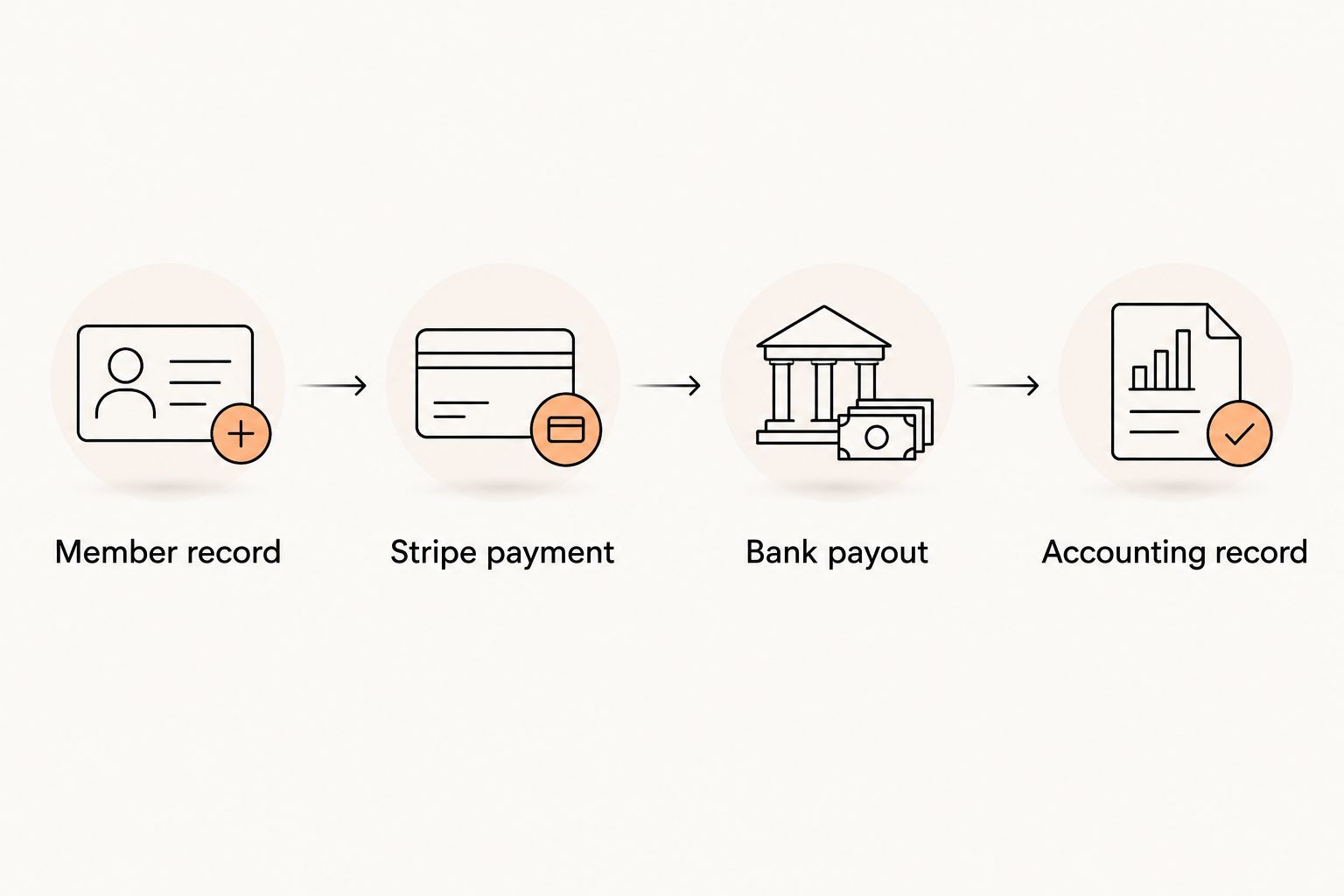
Retain 3 references in your operational record: the member record, the Stripe payment reference, and the related payout reference when applicable. Keep sensitive payment credentials out of that record.
For accounting, distinguish the member's payment from the net bank deposit and any associated adjustments. MatPilot includes Xero sync; the payment reconciliation workflow is the next step once collection works. Confirm the resulting accounting records rather than assuming that a connected account proves reconciliation.
Variant: recover a failed recurring collection
The second workflow begins when an existing membership payment fails. Do not recreate the membership or open another subscription as a shortcut.
- Inspect the failure. Identify the affected payment and read the failure information in Stripe. Separate a decline from a payment still processing or requiring customer action.
- Review existing recovery. Check the retry and customer-notification behavior configured for that billing flow. Understand what is already scheduled before sending a separate demand.
- Request the right action. Direct the payer through the supported payment-update or authentication flow. Do not ask for card details by email.
- Confirm recovery. Verify the successful collection and the membership record before closing the issue. Updating a payment method alone does not prove the overdue payment was collected.
Stripe’s built-in payment recovery belongs in the retry decision: establish what the existing recovery process does before adding another layer of messages or collection attempts.
Expected result: The existing billing obligation is resolved or assigned for follow-up without creating a competing subscription. Keep cancellation decisions separate from technical retry decisions.
Troubleshooting
Account created, but collection remains blocked
Open the account's outstanding requirements and resolve the requested verification. Check the specific payment capability rather than repeatedly recreating payment requests. A login and a completed business profile are not the same as an enabled collection method.
Stripe shows success, but the membership still looks unpaid
Match the customer and payment references first. Confirm whether the transaction originated in the designated billing system, then follow the platform's support process for the mismatch. Do not collect again until you establish whether money already moved.
A member reports two charges
Inspect both transactions and their related subscriptions or invoices. Check the old system as well as the new one. Stop the unintended recurring instruction through the responsible system, then assess the duplicate transaction under your refund process; do not assume the correct fix is always a refund rather than cancellation of an uncompleted payment.
The charge succeeded, but the bank deposit is missing
Review the payout's status, destination, and expected arrival information in Stripe. Check for account requirements or payout failures. Do not promise a universal arrival time: the relevant evidence is the payout information for that account and transaction.
A member updated a card, but dues remain unpaid
Inspect the outstanding billing record and its collection status. Establish whether another attempt is scheduled or requires action through the billing system. A new payment method fixes credentials; it does not by itself confirm settlement of the missed dues.
Customize your workflow
Once the first collection is verified, expand by membership type rather than activating every account at once. Include an adult member, a parent-paid junior membership, and any distinct billing arrangement your academy actually uses.
For your 2026 billing checklist, assign an owner to each exception: failed collection, disputed payment, cancellation, and unmatched accounting entry. Staff should know who decides and where the final result is recorded.
Keep attendance and grading rules separate from collection status unless you have deliberately established the relevant policy. A declined card is a billing issue; it is not evidence that a student failed a promotion requirement.
FAQ
How do I set up Stripe to collect gym membership payments?
Complete business verification, designate the system that controls billing, configure the authorized membership collection, and verify the first live payment. Check the bank payout separately from payment success.
Can I create a Stripe subscription before connecting gym software?
Do not assume an independently created Stripe subscription will appear as a managed membership in your gym software. Establish the platform's supported billing setup first so you do not create duplicate recurring instructions.
Should I test a gym payment before going live?
Yes. Use the supported testing environment to rehearse success and failure, then verify an authorized live collection separately. Test payments do not collect real money.
Does a successful Stripe payment mean the money is in my bank?
No. Payment success and a bank payout are separate events. Review the payout status and destination in Stripe before treating the deposit as received.
Can parents pay for a child's martial arts membership?
Structure the billing record around the responsible adult as payer and the child as student. Confirm that your chosen membership flow preserves that distinction before collecting.
What should I do when a gym membership payment fails?
Inspect the failure, review existing retry behavior, and request any required payment update through the supported flow. Confirm successful collection before marking the issue resolved.
Does MatPilot handle more than Stripe billing?
Yes. MatPilot provides martial arts gym management software with member management, scheduling, attendance, and per-art grading alongside Stripe billing. It also includes Xero sync and an approval-gated co-pilot.
One last thing
Your first payment is not your first renewal. Before expanding the rollout, inspect the next scheduled collection and confirm the old billing instruction is no longer competing with it. That final check prevents a successful setup from becoming a duplicate-dues problem.