Help Center › Billing & Payments
Payment currency support
Setting your currency
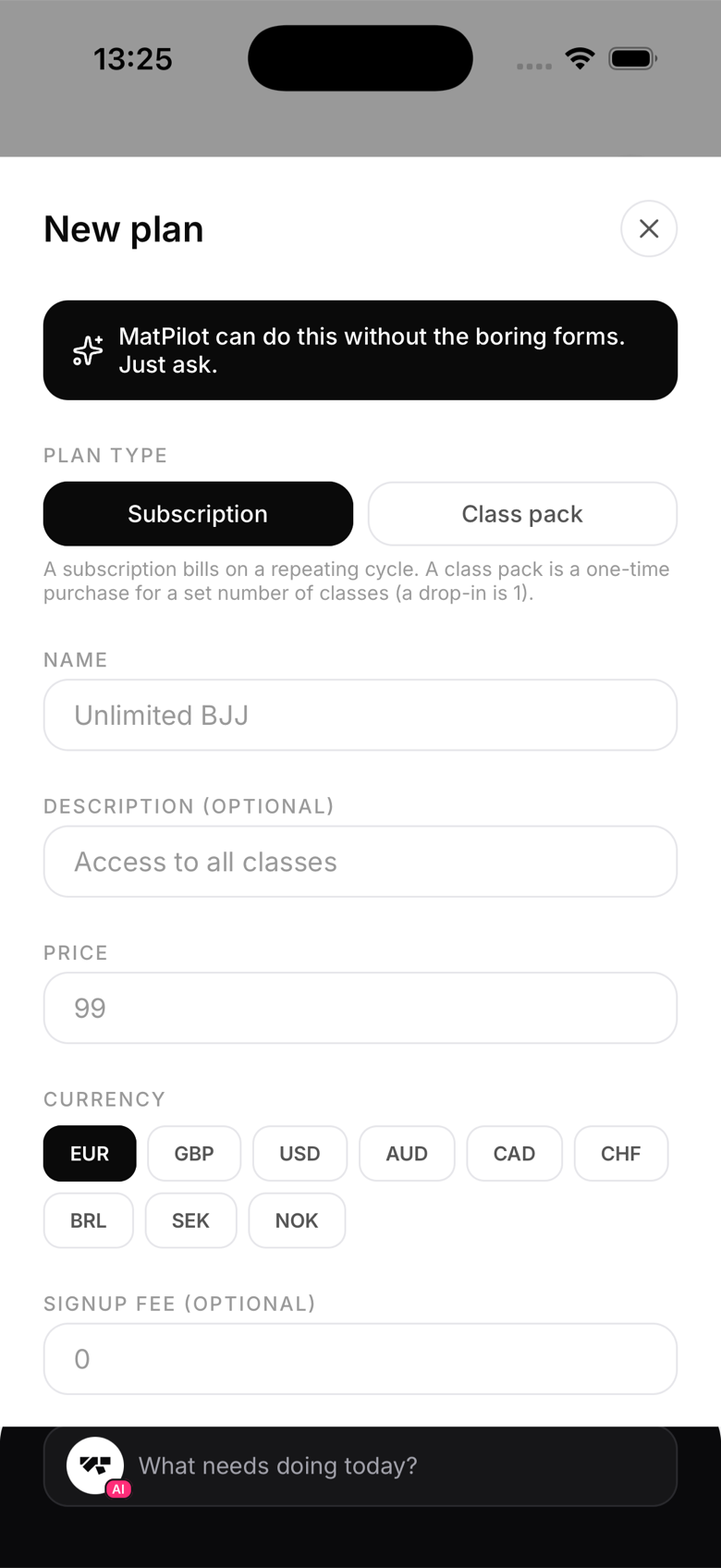
Currency is set per membership plan, not by your Stripe account or connection. When you create a plan, you choose its currency from a supported list: EUR, GBP, USD, AUD, CAD, CHF, BRL, SEK, and NOK. This is independent of the country you connected Stripe from.
Changing currency
You can create a new plan in a different currency at any time. There's no need to disconnect or reconnect Stripe, and no need to cancel existing subscriptions just to offer a plan in another currency.
Multiple currencies at one gym
MatPilot supports plans in different currencies at the same gym, but keep in mind: your revenue dashboard and reports total figures in a single configured currency (your gym's main currency, EUR by default). Payments in a different currency won't be added into that headline total, so if you plan to sell in more than one currency, treat it as a deliberate choice rather than a mix-and-match default.
Currency display in the app
Amounts are displayed with the correct currency symbol throughout the member and owner app based on each plan's own currency.
VAT and taxes
MatPilot lets you set a tax rate per plan, which Stripe then applies automatically and inclusively at checkout. The AI Assistant can also review your plans for VAT risk and offer to fix a rate for you. You (or your accountant) are still responsible for choosing the correct rate for your country and service type, consult an accountant familiar with fitness and coaching services in your jurisdiction.