Viewing staff activity logs
A belt or price changed and nobody remembers doing it; the audit log already knows.
Accessing the audit log
Go to Settings → Tools → Audit log. It's visible to the owner by default. A manager can only see it if specifically granted that permission, which isn't yet a self-service toggle in the app, contact MatPilot support if you need a manager to have access.
What's recorded
- Members invited, archived, restored, suspended, or reactivated
- Role changes
- Belt promotions (who promoted whom, to what rank)
- Diplomas generated or revoked
- Membership plans created, updated, or archived
- Payments retried, refunds issued
- Announcements sent
- AI co-pilot actions
- Front-desk kiosk walk-in enrollments
- Sign-ins
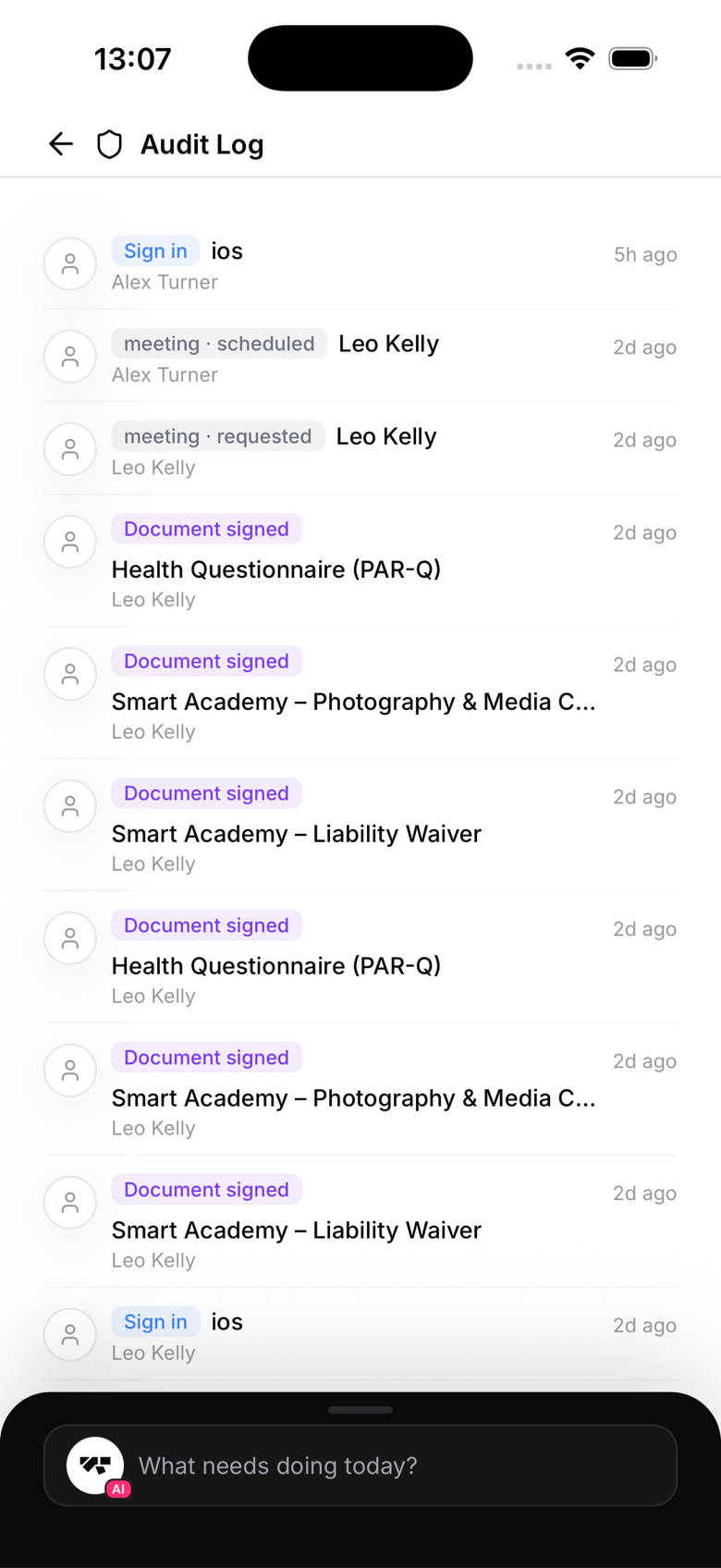
Each log entry shows
- Timestamp
- Actor (who took the action, human or AI)
- Action type
- Affected entity (member name, plan name, and so on)
- Details, for example "Promoted James Murphy from White Belt to Blue Belt in BJJ"
AI-attributed actions
Actions taken through the AI co-pilot show "AI Assistant" as the actor. The log doesn't separately record which staff member confirmed the action, only that it was AI-executed.
Log retention
Audit log entries are kept for 1 year, then automatically deleted. Export important records if you need to keep them longer.
Browsing the log
The log loads newest first with a "load more" option as you scroll. There's no filter by date range, actor, or action type yet, so for now you're scanning rather than searching.