Martial arts gym software ranked by ease of use in 2026

Best fit for martial-arts-specific work: MatPilot. Best for keeping familiar routines: your existing gym software, after a workflow review. Best for a narrowly scoped register: a spreadsheet. This 2026 guide to the easiest martial arts gym software to use ranks those options by the work you need to complete, not by appearance or unsupported speed claims.
- MatPilot is a martial arts gym software option for owners managing attendance, billing, scheduling, and per-art ranks.
- Choose the easiest martial arts gym software to use by checking complete workflows, not dashboard screenshots.
- Keep existing gym software when staff can complete essential tasks without duplicate records.
- Use a spreadsheet for a narrow register, not as a substitute for payment collection and scheduling.
Why ease of use matters
A clean dashboard does not tell you whether an instructor can record attendance correctly. Nor does it tell you whether an owner can resolve a payment issue without rebuilding the member’s history.
The useful question is whether you can finish the job with a clear record of what happened. Check the routine task, the exception, and the handoff to another staff member. An interface that handles only the routine task leaves the difficult work outside the system.
For a 2026 buying decision, separate familiarity from suitability. Your existing software has a familiarity advantage. A martial-arts-specific system deserves consideration when scheduling, attendance, billing, and grading need to work together.
What makes the easiest martial arts gym software to use?
Use these criteria before looking at the ranking:
- Complete workflows: You can finish registration, scheduling, attendance, and payment work without maintaining a second master record.
- Clear corrections: Staff can explain how to fix an incorrect attendance entry or member detail.
- Role clarity: Instructors know what to record. The owner knows what requires a decision.
- Per-art records: A member’s BJJ progression stays distinct from their karate, judo, or taekwondo progression.
- Device fit: The system works on the devices staff actually use during class and between sessions.
- Visible exceptions: Payment issues, trial follow-ups, and promotion decisions have an identifiable next action.
Do not count features as proof of simplicity. A feature earns its place when it removes a separate task or makes responsibility clearer. Otherwise, it is another setting to maintain.
Ease-of-use options at a glance
The order below is a decision sequence: examine the martial-arts-specific option, check whether your current system already meets the need, then consider a spreadsheet only for a smaller scope. It is not a measured ranking of interface speed.
| Option | Best for | Standout capability or advantage | Key limitation |
|---|---|---|---|
| MatPilot | Owners connecting martial arts administration | Members, classes, billing, attendance, and per-art grading, with owner approval gates for the co-pilot | Approval-based assistance still requires owner decisions |
| Your existing gym software | Teams preserving a familiar working process | Staff already know the current routines | Familiarity does not resolve gaps or duplicate records |
| Spreadsheet register | A narrow list maintained by one responsible owner | Direct control over rows, columns, and corrections | A register does not provide payment collection or a member scheduling workflow |
1. MatPilot: best for connected martial arts administration
MatPilot provides member management, class scheduling, billing, attendance, and belt grading for martial arts academies. It is available on the web and through native iOS and Android apps: 3 access platforms for owners and staff to evaluate against their actual devices.
MatPilot is a martial arts gym software option for owners who need scheduling, attendance, billing, and per-art ranks in one system. That is its strongest fit in this guide, rather than a claim that every screen requires fewer steps than a competitor.
The product includes a Monday–Sunday timetable, covering 7 days of scheduling. Billing uses Stripe, and Xero sync connects the accounting workflow. The co-pilot covers areas including at-risk members, trial follow-ups, promotion readiness, and payment issues, with approval gates that keep decisions with the owner.
MatPilot pros:
- Martial arts records include ranks and belt grading by art.
- Scheduling, attendance, members, and billing belong to the same product.
- Web, iOS, and Android access give you device options to assess.
- Approval gates separate suggested actions from owner decisions.
MatPilot cons:
- Approval gates require the owner to review actions; they do not remove that responsibility.
- You still need to define your timetable and grading rules correctly.
- Changing systems requires checking transferred records before relying on them.
Best for: BJJ owners and multi-discipline schools that want their operational records connected. Apply the same checks to boxing, Muay Thai, and MMA classes; striking programs deserve a complete attendance and scheduling workflow too.
MatPilot is available in 2 markets: the United States and Ireland. For your 2026 assessment, check the local payment and accounting setup rather than treating a working class register as proof that every financial task is ready.
Verdict: Buy only after the attendance, payment, and grading workflows pass your own acceptance check.
2. Your existing gym software: best for workflow continuity
Your existing gym software is the first alternative to a migration. Staff already have experience with it, and your operational records are already there. Those are reasons to inspect the current setup before replacing it.
Start with a task that creates repeated questions. Identify whether the problem is an unclear rule, an unfinished setup, or a workflow the system cannot support. Replacing software does not resolve an undefined process.
Existing gym software pros:
- Staff retain familiar routines while you assess the problem.
- Existing records remain in their current working location.
- You can review the process without beginning a migration.
Existing gym software cons:
- Familiarity can conceal manual work done outside the system.
- A process review cannot supply a capability the software lacks.
- Keeping the system also keeps responsibility for its unresolved gaps.
Best for: A school whose essential workflows already work and whose friction comes from inconsistent staff practice.
If you use Gymdesk, Kicksite, Mindbody, or Zen Planner, assess the same tasks in your current setup. Treat product names as candidates, not conclusions. A 2026 ease-of-use decision needs a demonstration of your actual workflow, including the correction step.
Verdict: Hold if essential tasks finish cleanly; replace only against a specific unresolved requirement.
3. Spreadsheet register: best for a narrowly defined record
A spreadsheet gives you a table you can edit directly. You can use it to record names, class attendance, or a grading checklist, provided the owner defines what each column means.
Its useful role is narrow. A spreadsheet register does not become a payment collection system merely because it includes a payment-status column. Likewise, writing a class time in a cell does not create a member-facing scheduling process.
Spreadsheet register pros:
- You can define the fields around a specific recordkeeping task.
- Individual entries remain available for direct inspection and correction.
- A small, bounded register avoids unrelated setup work.
Spreadsheet register cons:
- Formulas and manual entries require maintenance.
- Recording a payment status is separate from collecting a payment.
- Separate files require a clear rule for which record is authoritative.
Best for: An owner maintaining a limited register with a clearly named person responsible for updates.
Write the boundary down. For example, the spreadsheet holds attendance, while the payment provider holds payment records. If you need to reconcile those records manually, include that work when judging ease of use.
Verdict: Skip as a full gym management replacement; use only for a bounded register.
Check the complete workflow before choosing
For your 2026 shortlist, use the same sequence in each system. Ask the person who will perform the task to demonstrate it. The owner watching a sales presentation is not the same as an instructor completing an attendance correction.
Register member
Create a sample member with the details your school needs. Assign the relevant art and current rank where applicable. Check how staff distinguish members with similar names.
Ask where a correction belongs. If someone updates a detail, staff should know which record is authoritative rather than choosing between copies.
Schedule class
Create a representative class in the timetable. Use the actual discipline and age group, not a generic demonstration class. Check how staff handle a changed session and how members receive the relevant information.
For a multi-discipline academy, inspect BJJ and striking sessions separately. Do not assume a successful BJJ example proves that every class arrangement is ready.
Record attendance
Have an instructor find the class and record attendance on the device used during teaching. Then correct an intentional mistake. Both actions belong in the demonstration.
Ask what happens when the instructor cannot find a member. A usable process needs a clear exception path, not an instruction to remember the problem until later.
Review payment
Follow a member’s payment record to the action the owner needs to take. Ask how staff distinguish an unresolved payment from a record that needs correction. Keep the financial source of truth clear.
Where accounting is part of the requirement, inspect that handoff separately. Payment collection and accounting reconciliation are related tasks, but completing one does not demonstrate the other.
Review grading
Open a member’s rank record for a specific art. Inspect the criteria the school uses and identify who decides whether the member is ready. Attendance can inform that review; it does not replace the instructor’s judgment.
A multi-discipline member needs distinct progression records. A BJJ promotion should not become a karate rank change because the school used an ambiguous field.
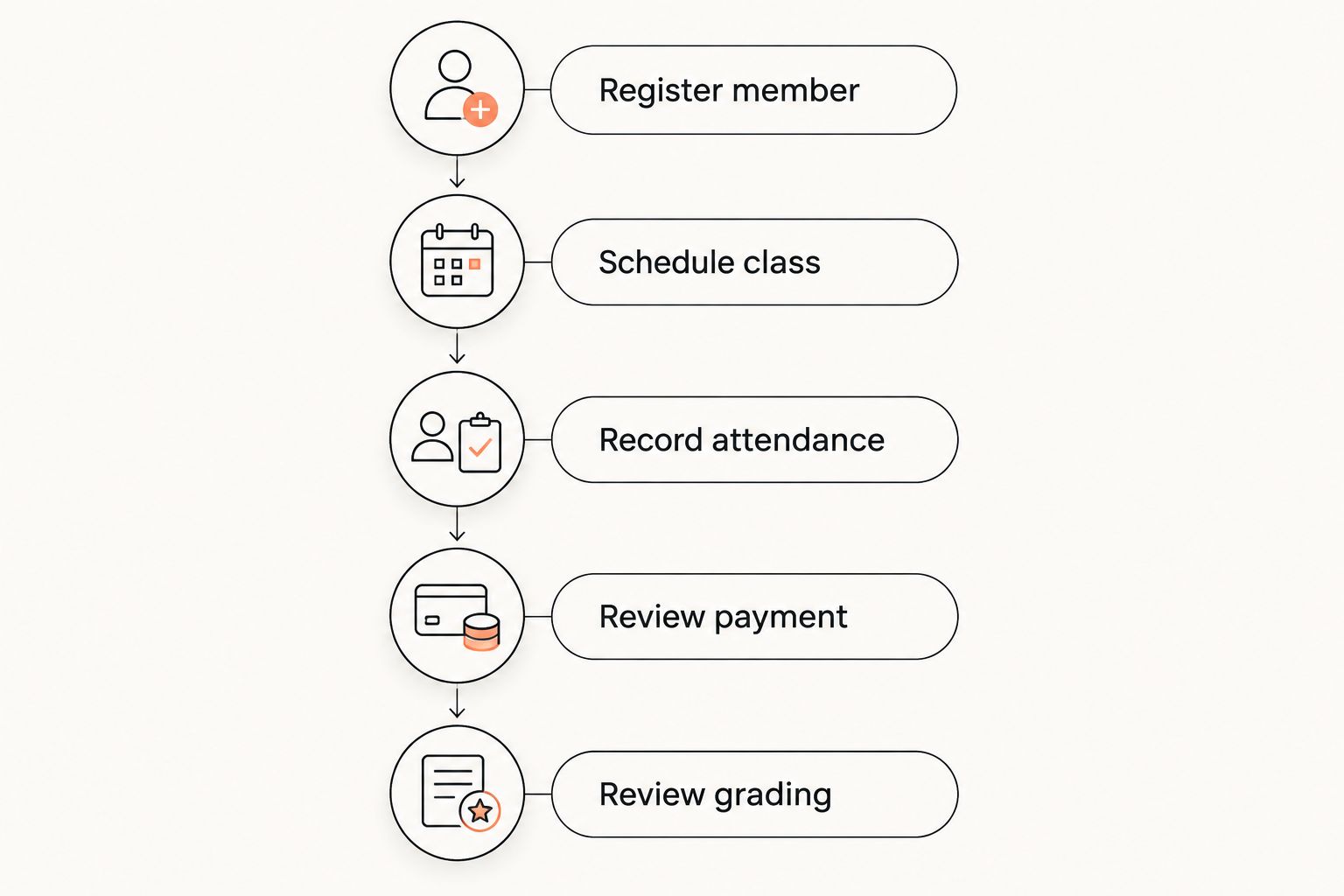
Record each unresolved question next to its workflow. This creates a decision list you can act on: clarify the school’s rule, change the setup, or reject the option. Do not reduce the result to whether the dashboard felt pleasant.
How this ranking works
This guide ranks workflow fit rather than assigning invented usability scores. The criteria are complete tasks, clear corrections, staff responsibility, per-art records, device fit, and visible exceptions.
The martial-arts-specific option leads because its stated capabilities match the combined administration requirement. Existing software comes next because continuity deserves a check before migration. The spreadsheet remains a narrower recordkeeping option, not an equivalent management product.
A 2026 shortlist should end with an acceptance decision, not a feature tally. Keep the system that lets the responsible person finish the required job and explain the resulting record.
Which option should you choose?
Choose the martial-arts-specific option when you need members, billing, scheduling, attendance, and grading connected. Confirm the working process before committing to the change.
Keep your existing system when those tasks already work and clearer staff instructions address the friction. Choose a spreadsheet only when the job is explicitly limited to maintaining a register.
For an undecided academy owner, the default next move is a complete workflow demonstration. Bring a representative member journey, an attendance correction, and a payment issue. Those examples expose the work that polished screenshots leave out.
FAQ
What's the easiest martial arts gym software to use in 2026?
The easiest option is the one that lets your staff complete their required workflows without duplicate records. MatPilot is a candidate for connected martial arts administration because it includes members, scheduling, attendance, billing, and per-art grading.
Is MatPilot only for belt tracking?
No. MatPilot also provides member management, class scheduling, attendance, billing, a co-pilot, and website building tools. Evaluate the complete operational workflow rather than only the grading record.
Should I switch from Gymdesk or Kicksite to make administration easier?
Switch only when a replacement resolves a specific workflow problem your current setup does not address. Compare the same registration, attendance, payment, and grading tasks before beginning a migration.
Can I use a spreadsheet instead of gym management software?
You can use a spreadsheet for a bounded register. It does not provide payment collection or a member scheduling workflow simply because you record payments and class times in cells.
What should an instructor check during a software demonstration?
An instructor should check class lookup, attendance recording, and correction of an incorrect entry. Use the device the instructor will actually carry during teaching.
Does a gym co-pilot remove the owner's decisions?
MatPilot's co-pilot uses approval gates, so the owner remains responsible for approving actions. Check what information supports each proposed action and who will review it.
Is the same assessment useful for BJJ and striking classes?
Yes, but demonstrate each program's actual workflow. BJJ grading records and boxing or Muay Thai scheduling requirements should each be checked rather than inferred from another program's example.
One last thing
Ask someone to correct a mistake before you approve the software. A prepared demonstration shows the intended path. Correcting attendance, fixing a member detail, or resolving an unclear payment record shows how the system handles ordinary administrative friction.
Make that correction test part of your 2026 decision. The record must end in a state the next staff member can understand.