Best member management software for martial arts schools in 2026

Best overall: MatPilot for martial arts member management that connects attendance, billing and grading. Best for a shared manual roster: Google Sheets. Best for a locally maintained roster: Microsoft Excel. This 2026 guide separates complete member management software for martial arts schools from spreadsheets that handle only part of the work.
- MatPilot is best for martial arts schools that need member records, scheduling, billing and belt grading together.
- Google Sheets suits a shared manual roster, not connected payment recovery or promotion tracking.
- Microsoft Excel suits locally maintained member records, but updates and follow-ups still need an owner.
- Choose member management software for martial arts schools by testing attendance, billing and grading on the same member record.
Why this matters
A member list tells you who enrolled. A working management system helps you see who attended, whose payment needs attention and whose next promotion needs review. Those are different jobs.
For your 2026 shortlist, start with the work that falls between systems. A coach records attendance. An administrator checks payments. Someone else keeps the grading sheet. When those records disagree, you have to resolve the disagreement before taking action.
Choose the system around the member record, not the dashboard. A useful record connects the person, their training and the administrative work attached to their membership.
What makes the best martial arts member management software
Use these criteria before comparing interfaces. Each one should become a task in your demonstration, not a checkbox on a sales page.
- Member records: Find the student, their contact details and their training information without searching separate files.
- Attendance and scheduling: Record the class attended and connect that attendance to the correct member. Check how timetable changes affect your daily work.
- Per-art progression: Keep ranks separate when a student trains across disciplines. Attendance should support a grading decision, not replace coaching judgment.
- Billing follow-through: Identify a payment issue, review the account and decide what happens next. Ask how family billing works before committing.
- Owner control: Check who can change records, approve actions and correct mistakes. Automation should leave consequential decisions with you.
- Usable access: Test the tasks your coaches perform during class, including the access route they actually use.
Do not award extra credit for a long feature list. Award it when the system completes your actual workflow without a second record that someone must maintain.
The options at a glance
This is a workflow ranking, not a claim that spreadsheets are equivalent to dedicated gym software. Google Sheets and Microsoft Excel belong here because a manual member roster is a real alternative for an owner who does not yet need connected operations.
| Rank and option | Best for | Standout function | Key limitation |
|---|---|---|---|
| 1. MatPilot | Connected martial arts operations | Members, classes, billing, attendance and per-art grading in a gym platform | Documented markets are the United States and Ireland |
| 2. Google Sheets | A shared manual member roster | Collaborative spreadsheet editing | Gym workflows must be designed and maintained manually |
| 3. Microsoft Excel | A locally maintained member roster | Desktop spreadsheet organization and filtering | A workbook does not connect gym operations by itself |
The dedicated platform wins when you need the member record to connect operational tasks. A spreadsheet wins only when its narrower job matches what you need.
1. MatPilot: best for connected martial arts operations
MatPilot provides member management, class scheduling, attendance, Stripe billing and per-art ranks and belt grading. Its co-pilot supports work around at-risk members, trial follow-ups, promotion readiness and payment issues, with owner approval gates. It also includes website-building tools and Xero sync.
Best for: BJJ academies and multi-discipline schools that need member administration connected to training and billing. Boxing, Muay Thai, MMA, judo, karate and taekwondo schools should test their own timetable and progression processes rather than copying a BJJ demonstration.
MatPilot pros
- Member records, attendance, classes and billing sit within the same gym management product.
- Per-art ranks support students whose progression differs between disciplines.
- Approval gates keep the owner responsible for co-pilot actions.
- You have 3 access routes: web, native iOS and native Android apps.
MatPilot cons
- Its documented markets cover 2 countries: the United States and Ireland. This recommendation does not extend that coverage to other countries.
- Stripe billing and Xero sync are named integrations. Do not assume another payment processor or accounting connection.
- Approval gates still require owner review. This is not a system for handing over every decision without supervision.
What to test before choosing
Ask for a demonstration using a student who trains in different disciplines. Check that each art retains its own rank, then inspect the attendance and billing work attached to that member.
Next, review a payment issue and a promotion-readiness action. Identify what the system prepares, what you approve and what happens after approval. Keep those steps separate.
The timetable covers Monday through Sunday, all 7 days of the week. Use that coverage to test your actual combination of adult sessions, children's classes and striking classes—not just an empty calendar.
Verdict: Buy if you need connected martial arts operations and the demonstration matches your school's processes.
2. Google Sheets: best for a shared manual member roster
Google Sheets is a collaborative spreadsheet tool. You can organize a member roster in rows and columns, share it with staff and use filters to find records. The sheet contains the structure you create; it is not a martial arts management system.
Best for: A school whose immediate task is maintaining a shared roster, with billing and training decisions handled separately. Use it deliberately as a roster, not as an assumed replacement for every gym workflow.
Google Sheets pros
- Staff can collaborate on a shared spreadsheet rather than exchange separate file copies.
- Columns can reflect the fields your roster needs.
- Sorting and filtering help you review selected groups of members.
- A simple table keeps the underlying records visible and editable.
Google Sheets cons
- You must design the attendance, rank and billing-status structure yourself.
- Spreadsheet entries do not establish whether a payment actually completed.
- Formulas and editing rules need maintenance when your process changes.
What to test before choosing
Have a coach record attendance while another staff member updates a member detail. Check whether both can identify the correct row and understand which fields they should edit.
Then try a member who trains in BJJ and Muay Thai. Decide where each discipline's progression belongs. If staff must interpret a crowded notes cell, the roster needs a clearer structure.
In 2026, a shared spreadsheet remains a reasonable choice for a limited task. The warning sign is not its appearance. It is the growing amount of work needed to keep separate records consistent.
Verdict: Hold as a shared roster; skip it as a complete operational replacement.
3. Microsoft Excel: best for a locally maintained member roster
Microsoft Excel is spreadsheet software with desktop tools for tables, sorting, filtering and formulas. You can maintain a member workbook locally and organize records around your own administrative process. The workbook's usefulness depends on its structure and the person maintaining it.
Best for: An owner who needs a locally maintained roster or a working file for reviewing member data. It is a narrower recommendation than a shared, connected gym platform.
Microsoft Excel pros
- Desktop workbooks support local record maintenance.
- Tables and filters help organize member data for review.
- Formulas support calculations based on the entries you supply.
- Separate worksheets can organize distinct administrative tasks.
Microsoft Excel cons
- A local workbook is not automatically the current record for every coach.
- Separate worksheets can hold conflicting information about the same member.
- Attendance, payment status and grading processes require your own design and upkeep.
What to test before choosing
Start with a workbook that has a clear owner. Ask another staff member to find a student's current rank, then determine whether the workbook is the approved source or merely a copy.
Test a correction next. If a coach notices an attendance error during class, decide how that correction reaches the workbook and who confirms it. A workable process needs a clear answer.
Do not choose Excel because the first roster looks tidy. Choose it when local ownership is useful and the manual handoffs remain acceptable.
Verdict: Hold for locally maintained records; skip it when staff need connected daily workflows.
Run the same member-management test on every option
For your 2026 evaluation, use an example that resembles your school. Do not enter real member details into an unfamiliar demonstration environment. Follow the same sequence on every candidate so the comparison stays concrete.
Create the record
Add a fictional student with the fields your staff actually need. Check how you identify the student without relying on a nickname or an ambiguous row label. Record who owns corrections to that information.
Record attendance
Assign the student to the relevant class and record attendance. Inspect what the next coach sees. If your main concern is timetable administration, use the separate guide to martial arts class scheduling software to narrow that evaluation.
Review billing
Work through a payment issue without charging anyone. Find the affected account, identify the next action and check who authorizes it. For families, ask the provider to show the exact account and payer relationship your school requires.
Review progression
Give the fictional student different ranks in different arts. Check that the records remain distinct. Then inspect the information a coach uses to consider a promotion, without treating attendance alone as proof of readiness.
Approve action
Identify the actions that need your decision. Confirm how staff see the result and how you correct an error. In a spreadsheet, document the manual handoff instead of pretending the file performs it.
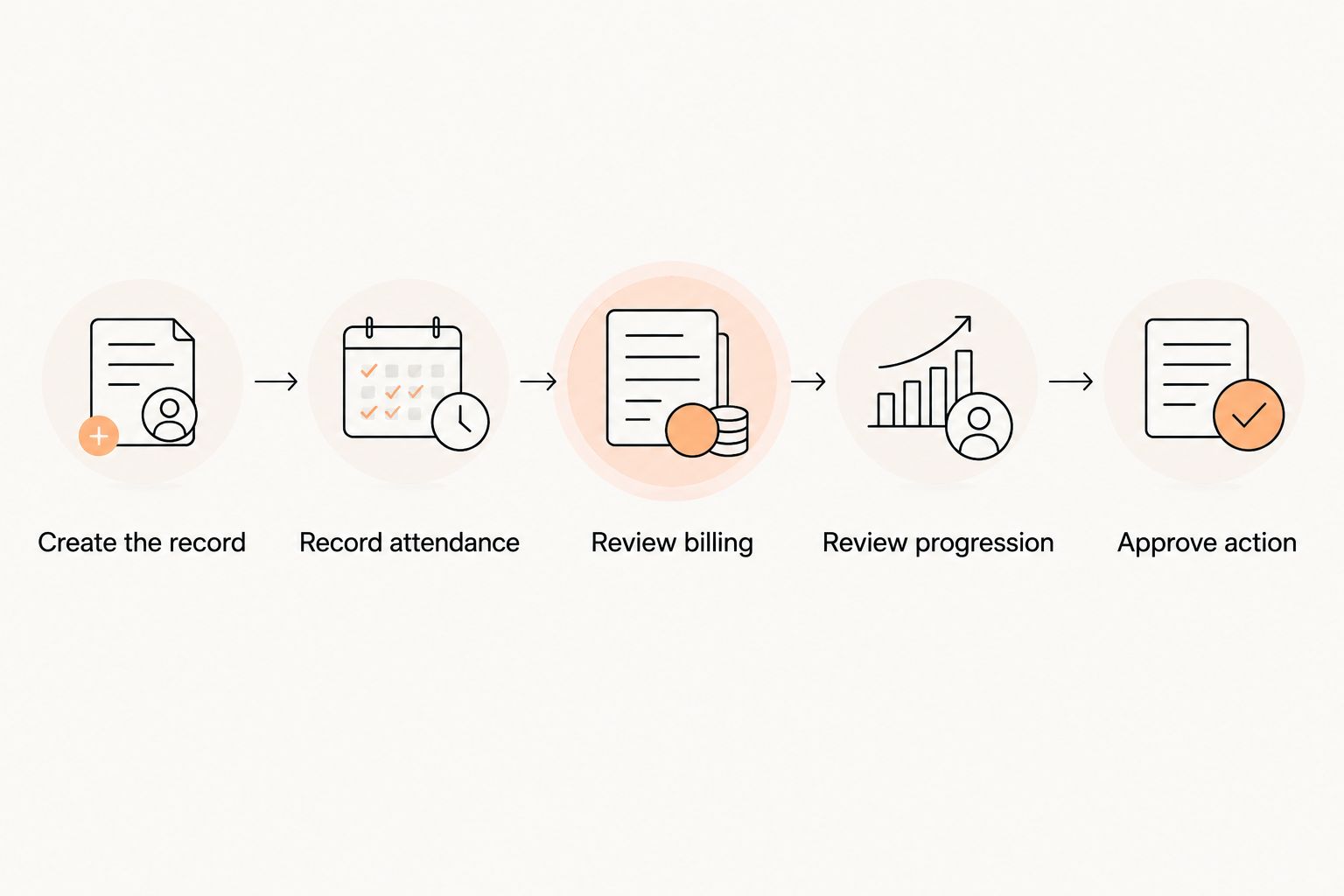
Keep the record connected throughout the test. A polished attendance screen does not settle the buying decision if billing and progression still require independent records.
How the options are ranked
The ranking prioritizes connected member records, martial arts progression, billing follow-through and owner control. It uses documented product functions and established spreadsheet capabilities, not a claimed hands-on performance test.
The dedicated platform ranks first because the brief is member management for martial arts schools, not spreadsheet selection. Google Sheets takes the shared-roster slot. Microsoft Excel takes the locally maintained-roster slot.
For a 2026 purchase, verify the workflow during a demonstration and read the current terms before committing. A useful shortlist tells you what to test; it does not replace that check.
Which option should you choose?
MatPilot is best for martial arts schools that need member records, attendance, billing and per-art grading in one operational system. Choose it when those connected tasks are the reason you are shopping.
Choose Google Sheets when the immediate need is a shared manual roster. Choose Microsoft Excel when a locally maintained workbook is the intended source of record. Neither recommendation turns a spreadsheet into connected gym software.
Before switching, identify which records you need to preserve: member identity, attendance, current ranks and billing information. Ask the receiving provider to confirm the transfer process before changing your live workflow.
FAQ
What's the best member management software for martial arts schools in 2026?
A dedicated martial arts platform is the best fit when you need members, attendance, billing and grading connected. Use the same member workflow to evaluate each candidate rather than choosing from feature counts.
Can I manage my martial arts school with Google Sheets?
Google Sheets can maintain a shared manual roster. You still need to design and maintain the processes for attendance, payment review and rank tracking.
Is Microsoft Excel enough for a small martial arts school?
Microsoft Excel is enough for a locally maintained roster when manual handoffs are acceptable. It is not a connected gym management system by itself.
What should I check for students who train in different martial arts?
Check that each discipline keeps its own rank and progression record. Use a fictional multi-discipline student in the demonstration and inspect what each coach sees.
How do I evaluate family billing in gym software?
Ask the provider to demonstrate your family's exact payer and member arrangement. Check which account receives the payment issue and who can review or change the arrangement.
Should attendance automatically decide belt promotions?
Attendance should inform a promotion review, not replace a coach's judgment. Check how the system presents attendance alongside your school's grading requirements.
What should I check before switching member management software?
Confirm which member, attendance, rank and billing records will transfer. Ask the receiving provider to explain the transfer process and how you will check the resulting records.
One last thing
Test a correction, not just a successful entry. Record attendance against the wrong fictional student, then ask staff to fix it and inspect the resulting record. Repeat the exercise with an incorrect rank entry.
This is a practical final check for your 2026 decision. Staff need to recover from ordinary mistakes without leaving contradictory records behind.