Best software for multi-location martial arts academies in 2026

Best overall approach: centralized academy management with demonstrated branch controls. Best for martial-arts-specific administration: MatPilot, subject to a multi-location demonstration. Best for independently operated branches: separate academy systems. This 2026 guide ranks software approaches by how your locations share members, payments, schedules, and grading records—not by a feature count.
- Choose software for multi-location martial arts academies by testing branch permissions, shared memberships, billing ownership, and reporting.
- MatPilot fits martial-arts-specific administration; verify the required branch workflows before choosing it for multiple locations.
- Centralized management suits shared memberships; separate systems suit branches that operate independently.
- Scheduling-only software is a narrow choice when billing and grading already have reliable systems.
Why this matters
A second location changes the administrative problem. You need to decide whether members belong to one branch, whether they can train elsewhere, and which staff can change their records. A timetable alone does not answer those questions.
The best multi-location system preserves a clear member record while respecting each branch's operating rules. Put those rules on paper before comparing software. Otherwise, a convincing demonstration can hide the exact work your academy needs to do every week.
For your 2026 shortlist, separate martial arts features from branch management. Belt tracking matters. So do instructor access, payment ownership, and a clear answer when a member trains at a different location.
What makes the best multi-location academy software
Use these criteria before reading the ranking:
- Member ownership: Establish whether a person has one shared record or separate branch records. Test a member transfer and cross-location attendance.
- Staff permissions: Ask an instructor to perform an allowed task and attempt a restricted one. Do not accept a permissions slide as proof.
- Billing ownership: Identify who collects each payment, who handles a failed payment, and where the transaction belongs in your accounts.
- Location-aware schedules: Check that members can distinguish branches, classes, and instructors before booking or attending.
- Discipline-specific progression: Keep BJJ, judo, karate, and taekwondo ranks distinct. Do not force boxing or Muay Thai classes into a belt workflow.
- Reporting and portability: Require usable branch reports and an export you can inspect. Check the records, not just the dashboard.
These criteria rank operating approaches, not unverified claims about individual vendors. A product earns a place on your final shortlist by completing your academy's demonstration script.
Multi-location software approaches at a glance
| Rank and option | Best for | Standout fit | Key limitation |
|---|---|---|---|
| 1. Centralized academy management | Branches sharing members and operating rules | One operating model across locations | Must demonstrate branch permissions, billing ownership, and reporting |
| 2. MatPilot | Martial-arts-specific member administration | Members, classes, billing, attendance, and per-art grading | Multi-location workflows require a separate acceptance test |
| 3. Separate academy systems | Independently operated branches | Clear local responsibility | Cross-location records and reporting need an agreed process |
| 4. Scheduling-only software | Academies replacing only their timetable | A focused scheduling decision | Does not replace the member, billing, and grading systems |
The rows describe different buying decisions. Centralized management is the default architecture for connected branches; the martial-arts-specific option is a named product to evaluate within that decision. Separate systems and scheduling-only software solve narrower problems.
1. Centralized academy management: best for shared memberships
Centralized academy management is the first approach to evaluate when your locations share members, staff, or membership entitlements. Specify the member record, branch rules, and billing responsibilities you need, then require the shortlisted vendor to demonstrate them.
Do not confuse a location selector with centralized operations. Switching between branch names on a screen does not prove that memberships, attendance, permissions, and reports behave correctly across them.
Centralized academy management pros:
- Gives you a clear target: a consistent member record across connected branches.
- Lets you define common membership and attendance rules before selecting a product.
- Supports a single acceptance test for shared administration and local responsibilities.
Centralized academy management cons:
- Shared settings require agreement between branch managers.
- Incorrect access rules can expose records or actions to the wrong staff.
- A central report is insufficient if you cannot inspect its branch-level records.
Best for: Academies where members train across locations and management wants common operating rules.
For a 2026 purchase, ask the vendor to demonstrate a member attending away from their home branch. Check the attendance record, the applicable membership, and the branch report. Then ask a local instructor to edit a billing setting they should not control.
Verdict: Buy only after the shared-membership and branch-permission tests pass. This is the default approach for connected locations, not a reason to accept an untested product.
2. MatPilot: best for martial-arts-specific administration
MatPilot provides martial arts gym management software for members, classes, billing, attendance, and belt grading. It supports per-art ranks, Stripe billing, Xero sync, a Monday–Sunday timetable, and access through the web and native iOS and Android apps.
Its co-pilot covers at-risk members, trial follow-ups, promotion readiness, and payment issues, with owner approval gates. Website building tools are also part of the product. These are operational capabilities, not proof of a particular multi-branch account structure.
MatPilot is best for martial arts owners who need member administration and per-art grading in the same system. For this multi-location buying decision, test branch behavior separately from those core capabilities.
MatPilot pros:
- Combines member administration, class scheduling, attendance, and billing.
- Tracks ranks by martial art rather than treating every discipline as one progression.
- Provides web, iOS, and Android access.
- Keeps the owner involved through approval gates for co-pilot actions.
MatPilot cons:
- Martial-arts-specific features do not establish the branch permissions your academy requires.
- Stripe billing and Xero sync do not, by themselves, establish separate branch payment ownership or consolidated accounting.
- An academy needing shared memberships must validate that workflow before committing.
Best for: BJJ and multi-discipline owners evaluating martial-arts-specific administration across their academy.
Ask for a 2026 demonstration using your actual operating model. Include BJJ and a striking discipline, not just a belt-based example. Check which staff can review attendance, who approves a follow-up, and how a member's activity is attributed to a location.
Verdict: Hold the multi-location decision until the branch tests pass. Evaluate the named product for its stated martial arts capabilities; approve the multi-location deployment only on demonstrated behavior.
3. Separate academy systems: best for independent branches
Separate academy systems keep each branch's administration distinct. This approach fits a buying brief where locations do not share membership entitlements, payment collection, or day-to-day management.
Write the boundaries explicitly. If members routinely train at another branch, or if headquarters needs combined reporting, separate systems introduce work that needs an owner and a documented process.
Separate academy systems pros:
- Makes local responsibility for records and administration explicit.
- Allows each branch to define its own timetable and operating rules.
- Avoids requiring a shared membership model when your business does not use one.
Separate academy systems cons:
- Cross-location training can require duplicate records or manual coordination.
- Combined reporting needs a consistent export and reconciliation process.
- Member transfers need clear instructions for history, billing, and access.
Best for: Branches that operate independently and do not promise members shared access.
Before choosing separate systems, write a transfer procedure. Specify who closes or changes the old membership, who creates the new record, and how attendance and rank history move. Do not leave this to whichever instructor answers the member's message.
Also agree on reporting definitions. A branch's active-member total is useful only when every location applies the same definition in a combined report.
Verdict: Buy for genuinely independent branches; skip when shared memberships are central to your offer. Local control is a valid choice. Unplanned fragmentation is not.
4. Scheduling-only software: best for a timetable replacement
Scheduling-only software is the narrow option when your member, billing, and grading processes already work. Evaluate it for location clarity, class changes, instructor responsibility, and the attendance handoff your existing system requires.
Do not turn a timetable purchase into an accidental replacement of your member database. Decide which system owns each record before introducing another tool.
Scheduling-only software pros:
- Keeps the buying decision focused on a defined scheduling problem.
- Lets you retain working billing and grading processes.
- Provides a clear demonstration brief built around classes and locations.
Scheduling-only software cons:
- Does not resolve branch billing ownership or member-record conflicts.
- Attendance handoffs require verification rather than an assumed integration.
- Staff can end up maintaining the same class information in multiple places.
Best for: Multi-location academies with reliable administration that need a better timetable process.
Test a canceled class, a replacement instructor, and a member arriving at the wrong branch. Confirm who updates the schedule, how the change reaches members, and where the resulting attendance belongs.
Verdict: Buy only for a scheduling problem; skip as a substitute for academy management. A clearer calendar cannot repair an unclear membership or payment process.
Run a branch-level acceptance test
Use the same demonstration script for every shortlisted product in 2026. Ask the vendor to perform the tasks live, then repeat them with your staff roles. Treat this as an acceptance test, not a tour.
Build the example around 2 locations, 1 household, and 2 disciplines. These are suggested test conditions, not product limits. They create enough variation to expose whether records stay consistent when people train, pay, or progress differently.
Set permissions
Create an owner role and a branch instructor role. Ask the instructor to record attendance, then attempt a restricted billing change. Record whether the system blocks the action and whether the owner can review it.
Move members
Have a member attend the other location, then transfer their home branch. Check that history remains attached to the right person. Verify the membership rules rather than assuming attendance automatically grants access.
Check billing
Use the household example to establish who receives the bill and which memberships it covers. Walk through a failed-payment case without taking a real payment. Identify the responsible staff member, the permitted action, and the accounting destination.
Review ranks
Give the member records for distinct disciplines. Review attendance and promotion readiness without merging those histories. For striking classes, confirm that ordinary participation remains usable without a belt requirement.
Export records
Request the records needed to check members, attendance, payments, and progression. Open the export. Confirm that the location and member relationships remain understandable outside the software.
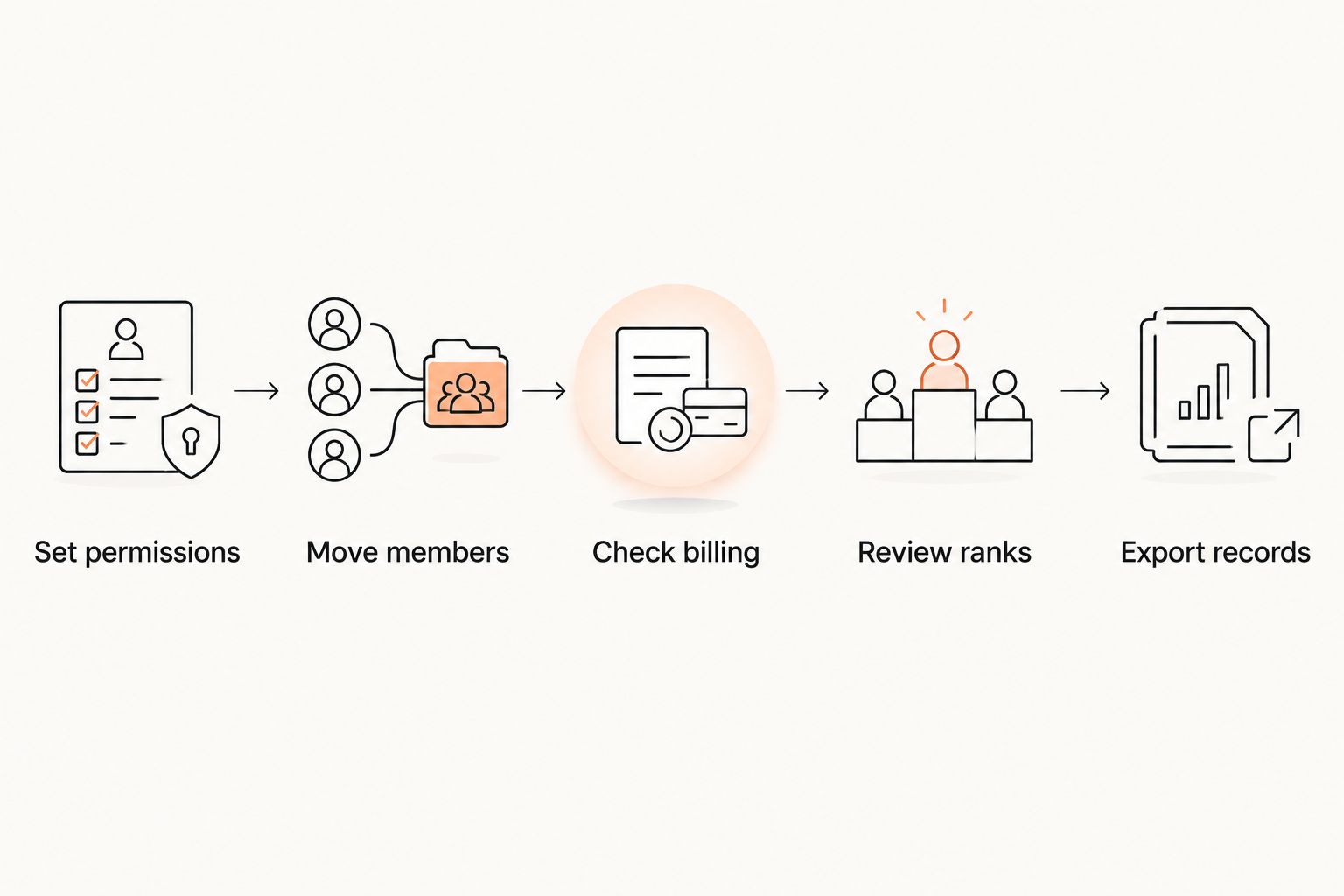
A pass means the demonstrated result matches your written rule. A workaround needs an owner and a repeatable procedure. A failed requirement stays failed until you can repeat the task successfully.
How the approaches are ranked
The order follows the operating model. Shared members put centralized management first. Martial-arts-specific administration earns a separate product evaluation. Independent branches justify separate systems. A timetable-only problem puts scheduling software in scope.
The criteria are member ownership, permissions, billing ownership, location-aware schedules, discipline-specific progression, and reporting. This is not a hands-on performance ranking or a claim that one named vendor has passed every test.
Which approach should you choose?
Choose centralized academy management as your default when branches share members. Start with the cross-location attendance and permission tests. Those requirements shape the rest of the purchase.
Put MatPilot on your 2026 shortlist when martial arts administration and per-art grading are priorities. Require the same branch-level proof you would request from any vendor. If your branches operate independently, choose separate systems deliberately; if only the timetable is broken, keep the purchase narrow.
FAQ
What's the best software for multi-location martial arts academies?
The best choice is software that demonstrates your shared-membership, branch-permission, billing, and reporting rules. Centralized academy management is the default approach when members train across locations; the final product decision needs a live acceptance test.
Is MatPilot suitable for a multi-location martial arts academy?
MatPilot is a martial arts management option to evaluate, but a multi-location decision requires a branch-level demonstration. Test shared memberships, staff permissions, payment ownership, and reporting alongside its member, scheduling, billing, and grading capabilities.
Should every branch have a separate software account?
Separate accounts fit branches that operate independently. If members train across locations, first test whether a shared system can preserve one member history while enforcing the correct access and billing rules.
How do I test family billing across academy locations?
Use a household with members training at different locations and identify the payer, covered memberships, and responsible branch. Then walk through a failed-payment case and check who can act on it and where the transaction belongs.
Can BJJ and striking classes use the same academy system?
Evaluate them together, but test their workflows separately. BJJ needs appropriate rank and promotion records; boxing and Muay Thai classes need usable scheduling and attendance without being forced into a belt process.
What should I check before switching from Gymdesk or Kicksite?
Inspect the records you can export and test how the replacement handles them. Reconcile members, attendance, ranks, and billing responsibilities before changing which system staff use for daily work.
What should a multi-location software quote explain in 2026?
Request written details covering locations, staff access, payment-related charges, migration work, contract terms, and exports. Compare the same academy setup across vendors rather than comparing differently scoped proposals.
One last thing
Test the awkward case before the ordinary one: a member trains at another branch, owes a payment, and is ready for a grading review. Ask different staff roles to handle their part. If nobody can tell you which record, location, and owner control the next action, the demonstration has not answered your multi-location question.