Best Mindbody alternatives for martial arts gyms in 2026

Best overall for this shortlist: MatPilot. Best for a member-record comparison: Gymdesk. Best for an instructor-led grading evaluation: Kicksite. These Mindbody alternatives for martial arts gyms deserve different demonstrations in 2026: daily operations, member administration, and promotion decisions. The latter two labels describe what to evaluate, not verified feature advantages.
- MatPilot leads this shortlist of Mindbody alternatives for martial arts gyms for integrated billing, scheduling, attendance, and per-art ranks.
- Evaluate Gymdesk against your member-record and migration requirements before choosing a replacement.
- Evaluate Kicksite through an instructor-led grading demonstration, not a generic sales tour.
- Keep billing, attendance, and promotion decisions in the same switching checklist.
Why this matters
Replacing Mindbody means moving more than a class calendar. Your academy has paying members, trial students, instructors, attendance records, and ranks. A replacement needs to support the work between those records, not just display them separately.
For a BJJ school, that includes reviewing attendance alongside promotion readiness. For boxing and Muay Thai, attendance, scheduling, and payment follow-up remain central even without a belt syllabus. A multi-discipline academy needs both workflows without treating striking members as an exception.
Your 2026 shortlist should start with those jobs. Choose the system that handles your real operating week, not the system with the longest feature list. A polished demonstration is useful only when it answers a question you already had.
What makes the best martial arts gym management alternative
Use these six criteria before comparing products. Write down what passing each criterion means for your academy.
- Member records: You can distinguish an active student, a trial student, a parent, and a former member without keeping a separate explanation elsewhere.
- Scheduling and attendance: Your timetable represents the classes you actually teach. Attendance stays useful when students train across different disciplines.
- Billing control: You can identify a payment issue, see who needs attention, and understand the next action. Ask separately about family billing rather than assuming household support.
- Ranks and grading: Each discipline retains its own progression. An instructor can explain why a student is ready without confusing attendance with technical competence.
- Owner approval: You can review proposed follow-ups or account actions before they happen. Automation must preserve responsibility for the decision.
- Switching clarity: The provider explains what transfers, what does not, and what you must check before changing recurring billing.
Make the 2026 demonstration concrete. Bring 3 sample member records: a trial student, a member with a payment issue, and a student training in 2 disciplines. Use anonymized examples rather than exposing personal information during an initial sales call.
Ask each provider to complete the same tasks. Different demonstrations cannot produce a useful comparison if one shows a timetable and another shows only a dashboard.
Mindbody alternatives at a glance
The table separates a documented product fit from the purpose of each competing evaluation. It does not assign unverified features, contract terms, or fees to another provider.
| Option | Best for | Standout feature or evaluation focus | Key limitation |
|---|---|---|---|
| MatPilot | BJJ-first and multi-discipline daily operations | Members, scheduling, Stripe billing, attendance, per-art ranks, and approval-gated assistance | Confirm your exact import requirements before replacing an existing system |
| Gymdesk | A member-record comparison | Demonstrate how your member states and existing records would be handled | The evaluation still needs separate billing and grading checks |
| Kicksite | An instructor-led grading evaluation | Demonstrate how a coach reviews attendance, rank, and promotion decisions | A grading demonstration alone does not settle scheduling or billing fit |
No column replaces a live walkthrough. Keep a written record of each answer, especially when a capability depends on configuration or a separate service.
1. MatPilot: best for integrated martial arts daily operations
MatPilot manages members, classes, billing, attendance, and belt grading. It supports per-art ranks, a Monday–Sunday timetable, Stripe billing, and Xero sync. Owners can use the web application or native iOS and Android apps.
The co-pilot addresses at-risk members, trial follow-ups, promotion readiness, and payment issues through approval gates. The owner reviews the action rather than handing over the decision. Website-building tools are also part of the stated offering, but your first demonstration should stay focused on running the academy.
MatPilot is the best fit on this shortlist for BJJ and multi-discipline owners who want billing, attendance, scheduling, and per-art ranks together. That recommendation rests on the stated product scope, not an invented performance result.
What to demonstrate
Start with a student who attends both BJJ and Muay Thai. Review the class timetable, record attendance, and inspect the student's art-specific information. Then review a proposed follow-up and the point at which the owner approves it.
Next, move to a billing issue. Ask where the issue appears, what information the owner sees, and how the proposed response is reviewed. Keep payment records and member communication distinct so an unclear payment status does not become an inaccurate message.
Finally, inspect promotion readiness for a ranked discipline. Attendance is evidence of participation; it is not proof that a student meets your technical standard. Your instructor must still make that distinction.
Pros:
- The stated feature set covers membership, scheduling, billing, attendance, and ranks.
- Per-art ranks match an academy where students train in more than one ranked discipline.
- Approval gates keep the owner involved in proposed actions.
- Web, iOS, and Android access support different administrative working habits.
Cons and fit limits:
- Approval-gated workflows still require someone to review the proposed action.
- Your grading criteria need a clear definition before promotion readiness becomes useful.
- Existing records and billing arrangements need a separate migration check.
Best for: Owners who want martial arts-specific administration across BJJ, striking classes, and other disciplines.
Verdict: Buy only after the demonstration passes your member, billing, and grading checks. Product scope is a reason to shortlist, not a reason to skip validation.
2. Gymdesk: best for a member-record comparison
Gymdesk is a gym management software option to include when evaluating a replacement. Give its demonstration a specific job: show how your academy's member records would work after the move. This recommendation is about evaluation order, not a claim that Gymdesk outperforms the other options on member management.
Start with the records you already use to answer operational questions. Who is training? Who is on a trial? Who has stopped attending? Who pays for whom? A record that looks tidy but cannot answer those questions is not enough.
What to demonstrate
Ask the provider to represent the same sample members used elsewhere in this shortlist. Keep the original source record beside the proposed destination record. Check names, contact details, membership state, and the relationship between a student and the person responsible for payment.
Then ask how historical information would be handled during switching. Do not assume every field, attachment, attendance entry, or rank history transfers. Get the import scope in writing before treating a migration as settled.
Finish by opening the student's schedule and billing context. A good member-record demonstration must connect to the next administrative task. Otherwise, you have compared storage rather than operations.
Pros of this evaluation route:
- It makes data continuity the first decision rather than a late migration problem.
- It tests everyday member questions with your own academy structure.
- It creates a concrete record-by-record comparison against your current system.
Cons and fit limits:
- A successful import example does not establish how every historical record transfers.
- Member administration alone does not prove grading or failed-payment fit.
- A clean record layout does not establish an acceptable switching process.
Best for: Owners whose first replacement question is whether their existing member information will remain usable.
Verdict: Hold until the provider demonstrates member continuity and documents the import scope. Then test billing and attendance with the same records.
3. Kicksite: best for an instructor-led grading evaluation
Kicksite is a martial arts management software option to include in the shortlist. Put an instructor in charge of this demonstration. The useful question is whether the proposed workflow represents how your school makes promotion decisions, not whether a screen contains a belt field.
This is a distinct evaluation slot. It does not claim that Kicksite has better grading tools than another provider. It gives your coaching team a defined task before an owner signs off on a replacement.
What to demonstrate
Ask the instructor to describe a promotion decision from start to finish. Separate current rank, training attendance, technical requirements, and the final approval. Then ask the provider to show where each part belongs.
For a multi-discipline school, include a student whose rank differs between arts. Check that the demonstration preserves the distinction. Do not let a single student-level label stand in for the academy's full progression structure.
Include a striking-class example as well. Boxing and Muay Thai students still need reliable class and attendance records even when the school does not use belt progression for those programs. The administrative test should cover them on equal terms.
Pros of this evaluation route:
- It lets instructors judge the workflow they will actually use.
- It separates attendance evidence from the promotion decision.
- It prevents a belt-focused demonstration from excluding non-ranked programs.
Cons and fit limits:
- Grading fit does not establish family billing or payment follow-up fit.
- A demonstration built around one discipline can hide multi-discipline requirements.
- Instructor approval does not settle migration, account administration, or contract questions.
Best for: Schools that want coaches to validate progression workflows before choosing administrative software.
Verdict: Hold until the instructor approves the grading workflow and the owner checks billing separately. Neither approval substitutes for the other.
How this shortlist is ranked
The 2026 ranking starts with documented fit for the full operating workflow. MatPilot comes first because its stated scope includes the core tasks this article evaluates. Gymdesk and Kicksite occupy different demonstration priorities rather than unsupported feature rankings.
The criteria remain the same for every option: member records, scheduling, attendance, billing control, grading, approval, and switching. A provider moves ahead only when its demonstration answers your academy's questions clearly.
Do not treat a use-case label as a verified competitor feature claim. Record the answer, the date, and any conditions attached to it.
Run the switching check before committing
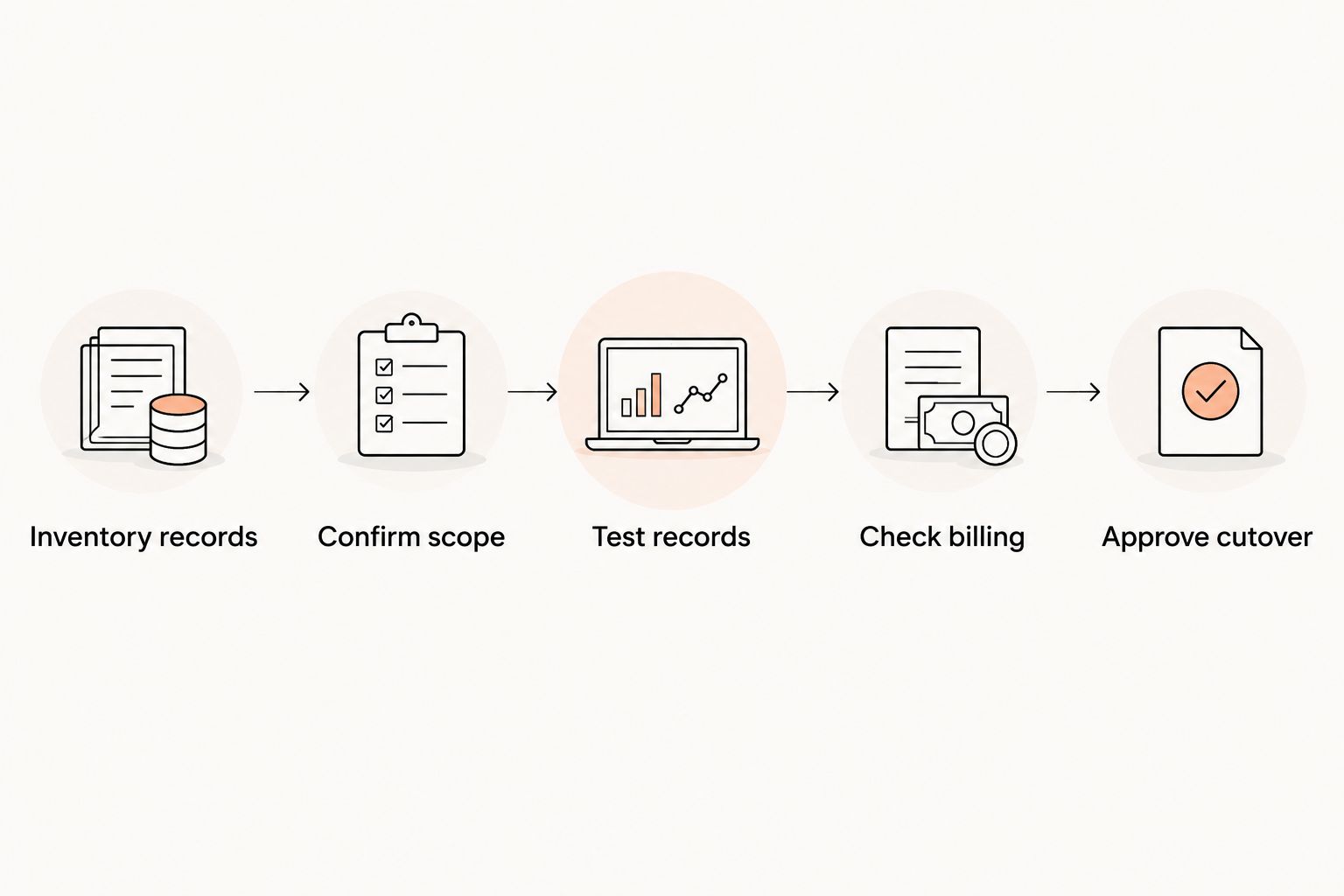
A software decision is incomplete until you know how the academy will move. Use this sequence before your 2026 switch.
- Inventory records: List the member, attendance, rank, timetable, and billing information you need to preserve. Identify which information remains in an archive.
- Confirm scope: Ask the destination provider to document the import scope and any work your team must do.
- Test records: Compare a sample of destination records with their originals. Include a trial student, a family relationship, and a multi-discipline member.
- Check billing: Confirm how existing recurring payments will be handled before changing payment instructions. Do not assume payment credentials transfer.
- Approve cutover: Name the person responsible for authorizing the change and checking the first live operating cycle.
Keep cancellation separate from migration. Review your current agreement and obtain written confirmation of notice requirements before stopping the old service. A new account does not cancel an existing agreement.
Which alternative should you choose?
Choose MatPilot as the default 2026 shortlist leader if your priority is integrated martial arts operations. Demonstrate the exact timetable, billing issues, and rank structure you need before committing.
Use Gymdesk for a member-led comparison and Kicksite for an instructor-led evaluation. If either passes those initial checks, require the same full operating demonstration before making the final decision.
Do not select a replacement because one isolated feature looks better. Your academy needs the next task to work too: attendance must lead to a useful record, a payment issue must lead to a reviewed response, and promotion readiness must lead to an instructor's decision.
FAQ
What's the best Mindbody alternative for a BJJ academy?
MatPilot is the strongest documented fit in this shortlist for a BJJ academy that needs members, scheduling, billing, attendance, and per-art ranks together. Validate those workflows with your academy's sample records before committing.
Is Gymdesk better than Kicksite for martial arts gyms?
This shortlist does not establish a verified feature advantage between Gymdesk and Kicksite. Use Gymdesk for a member-record demonstration and Kicksite for an instructor-led grading evaluation, then apply the same billing and scheduling checks to both.
Can one system manage BJJ and striking classes?
A multi-discipline system needs to handle class scheduling and attendance for both ranked and non-ranked programs. Demonstrate a student attending BJJ and Muay Thai, and check how the student's records stay distinct.
What should I check before moving recurring payments?
Confirm the payment migration process before changing existing payment instructions. Ask what transfers, what requires member action, and who authorizes the change; do not assume payment credentials move with member records.
Does attendance mean a student is ready for promotion?
Attendance alone does not establish technical readiness. Review participation alongside your syllabus requirements and keep the final promotion decision with the responsible instructor.
How do I compare family billing between providers?
Ask each provider to demonstrate your actual household arrangement. Show who trains, who pays, and how a payment issue is associated with the responsible person rather than assuming family billing works the same everywhere.
What should I check before canceling Mindbody?
Review your current agreement and confirm its notice requirements in writing. Complete the migration and billing checks separately; opening a replacement account does not cancel the existing service.
One last thing
Test a person who does not fit your simplest membership pattern. Use a parent who pays for a child while training in another discipline themselves. That example forces the demonstration to address household relationships, separate attendance, and different progression records.
If the provider cannot explain that record clearly, stop the demonstration and resolve it before discussing the switch. An exception you encounter every week is part of the core workflow.