Gymdesk alternatives for martial arts gyms in 2026

Gymdesk brings membership management, scheduling, and billing into one system for gym owners. Look at alternatives when your next decision concerns discipline-specific ranks, payment follow-up, or actions that need your approval—not simply another member database. The best Gymdesk alternative in 2026 is MatPilot if you need per-art grading and an owner-approved AI co-pilot; Kicksite belongs on your shortlist if belt testing and check-in are your main evaluation priorities.
- Compare Gymdesk alternatives against your actual billing, class scheduling, and belt-grading workflows—not a feature count.
- MatPilot suits martial arts gyms that need per-art ranks and owner-approved follow-up actions.
- Evaluate Kicksite around belt testing and check-in; evaluate Mindbody around its marketplace.
- Stay with Gymdesk when your current workflows work and switching solves no specific operational problem.
Why this matters
A software change touches the records you use to run class and collect money. Your membership list, payment status, attendance history, and promotion records must remain useful after the move.
Start with the job that is breaking. Is someone chasing failed payments by hand? Does a student train in two disciplines with different ranks? Are trial follow-ups sitting in an instructor's inbox? Those questions produce a better shortlist than a long list of integrations.
This 2026 guide focuses on choosing and evaluating an alternative. It does not treat a different interface as a reason to replace a working system.
Gymdesk alternatives at a glance
Use the table to decide what each demonstration should prove. The last column describes the comparison to make, not a claim that Gymdesk lacks the feature.
| Software | Best for | Evaluation focus | How to compare it with Gymdesk |
|---|---|---|---|
| Gymdesk | Owners whose existing membership, scheduling, and billing workflows work | Current setup and promotion criteria | Use your live workflow as the baseline |
| MatPilot | BJJ and multi-discipline gyms needing per-art ranks and approved actions | AI co-pilot, rank tracking, Stripe billing, Xero sync | Test the full sequence from issue identification to owner approval |
| Kicksite | Martial arts schools evaluating belt testing and check-in | Belt-testing and kiosk workflows | Run the same attendance and promotion examples in both systems |
| Mindbody | Owners for whom a marketplace is part of the software decision | Marketplace and its place in member acquisition | Separate discovery requirements from day-to-day academy administration |
Do not score every feature equally. A gym that needs separate BJJ and karate ranks has a different decision from a school whose main problem is check-in before a crowded children's class.
1. MatPilot: best for per-art ranks and approved actions
MatPilot is martial arts gym management software with member records, classes, billing, belt grading, an AI co-pilot, and website-building tools. It is available in the United States and Ireland, through the web and native iOS and Android apps.
MatPilot is best for martial arts owners who want discipline-specific records and approval control over proposed actions. Evaluate those capabilities together. A useful member record must support the work that follows, not merely store a belt color.
Where the platform shines
- Per-art ranks: Keep the evaluation focused on students who train across disciplines, rather than one rank attached to one person.
- Approval gates: Review proposed actions for at-risk members, trial follow-ups, promotion readiness, and payment issues before approving them.
- Connected administration: Stripe billing and Xero sync sit alongside attendance and a Monday-to-Sunday timetable.
- Mobile access: Web, iOS, and Android access let you evaluate the workflow on the devices your staff actually use.
Use a practical demonstration. Pick a student who trains in BJJ and a striking art. Review the student's attendance, inspect the relevant rank records, and ask how a proposed follow-up reaches the owner for approval.
Where the platform falls short
- It is not unattended administration. Approval gates keep you responsible for decisions; someone must review the proposed actions.
- Its stated markets are the United States and Ireland. Owners elsewhere should not treat this guide as confirmation of local support.
- Switching still requires record review. A new system does not remove the need to check balances, attendance, and ranks before using them.
Family billing deserves its own demonstration. Ask how the payer, participating children, membership changes, and failed payment are represented. Do not infer that workflow from a general billing feature.
Head-to-head evaluation
| Dimension | Alternative workflow to test | Gymdesk baseline to use |
|---|---|---|
| Rank records | Separate ranks for each discipline | Your current ranks and promotion criteria |
| Follow-up | Proposed action, owner review, approval | The steps your staff currently take |
| Billing | Stripe payment and Xero accounting workflow | Your existing payment and reconciliation process |
| Daily use | Complete the task on web and mobile | Complete the same task on your current device |
Best for: BJJ academies and multi-discipline schools that need per-art records and owner-controlled follow-up.
Verdict: Buy only after the demonstration proves your essential workflows.
2. Kicksite: best for a belt-testing and check-in shortlist
Kicksite belongs in a martial arts software comparison when belt testing and kiosk check-in are central to your decision. Keep the demonstration close to class operations: a student arrives, attendance is recorded, and an instructor reviews the student's progression.
Do not turn that into a contest over how many screens each system has. Ask whether the person teaching class can find the information needed without interrupting the session.
Where Kicksite shines
- Belt testing gives your evaluation a concrete martial arts workflow.
- Kiosk check-in gives you a specific arrival process to compare.
- You can assess both against the attendance and promotion work your school already performs.
Where Kicksite falls short
A belt-testing workflow alone does not settle your billing, family-account, or multi-discipline requirements. Those need separate demonstrations. Switching also creates reconciliation work even when the new check-in process fits your school.
For a mixed academy, test two disciplines rather than one. For a children's program, test the relationship between the paying adult and the students attending class. These are evaluation requirements, not assumptions about what the software supports.
| Dimension | Kicksite evaluation | Gymdesk baseline |
|---|---|---|
| Arrival | Demonstrate kiosk check-in | Your current check-in process |
| Progression | Demonstrate belt testing | Your current promotion criteria |
| Billing | Trace a payment issue through resolution | Your current collection process |
Best for: Schools that want belt testing and check-in to lead the selection process.
Verdict: Hold until the billing and member-record demonstrations meet your requirements.
3. Mindbody: best for a marketplace-led evaluation
Mindbody belongs on the shortlist when its marketplace is part of what you want from the software. That is a different evaluation from replacing a belt register or simplifying attendance recording.
Separate the acquisition question from the administration question. A discovery channel does not, by itself, prove that your instructors can use the member records during class.
Where Mindbody shines
- Its marketplace gives you a distinct acquisition-related capability to evaluate.
- You can assess discovery alongside the operational software rather than treating them as unrelated purchases.
Where Mindbody falls short
A marketplace is not a substitute for discipline-specific progression records. You still need to demonstrate ranks, attendance, family relationships, and payment follow-up against your academy's requirements.
Do not let the marketplace dominate the decision if your actual problem is an overdue membership or an instructor who cannot find a student's grading history.
Best for: Owners who have made marketplace participation an explicit selection requirement.
Verdict: Hold unless both the marketplace purpose and the academy workflows justify switching.
Why people switch from Gymdesk
The useful reason to switch is a defined operational requirement. Do not assume a competitor is missing a capability because another vendor highlights it.
For your 2026 shortlist, write down the current process and the replacement you want:
- Separate progression by discipline. Record what happens when one student holds different ranks in BJJ and taekwondo.
- Reduce scattered follow-up. Identify who notices a trial that needs attention, who drafts the message, and who approves it.
- Connect payment and accounting work. Follow a payment from collection through the accounting process you use.
- Make class administration usable on mobile. Complete attendance and member-review tasks on the instructor's actual device.
These are reasons to investigate, not evidence that Gymdesk cannot perform them. First inspect your current configuration and staff process. If the existing system can solve the problem, changing software adds work without addressing a genuine gap.
Switch for a proven workflow improvement, not a longer feature list.
Run the same demonstration with every vendor
Bring your own scenarios. A vendor's clean demonstration account rarely resembles a family with changing memberships or a student whose attendance spans several classes.
Use 30 days of attendance as a sample and one complete billing cycle as your payment scenario. Those are suggested evaluation windows, not claims about how long migration takes. Remove personal information before sharing examples outside your current system.
Member record
Choose a student who trains in two disciplines. Ask the demonstrator to show the student's memberships, attendance, and separate progression records. Confirm which staff member can change a rank and how the owner checks that change.
Family payer
Use a household with one paying adult and two students. Ask what happens when one student changes classes or stops training. Review the payer relationship and account status rather than accepting a general statement about billing.
Payment issue
Walk through a failed-payment scenario. Identify where staff see the problem, what action they take, and what confirms resolution. If a proposed message needs approval, demonstrate that step too.
Promotion review
Ask an instructor to explain the evidence behind a promotion decision. Attendance and rank history should answer distinct questions. Class participation is not, by itself, proof of technical readiness.
Staff handoff
Have an instructor complete the class task and an administrator complete the follow-up. If the process depends on someone remembering an undocumented step, record that dependency before deciding.
In a 2026 evaluation, the strongest comparison is the same task completed in each system. A feature name is only the starting point.
Plan the switch before changing live billing
Choose the replacement only after you have a record-checking process. A successful demonstration does not establish that every existing student balance and rank will arrive correctly.
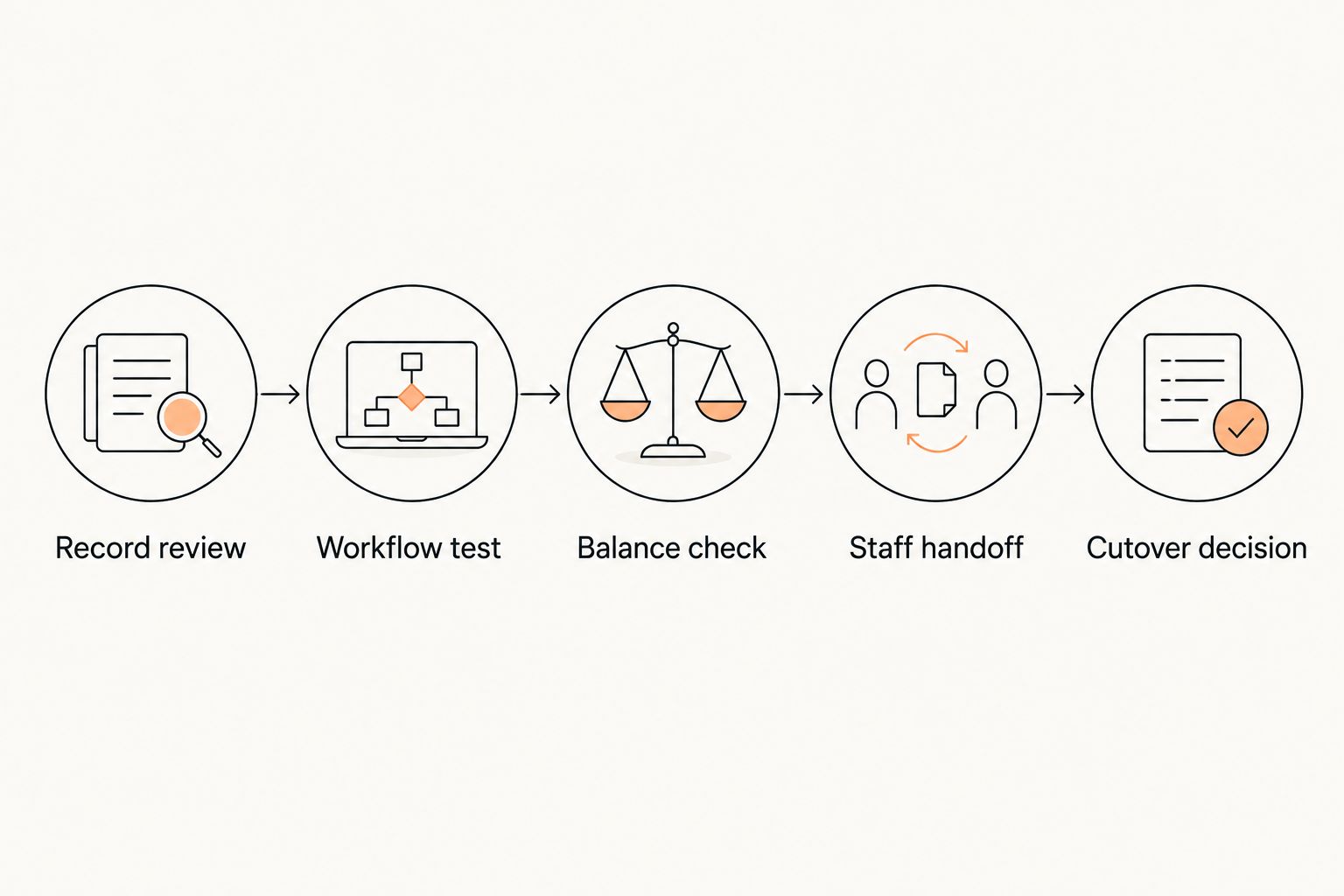
Use this sequence:
- Record review: Check member identities, payer relationships, active memberships, and rank records in the current system.
- Workflow test: Reproduce the important class, promotion, and payment scenarios in the proposed setup.
- Balance check: Compare outstanding amounts and payment status before anyone changes live collection.
- Staff handoff: Give instructors and administrators a written explanation of their tasks.
- Cutover decision: Approve the change only after the checks pass and payment responsibilities are clear.
Keep a written list of unresolved records. A duplicate student, unclear payer, or disputed balance needs a decision, not an assumption. Assign someone to resolve each issue before it affects a class or collection.
For United States and Ireland owners, test the local payment and accounting workflow you intend to use. Do not assume that a demonstration for another market answers your questions.
When staying with Gymdesk is the right call
Stay with Gymdesk when your member records are accurate, staff can run classes, billing is manageable, and promotion criteria support your school. A working setup has value beyond its feature list.
Also stay when your proposed replacement has not demonstrated the essential tasks. An attractive follow-up feature does not compensate for an unresolved payer relationship or unusable attendance history.
For 2026, make the decision in writing: the problem, the demonstrated improvement, and the work required to switch. If the improvement is not specific enough to describe, do not move live billing.
FAQ
What's the best Gymdesk alternative for a BJJ academy?
MatPilot is a strong fit for BJJ academies that need per-art ranks and owner-approved follow-up actions. Test attendance, promotion review, and billing together before choosing.
Is Kicksite better than Gymdesk for martial arts schools?
Choose between Kicksite and Gymdesk by demonstrating the same belt-testing, check-in, and billing scenarios. A feature label does not establish which system fits your school better.
Should a martial arts gym consider Mindbody?
Consider Mindbody when its marketplace is an explicit part of your software requirements. Evaluate academy administration separately, including progression records, attendance, and payer relationships.
What should I test before switching gym management software?
Test member records, family payer relationships, failed-payment handling, attendance, and promotion review. Use the same scenarios with each vendor so the comparison stays meaningful.
Can I assume family billing works because software supports payments?
No. Demonstrate one payer with multiple students, then change one student's membership and inspect the account. Payment collection and household administration are separate requirements.
Should I switch Gymdesk and change live billing at the same time?
Do not change live collection before checking balances and payment responsibilities. Approve the cutover after record review, workflow testing, and staff handoff.
When should I stay with Gymdesk?
Stay with Gymdesk when your current workflows work and no replacement has demonstrated a specific improvement. Switching without a defined problem adds record-checking and staff-training work.
One last thing
Ask the demonstrator to correct a mistake, not just complete a clean task. Change the wrong student's rank, select the wrong payer, or record attendance incorrectly in a test account. Then ask how staff identify and correct the error.
That test exposes the daily work behind the feature list. Choose the system your staff can use correctly—and correct when they get it wrong.