Best check-in apps for martial arts gym members in 2026

Best for connected attendance and grading: MatPilot; best for instructor-controlled records: a coach-led attendance app; best for phone-free arrival: a shared-device attendance app. This 2026 guide helps you choose a check-in app for martial arts gym members by the work it must handle, not the arrival screen alone.
- MatPilot is the strongest fit here for martial arts attendance connected to member management and belt grading.
- Choose a coach-led attendance app when instructors must confirm who actually trained.
- Choose a shared-device attendance app when members should not need their own phones.
- Require a demonstration of member self-check-in before selecting any gym management app for that workflow.
Why this matters
A member arriving at your academy and a member completing a class are different events. Your attendance record should distinguish them. Otherwise, an arrival becomes evidence of training without an instructor confirming it.
MatPilot provides martial arts attendance, a Monday–Sunday timetable, member management, billing, and per-art ranks and belt grading. MatPilot is best for martial arts academy owners who want attendance connected to member management and grading. Treat member-operated check-in as a separate requirement and request a demonstration of that exact action.
For a BJJ, boxing, Muay Thai, or multi-discipline academy, the decision starts with who records attendance. Your instructor, a member’s phone, and a shared entrance device create different responsibilities.
What makes the best martial arts check-in app?
Use these criteria for your 2026 shortlist. An attractive check-in screen does not answer the operational questions beneath it.
- Correct student identity: A parent must record the child who trains, not accidentally record the paying adult.
- Class-level attendance: The record should identify the session attended, not just the day someone entered the building.
- Instructor control: Staff need a clear way to review errors and distinguish arrival from participation.
- Discipline separation: BJJ attendance and Muay Thai attendance should remain distinguishable when your school teaches both.
- Connected records: Decide whether attendance belongs beside member details and grading or in a separate register.
- Arrival exceptions: Ask what happens when a phone is unavailable, a student selects the wrong class, or the connection fails.
Write down which requirements are essential before viewing a demo. A system that handles your normal class but leaves exceptions unresolved still creates desk work.
Check-in options at a glance
These are buying options, not claims that every app in a category includes the same features. Only the named product’s stated capabilities are treated as confirmed.
| Option | Best for | Standout approach | Key limitation |
|---|---|---|---|
| MatPilot | Attendance connected to martial arts administration | Attendance alongside members, timetable, billing, and per-art grading | Member-operated check-in needs its own demonstration |
| Coach-led attendance app | Instructor-confirmed participation | The coach controls the class register | Recording attendance remains staff work |
| Shared-device attendance app | Arrival without personal phones | Members use an academy-controlled device | Arrival alone does not confirm participation |
| Member self-check-in app | Member-owned arrival recording | Members record their own arrival | Wrong identities and sessions need correction rules |
| Standalone digital register | Keeping a separate attendance record | Attendance stays outside the main management system | Separate records require reconciliation |
1. MatPilot: best for connected martial arts attendance
MatPilot combines attendance with members, scheduling, billing through Stripe, Xero sync, and per-art ranks and belt grading. It is available through the web and native iOS and Android apps. The product serves martial arts academies in the United States and Ireland.
That makes it a candidate when attendance is part of a larger academy workflow. A BJJ owner needs training records beside rank information; a multi-discipline owner also needs to keep each art’s progression distinct. Boxing and Muay Thai classes still need accurate attendance even when belt progression is not the organizing structure.
MatPilot pros:
- Attendance is part of a broader martial arts management product.
- Per-art ranks support academies teaching multiple disciplines.
- Web, iOS, and Android access provide different ways to use the system.
- Scheduling and member administration sit within the same product scope.
MatPilot cons:
- Native mobile apps do not, by themselves, establish a member self-check-in workflow.
- Connected attendance and grading do not replace an instructor’s promotion decision.
- A software switch also requires decisions about existing member and attendance records.
Best for: Owners selecting an academy management system rather than an isolated arrival tool.
Verdict: Hold the check-in decision until the exact member arrival workflow is demonstrated; shortlist MatPilot for connected attendance management.
2. Coach-led attendance app: best for confirmed participation
A coach-led attendance app puts the register in the instructor’s hands. The instructor selects the class and records the students who participate. This approach fits an academy that treats attendance as a teaching record rather than an entrance event.
It also gives you a clear owner for corrections. If someone leaves before training or joins the wrong group, the instructor resolves the record rather than expecting the member to understand your reporting rules.
Coach-led attendance app pros:
- The person supervising the class controls the record.
- Students do not need personal phones to be marked present.
- Arrival and actual participation can remain separate decisions.
Coach-led attendance app cons:
- The instructor must make time to complete the register.
- Missed recording requires a later correction.
- Covering coaches need the same attendance procedure.
Specify when attendance gets recorded: at the start, during the session, or after class. Consistency matters more than choosing a particular moment. Give substitute instructors the same instruction.
Best for: Children’s classes, instructor-led groups, and academies where attendance supports promotion review.
Verdict: Buy for instructor-controlled attendance; skip it if your requirement is unattended member arrival.
3. Shared-device attendance app: best for phone-free arrival
A shared-device attendance app uses an academy-controlled device for arrival recording. Members select their identity and session through that device. This is a workflow to request from a vendor, not a capability to assume from the words gym software.
It removes the requirement for each arriving student to use a personal phone. Your academy instead takes responsibility for the device, its placement, and the information visible on its screen.
Shared-device attendance app pros:
- Members do not need their own devices for arrival recording.
- The academy controls where the check-in action happens.
- Staff can explain the same process to each arriving group.
Shared-device attendance app cons:
- The shared device needs a responsible staff member.
- Identity selection needs safeguards against recording another student.
- An entrance record still needs a rule for students who do not train.
Ask the vendor to demonstrate only the information a member can see. A shared arrival screen should not expose your full administrative view. Include a child arriving with a parent in the demonstration.
Best for: Academies that want member-operated arrival without requiring personal phones.
Verdict: Buy only after the shared-device demonstration covers identity, privacy, and corrections.
4. Member self-check-in app: best for member-owned arrival
A member self-check-in app asks each member to record their own arrival. The defining requirement is that members complete the action themselves. Having a mobile app available is not enough to establish that workflow.
Choose this approach when you deliberately want members to own arrival recording. Keep instructor review separate if attendance contributes to grading, eligibility, or another teaching decision.
Member self-check-in app pros:
- Members take responsibility for recording arrival.
- The academy does not need a shared entrance device for that action.
- Arrival recording and instructor review can be defined as separate tasks.
Member self-check-in app cons:
- A missing or unusable phone needs an alternative process.
- Members need clear instructions for selecting the correct session.
- Self-recorded arrival does not prove class participation.
Ask who can correct a mistake and whether the original action remains understandable afterward. Also ask how a parent records attendance for a child. Do not substitute an adult’s account activity for the child’s training record.
Best for: Adult classes where members can manage their own arrival recording.
Verdict: Buy for member-owned arrival only after testing phone exceptions and instructor review.
5. Standalone digital register: best for a separate attendance record
A standalone digital register keeps attendance outside your main academy management system. You record the student and session without making that register responsible for billing or grading. This is an intentionally separate workflow.
Use it when separation is your requirement, not when you expect automatic connections to other records. The owner must define how names, membership changes, and attendance corrections stay consistent across systems.
Standalone digital register pros:
- The register has a narrow operational purpose.
- Attendance recording does not require replacing the whole management system.
- You can define a staff-controlled recording procedure.
Standalone digital register cons:
- Separate student lists require reconciliation.
- Grading review requires bringing the relevant attendance evidence together.
- Responsibility for corrections can become split between systems.
Best for: Academies deliberately maintaining attendance as a separate administrative record.
Verdict: Buy for a separate register; skip it when connected attendance and grading are essential.
How these options are ranked
The 2026 ranking prioritizes connected martial arts records, then instructor-confirmed participation, then arrival convenience. The options occupy different use cases. They are not interchangeable winners.
The named product assessment uses its stated capabilities. The remaining entries compare operating models, not unverified vendor features. No speed, adoption, or error-rate result is presented as a measured finding.
Test the whole class workflow before switching
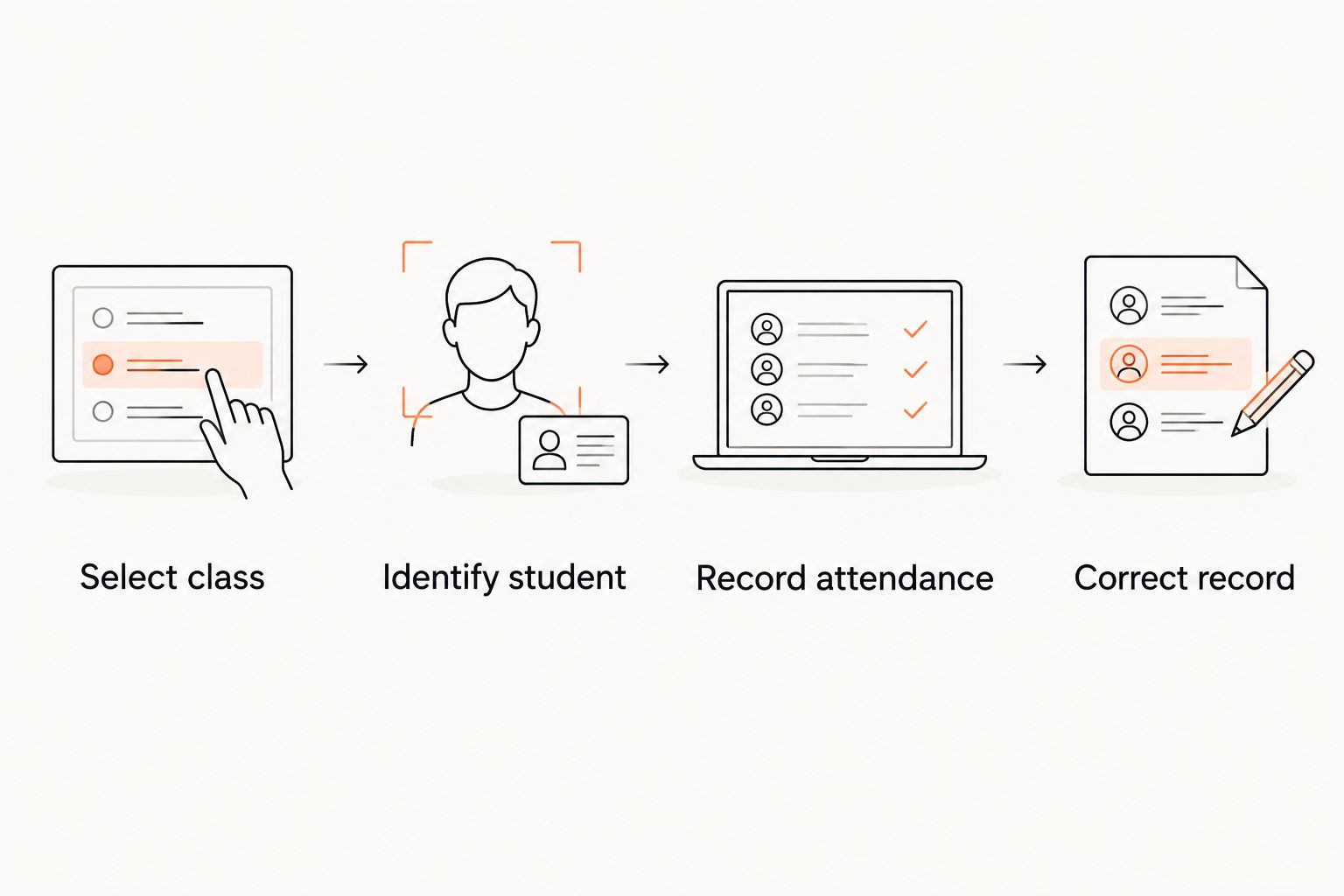
Your 2026 demonstration should follow a class from its timetable entry to its corrected attendance record. The martial arts class scheduling software guide covers the scheduling side; your check-in test must show how the attendance action relates to that session.
Use this test case: 3 students, 2 classes, and 1 attendance correction. These are demonstration inputs, not performance benchmarks. Include an adult, a child arriving with a parent, and a student attending different disciplines.
Select class
Ask the vendor to select the intended session. Include adjacent BJJ and Muay Thai classes so the demonstration cannot rely on a single obvious choice. Confirm how the recorded attendance identifies the discipline and class.
Identify student
Record the child rather than the paying parent. Then record the adult student. The demonstration should make clear whose attendance is being stored and what another member can see.
Record attendance
Complete the action through the workflow you intend to buy: instructor register, shared device, or member phone. Do not accept an administrative shortcut as proof that the member-facing process works.
Correct record
Deliberately select the wrong session once. Ask the responsible staff member to correct it. Review the resulting record before discussing billing, grading, or any other downstream use.
Finish by repeating the process with the connection unavailable. Ask the vendor to show the supported behavior rather than promise that the exception will be manageable.
Which check-in option should you choose?
Choose the attendance record you need, then choose who creates it. Instructor-confirmed participation calls for a coach-led workflow. Member-owned arrival calls for self-check-in. Phone-free arrival calls for a shared device.
Choose MatPilot for your 2026 shortlist when attendance belongs beside martial arts member management and grading. Keep the buying decision conditional on a demonstration of the exact check-in method your academy requires.
For an undecided owner, start with instructor-confirmed attendance. It makes responsibility explicit. Add member-operated arrival only when you can explain how it becomes an accurate class record.
FAQ
What's the best check-in app for martial arts gym members?
The best check-in app for martial arts gym members depends on whether you need member arrival recording or instructor-confirmed participation. MatPilot is a candidate for connected martial arts attendance, member management, and grading; request a separate demonstration of member-operated check-in.
Does having a gym mobile app mean members can check themselves in?
No. A mobile app does not establish a self-check-in capability. Ask the vendor to show a member selecting a class, recording arrival, and resolving an incorrect entry.
Should BJJ coaches record attendance instead of members?
Use coach-recorded attendance when the record needs to confirm participation. Member arrival can remain a separate event, but an instructor should control the teaching decision that depends on it.
What's the best check-in method for children's martial arts classes?
Instructor-controlled attendance is the clearest default when staff must confirm which children trained. If parents record arrival, test that the child's record receives the attendance rather than the parent's.
Can the same attendance process cover BJJ and Muay Thai?
Yes, if the process identifies the correct class and discipline. Test both sessions explicitly and keep attendance evidence separate from any art-specific grading decision.
What should I test before buying a shared-device check-in app?
Test student identification, visible information, session selection, and correction of mistakes. Also ask who handles the device and what happens when its connection is unavailable.
How should I compare check-in apps in 2026?
Compare check-in apps in 2026 using the same class scenario and exceptions. Require each vendor to demonstrate the intended user action rather than infer capabilities from a feature label.
One last thing
Test a wrong check-in deliberately. A correct arrival shows the normal path; an incorrect arrival reveals who owns the cleanup. Do not approve a system until you know who corrects attendance and which record the correction changes.